
Pigtronix GDR
Pigtronix Gamma Drive Overdrive Pedal
Leabhar-làimhe cleachdaiche
Ro-ràdh
The Pigtronix Gamma Drive is a versatile overdrive pedal designed to deliver a wide range of tones, from subtle boosts to aggressive, all-out grind. Its intuitive controls allow musicians to sculpt their sound with precision, making it an essential tool for any guitarist seeking dynamic and expressive overdrive.

Figear 1: Aghaidh view of the Pigtronix Gamma Drive Overdrive Pedal. This image displays the pedal's blue casing, the four control knobs (Volume, Gain, Treble, Bass), the footswitch, and the DC 9V power input label.
Prìomh fheartan
- Overdrive Pedal with Treble Bass Controls
- Wide range of gain from subtle boost to heavy distortion
- Dealbhadh teann agus seasmhach
- True bypass switching for signal integrity
Susbaint pacaid
Nuair a dh’fhosglas tu am pasgan, dèan cinnteach gu bheil na nithean a leanas uile an làthair:
- Pigtronix Gamma Drive Overdrive Pedal
- Leabhar-làimhe cleachdaiche (an sgrìobhainn seo)
- Càball ceangail
Stiùireadh rèiteachaidh
Follow these steps to properly set up your Pigtronix Gamma Drive pedal:
1. Ceangal Cumhachd
Connect a standard 9V DC power supply (not included) to the "DC 9V" input jack on the top of the pedal. Ensure the power supply is center-negative and provides at least 10mA of current.
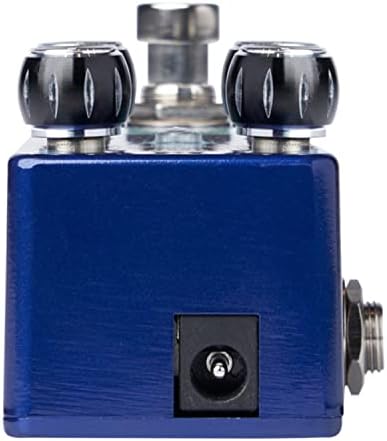
Figure 2: Close-up of the DC 9V power input jack located on the top side of the pedal.
2. Ceangal Ionnsramaid
Connect your instrument (e.g., guitar) to the INPUT jack on the right side of the pedal using a standard 1/4-inch instrument cable.
3. AmpCeangal lifier
Ceangail an jack OUTPUT air taobh clì a 'pheadal ri do chuid ampcuir a-steach an lifer a’ cleachdadh càball ionnstramaid àbhaisteach 1/4-òirleach eile.
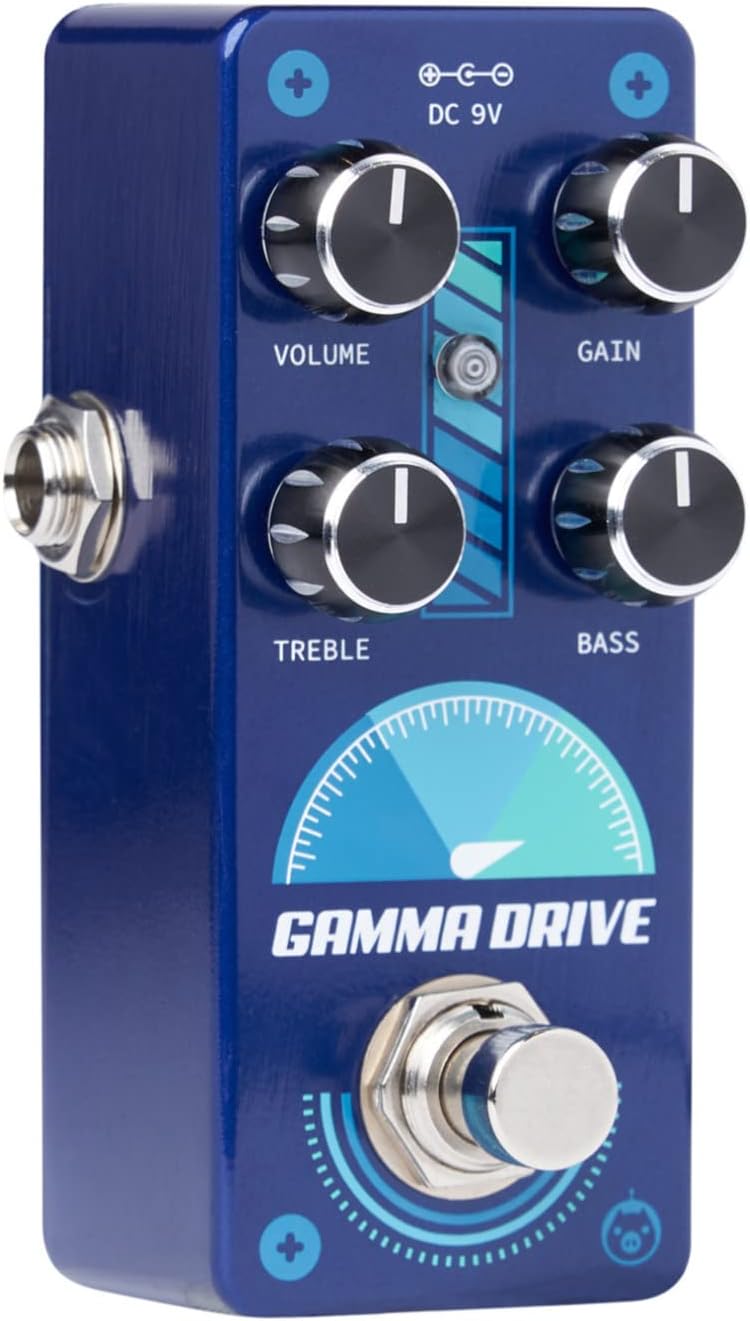
Figear 3: Ceàrnach view illustrating the input jack (right side) and output jack (left side) for instrument and ampceanglaichean lìonaidh.
Obrachaidh
The Pigtronix Gamma Drive features four primary control knobs and a footswitch for intuitive sound shaping.
Smachdan thairisview
Figear 4: Aghaidh view of the pedal showing the layout of the control knobs.
- LUACH: Controls the overall output level of the pedal. Turn clockwise to increase the volume.
- GAIN: Adjusts the amount of overdrive and distortion. Higher settings produce more saturated and aggressive tones.
- TREBLE: Shapes the high-frequency content of your tone. Turn clockwise for brighter sounds, counter-clockwise for warmer tones.
- BAS: Controls the low-frequency content. Turn clockwise to add more bass, counter-clockwise to reduce it.
A 'cleachdadh an Footswitch
The large footswitch at the bottom of the pedal engages or bypasses the effect. When the effect is active, the LED indicator above the footswitch will illuminate. When bypassed, your signal passes through the pedal unaffected (true bypass).
Cùram agus cumail suas
- Glanadh: Use a soft, dry cloth to clean the pedal's surface. Avoid abrasive cleaners or solvents.
- Stòradh: Stòraich am pedal ann an àite fionnar, tioram air falbh bho sholas dìreach na grèine agus teòthachd anabarrach.
- Cumhachd: Always use a regulated 9V DC power supply with the correct polarity (center-negative) to prevent damage.
- Ceanglaichean: Ensure all cables are securely connected before use. Disconnect cables when not in use to prevent accidental damage.
Fuasgladh thrioblaidean
| Trioblaid | Adhbhar a dh’fhaodadh a bhith ann | Fuasgladh |
|---|---|---|
| Gun fhuaim nuair a thèid am pedal a chur an sàs. | Incorrect cable connections; Power supply issue; Pedal not engaged. | Check all input/output cables; Ensure 9V DC power supply is connected and functional; Press footswitch to engage pedal (LED should light up). |
| Fuaim lag no saobhadh. | Low power; Incorrect gain/volume settings. | Dearbhaich solar cumhachd voltage and current; Adjust GAIN and VOLUME knobs to desired levels. |
| Fuaim no hum nach eilear ag iarraidh. | Ground loop; Faulty cables; Interference from other electronics. | Use isolated power supply; Try different cables; Move pedal away from power transformers or fluorescent lights. |
Sònrachaidhean Teicnigeach
| Sònrachadh | Luach |
|---|---|
| Cuideam nì | 9 unnsa |
| Meudan toraidh | 8.4 x 6.3 x 4.7 òirleach |
| Modail Àireamh | GDR |
| Dath | Light Blue, Black |
| Eadar-aghaidh bathar-cruaidh | HP-HSC |
| Cruth chomharran | Analog |
| Stòr cumhachd | Battery Powered (Note: Typically refers to ability to use battery, but 9V DC adapter is standard for pedals) |
| Voltage | 9 bholta DC |
| Amplinn | 10 mìleamps (minimum required) |
Barantas agus Taic
For detailed warranty information, product registration, and technical support, please visit the official Pigtronix weblàrach-lìn no cuir fios chun roinn seirbheis teachdaiche aca. Cùm dearbhadh do cheannach airson tagraidhean barantais.
Oifigeil Weblàrach: www.pigtronix.com
Ask a question about this manual
Ask about setup, troubleshooting, compatibility, parts, safety, or missing instructions. Manuals+ will review the question and use this page’s manual context to help answer it.