
1. Toradh thallview
The A-ZONE AZB4 Wireless Outdoor Security Camera System provides comprehensive surveillance with its 13.3-inch IPS monitor and four 3MP cameras. Designed for easy installation without complex wiring, this system features advanced functionalities such as audio recording, multiple recording modes, motion detection, and remote viewing capabilities. The IP66 waterproof and dustproof rating ensures reliable performance in various outdoor conditions.

Figear 1: Os a chionnview of the A-ZONE Wireless Outdoor Security Camera System, showing the 13.3-inch monitor and four cameras.
Prìomh fheartan:
- Suidheachadh furasta: Wireless connection between cameras and NVR. Pre-paired for plug-and-play functionality. No internet required for local viewing.
- Àrd-rùn: 3MP (2048x1536) cameras with a 13.3-inch IPS monitor for clear, detailed images.
- Sealladh na h-oidhche: 24 infrared LEDs and IR-CUT for clear night vision up to 20 meters.
- Clàradh Fuaim: Built-in microphone for simultaneous video and audio recording.
- Ioma modhan clàraidh: Continuous, motion detection, schedule, manual, and infrared recording options.
- Siostam a ghabhas leudachadh: 8-channel NVR supports up to 8 cameras (4 included, 4 expandable).
- Repeater Function: Extends Wi-Fi range for cameras, doubling communication distance.
- Dìon-aimsir: IP66 waterproof and dustproof rating for outdoor use.
- Sgrùdadh air astar: View beò footage and playback via mobile app.
2. Pasgan-susbaint
Dearbhaich gu bheil na nithean uile a tha air an liostadh gu h-ìosal air an toirt a-steach sa phacaid agad. Ma tha nithean sam bith a dhìth no millte, cuir fios gu taic luchd-cleachdaidh.
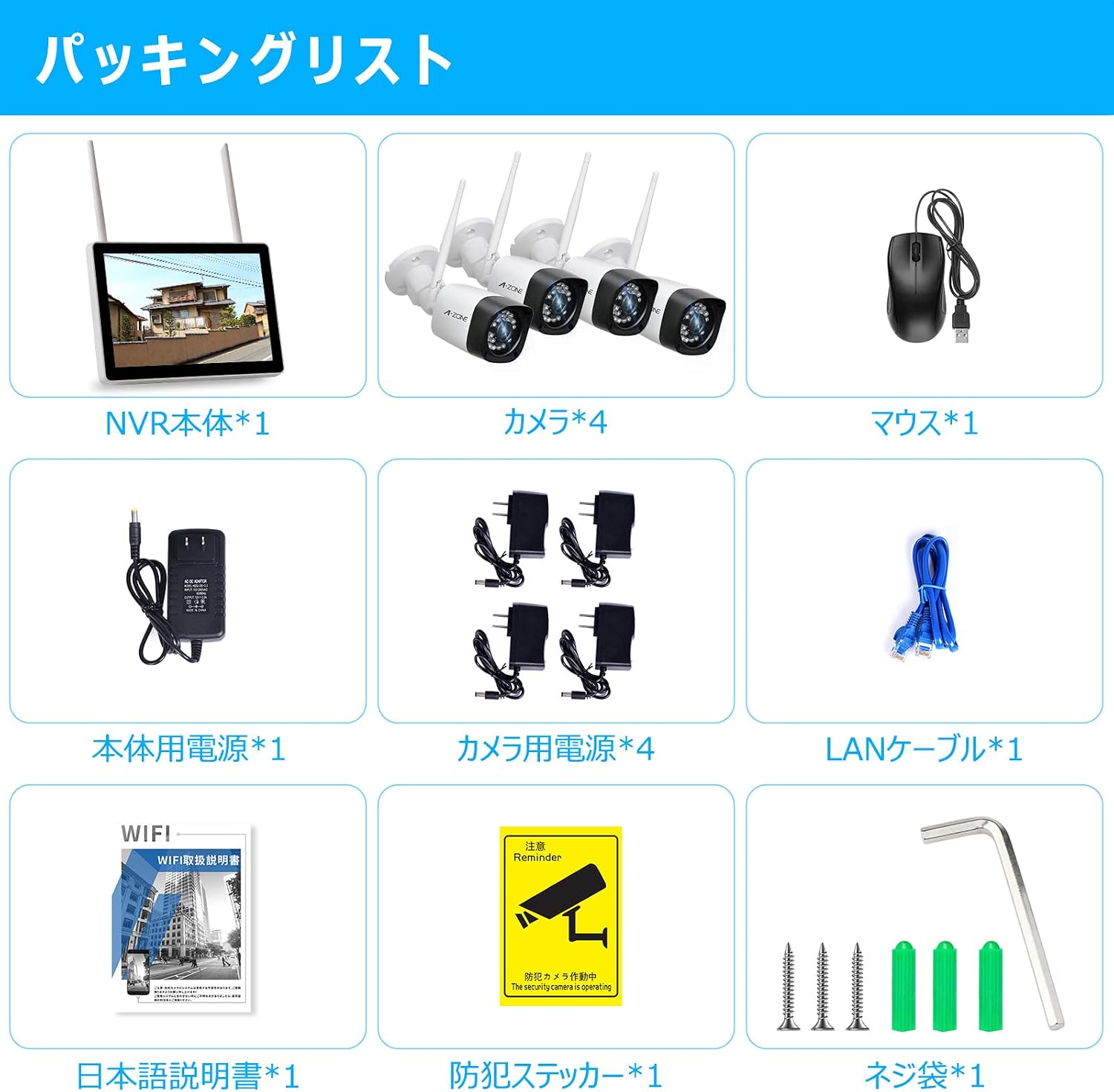
Figear 2: Riochdachadh lèirsinneach de shusbaint a’ phacaid.
Feartan air an gabhail a-steach:
- 1x 13.3-inch IPS NVR Monitor
- 4x 3MP Wireless Cameras
- 1x Adaptair Cumhachd NVR
- 4x Innealan-atharrachaidh Cumhachd Camara
- 1 x luchag USB
- 1x LAN Cable
- 1x Instruction Manual (Japanese)
- 1x Security Sticker
- Sgriubha stàladh agus Accessories
Video: Introduction of Accessories
Video 1: This video provides a detailed introduction to the accessories included in the 10-inch monitor wireless security camera set. It demonstrates each component and its purpose, helping users identify all parts before installation.
3. Stiùireadh Stèidheachaidh
The A-ZONE security camera system is designed for easy installation. Follow these steps to set up your system.
3.1 Stàladh Camara
Cameras can be mounted on walls or ceilings using the provided screws. Ensure the mounting location provides a clear view and stable Wi-Fi signal.

Figure 3: Illustration of camera installation and connection points on the NVR.
Video: Wireless Security Camera Installation Demo
Video 2: This video demonstrates the step-by-step process of installing a wireless security camera, including marking drill points, drilling, inserting anchors, and securing the camera with screws.
3.2 Ceangal siostam
Connect the cameras to the NVR and power outlets. The system is pre-paired, so cameras should automatically connect to the NVR once powered on.

Figure 4: Close-up of the NVR monitor's ports, including HDMI, LAN, USB, and power input.
Video: Initial Operation Procedure
Video 3: This video guides users through the initial setup and connection of the security camera system, including connecting power, LAN cables, and the mouse, followed by language selection and camera detection on the monitor.
4. Stiùireadh Obrachaidh
Learn how to use the various features of your A-ZONE security camera system.
4.1 Modhan Clàraidh
The system offers five recording modes to suit your surveillance needs:
- Clàradh leantainneach: Clàran 24/7.
- Clàradh Dearbhadh Gluasad: Records automatically when motion is detected. Customize sensitivity and detection areas to reduce false alarms.
- Clàradh clàr: Set specific time periods for recording.
- Clàradh làimhe: Start recording manually via the monitor.
- Infrared Recording: Records clear images in complete darkness using infrared.

Figure 5: Visual representation of the various recording modes available.
4.2 Iomallach Viewing
Monitor your property remotely using the dedicated mobile application on your smartphone or tablet, or via PC.

Figure 6: Screenshot showing remote viewing of camera feeds on a smartphone.
Video: Product Function Introduction
Video 4: This video highlights the key functions of the product, including motion detection, remote viewing, and night vision capabilities.
4.3 Sealladh na h-Oidhche
The cameras are equipped with 24 infrared LEDs and IR-CUT technology, automatically switching between day and night modes to provide clear images even in complete darkness up to 20 meters.

Figure 7: Comparison of day and night vision footage from the camera, demonstrating clarity in low-light conditions.
5. Cumail suas
Regular maintenance ensures optimal performance and longevity of your security camera system.
- Lionsan glan: Periodically wipe camera lenses with a soft, damp aodach airson duslach agus smudges a thoirt air falbh.
- Thoir sùil air ceanglaichean: Ensure all power and network cables are securely connected and free from damage.
- Ùrachaidhean bathar-bog: Check for and install any available firmware updates for the NVR and cameras to enhance security and features.
- Stiùireadh Stòraidh: Gu cunbhalach a-rithistview foo air a chlàradhtage and manage storage space on the 1TB HDD. Back up important recordings as needed.
- Solar cumhachd: Ensure cameras and NVR receive stable power. Avoid exposing power adapters to extreme weather.
6. A ’dèanamh trioblaid
If you encounter issues with your A-ZONE security camera system, refer to the following common troubleshooting steps:
- Gun ìomhaigh air an sgrùdair:
- Check if the NVR monitor is powered on.
- Ensure all cameras are powered on and within range of the NVR.
- Verify camera-NVR pairing. If necessary, re-pair cameras according to the full manual.
- Càileachd Ìomhaigh truagh:
- Glan lionsan camara.
- Thoir sùil airson bacadh sam bith ann an raon a’ chamara view.
- Ensure cameras are receiving sufficient power.
- Gun Rabhaidhean Lorgaidh Gluasaid:
- Verify motion detection settings in the NVR menu or mobile app.
- Adjust sensitivity and detection areas.
- Ensure the mobile app has notification permissions enabled.
- iomallach ViewCùisean:
- Ensure the NVR is connected to the internet via the LAN port.
- Thoir sùil air a’ cheangal eadar-lìn agad aig an taigh.
- Update the mobile app to the latest version.
- Wi-Fi Signal Weakness:
- Utilize the repeater function of the cameras to extend signal range.
- Relocate cameras or NVR to minimize obstacles.
For more detailed troubleshooting or persistent issues, please refer to the full instruction manual or contact customer support.
7. Sònrachaidhean
| Feart | Tuairisgeul |
|---|---|
| Brand | A-CHRIOSDUIDH |
| Modail Àireamh | AZB4 |
| Teicneòlas ceangail | Uèirleas |
| Fuasgladh glacadh bhidio | 1536p (3MP) |
| Feart sònraichte | Uisge-dhìonach (IP66) |
| Meudan toraidh (LxWxH) | 30 x 20 x 30 cm |
| Eadar-aghaidh conaltraidh | Uèirleas |
| Piogsail Bhidio | 1536p |
| Tuairisgeul a ’chamara | Beulaibh, Cùil |
| Sealladh na h-oidhche | Tha |
| Mòdan Clàraidh | Schedule, Manual |
| Co-phàirtean air an toirt a-steach | 1/2-Inch Collet (Note: This seems like a generic item, actual components are listed in Package Contents) |
| Seòrsa lionsa | Lionsa ceàrn farsaing |
8. Barantas & Taic
A-ZONE is committed to providing high-quality products and excellent customer service.
8.1 Barantas toraidh
Tha an toradh seo a’ tighinn le a Barantas càileachd 2-bliadhna. Our security cameras are PSE and technical compliance certified, and undergo approximately 48 hours of operation testing before shipment to ensure reliability.
8.2 Taic teachdaiche
If you have any questions or concerns during your purchase or use of the product, please do not hesitate to contact us. We recommend reviewing the instruction manual before using the product for quick and correct operation.
Dòighean conaltraidh:
- Contact the seller directly through your order history.
- Use the email address or LINE contact information provided in the instruction manual.