
1. Ro-ràdh
This manual provides instructions for the setup, operation, and maintenance of your Crosley C6B-DB Belt-Drive Bluetooth Turntable. The C6B-DB is a fully manual two-speed turntable designed to deliver an authentic analog listening experience. It features a durable MDF plinth, a heavy steel platter, and a low-vibration synchronous motor. The adjustable tonearm with a pre-installed moving magnet cartridge allows for precise tracking. Connectivity options include RCA outputs for wired speakers and built-in Bluetooth for wireless streaming to external speakers. Please read this manual thoroughly before using your turntable.
2. Fiosrachadh Sàbhailteachd
Please observe the following safety precautions to prevent damage to the unit and ensure safe operation:
- Na nochd an aonad gu uisge no taiseachd.
- Na cuir an aonad fo sholas dìreach na grèine, stòran teas no teòthachd anabarrach.
- Dèan cinnteach gu bheil fionnarachadh ceart timcheall an aonaid.
- Cleachd dìreach an inneal-atharrachaidh cumhachd a tha air a thoirt seachad leis an aonad.
- Na feuch ri an aonad a thoirt às a chèile no atharrachadh. Thoir aire do luchd-obrach teisteanasach airson a h-uile seirbheiseachadh.
- Cùm an aonad air falbh bho raointean magnetach làidir.
- Handle the stylus with care to avoid damage and injury.
3. Dè tha sa bhogsa
Dèan cinnteach gu bheil na nithean gu lèir a tha air an liostadh gu h-ìosal air an toirt a-steach don phacaid agad:
- Crosley C6B-DB Turntable Unit
- Adaptar solar cumhachd
- Leabhar-làimhe cleachdaiche
- Còmhdach Dust
- Platter
- Belt draibhidh
- Faireachdainn Mat
- Frith-chuideam
- Cuideam anti-skate
4. Toradh thallview
Familiarize yourself with the components of your Crosley C6B-DB turntable.

Figear 1: Crosley C6B-DB Turntable with its clear dust cover in place. This image shows the overall design of the turntable, including the plinth, platter, tonearm, and the protective dust cover.
4.1 as àirde View Co-phàirtean
- Còmhdach dust: A’ dìon a’ chlàr-tionndaidh bho dhuslach nuair nach eilear ga chleachdadh.
- Platter: The surface on which records are placed. Made of heavy steel for stability.
- Mata Fàilte: Provides a soft surface for records and helps reduce static.
- Fearsaid: A’ cumail a’ chlàir na àite air a’ phlàta.
- Tonearm: Holds the cartridge and stylus, guiding it across the record grooves.
- Cartridge: Converts groove vibrations into electrical signals. The C6B-DB comes with a pre-installed moving magnet cartridge.
- Stoidhle (Snàthad): The tip of the cartridge that reads the record grooves.
- Frith-chuideam: Adjusts the tracking force of the tonearm.
- Dial an-aghaidh sgèitidh: Compensates for the inward force on the tonearm, ensuring even tracking.
- Luamhan Ciùnaidh: Raises and lowers the tonearm gently.
- Tagraiche astair: Switch between 33 1/3 RPM and 45 RPM.
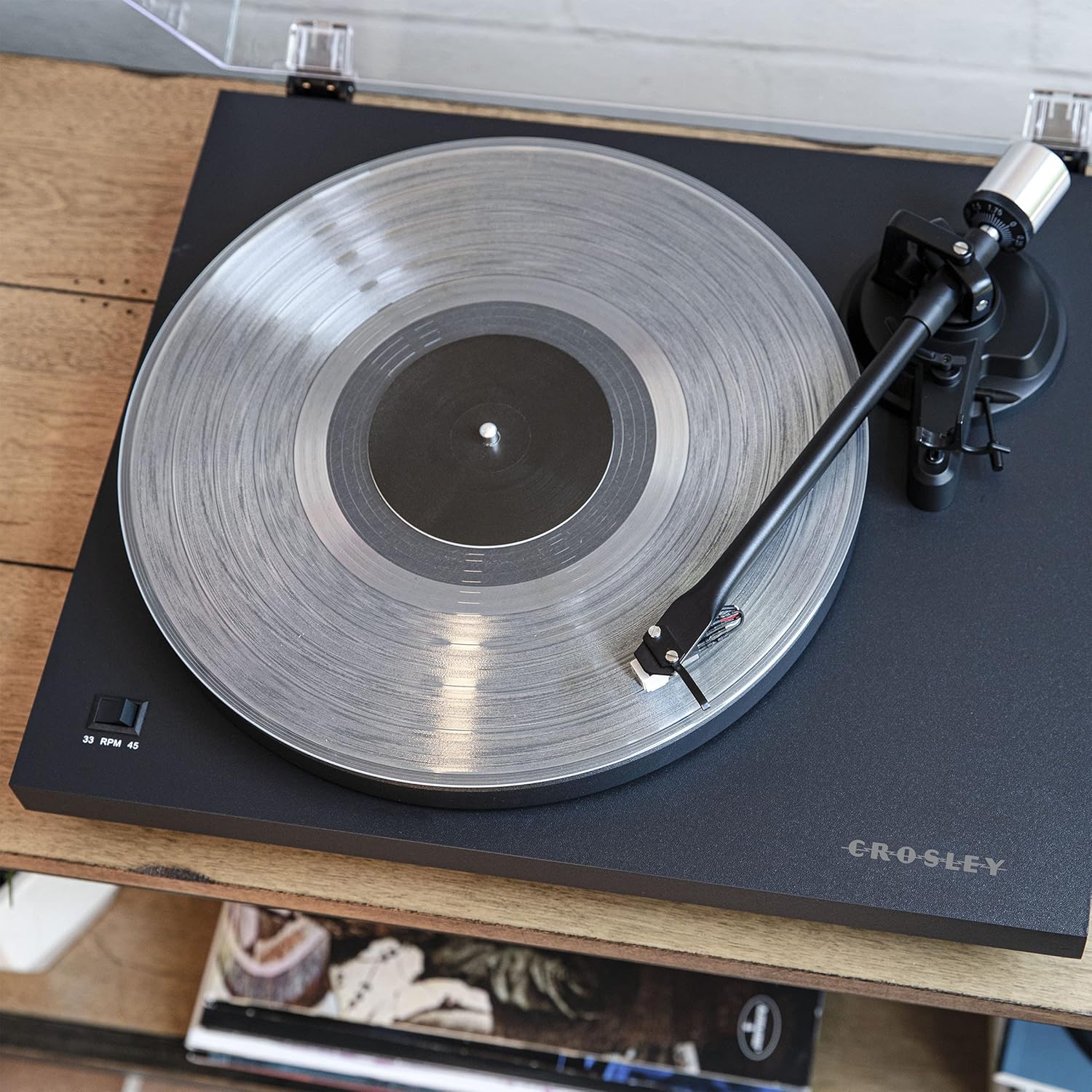
Figear 2: A bhàrr-sìos view of the turntable, highlighting the platter, felt mat, spindle, and the tonearm assembly. The speed selector switch is visible on the left side of the plinth.

Figear 3: A detailed close-up of the pre-installed moving magnet cartridge and stylus on the tonearm. This component is crucial for converting the physical grooves of a record into an audio signal.
4.2 Ceanglaichean pannal cùil
- Terminal talmhainn: For connecting a ground wire from an amplifier/receiver to reduce hum.
- Toradh RCA (Clì/Deas): A 'ceangal ri a ampluchd-labhairt no luchd-labhairt cumhachd.
- Tionndadh fòn / loidhne: Selects between the built-in preamplifier (Line) or an external phono preamplifier (Phono).
- DC ann an 12V: Cuir a-steach cumhachd airson an inneal-atharrachaidh a tha air a thoirt seachad.
- Comharra Bluetooth: LED light indicating Bluetooth pairing status.
- Switch cumhachd: Turns the turntable on or off.

Figear 4: The rear panel of the turntable, showing the ground terminal, RCA L/R outputs, Phono/Line switch, DC 12V power input, Bluetooth indicator, and the main power switch.
5. Suidhich
Lean na ceumannan seo gus an clàr-tionndaidh agad ullachadh airson a’ chiad chleachdadh.
5.1 Dì-phapadh agus suidheachadh
- Thoir air falbh na pàirtean gu lèir bhon phacaid gu faiceallach.
- Place the turntable on a stable, level surface away from direct sunlight, heat, and vibrations.
- Ensure there is enough space around the turntable for proper ventilation and operation.
5.2 Stàladh Plàta is Crios
- Cuir am truinnsear air snìomhag a’ chlàr-tionndaidh.
- Locate the drive belt. Gently stretch the belt around the inner rim of the platter and then around the motor pulley. Ensure the belt is not twisted.
- Cuir am brat le faireachdainn air mullach an truinnsear.
5.3 Tonearm Balance and Tracking Force Adjustment
Proper tonearm adjustment is crucial for optimal sound quality and to prevent damage to your records and stylus.
- Thoir air falbh an dìonadair stylus.
- Place the counterweight onto the rear of the tonearm. Rotate it clockwise until it is approximately halfway on.
- With the cueing lever in the down position, carefully balance the tonearm by rotating the counterweight until the tonearm floats horizontally. Do not let the stylus touch the platter or record.
- Once balanced, hold the counterweight steady and rotate the numbered ring on the front of the counterweight until "0" aligns with the line on the tonearm.
- Rotate the entire counterweight (both parts) counter-clockwise to the recommended tracking force. For the pre-installed cartridge, a tracking force of 2.0 grams is typically recommended. Refer to your cartridge manufacturer's specifications for precise values.
5.4 Anti-skate Adjustment
The anti-skate mechanism prevents the tonearm from being pulled inward excessively.
- Attach the small loop of the anti-skate weight's thread to the anti-skate post on the tonearm.
- Pass the thread through the wire support.
- Set the anti-skate dial to the same value as your tracking force (e.g., 2.0 for 2.0 grams tracking force).
5.5 Ceangal Fuaim
Connect your turntable to an audio system.
- Using Built-in Preamplifier (Line Out): Connect the RCA cables from the turntable's RCA outputs to a Line-level input (AUX, CD, Tuner) on your amplifier or powered speakers. Set the Phono/Line switch on the turntable's rear panel to "Line".
- Using External Preamplifier (Phono Out): Ma tha do amplifier has a dedicated Phono input, connect the RCA cables from the turntable's RCA outputs to the Phono input on your amplifier. Set the Phono/Line switch on the turntable's rear panel to "Phono". Connect the ground wire from the turntable to the ground terminal on your amplosgadair.
5.6 Ceangal cumhachd
Connect the power adapter to the DC IN 12V port on the turntable and then plug it into a wall outlet.
6. Obrachadh
Instructions for playing records and using Bluetooth connectivity.
6.1 A’ cluich clàr
- Ensure the turntable is powered on using the switch on the rear panel.
- Select the correct speed (33 1/3 or 45 RPM) using the speed selector switch on the plinth.
- Cuir clàr air a’ bhrat-ùrlair feilt.
- Tog suas a’ ghàirdean-tòin le bhith a’ cleachdadh luamhan a’ chiù.
- Manually position the tonearm over the desired starting groove of the record.
- Gently lower the tonearm using the cueing lever. The stylus will begin playing the record.
- To stop playback, lift the tonearm using the cueing lever and return it to the tonearm rest.
6.2 Bluetooth Out Function
The C6B-DB can stream audio wirelessly to external Bluetooth speakers.
- Dèan cinnteach gu bheil an neach-labhairt Bluetooth taobh a-muigh agad ann am modh paidhreachaidh.
- Turn on the turntable. The Bluetooth indicator light on the rear panel will flash, indicating it is searching for a device.
- Cho luath ‘s a bhios e ceangailte, tionndaidhidh solas comharrachaidh Bluetooth gu gorm seasmhach.
- You can now play records, and the audio will stream to your paired Bluetooth speaker.
- To disconnect, turn off the Bluetooth speaker or the turntable.
Bhidio 1: This video demonstrates the features and operation of the Crosley C6B Turntable, including playing records, speed selection, and Bluetooth connectivity. It highlights the adjustable tonearm, pre-mounted cartridge, steel platter, and belt-driven motor.
7. Cumail suas
Regular maintenance helps prolong the life of your turntable and records.
7.1 Glanadh a’ Chlàir-thionndaidh
- Wipe the dust cover and plinth with a soft, dry cloth. Do not use abrasive cleaners or solvents.
- For the stylus, use a soft brush designed for stylus cleaning, brushing gently from back to front.
7.2 Ath-chur Stoidhle
The stylus is a consumable part and should be replaced after approximately 300-500 hours of playback, or if you notice a degradation in sound quality. The C6B-DB is compatible with NP5 replacement needles.
- Gently pull the old stylus assembly downwards and forwards to remove it from the cartridge.
- Align the new stylus assembly with the cartridge body and push it upwards until it clicks into place.
8. A ’dèanamh trioblaid
If you experience issues with your turntable, refer to the following common problems and solutions.
| Trioblaid | Adhbhar a dh’fhaodadh a bhith ann | Fuasgladh |
|---|---|---|
| Gun chumhachd | Chan eil an inneal-atharrachaidh cumhachd ceangailte; Chan eil an socaid cumhachd gnìomhach. | Ensure power adapter is securely connected to the turntable and a working outlet. Check the power switch on the rear panel. |
| Gun fhuaim no tomhas-lìonaidh ìosal | Incorrect Phono/Line switch setting; RCA cables not connected; AmpLuathaiche/luchd-labhairt dheth no fuaim ìosal; Stoidhle millte. | Set Phono/Line switch correctly (Line for line input, Phono for phono input). Check RCA cable connections. Ensure amplifier/speakers are on and volume is up. Inspect stylus for damage and replace if necessary. |
| Fuaim air a shaobhadh no a’ leum | Tracking force incorrect; Anti-skate incorrect; Stylus dirty or damaged; Record dirty or damaged; Turntable not level. | Re-adjust tracking force and anti-skate. Clean stylus. Clean record. Ensure turntable is on a level surface. Replace stylus if damaged. |
| Record speed incorrect | Incorrect speed selected; Drive belt dislodged or worn. | Select the correct speed (33 1/3 or 45 RPM). Check if the drive belt is properly seated around the platter and motor pulley. Replace belt if worn. |
| Bluetooth nach eil a 'càradh | External speaker not in pairing mode; Too far from speaker. | Ensure external Bluetooth speaker is in pairing mode. Move turntable closer to the speaker. |
9. Sònrachaidhean
| Feart | Mion-fhiosrachadh |
|---|---|
| Modail Àireamh | C6B-DB |
| Meudan toraidh | 16.38 x 14.25 x 5.25 òirleach |
| Cuideam nì | 12.13 not |
| Luas | 33 1/3, 45 RPM |
| Seòrsa motair | AC Motor, Belt-Drive |
| Seòrsa cartridge | Moving Magnet (NP5 replacement needle compatible) |
| Ceangalachd | RCA Output (Phono/Line switchable), Bluetooth Out |
| Stuth | Fiodh Innleadaichte, Plastaig |
| Stòr cumhachd | Dealain le Càball (DC 12V) |
10. Barantas agus Taic
Crosley products are manufactured to high-quality standards. For detailed warranty information, please refer to the warranty card included with your product or visit the official Crosley website. If you encounter any issues or require technical assistance, please contact Crosley customer support.
Crosley Support: www.crosleyradio.com/support


