
Ro-ràdh
This manual provides essential information for setting up, operating, maintaining, and troubleshooting your HP 2021 15.6-inch Full HD Laptop. This device is equipped with an Intel Celeron N4020 Processor, 8GB DDR4 RAM, and a 256GB Solid State Drive, designed for everyday computing tasks.
Dè th' anns a' Bhocsa
Carefully unpack your new HP laptop and ensure all components are present.
- Laptop HP 15
- Adapter cumhachd 45 W Smart AC
- Documentation (Setup poster)

Image: Contents of the HP laptop box, showing the laptop, AC adapter, and setup poster.
Suidhich
1. A’ chiad chumhachd air agus a’ cur cosgais air
Before first use, connect the AC power adapter to the laptop's power port and then to a wall outlet. Allow the battery to charge sufficiently before disconnecting the power adapter.
2. Windows 10 S Mode Setup
Follow the on-screen prompts to complete the initial Windows 10 S mode setup. This includes selecting your region, keyboard layout, connecting to a Wi-Fi network, and signing in with or creating a Microsoft account.
3. Activating Microsoft Office 365
Your laptop includes a 1-year subscription to Microsoft Office 365. To activate:
- Launch any Office application (e.g., Word, Excel).
- Start activation by signing in with your Microsoft account. Create one if you do not have one.
- Click "Activate Office."
- Sign in to your account and follow the prompts.
- Complete steps 1, 2, and 3 as indicated.
- Click "Refresh" once Office is ready.
- Open a document and accept the license agreement.
4. Switching Out of Windows 10 S Mode (Optional)
Windows 10 S mode is designed for security and performance, limiting app installations to the Microsoft Store. If you need to install apps from outside the Microsoft Store, you can switch to regular Windows 10 Home or Pro. This process is irreversible.
- On your PC running Windows 10 in S mode, open Suidhichidhean > Ùrachadh & tèarainteachd > Gnìomhachadh.
- In the "Switch to Windows 10 Home" or "Switch to Windows 10 Pro" section, select Go to the Store. (Ensure you do not click a "Go to the Store" link in an "Upgrade your edition of Windows" section if present.)
- On the "Switch out of S mode" (or similar) page that appears in the Microsoft Store, select the Faigh putan.
- After you see a confirmation message on the page, you will be able to install apps from outside of the Microsoft Store.
Ìomhaigh: Taobh view of the HP laptop highlighting the SuperSpeed USB Type-C, SuperSpeed USB Type-A, HDMI 1.4b, RJ-45 Ethernet port, headphone/microphone combo, and media card reader.
Stiùireadh Obrachaidh
Meur-chlàr agus Touchpad
The laptop features a full-size keyboard with an integrated numeric keypad for enhanced productivity. The precision touchpad supports multi-touch gestures for intuitive navigation.
Ceangal Peripherals
- Innealan USB: Connect USB devices such as external drives, mice, or keyboards to the SuperSpeed USB Type-A or Type-C ports.
- Taisbeanadh taobh a-muigh: Cleachd am port HDMI 1.4b gus monitor no proiseactair taobh a-muigh a cheangal.
- Lìonra: Ceangail càball Ethernet ris a’ phort RJ-45 airson ceangal lìonra uèirleas.
- Fuaim: Plug headphones or an external microphone into the headphone/microphone combo jack.
Webcamara agus microfòn
The integrated HP True Vision 720p HD camera and dual array digital microphones are ready for online meetings and video calls. Ensure appropriate privacy settings are configured in Windows.
Leughadair cairt meadhanan
Insert compatible SD media cards into the multi-format SD media card reader to access photos and files.

Image: The HP laptop's display area, highlighting the HP True Vision 720p HD Camera, rich 6.5 mm micro-edge Full HD IPS display, Intel UHD Graphics, and tuned stereo speakers.
Cumail suas
Cùram Bataraidh
To prolong battery life, avoid fully discharging the battery frequently. For optimal performance, use the provided HP 45W Smart AC power adapter. The laptop supports HP Fast Charge, allowing it to charge up to 50% in approximately 45 minutes when powered off.
A’ glanadh an laptop
Cleachd clò bog, gun lint beagan dampened with water or a screen cleaner to clean the display. For the keyboard and chassis, use a soft, dry cloth. Avoid harsh chemicals or abrasive materials.
Ùrachaidhean bathar-bog
Regularly check for and install Windows updates to ensure your system has the latest security patches and performance improvements. You can find these in Suidhichidhean > Ùrachadh & tèarainteachd > Ùrachadh Windows.
Fuasgladh thrioblaidean
Laptop gun a bhith a’ tionndadh air
- Dèan cinnteach gu bheil an inneal-atharrachaidh AC ceangailte gu tèarainte ris an laptop agus ri socaid cumhachd a tha ag obair.
- Dearbhaich gu bheil an socaid cumhachd ag obair le bhith a’ cur inneal eile a-steach.
- Ma tha am bataraidh air a dhrèanadh gu tur, is dòcha gun toir e beagan mhionaidean airson a bhith air a ghearradh mus urrainn don laptop tionndadh air.
Battery Not Holding Charge / Only Works When Plugged In
- Check the battery health status in Windows settings.
- Ensure all drivers, especially power management drivers, are up to date.
- If the issue persists, the battery may require service or replacement. Contact HP Support for assistance.
Gun cheangal Wi-Fi
- Thoir sùil a bheil Wi-Fi air a chomasachadh ann an roghainnean Windows.
- Ath-thòisich an router agus am modem agad.
- Ensure Wi-Fi drivers are installed and up to date.
Cùisean Taisbeanaidh
- If the screen is blank, try connecting an external monitor to determine if the issue is with the laptop's display or graphics card.
- Adjust display brightness using the function keys.
Airson cùisean nas iom-fhillte, thoir sùil air taic HP weblàrach-lìn no cuir fios chun t-seirbheis teachdaiche aca.
Sònrachaidhean
Below are the key technical specifications for your HP 2021 15.6" FHD Laptop:
| Feart | Sònrachadh |
|---|---|
| Brand | HP |
| Ainm Modail | HP 2021 |
| Meud sgrion | 15.6 òirlich |
| Fuasgladh Taisbeanaidh | FHD (1920 x 1080) IPS, Anti-Glare |
| Pròiseasar | Intel Celeron N4020 (up to 2.8 GHz, 2 Cores, 4MB Cache) |
| Cuimhne RAM | 8 GB DDR4 SDRAM |
| Stòradh | 256GB SSD (Solid State Drive) |
| Grafaigean | Grafaigean Intel UHD |
| Siostam-obrachaidh | Windows 10 S |
| Puirt | 1x SuperSpeed USB Type-C, 2x SuperSpeed USB Type-A, 1x HDMI 1.4b, 1x RJ-45, 1x Headphone/Microphone Combo, 1x AC Smart Pin |
| Ceangal gun uèir | Wi-Fi 802.11a/b/g/n/ac, Bluetooth |
| Webcam | Camara HP True Vision 720p HD le microfònan didseatach sreath dùbailte aonaichte |
| Bataraidh | 3-Cell, 41 WHr, Integrated Lithium Ion |
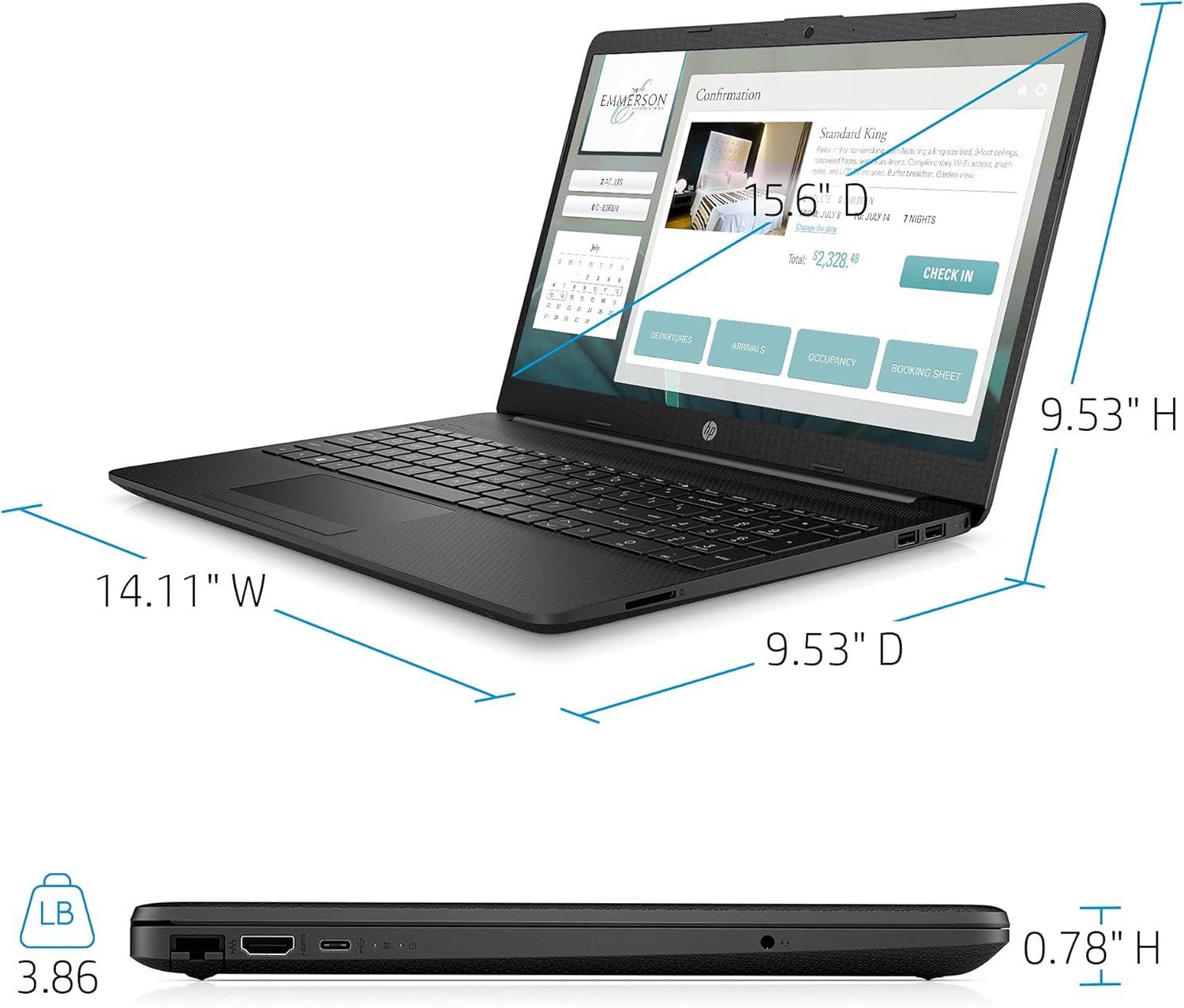
| Cuideam | 3.86 Punnd |
| Dath | Dubh |

Image: Physical dimensions of the HP laptop (14.11" W x 9.53" D x 0.78" H) and weight (3.86 lbs).
Fiosrachadh Barantais
Your HP 2021 15.6" FHD Laptop comes with a limited manufacturer's warranty. Please refer to the documentation included in the box for specific terms, conditions, and duration of your warranty. Keep your proof of purchase for warranty claims.
Taic
For further assistance, technical support, or service inquiries, please visit the official HP support website or contact HP customer service directly. You can find contact information and resources on the HP weblàrach: