
Lepro PR410082-RGB-JP
Lepro 5m RGB LED Strip Light Instruction Manual
Model: PR410082-RGB-JP
Ro-ràdh
Thank you for choosing the Lepro 5m RGB LED Strip Light. This product is designed to provide versatile and vibrant lighting for various indoor applications. Featuring high-brightness SMD5050 LEDs, a wide range of colors, and easy installation, it enhances the ambiance of any space. Please read this manual carefully before installation and use to ensure proper operation and safety.
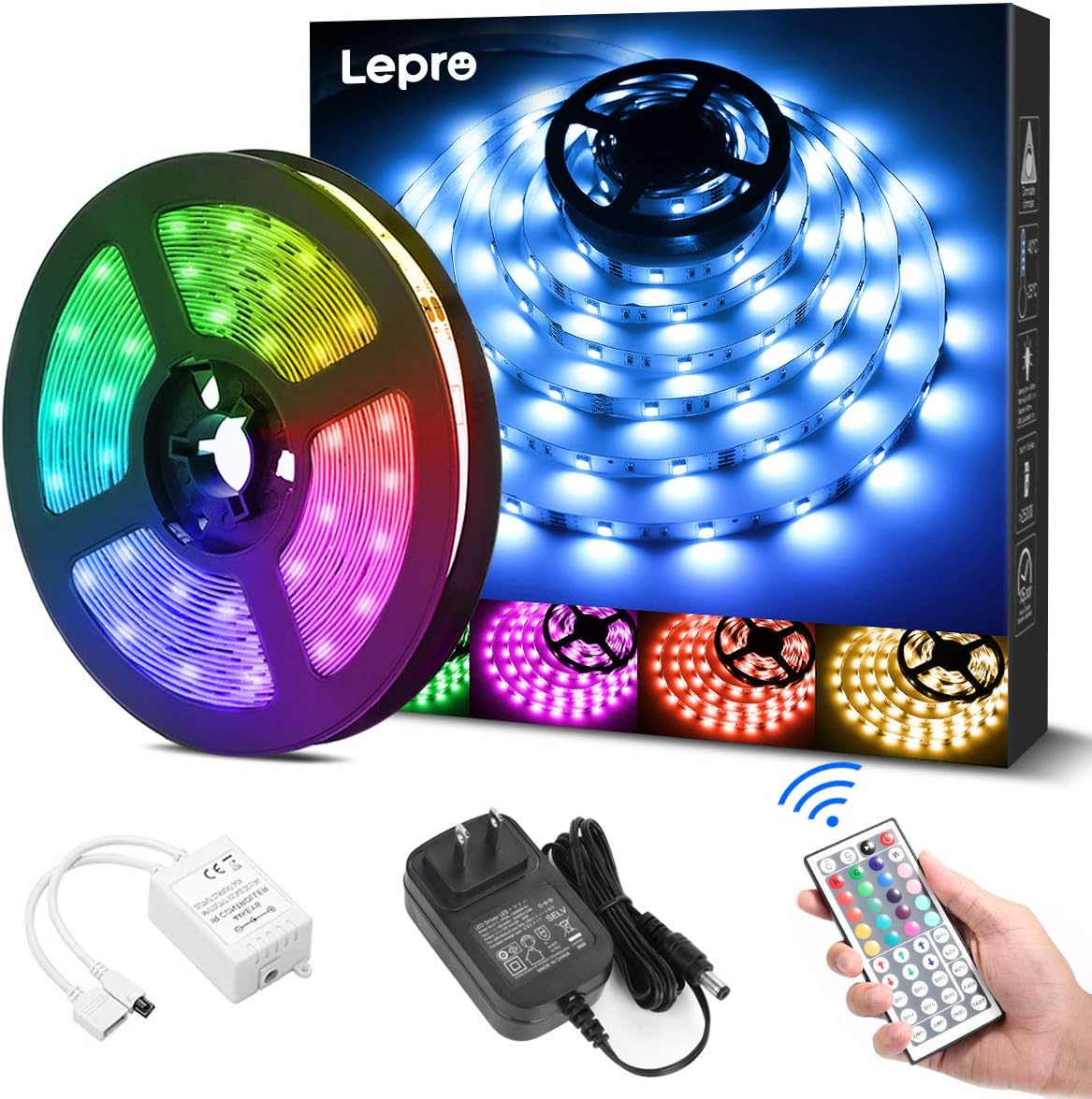
Dè th' anns a' Bhocsa
Dèan cinnteach gu bheil na pàirtean uile an làthair mus tòisich an stàladh:
- LED Strip Light (5 meters) x 1
- DC12V Power Adapter x 1
- Connection Receiver x 1
- Smachd Iomallach x 1
- Instruction Manual (Japanese) x 1
Fiosrachadh Sàbhailteachd
- Tha an toradh seo air a dhealbhadh airson cleachdadh a-staigh a-mhàinNa cuir fo uisge no taiseachd àrd e.
- Dèan cinnteach gu bheil an solar cumhachd air a dhì-cheangal mus tèid a stàladh no a chumail suas.
- Use only the provided DC12V power adapter. Using an incompatible power supply may damage the product or pose a fire hazard.
- Do not bend the LED strip sharply or apply excessive force, as this may damage the circuit.
- Cùm a-mach à ruigsinn chloinne.
- If any part of the product is damaged, discontinue use immediately and contact support.
Suidhich
Lean na ceumannan seo gus an stiall solais LED agad a stàladh gu ceart:
- Ullaich an uachdar: Clean the desired installation surface thoroughly. Ensure it is dry, smooth, and free of dust or oil for optimal adhesive performance.
- Tomhais agus Gearr (Roghainneil): If a shorter length is required, cut the LED strip along the designated cut marks (indicated by a scissor icon) using scissors. Thoir an aire: Only cut at these specific marks. Cutting elsewhere will damage the strip. Cut sections cannot be reconnected without additional connectors (sold separately).
- Cuir an stiall an sàs: Peel off the backing from the 3M adhesive tape on the back of the LED strip. Carefully press the strip onto the cleaned surface, ensuring firm contact along its entire length.
- Ceangail na pàirtean: Connect the LED strip to the connection receiver, ensuring the arrows on both components align. Then, connect the DC12V power adapter to the receiver.
- Cumhachd air: Plug the power adapter into a suitable power outlet. Remove the insulation sheet from the remote control before first use. Point the remote control towards the receiver and press the power button to turn on the lights.


Stiùireadh Obrachaidh
The LED strip light is controlled using the included 44-key remote control. Ensure the remote is pointed towards the receiver for effective operation.
Feartan smachd aig astar:
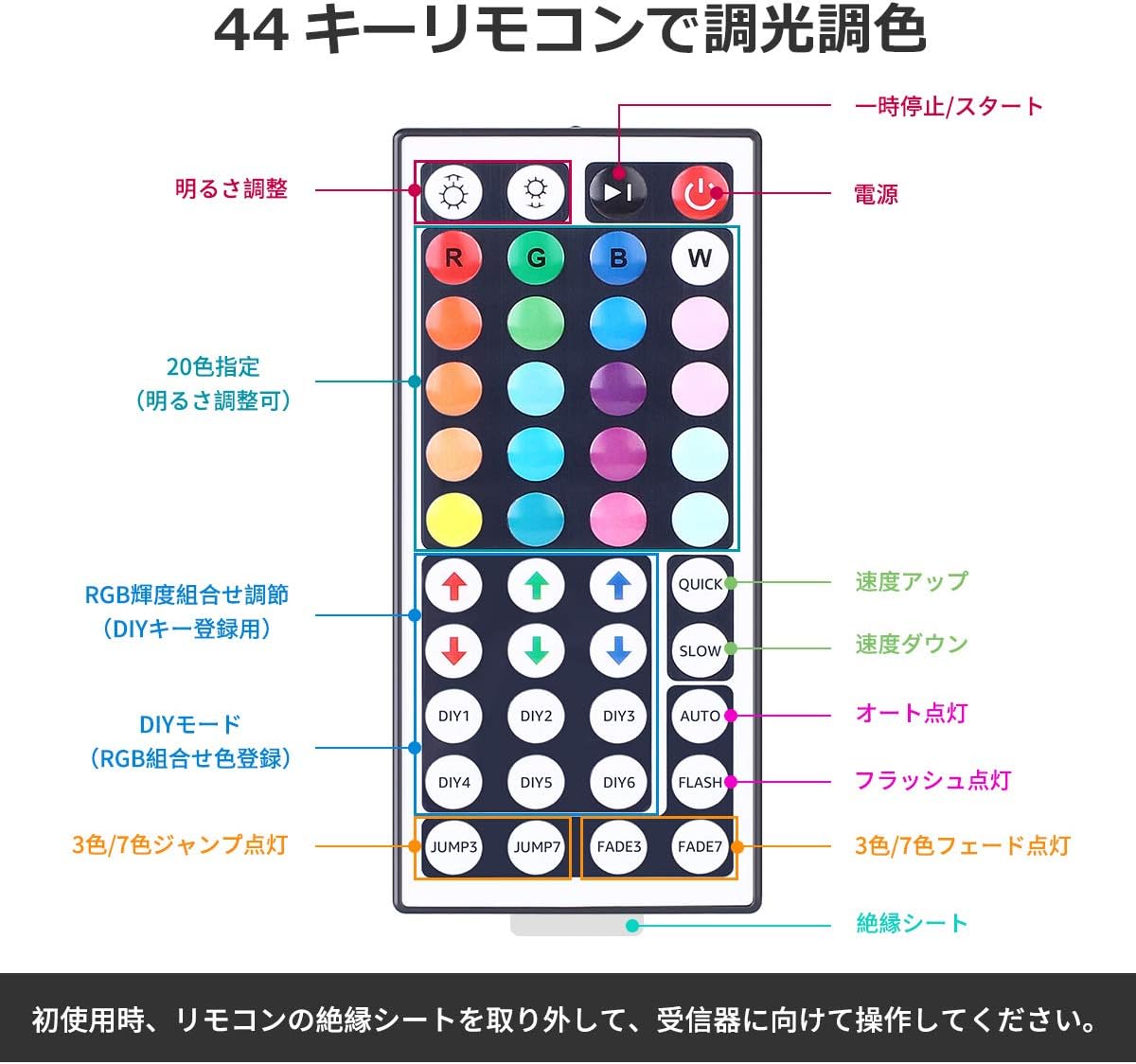
- Cumhachd air / dheth: Brùth an putan cumhachd dearg gus na solais a thionndadh air no dheth.
- Atharrachadh soilleireachd: Cleachd an putanan saighead suas is sìos (labeled 'Brightness Adjust') to increase or decrease the light intensity.
- Taghadh dath: Tagh bho 20 dathan ro-shuidhichte by pressing the corresponding color buttons.
- Modhan DIY: Tha an Putanan DIY1-DIY6 allow you to create and save custom colors by adjusting the Red, Green, and Blue intensity using the RGB arrow buttons.
- Modhan fiùghantach:
- LUATH/SALACH: Atharraich astar nam modhan fiùghantach.
- AUTO: Cycles through all dynamic modes automatically.
- Flash: A’ deàrrsadh tro na dathan.
- JUMP3/JUMP7: Jumps between 3 or 7 colors.
- FADE3/FADE7: A’ seargadh eadar 3 no 7 dathan.
Cumail suas
- Glanadh: Ensure the power is off and unplugged before cleaning. Gently wipe the LED strip with a dry, soft cloth. Do not use harsh chemicals or abrasive cleaners.
- Stòradh: If storing the strip for an extended period, ensure it is clean and dry. Roll it loosely to prevent damage to the LEDs or circuit. Store in a cool, dry place away from direct sunlight.
- Cùram Greamachaidh: The 3M adhesive is strong, but repeated removal and reapplication may reduce its effectiveness.
Fuasgladh thrioblaidean
| Trioblaid | Adhbhar a dh’fhaodadh a bhith ann | Fuasgladh |
|---|---|---|
| Chan eil an stiall LED a’ lasadh suas. | 1. Power adapter not plugged in. 2. Remote control insulation sheet not removed. 3. Connections are loose or incorrect. 4. Remote control battery is dead. | 1. Ensure power adapter is securely plugged into an outlet. 2. Remove the clear plastic insulation sheet from the remote control battery compartment. 3. Check all connections, ensuring arrows align between the strip and receiver. 4. Replace the remote control battery (CR2025 or equivalent). |
| Chan eil an smachd iomallach a’ freagairt. | 1. Remote not pointed at receiver. 2. Obstruction between remote and receiver. 3. Remote control battery is dead. | 1. Point the remote directly at the receiver. 2. Remove any objects blocking the line of sight. 3. Cuir an àite am bataraidh smachd iomallach. |
| Some sections of the strip are not lighting up. | 1. Damage to the LED strip. 2. Incorrect cutting. | 1. Inspect the strip for physical damage. If damaged, contact support. 2. Ensure cuts were made only at designated marks. |
Sònrachaidhean
- Àireamh Modail: PR410082-RGB-JP
- Brand: Lepro
- Seòrsa Stòr Solais: LED (SMD5050)
- Meud LED: 150 LEDs (30 LEDs per meter)
- Fad stiall: 5 meatairean
- Caitheamh cumhachd: 18W
- Input Voltage: DC12V 1.5A
- Roghainnean dath: RGB (20 preset colors + DIY modes)
- Modh smachd: Smachd Iomallach IR 44-iuchrach
- Cleachdadh a-staigh / a-muigh: A-staigh
- Feartan sònraichte: Dimmable, Cuttable, 3M Adhesive, PSE Certified
- Meud pacaid: 13.1 x 10.7 x 6.7cm; 230g

Barantas agus Taic
Tha an stiall solais LED Lepro seo a’ tighinn le Barantas 2-bliadhna. If you encounter any issues or have questions regarding the product, please contact Lepro JP customer support through the retailer's platform. Provide your order details and a description of the issue for prompt assistance.
For further assistance, you can visit the official Lepro store on Amazon: Bùth Amazon Lepro
Ask a question about this manual
Ask about setup, troubleshooting, compatibility, parts, safety, or missing instructions. Manuals+ will review the question and use this page’s manual context to help answer it.