
1. Ro-ràdh
This manual provides detailed instructions for the setup, operation, and maintenance of your WISE TIGER LED Digital Alarm Clock (Model CK-LED1302). Please read this manual thoroughly before use to ensure proper functionality and to maximize your product experience.

Image 1.1: WISE TIGER LED Digital Alarm Clock and its remote control.
2. Pasgan-susbaint
Dèan cinnteach gu bheil a h-uile nì an làthair sa phacaid agad:
- WISE TIGER LED Digital Alarm Clock (Model CK-LED1302)
- Smachd Iomallach
- Càball cumhachd USB
- Leabhar-làimhe cleachdaiche (an sgrìobhainn seo)
- Fixed Bracket (for desk placement)
3. Toradh thallview
The WISE TIGER LED Digital Alarm Clock features a modern 3D design, offering clear time display and multiple functions for various environments.
3.1 Prìomh fheartan
- Taisbeanadh ùine: 12-hour or 24-hour format.
- Taisbeanadh Mìosachan: Shows date.
- Cloc rabhaidh: With snooze function.
- Taisbeanadh teothachd: Shows ambient temperature.
- Soilleireachd a ghabhas atharrachadh: Automatic brightness sensor and manual adjustment via remote control.
- Gnìomh solais oidhche: Provides soft illumination.
- Gnìomh cuimhne: Built-in battery retains time settings for 4-8 hours during power disconnection.
- Suidheachadh ioma-chruthach: Suitable for desk or wall mounting.

Image 3.1: Visual representation of the clock's main functions.
3.2 Co-phàirtean
Thoir sùil air an diagram gu h-ìosal airson còrrview of the clock's components and connection points.
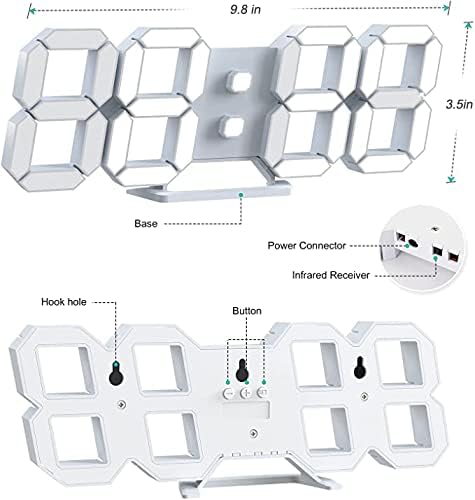
Ìomhaigh 3.2: Cùl view and dimensions of the clock, highlighting the power connector, infrared receiver, and mounting options.
- Taisbeanadh: Large 3D LED digits for time, date, and temperature.
- Bun-stèidh: Removable stand for desk placement.
- Fuasgladh Mapa (Fosgail) USB port for power input.
- Glacadair fo-dhearg: Airson comharran smachd iomallach.
- Hook Holes: Airson cur suas balla.
- Putanan smachd: Located on the back for basic settings (Power, Up, Down, Set).
4. Suidhich
4.1 Ceangal cumhachd
- Connect the provided USB power cable to the power connector on the back of the clock.
- Cuir ceann eile a’ chàball USB a-steach do inneal-atharrachaidh cumhachd USB àbhaisteach (nach eil air a ghabhail a-steach) no do phort USB coimpiutair.
- The clock will power on and display the time.
The clock is powered by the USB cable only. A built-in battery serves to record time settings when power is disconnected, ensuring settings are retained for 4-8 hours.

Image 4.1: Explanation of the clock's power and memory function.
4.2 Roghainnean Suidheachaidh
The clock can be used as a desk clock or a wall clock.
- Suidheachadh deasg: Attach the fixed bracket to the bottom of the clock. The angle of the bracket can be adjusted for optimal viewing.
- Stàladh balla: Remove the fixed bracket if attached. Use the installation slots (hook holes) on the back of the clock to hang it securely on a wall using appropriate fasteners (not included).

Image 4.2: The clock configured for wall mounting and desk placement.
5. Stiùireadh Obrachaidh
The clock's functions are primarily controlled using the included remote control. Basic settings can also be adjusted via the buttons on the back of the clock.
5.1 A' suidheachadh Àm agus Ceann-latha
- Brùth an AM FEAR-CIUIL button on the remote control to enter time setting mode.
- Cleachd an UP agus DOWN arrows to adjust the hour.
- Brùth AM FEAR-CIUIL again to move to minute setting, then use UP agus DOWN a rèiteachadh.
- Lean air adhart a 'bruthadh AM FEAR-CIUIL gus gluasad tro roghainnean na bliadhna, na mìosa agus an latha, ag atharrachadh gach fear le UP agus DOWN.
- Brùth AM FEAR-CIUIL aon uair mu dheireadh no feith beagan dhiog gus an sàbhail na roghainnean gu fèin-ghluasadach.
Cruth 5.2 12/24 Uair
To switch between 12-hour and 24-hour time formats, press the 12/24h putan air an smachd iomallach.

Ìomhaigh 5.1: Eisimpleirample of 12-hour and 24-hour time display.
5.3 A' suidheachadh an Alarm
- Brùth an ALARM button on the remote control to enter alarm setting mode.
- Cleachd an UP agus DOWN arrows to set the desired alarm hour.
- Brùth ALARM again to move to minute setting, then use UP agus DOWN a rèiteachadh.
- Brùth ALARM one last time or wait for the settings to save.
- Gus an inneal-rabhaidh a ghnìomhachadh/a dhì-ghnìomhachadh, brùth air a’ phutan ALARM brùth air a’ phutan airson ùine ghoirid taobh a-muigh modh nan roghainnean. Nochdaidh/falaichidh ìomhaigh rabhaidh air an taisbeanadh.
5.4 Gnìomh Snooze
Nuair a chluinneas an inneal-rabhaidh, brùth air an SNOZE button on the remote control to temporarily silence the alarm. The alarm will sound again after a set interval (typically 5-10 minutes).

Image 5.2: The snooze alarm function in use.
5.5 Atharrachadh soilleireachd
The clock features both automatic and manual brightness control.
- Gile fèin-ghluasadach: The built-in sensor automatically adjusts the display brightness based on ambient light conditions.
- Soilleireachd làimhe: Brùth an BRIGHINN button on the remote control to cycle through different brightness levels (e.g., high, medium, low).

Image 5.3: Automatic brightness adjustment based on ambient light.

Image 5.4: Manual adjustment through three brightness levels.
5.6 Taisbeanadh Teòthachd
The clock automatically displays the ambient temperature. No manual adjustment is typically required for this function.
6. Cumail suas
To ensure the longevity and optimal performance of your WISE TIGER LED Digital Alarm Clock, follow these maintenance guidelines:
- Glanadh: Cleachd clò bog, tioram gus an taisbeanadh a sguabadh agusasing. Avoid abrasive cleaners, solvents, or spray cleaners directly on the clock.
- Cumhachd: Always use the provided USB cable for power. Ensure the power source is stable.
- Àrainneachd: Keep the clock away from extreme temperatures, direct sunlight, and high humidity.
- Smachd air astar: Store the remote control in a safe place to prevent loss or damage. Ensure batteries are replaced when needed (typically 2 Lithium Ion batteries, included).
7. A ’dèanamh trioblaid
If you encounter issues with your clock, refer to the following common problems and solutions:
| Trioblaid | Adhbhar a dh’fhaodadh a bhith ann | Fuasgladh |
|---|---|---|
| Chan eil an uaireadair a’ tionndadh air | Chan eil cumhachd no ceangal sgaoilte | Ensure USB cable is securely connected and power source is active. Try a different USB port or adapter. |
| Chan eil smachd iomallach ag obair | Remote batteries are dead or remote is out of range/blocked | Replace remote control batteries. Ensure remote is pointed at the clock's infrared receiver (refer to Image 3.2) and within 8 meters. Remove any obstructions. |
| Tha an ùine mearachdach | Time was not set precisely | Reset the time carefully, ensuring you set it at the exact second of the desired time. |
| Tha an taisbeanadh ro dhorcha no ro shoilleir | Feumaidh suidheachadh soilleireachd atharrachadh | Brùth an BRIGHINN button on the remote to cycle through manual brightness levels. Check if automatic brightness is functioning correctly in different light conditions. |
| Chan eil an inneal-rabhaidh a’ fuaim | Alarm is not activated or set incorrectly | Ensure the alarm is set and activated (alarm icon visible). Verify the alarm time is correct. |
8. Sònrachaidhean
| Feart | Mion-fhiosrachadh |
|---|---|
| Brand | Tìgear WISE |
| Modail Àireamh | CK-LED1302 |
| Seòrsa Taisbeanaidh | Didseatach |
| Dath | Geal |
| Meudan toraidh | 9.7"L x 3.5"À |
| Stòr cumhachd | Electric Corded (USB) |
| Bataraidh Cuimhne | 2 Lithium Ion batteries (included), retains settings for 4-8 hours |
| Seòrsa stàladh | Wall Mount, Desk Mount |
| Feartan sònraichte | Adjustable Brightness, Alarm Clock, Temperature Display, Date Display, 12/24 Hour Format |
| Stuth | Styrene Butadiene Acrylonitrile |
| Cuideam nì | 0.317 unnsa (mu 9 gram) |
| UPC | 728990655931 |
9. Barantas agus Taic
For warranty information or technical support, please refer to the product packaging or contact the retailer where the product was purchased. Keep your purchase receipt as proof of purchase.