
1. Ro-ràdh
Thank you for choosing the AIYIMA A05 TPA3221 Power Amplifier. This compact 2.0 channel stereo amplifier is designed to deliver high-fidelity audio to passive speakers, featuring both Bluetooth and RCA input options. This manual provides detailed instructions for setup, operation, and maintenance to ensure optimal performance and longevity of your device.
2. Stiùireadh Sàbhailteachd
- Solar cumhachd: Use only the specified power adapter (DC 12-32V) to prevent damage. Ensure the power outlet voltage co-chòrdail.
- Fionnarachadh: Cuir an amplifier in a well-ventilated area. Do not block ventilation openings. Avoid placing it on soft surfaces that may obstruct airflow.
- Taiseachd: Keep the device away from water, humidity, and liquids. Do not operate with wet hands.
- Teas: Avoid direct sunlight, heat sources, or extreme temperatures.
- Glanadh: Dì-cheangail an cumhachd mus glan thu e. Cleachd clò bog, tioram. Na cleachd innealan-glanaidh leaghaidh no aerosol.
- Seirbheis: Na feuch ri an aonad a chàradh no a thoirt às a chèile thu fhèin. Thoir aire do luchd-obrach teisteanasach airson a h-uile seirbheis.
- Clann: Cùm a-mach à ruigsinn chloinne.
3. Pasgan-susbaint
Thoir sùil air a’ phacaid airson nan nithean a leanas:
- AIYIMA A05 Bluetooth 5.0 Ampinneal-sgaoilidh x 1
- Antenna Bluetooth x 1
- Leabhar-làimhe cleachdaiche x 1
- Cairt barantais x 1
- Adaptor Cumhachd DC 32V x 1

Dealbh 3.1: Contents of the AIYIMA A05 amppasgan lifier, a’ gabhail a-steach an amplifier unit, Bluetooth antenna, user manual, warranty card, and power adapter.
4. Toradh thallview
4.1 Smachdan Pannal aghaidh
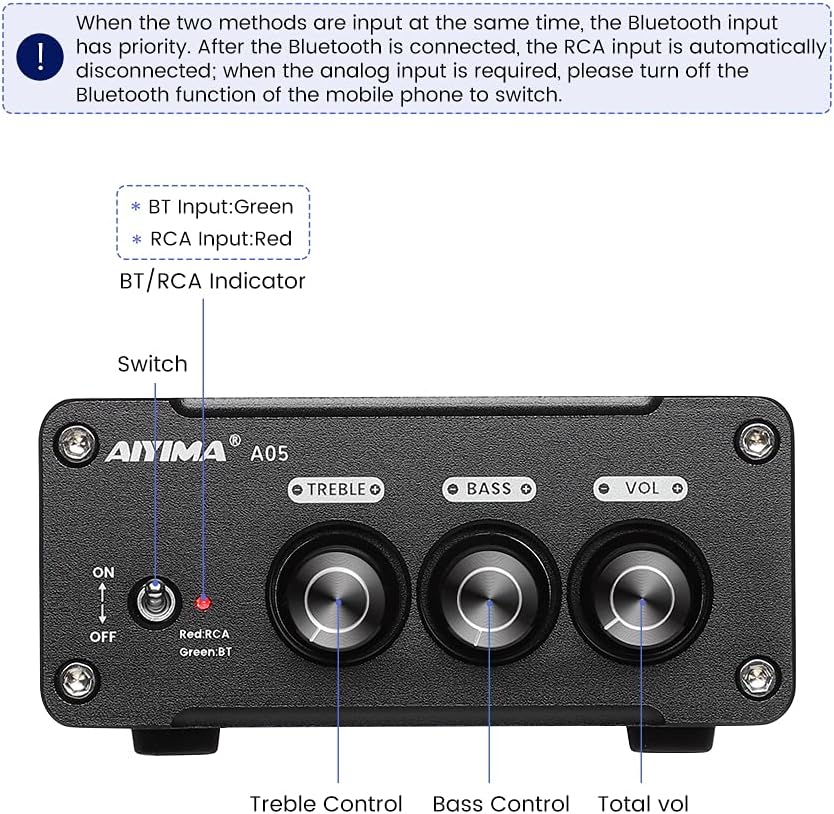
Dealbh 4.1: Front panel of the AIYIMA A05 amplifier, showing the power switch, input indicator, treble, bass, and volume controls.
- Tionndadh cumhachd (AIR / OFF): Togaidh e an ampcumhachd lasachaidh.
- BT/RCA Indicator: Displays the active input source. Green indicates Bluetooth (BT) input, Red indicates RCA input.
- Smachd Treble: Bidh e ag atharrachadh an toradh claisneachd àrd-tricead.
- Smachd bass: Bidh seo ag atharrachadh toradh claisneachd ìosal-tricead.
- Smachd tomhas-lìonaidh: Atharraichidh seo ìre toraidh claisneachd iomlan.

Dealbh 4.2: Faisg air làimh view of the power switch and the BT/RCA input indicator on the front panel.

Dealbh 4.3: Faisg air làimh view of the Treble, Bass, and Volume control knobs.
4.2 Ceanglaichean pannal cùil

Dealbh 4.4: Rear panel of the AIYIMA A05 amplifier, showing the Bluetooth antenna port, RCA audio input, speaker outputs, and DC power input.
- ANT (Bluetooth Antenna Port): Connect the included Bluetooth antenna here for wireless audio reception.
- AUDIO IN (RCA Input): Connect audio sources (e.g., CD player, TV, DAC) using RCA cables.
- SPEAKER (Audio Output): Connect passive speakers using speaker wires. Ensure correct polarity (+ to + and - to -).
- DC 24-32V (Power Input): Connect the provided DC power adapter.
5. Stiùireadh Stèidheachaidh
Follow these steps to set up your AIYIMA A05 amplosgadair:
- Ceangail Antenna Bluetooth: Screw the included Bluetooth antenna into the ANT port on the rear panel.
- Ceangail Luchd-labhairt: Connect your passive speakers to the SPEAKER output terminals on the rear panel. Ensure the positive (+) terminal of the amplifier connects to the positive (+) terminal of the speaker, and the negative (-) terminal connects to the negative (-).
- Ceangail an Stòr Fuaime (RCA): If using a wired audio source, connect it to the AUDIO IN (RCA) ports on the rear panel using appropriate RCA cables.
- Ceangal cumhachd: Connect the DC power adapter to the DC 24-32V input port on the rear panel, then plug the adapter into a wall outlet.
- Cumhachd air: Flip the power switch on the front panel to the "ON" position. The input indicator will light up.

Dealbh 5.1: Rear panel of the amplifier with Bluetooth antenna, RCA cables, speaker wires, and power adapter connected.
6. Stiùireadh Obrachaidh
6.1 A’ cur cumhachd air/dheth
Gus cumhachd a thoirt air an amplifier, flip the front panel switch to the "ON" position. To power off, flip the switch to the "OFF" position.
6.2 Ceangal Bluetooth
- Dèan cinnteach gu bheil an amplifier is powered on and the BT/RCA indicator is green, indicating Bluetooth mode. If it's red, ensure no RCA cable is connected or disconnect it.
- Air an inneal gluasadach agad (fòn, tablet, msaa.), cuir Bluetooth an gnìomh agus rannsaich airson innealan a tha rim faighinn.
- Select "AIYIMA A05" from the list of devices to pair.
- Once paired, the indicator light will remain green, and you can play audio from your device through the amplosgadair.
6.3 RCA Input Usage
- Connect your audio source to the RCA input ports on the rear panel.
- Dèan cinnteach gu bheil an amplifier is powered on. The BT/RCA indicator should be red, indicating RCA input mode.
- If the indicator is green (Bluetooth mode), ensure Bluetooth is disconnected on any paired device, or turn off Bluetooth on your mobile device to switch to RCA input.
6.4 Adjusting Audio
- Meud: Rotate the "VOL" knob clockwise to increase volume and counter-clockwise to decrease.
- Treble: Rotate the "TREBLE" knob to adjust high-frequency sounds to your preference.
- Bass: Rotate the "BASS" knob to adjust low-frequency sounds to your preference.
7. Cumail suas
- Glanadh: Disconnect the power adapter before cleaning. Use a soft, dry, lint-free cloth to wipe the surface of the amplifier. Do not use harsh chemicals or abrasive materials.
- Stòradh: If not in use for an extended period, store the ampStòraich an lifier ann an àite fionnar, tioram, air falbh bho sholas dìreach na grèine agus teòthachd anabarrach.
- Ceanglaichean: Dèan sgrùdadh bho àm gu àm air a h-uile ceangal càball gus dèanamh cinnteach gu bheil iad tèarainte agus saor bho chreimeadh.
8. A ’dèanamh trioblaid
If you encounter issues with your AIYIMA A05 amplifier, thoir sùil air na duilgheadasan agus na fuasglaidhean cumanta a leanas:
| Trioblaid | Adhbhar a dh’fhaodadh a bhith ann | Fuasgladh |
|---|---|---|
| Gun toradh fuaim |
|
|
| Distorted or buzzing sound |
|
|
| Bluetooth nach eil a 'ceangal |
|
|
| Loud noise/ticking on startup |
|
|
If the problem persists after trying these solutions, please contact AIYIMA customer support for further assistance.
9. Sònrachaidhean

Dealbh 9.1: Dimensions of the AIYIMA A05 amplifier: 107mm (4.2in) width, 87mm (3.4in) depth, 36mm (1.4in) height.
| Feart | Sònrachadh |
|---|---|
| Modail | A05 |
| Cumhachd Toraidh | 105 Watts (at 4 Ω) |
| Àireamh nan Sianalan | 2.0 (Stiùidio) |
| Tionndadh Bluetooth | QCC3034 APTX Bluetooth 5.0 |
| Chipset | TPA3221 |
| Solarachadh as ìsle Voltage | 12 bholt (DC) |
| Solarachadh as àirde Voltage | 32 bholt (DC) |
| Cuideam nì | 500 gram |
| Meudan (Mu thuairmse) | 107mm (W) x 87mm (D) x 36mm (H) |
10. Barantas agus Taic
The AIYIMA A05 amplifier comes with a warranty. Please refer to the included Warranty Card for specific terms and conditions. For technical support, troubleshooting assistance, or warranty claims, please contact AIYIMA customer service through the retailer where the product was purchased or visit the official AIYIMA weblàrach.
Goireasan air-loidhne: For additional information and support, you may visit the AIYIMA store page: AIYIMA Official Store