
Ro-ràdh
Thank you for choosing the Renkforce RF-SBS-500 2D Wired Barcode Scanner. This device is designed for efficient and reliable scanning of both 1D and 2D barcodes from various surfaces, including paper and smartphone screens. Its omnidirectional scanning capability and hands-free operation make it suitable for a wide range of applications. This manual provides essential information for the proper setup, operation, and maintenance of your scanner.
Stiùireadh sàbhailteachd
- Do not expose the scanner to extreme temperatures, humidity, or direct sunlight.
- Seachain an sganair a leigeil sìos no a chur fo bhuaidhean làidir.
- Do not attempt to disassemble or modify the scanner. This will void the warranty.
- Keep the scanning window clean to ensure optimal performance. Use a soft, dry cloth.
- Ensure the USB cable is connected securely to prevent accidental disconnection.
Susbaint pacaid
- Renkforce RF-SBS-500 2D Wired Barcode Scanner
- Integrated USB-A Cable
- Leabhar-làimhe cleachdaiche (an sgrìobhainn seo)
Suidhich
Follow these steps to set up your Renkforce RF-SBS-500 barcode scanner:
- Fosgail am pasgan sganair: Thoir an sganair a-mach às a phacaid gu faiceallach.
- Ceangail ri coimpiutair: Plug the integrated USB-A cable from the scanner into an available USB port on your desktop or laptop computer.
- Stàladh an dràibhear: The scanner is typically plug-and-play. Your operating system (Windows, macOS, Linux) should automatically detect and install the necessary drivers. Wait for the installation to complete.
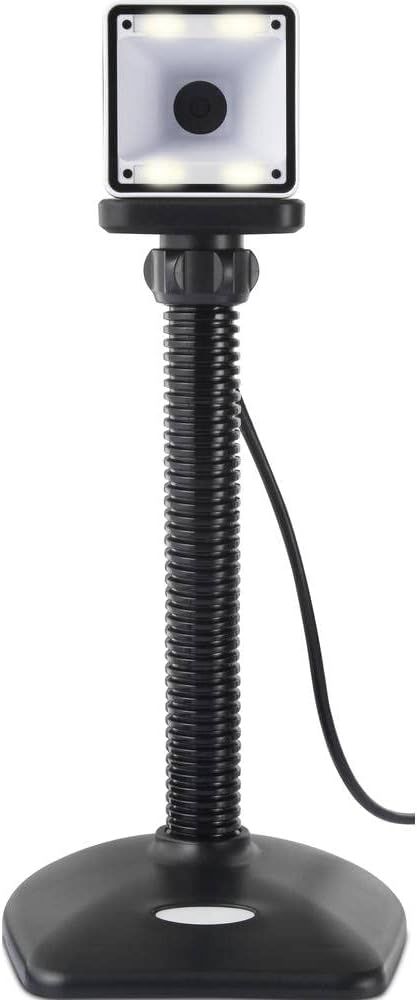
- Suidheachadh: Place the scanner on a stable, flat surface. The flexible neck allows for adjustment of the scanning head angle for optimal positioning.

Ag obrachadh an sganair
The Renkforce RF-SBS-500 is designed for ease of use with its omnidirectional and hands-free capabilities.
- Cumhachd air: Once connected via USB, the scanner will power on automatically. The LED indicators on the scanner head may illuminate briefly.
- A’ sganadh còd-barra: Position the barcode within the scanning area of the scanner head. The scanner will automatically detect and read the barcode.
- Beachdan lèirsinneach is claisneachd: Upon successful scanning, the integrated buzzer will emit a short beep, and the LED display on the scanner will flash or change color, indicating a successful read.
- Leughadh uile-stiùiridh: The scanner can read barcodes regardless of their orientation, eliminating the need to align the barcode precisely.
- Hands-Free Mode (Presentation Mode): The scanner operates continuously in a presentation mode, allowing you to simply pass items with barcodes in front of the scanning window without pressing any buttons. This saves time and improves workflow efficiency.
- Barcodes le taic: The scanner supports both 1D (e.g., EAN, UPC, Code 39) and 2D (e.g., QR Code, Data Matrix, PDF417) barcode types.
Cumail suas
Nì cumail suas ceart cinnteach gum mair an sganair agad fad-beatha agus gum bi e ag obair gu math.
- Glanadh na h-uinneige sganaidh: Regularly clean the scanning window with a soft, lint-free cloth. For stubborn dirt, slightly dampen the cloth with water or a mild, non-abrasive cleaner. Do not spray cleaner directly onto the scanner.
- Glanadh coitcheann: Wipe the exterior of the scanner with a dry or slightly damp aodach. Seachain a bhith a 'cleachdadh cheimigean cruaidh no stuthan sgrìobach.
- Stòradh: Nuair nach eilear ga chleachdadh, stòraich an sganair ann an àrainneachd ghlan, thioram air falbh bho sholas dìreach na grèine agus teòthachd anabarrach.
Fuasgladh thrioblaidean
Ma thachras tu ri duilgheadasan leis an sganair agad, thoir sùil air na duilgheadasan agus na fuasglaidhean cumanta a leanas:
| Trioblaid | Adhbhar a dh’fhaodadh a bhith ann | Fuasgladh |
|---|---|---|
| Chan eil an sganair a’ dol air. | USB cable not connected properly or faulty USB port. | Ensure the USB cable is firmly connected to both the scanner and the computer. Try a different USB port. |
| Chan eil an sganair a’ leughadh còdan-barra. | Barcode damaged, scanning window dirty, or incorrect barcode type. | Check the barcode for damage. Clean the scanning window. Ensure the barcode type is supported (1D/2D). Adjust the distance and angle of the barcode to the scanner. |
| Gun bhìp no fios-air-ais LED às dèidh sganadh. | Barcode not read successfully. | Refer to the "Scanner does not read barcodes" solution. If the issue persists, contact support. |
| Tha dàta sganaichte a’ nochdadh gu ceàrr. | Neo-cho-chòrdalachd ann an cruth a’ mheur-chlàir no duilgheadas le bathar-bog. | Ensure your computer's keyboard layout matches the expected output. Test with a simple text editor. |
If the problem persists after trying these solutions, please contact Renkforce customer support.
Sònrachaidhean
| Feart | Sònrachadh |
|---|---|
| Modail Àireamh | RF-4679568 |
| Comas Sganadh | 1D and 2D Barcodes |
| Teicneòlas ceangail | USB-A (Uèirleichte) |
| Ìre scan | 60 dealbh gach dàrna |
| Modh sganaidh | Omnidirectional, Hands-free (Presentation Mode) |
| Fios air ais | Integrated Buzzer, LED Display |
| Innealan co-fhreagarrach | Desktop Computer, Laptop, Smartphone (via appropriate adapter if needed) |
| Meudan (L x W x H) | 150 x 5.2 x 5.2 cm |
| Cuideam nì | 102 gram |
| Stòr cumhachd | Cumhachd USB |
| Dùthaich Tùs | A' Ghearmailt |
Barantas agus Taic
Renkforce products are manufactured to high-quality standards and come with a standard warranty. Please refer to your purchase documentation or the Renkforce official weblàrach-lìn airson teirmichean is cumhaichean barantais sònraichte a tha buntainneach don roinn agad.
For technical support, troubleshooting assistance, or warranty claims, please contact Renkforce customer service. Contact details can typically be found on the Renkforce weblàrach-lìn no air pacaigeadh an toraidh agad.