
1. Ro-ràdh
The SKYZONE Cobra X V4 FPV Goggles are advanced video goggles designed for an immersive First Person View (FPV) experience with racing drones. Featuring a high-resolution 1280x720 display, a 5.8GHz 48CH RapidMix Receiver, and integrated DVR capabilities, these goggles provide clear visuals and reliable signal reception for demanding FPV pilots. The built-in 3-axis accelerometer and 3-axis gyroscope enable precise head tracking, enhancing control and immersion.
This manual provides essential information for the proper setup, operation, and maintenance of your SKYZONE Cobra X V4 FPV Goggles. Please read it thoroughly before use to ensure optimal performance and longevity of your device.
2. Pasgan-susbaint
Dèan cinnteach gu bheil na nithean gu lèir a tha air an liostadh gu h-ìosal air an toirt a-steach don phacaid agad:
- Cobra FPV Goggles (Cobra X V4)
- Modal cuidhteas
- Strap ceann
- Càball cumhachd
- Headtracker Cable
- Two 5.8GHz 2dD Antennas
- Càball Bhidio / Fuaim
- Càball USB-C
- Leabhar-làimhe cleachdaiche (an sgrìobhainn seo)
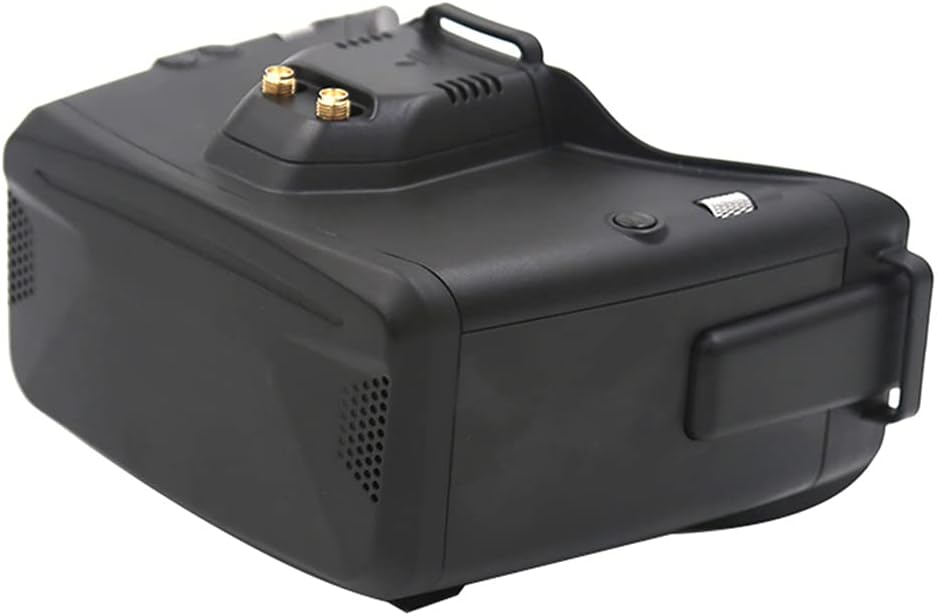
Figear 2.1: Os a chionnview of the SKYZONE Cobra X V4 FPV Goggles.
3. Prìomh fheartan
- Taisbeanadh àrd-rèiteachaidh: 1280x720 resolution on a 4.1-inch screen for the Cobra X V4 model, providing clear and detailed visuals. (Cobra S model features 800x480 resolution).
- RapidMix Receiver: Integrated 5.8GHz 48CH RapidMix Receiver ensures stable and strong signal reception, minimizing video breakup.
- Digital Video Recorder (DVR): H264 recording at 30fps, MOV format, 6Mbps bitrate. Supports SD cards up to 128GB for recording your flights.
- Head Tracker: Built-in 3-axis accelerometer and 3-axis gyroscope for precise head tracking, allowing for intuitive camera control.
- Taic ioma-chànan: Cobra X V4 supports 10 different languages for menu navigation.
- Cuir a-steach Cumhachd Iom-fhillte: Compatible with 2-6S lithium batteries and features a 18650 battery compartment.
- Ceangal USB: USB-C port for firmware updates and data transfer.
- Dealbhadh a tha càirdeil do speuclairean: Ergonomically designed for comfortable use, even for users wearing glasses.
4. Stiùirich rèiteachaidh
4.1 Powering the Goggles
The Cobra X V4 goggles can be powered by an external 2-6S LiPo battery via the DC IN port or by an internal 18650 battery (not included). Ensure the battery polarity is correct when inserting the 18650 battery.

Figure 4.1: Battery compartment and USB port location.
4.2 A ’ceangal antennas
Screw the two 5.8GHz 2dD antennas onto the SMA connectors located on the top of the goggles. Ensure they are securely tightened for optimal signal reception.
4.3 Head Strap Installation
Attach the head strap to the designated slots on the sides and top of the goggles. Adjust the strap for a comfortable and secure fit on your head.
4.4 Ceanglaichean a-muigh
The goggles feature various ports for external connections:
- DC ANN: Cuir a-steach cumhachd.
- HT OUT: Headtracker output.
- USB: For firmware updates and data transfer.
- A/V IN: Cuir a-steach claisneachd/bhidio.
- HDMI ANN: High-definition video input.
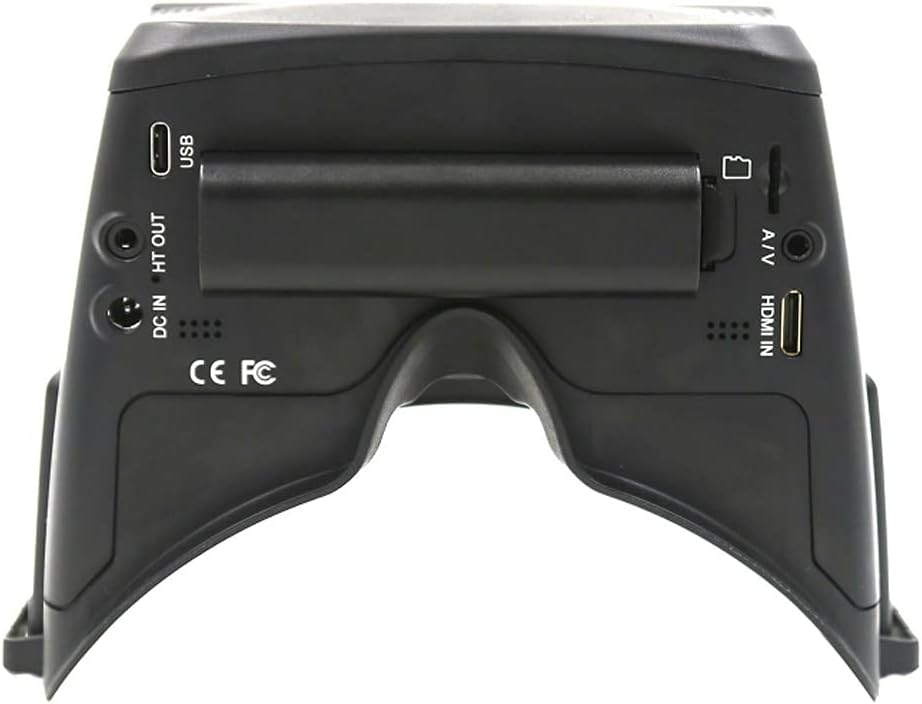
Figear 4.2: Cùl view le puirt cuir a-steach/toraidh.
5. Stiùireadh Obrachaidh
5.1 Cumhachd air / dheth
To power on, press and hold the power button located on the side of the goggles until the screen illuminates. To power off, press and hold the power button again until the screen turns off.
5.2 Stiùireadh Clàr
The goggles feature a dial wheel design for easy menu navigation and selection. Rotate the wheel to scroll through options and press it to confirm selections.
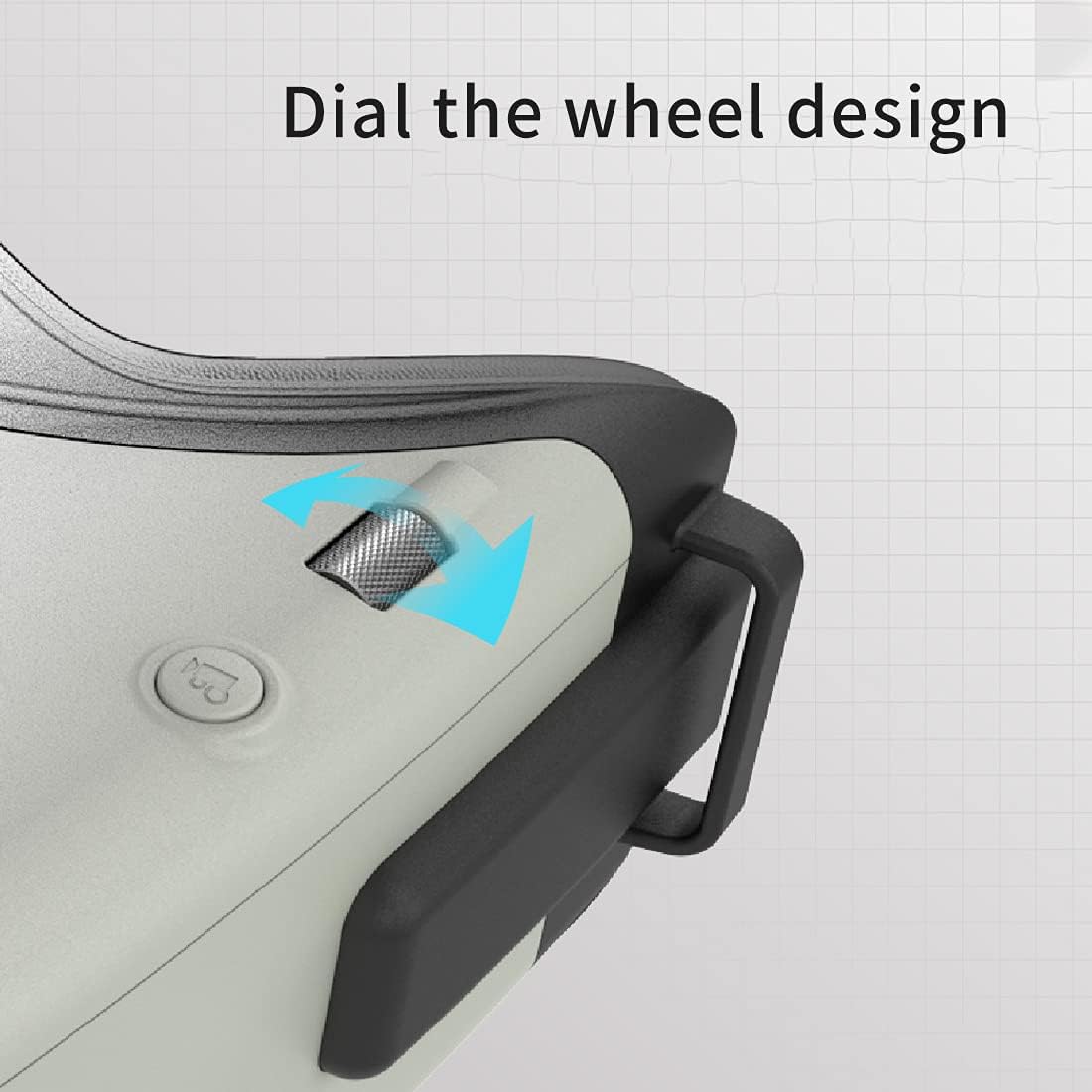
Figure 5.1: Dial wheel for menu navigation.
5.3 Channel Selection and Scanning
Use the menu to select the desired 5.8GHz channel. The RapidMix receiver automatically combines signals for the best possible reception. An auto-scan function is available to quickly find active FPV channels.
Clàradh DVR 5.4
Insert a compatible SD card (up to 128GB) into the SD card slot. Navigate to the DVR menu to start and stop recording. Recorded videos are saved in MOV format.
5.5 Head Tracking
Ensure the headtracker cable is connected to your compatible remote control. Calibrate the head tracker through the goggles' menu if necessary. This allows for camera movement based on your head's orientation.

Figure 5.2: Internal receiver module for enhanced image quality.
6. Cumail suas
- Glanadh: Use a soft, dry cloth to clean the goggle's exterior. For the lenses, use a specialized lens cleaning cloth and solution to avoid scratches.
- Stòradh: Store the goggles in a cool, dry place away from direct sunlight and extreme temperatures. Use the provided carrying case (if applicable) to protect them during transport.
- Cùram Bataraidh: If using an external LiPo battery, follow standard LiPo battery safety guidelines for charging and storage. If using the internal 18650 battery, ensure it is charged regularly and not left fully discharged for extended periods.
- Ùrachaidhean firmware: Periodically check the SKYZONE official website for firmware updates. Use the USB-C cable to connect the goggles to a computer for updates.
7. A ’dèanamh trioblaid
| Trioblaid | Adhbhar a dh’fhaodadh a bhith ann | Fuasgladh |
|---|---|---|
| Gun ìomhaigh air an sgrion | Goggles not powered on; Low battery; Incorrect video input selected; No signal from drone. | Ensure goggles are powered on; Charge or replace battery; Check video input settings; Verify drone's video transmitter is active and on the correct channel. |
| Poor video reception / Static | Antennas loose or damaged; Incorrect channel selected; Interference; Drone too far or obstructed. | Tighten or replace antennas; Perform channel scan; Move to an area with less interference; Reduce distance to drone or clear obstructions. |
| DVR gun chlàradh | SD card full or not inserted; SD card corrupted; Incorrect DVR settings. | Insert or replace SD card; Format SD card (backup data first); Check DVR recording settings. |
| Head tracker not working | Headtracker cable not connected; Not calibrated; Remote control not configured. | Ensure headtracker cable is securely connected; Perform head tracker calibration; Refer to your remote control's manual for head tracker setup. |
8. Sònrachaidhean
| Feart | Mion-fhiosrachadh |
|---|---|
| Ainm Modail | Cobra X v4 |
| Fuasgladh Taisbeanaidh | 1280x720 (Cobra X V4), 800x480 (Cobra S) |
| Meud sgrion | 4.1 inch (Cobra X V4), 4.3 inch (Cobra S) |
| Glacadair | 5.8GHz 48CH RapidMix Receiver |
| A ' clàradh DVR | H264, 30fps, MOV 6Mbps (Cobra X V4); MJPEG (Cobra S) |
| Taic cairt SD | Suas gu 128 GB |
| Prìomh Tracker | 3-axis Accelerometer, 3-axis Gyroscope |
| Teicneòlas ceangail | USB, A/V, HDMI |
| Cuir a-steach cumhachd | 2-6S LiPo, 18650 Battery (not included) |
| Meudan | 122 x 165 x 100mm |
| Cuideam | 332g |
| Dath | Dubh |
| Stuth | Plastaig |
| UPC | 030391995340 |
| Àireamh Pàirt Dèanadair | F42931 f42932 |
9. Barantas agus Taic
SKYZONE products are manufactured to high-quality standards. For specific warranty information and terms, please refer to the warranty card included with your product or visit the official SKYZONE weblàrach. Cùm dearbhadh ceannach airson tagraidhean barantais sam bith.
For technical support, troubleshooting beyond this manual, or service inquiries, please contact SKYZONE customer support through their official channels.