
Ro-ràdh
This manual provides detailed instructions for the installation, operation, and maintenance of your Kolink INSPIRE K9 Midi-Tower Gaming Case. Please read this manual thoroughly before beginning assembly or use to ensure proper functionality and safety. The Kolink INSPIRE K9 is designed for gaming enthusiasts, offering ample space for high-performance components, efficient cooling options, and customizable RGB lighting.
Feartan toraidh
- ATX Tower Compatibility: The interior accommodates motherboards from Mini-ITX to ATX formats, along with high-performance graphics cards up to 300 mm in length. CPU coolers can be installed with a maximum height of 155 mm.
- Siostam fuarachaidh: Features a pre-installed 120 mm fan at the rear with digitally addressable RGB lighting. Supports up to six 120 mm fans in total. Radiators up to 240 mm can be installed at the front, and up to 120 mm at the rear for water cooling setups.
- Roghainnean stòraidh: The case provides space for up to 2 x 3.5/2.5 inch drive bays and 2 x 2.5 inch drive bays.
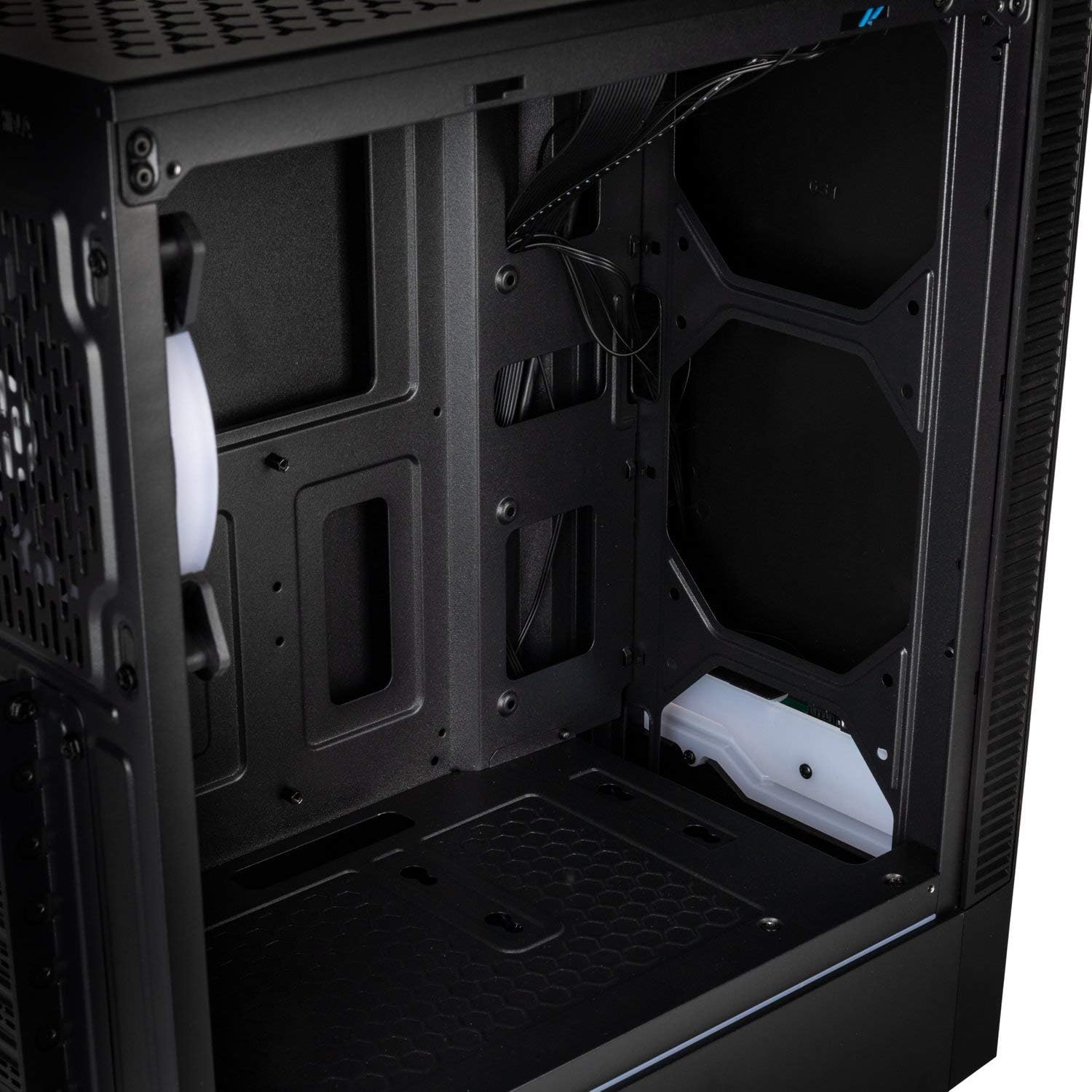
- Pannal I/O: Equipped with 1x USB 3.0 port, 2x USB 2.0 ports, and an RGB LED control button for easy access and customization.
- RGB Design with Tempered Glass: A side panel made of lightly tinted tempered glass complements the elegant design of the midi tower, allowing for a clear view of internal components and RGB lighting.
Sònrachaidhean
| Brand | KOLINK |
| Ainm Modail | Inspire K9 |
| Seòrsa cùise | Tùr Midi |
| Co-fhreagarrachd motherboard | Mini-ITX, ATX |
| Stuth | Glainne Tempered |
| Dath | Dubh |
| Modh fuarachaidh | Adhar, Uisge |
| Fans ro-stàlaichte | 1 x 120mm (rear, RGB) |
| Taic Luchd-leantainn as motha | 6 x 120mm |
| Taic Radiator | Front: up to 240mm, Rear: up to 120mm |
| Bàigh Drive | 2 x 3.5/2.5 inch, 2 x 2.5 inch |
| Slots leudachaidh | 7 |
| Pannal I/O | 1x USB 3.0, 2x USB 2.0, RGB LED Control |
| Fad GPU Max | 300 mm |
| Àirde nas fhuaire CPU | 155 mm |
| Meudan nì (D x W x H) | 48D x 44B x 23H cm |
| Cuideam nì | 4 cileagram |
Stàladh agus stàladh
Follow these steps for proper assembly and installation of components within your Kolink INSPIRE K9 case.
1. A’ cur a’ chùis air dòigh
- Fosgail a’ chùis agus cuir e air uachdar seasmhach, rèidh.
- Remove the tempered glass side panel by unscrewing the thumb screws, then carefully slide it off and set it aside on a soft, non-abrasive surface to prevent scratches.
- Remove the solid metal side panel by unscrewing the thumb screws at the rear and sliding it backward.
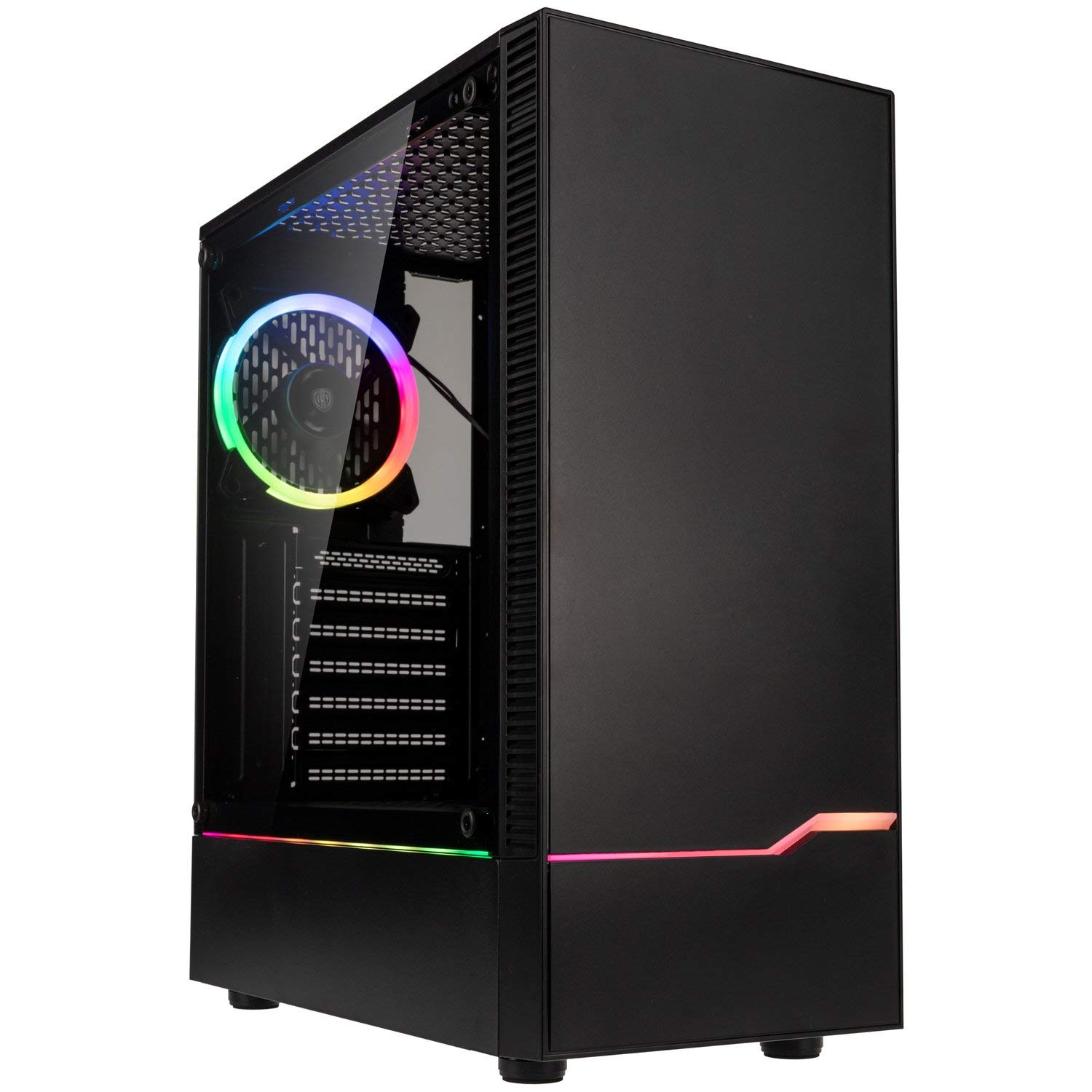
Ìomhaigh: Aghaidh-clì view of the Kolink INSPIRE K9 case, showcasing the tempered glass side panel and front RGB strip.

Image: Right side panel of the Kolink INSPIRE K9 case, showing the solid metal panel.
2. Stàladh motherboard
- Install the I/O shield that came with your motherboard into the designated slot at the rear of the case.
- Align your ATX or Mini-ITX motherboard with the standoffs inside the case. Ensure all standoffs match the screw holes on your motherboard.
- Secure the motherboard using the provided screws. Do not overtighten.
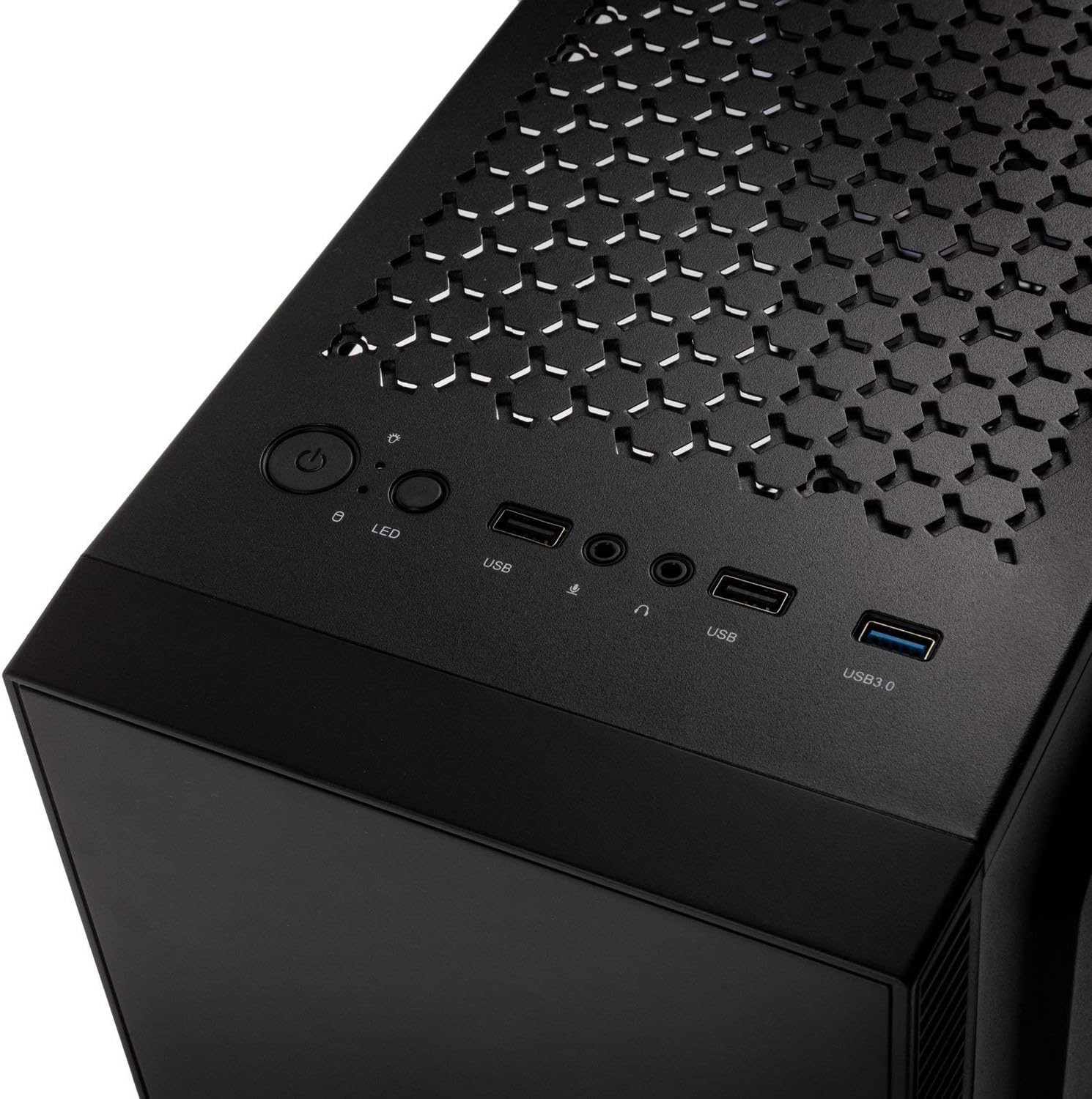
Ìomhaigh: Taobh a-staigh view of the Kolink INSPIRE K9 case, showing the motherboard tray and cable routing options.
3. CPU and CPU Cooler Installation
- Install your CPU onto the motherboard socket according to your motherboard's instructions.
- Apply thermal paste to the CPU. Refer to the video below for proper thermal paste application techniques.
- Install your CPU cooler (air or liquid) ensuring it fits within the 155 mm height limit. For liquid coolers, install radiators at the front (up to 240mm) or rear (up to 120mm) of the case.
Video: Guide on how to apply thermal paste correctly to a CPU. This is crucial for efficient CPU cooling.
4. Stàladh Cairt Grafaigean (GPU)
- Remove the necessary expansion slot covers at the rear of the case. The case has 7 expansion slots.
- Insert your graphics card into the primary PCIe slot on your motherboard. Ensure it clicks into place.
- Secure the graphics card with screws. The case supports GPUs up to 300 mm in length.
5. Stàladh Draibh Stòraidh
- Install 3.5-inch or 2.5-inch drives into the designated drive bays. The case supports 2 x 3.5/2.5 inch and 2 x 2.5 inch drives.
- Secure the drives with screws.
6. Stàladh Aonad Solarachaidh Cumhachd (PSU)
- Install your PSU into the bottom mounting area of the case.
- Daingnich an PSU le sgriothan bho chùl a’ chùis.
7. Riaghladh càball
- Route all power and data cables through the cutouts in the motherboard tray to the rear of the case.
- Use cable ties (not included) to neatly bundle and secure cables behind the motherboard tray. This improves airflow and aesthetics.

Ìomhaigh: Cùl view of the Kolink INSPIRE K9 case, showing the I/O shield cutout, expansion slots, and rear fan.

Ìomhaigh: Taobh a-staigh view of the Kolink INSPIRE K9 case from the right side, showing cable routing space and drive bays.
8. A’ ceangal I/O a’ Phannal Aghaidh
- Connect the front panel cables (USB 3.0, USB 2.0, HD Audio, Power Switch, Reset Switch, Power LED, HDD LED, RGB LED Control) to the corresponding headers on your motherboard. Refer to your motherboard manual for header locations.

Image: Close-up of the top I/O panel of the Kolink INSPIRE K9 case, featuring USB ports, audio jacks, power button, and RGB LED control.
Stiùireadh Obrachaidh
- Cumhachd air / dheth: Brùth am putan cumhachd air a’ phannal I/O as àirde gus an siostam agad a thionndadh air no dheth.
- Smachd RGB: Use the dedicated RGB LED control button on the top I/O panel to cycle through various lighting modes and colors for the pre-installed RGB fan and front RGB strip.
- Puirt USB: Utilize the USB 3.0 and USB 2.0 ports for connecting peripherals and external devices.
- Seacaidean Fuaime: Connect your headphones and microphone to the audio jacks on the top I/O panel.
Ìomhaigh: Dlùth-shealladh view of the pre-installed 120mm RGB fan at the rear of the Kolink INSPIRE K9 case.
Cumail suas
Bidh cumail suas cunbhalach a’ cuideachadh le bhith a’ dèanamh cinnteach à coileanadh agus fad-beatha as fheàrr airson pàirtean do PC.
- Glanadh Duslach: Periodically clean dust from the interior of the case, especially from fans and dust filters. Use compressed air or a soft brush.
- Glanadh a-muigh: Sguab na h-uachdaran a-muigh, a’ gabhail a-steach am pannal glainne tempered, le clò bog, tioram.amp aodach. Seachain luchd-glanaidh sgudail.
- Sgrùdadh Riaghlaidh Càbaill: Thoir sùil air slighe nan càbaill bho àm gu àm gus dèanamh cinnteach nach eil càbaill a’ cur bacadh air sruth-adhair no obrachadh an neach-leantainn.
Fuasgladh thrioblaidean
If you encounter issues with your PC build, consider the following common troubleshooting steps related to the case:
- Siostam gun chumhachdachadh:
- Ensure the power supply is properly connected to the wall outlet and the PSU switch is in the ON position.
- Dearbhaich gu bheil càball suidse cumhachd a’ phannal aghaidh ceangailte gu ceart ri ceann-sgrìobhaidh a’ bhòrd-mhàthar.
- Thoir sùil air a h-uile ceangal cumhachd bhon PSU chun a’ bhòrd-màthar agus na co-phàirtean.
- Fans Not Spinning / RGB Not Working:
- Confirm that the fan power cables are securely connected to the motherboard or fan controller.
- Check that the RGB cables are properly connected to the motherboard's RGB header or the case's RGB controller.
- Press the RGB LED control button on the I/O panel to cycle through modes.
- Puirt USB nach eil ag obair:
- Ensure the USB 3.0 and USB 2.0 front panel cables are correctly plugged into their respective headers on the motherboard.
- Cùisean cus-teasachaidh:
- Verify that all case fans are spinning correctly and are oriented for optimal airflow (intake/exhaust).
- Clean any dust buildup from fans and filters.
- Ensure the CPU cooler is properly seated and thermal paste is correctly applied.
Barantas agus Taic
For warranty information and technical support, please refer to the official KOLINK weblàrach no cuir fios chun neach-reic agad. Cùm dearbhadh do cheannach airson tagraidhean barantais.
Dèanadair: KOLINK
Àireamh Modail: INSPIREK9
Global Trade Item Number (GTIN): 05999094004030


