
Stiùireadh rèiteachaidh
1. Cosgais Tùsail
Before first use, fully charge your Radiant Smart Watch. Connect the charging cable to the watch's charging port and a compatible USB power source. The watch display will indicate charging status.

Image: The Radiant Smart Watch with its black silicone strap, displaying its digital watch face.
2. Stàladh App
To unlock the full functionality of your smartwatch, download the official Radiant companion application on your smartphone. Lorg airson "Radiant Smart Watch" in your device's app store (iOS App Store or Google Play Store).
3. Paidhir inneal
- Dèan cinnteach gu bheil Bluetooth air a chomasachadh air an fhòn-smart agad.
- Open the Radiant companion app and follow the on-screen instructions to add a new device.
- Select "RAS20401" from the list of available devices.
- Dearbhaich an t-iarrtas paidhreachaidh air an uaireadair agus am fòn cliste agad.
A’ obrachadh an uaireadair snasail agad
Seòladh bunaiteach
The Radiant Smart Watch features a 1.54-inch touchscreen display for intuitive navigation. Swipe left, right, up, or down to access different functions and menus. Press the side button to return to the home screen or activate specific features.

Image: The Radiant Smart Watch worn on a wrist, displaying its primary watch face.
Prìomh fheartan
- Chronograph: Cleachd an gnìomh stad-uaireadair airson gnìomhan clàr-ama.
- Taisbeanadh Ceann-latha: View the current date directly on your watch face.
- Solas: Activate the display backlight for visibility in low-light conditions.
- Alarm: Set multiple alarms to help manage your schedule.
- Tachymeter: Utilize the tachymeter scale for measuring speed based on travel time over a known distance.
- Rianachd gnìomhachd: Cùm sùil air ceumannan, astar, agus calaraidhean a chaidh a losgadh.
- Sgrùdadh Ìre Cridhe: Cùm sùil air ìre do chridhe tron latha.

Image: The Radiant Smart Watch displaying its application menu with various icons.
Ceangalachd
The watch supports both Bluetooth agus GPS connectivity. Bluetooth allows for seamless pairing with your smartphone for notifications and data synchronization, while GPS enables accurate tracking of outdoor activities without needing your phone.
Cùram agus cumail suas
A’ glanadh an uaireadair snasail agad
Regular cleaning helps maintain the appearance and functionality of your watch. Use a soft, lint-free cloth to wipe the screen and watch body. For stubborn dirt, slightly dampnigh an clò le uisge. Seachain ceimigean cruaidh no stuthan sgrìobach a chleachdadh.
Dìon-uisge (IP67)
The Radiant Smart Watch is rated IP67, meaning it is protected from dust ingress and can withstand immersion in water up to 1 meter for up to 30 minutes. It is suitable for daily use and light splashes, but not recommended for swimming, showering, or diving.
Cùram Bataraidh
To prolong battery life, avoid extreme temperatures. Charge the watch regularly and do not let the battery completely drain for extended periods. The battery composition is Aluminum Oxide.
Cùram strap
The watch comes with both a black silicone strap and a black steel strap. Clean silicone straps with mild soap and water. For steel straps, use a soft brush to remove dirt from links and wipe with a dry cloth.
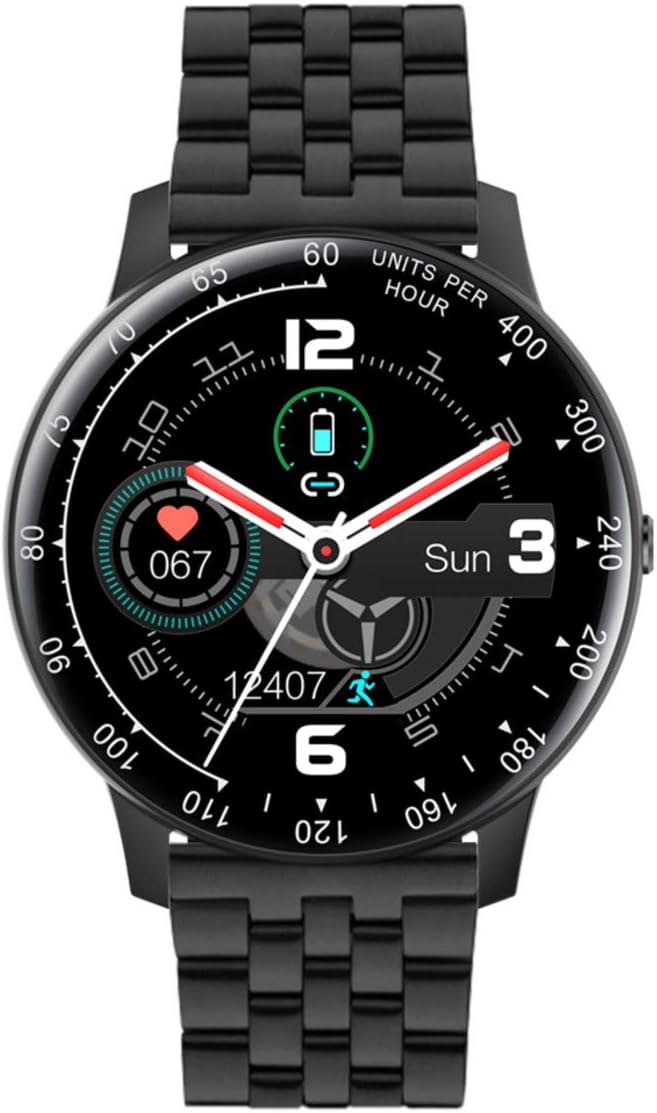
Image: The Radiant Smart Watch featuring its black steel strap.
Fuasgladh thrioblaidean
If you encounter issues with your Radiant Smart Watch, refer to the following common solutions:
| Trioblaid | Fuasgladh |
|---|---|
| Coimhead gun a bhith a 'tionndadh air | Dèan cinnteach gu bheil an uaireadair làn-luchdaichte. Ceangail e ris an charger airson co-dhiù 30 mionaid. |
| Chan urrainnear paidhir a dhèanamh le fòn cliste | Check if Bluetooth is enabled on both devices. Restart both the watch and the smartphone. Ensure the Radiant app is updated. |
| Tracadh gnìomhachd mì-chruinn | Dèan cinnteach gu bheil an uaireadair gu teann air do chaol-dùirn. Calabraich an uaireadair tron aplacaid co-cheangailte ma tha sin ri fhaighinn. |
| Taisbeanadh neo-fhreagairt | Perform a soft reset by holding down the side button for 10-15 seconds until the watch restarts. |
If the issue persists, please contact Radiant customer support.
Sònrachaidhean Teicnigeach
- Brand:
- Radiantach
- Ainm a' mhodail:
- Montre RAS20401
- Àireamh Modail:
- RAS20401
- ASIN:
- B08RDWDHFF
- Dath:
- Dubh
- Stoidhle:
- Band (includes silicone and steel straps)
- Meud sgrion:
- 1.54 òirlich
- Cruth:
- Cruinn
- Teicneòlas ceangail:
- Bluetooth, GPS
- Inbhe conaltraidh gun uèir:
- Bluetooth
- Feartan sònraichte:
- Chronograph, Date, Light, Alarm, Tachymeter
- Innealan co-fhreagarrach:
- Fòn-smart
- Cumadh bataraidh:
- Aluminium Oxide
- Seasmhachd uisge:
- IP67 (Dust protected, immersion up to 1m for 30 min)
- Dèanadair:
- RADIANT
- Ceann-latha a’ chiad uair ri fhaighinn air Amazon.com.be:
- 26 Giblean 2022
Barantas agus Taic
For detailed warranty information, please refer to the documentation included with your purchase or visit the official Radiant website. Information regarding software updates and spare parts availability is not explicitly provided.
For technical support or further assistance, please contact Radiant customer service through their official channels.