
Atomi Smart AT1603
Leabhar-làimhe Cleachdaiche Solais Sreinge Atharrachaidh Dath Smart Atomi
Modail: AT1603
Ro-ràdh
The Atomi Smart Color-Changing String Lights offer a versatile and durable lighting solution for both indoor and outdoor environments. These smart lights are designed for ease of use, featuring Wi-Fi connectivity, app control, and voice assistant compatibility. With 18 shatterproof acrylic bulbs across a 36-foot length, they provide vibrant color-changing options and tunable white light, enhancing any space with customizable ambiance.
Susbaint pacaid
- 1 x Atomi Smart Color-Changing String Lights (36ft cord with 18 bulbs)
- Leabhar-làimhe cleachdaiche
Sònrachaidhean
| Feart | Mion-fhiosrachadh |
|---|---|
| Modail Àireamh | AT1603 |
| Fad | 36 troigh |
| Àireamh nam bulbaichean | 18 (Acrylic, Shatterproof) |
| Stòr Solais | LED (RGB-CCT) |
| Toradh Lumen | 160 lumens |
| Dètage | 24 watt |
| Roghainnean dath | 16 Million Colors + Tunable White Light |
| Ceangalachd | Wi-Fi, Bluetooth |
| Modh smachd | Atomi Smart App, Voice Control (Alexa, Google Assistant) |
| Cleachdadh a-staigh / a-muigh | A-muigh (Rangachadh IP65) |
| Stuth | Acrylic (bulbs), Heavy-duty weatherproof cord |
| Cuideam nì | 3.29 not |
| Meud pacaid | 10 x 7.5 x 6.5 òirleach |

Figure 1: Key features and specifications of the Atomi Smart String Lights, highlighting LED technology, color options, durable bulbs, and IP65 weather rating.

Figure 2: Detailed dimensions of the Atomi Smart String Lights, illustrating the bulb size (3.15 inches hanging from cord) and the overall 36-foot length with bulb spacing.
Stàladh agus stàladh
1. Stàladh Corporra
- Unpack: Carefully remove the string lights from the packaging.
- Suidheachadh: Determine the desired location for your string lights. Ensure the location is within range of a Wi-Fi signal for smart functionality. The lights are IP65 rated, suitable for outdoor use in various weather conditions (rain, sun, wind, snow).
- Stàladh: Use appropriate hooks, clips, or ties to securely hang the string lights. Ensure the power adapter is protected from direct water exposure if installed outdoors, although the lights themselves are weatherproof.
- Ceangal cumhachd: Plug the string lights into a standard electrical outlet.

Figure 3: Atomi Smart String Lights enhancing an outdoor patio setting, demonstrating typical installation.

Figure 4: The IP65 rating ensures the lights withstand various weather conditions, as shown with snow accumulation on a bulb.
2. App Setup (Atomi Smart App)
To unlock the full smart features of your string lights, download and configure the Atomi Smart app.
- Luchdaich sìos an aplacaid: Lorg airson "Atomi Smart" in the Apple App Store or Google Play Store and download the application.
- Cruthaich cunntas: Open the Atomi Smart app and follow the on-screen instructions to create a new account or log in if you already have one.
- Cuir inneal ris:
- Dèan cinnteach gu bheil an inneal gluasadach agad ceangailte ri lìonra Wi-Fi 2.4GHz.
- Anns an aplacaid, tap air “Cuir Inneal ris” no an ìomhaigh “+”.
- Select "Lighting" or "String Lights" from the device list.
- Follow the in-app prompts to connect your string lights to your Wi-Fi network. This typically involves putting the lights into pairing mode (refer to app instructions for specific light blinking patterns).
- Ainm an inneil: Once connected, you can name your string lights for easy identification and control within the app.
Stiùireadh Obrachaidh
1. Using the Atomi Smart App
The Atomi Smart app provides comprehensive control over your string lights.

Figure 5: The Atomi Smart app interface for controlling light colors and settings.
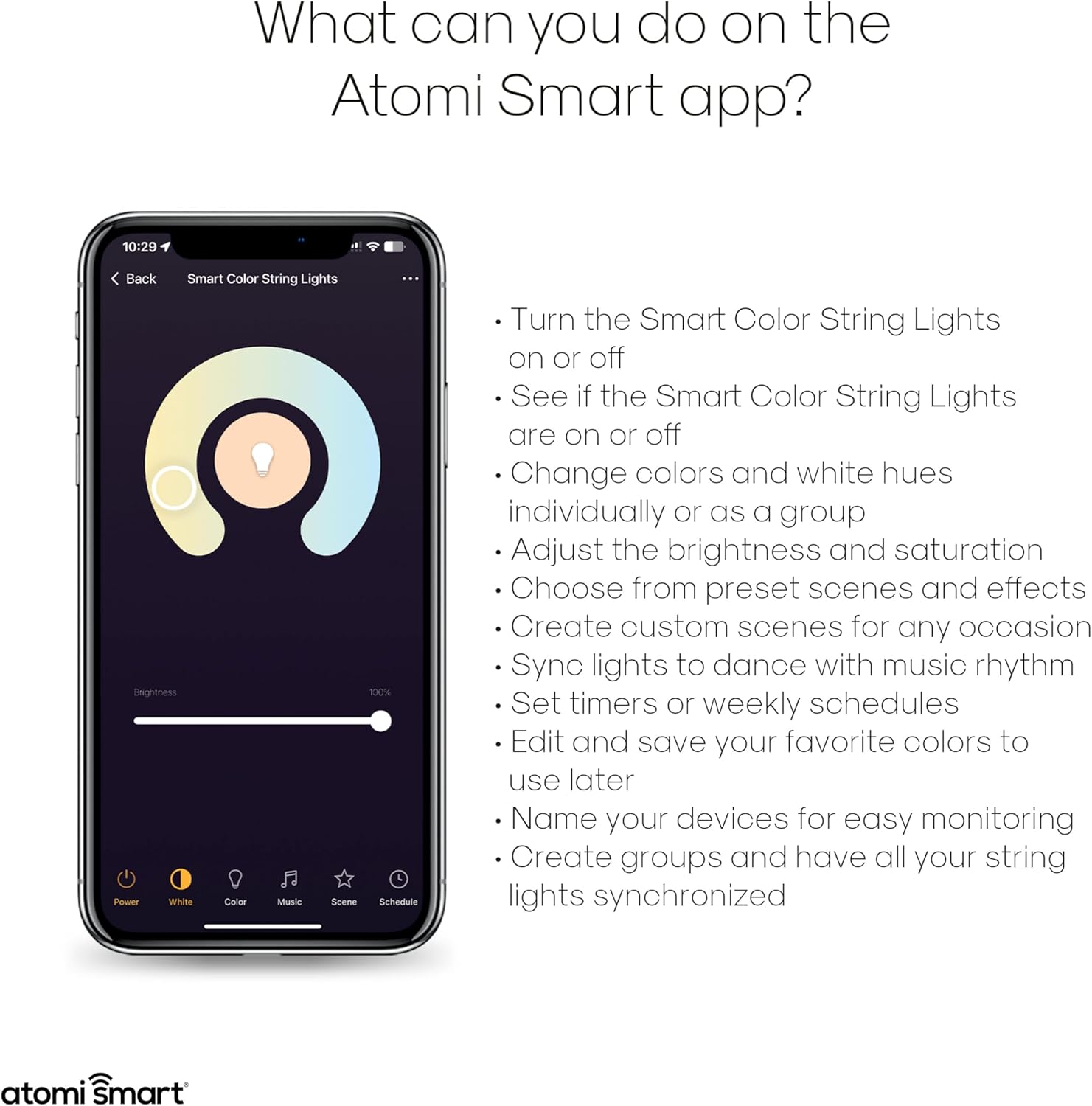
Figear 6: Os a chionnview of functions available within the Atomi Smart app for controlling your string lights.
- Cumhachd air / dheth: Tionndaidh na solais air no dheth gu dìreach bhon aplacaid.
- Smachd dath: Select from over 16 million colors. You can change colors individually or group lights for synchronized control.
- Geal Tunable: Atharraich an solas geal bho thònaichean blàth gu fuar.
- Soilleireachd & Sàthadh: Fine-tune the intensity and vibrancy of the lights.
- Preset Scenes & Effects: Choose from various built-in lighting scenes and dynamic effects, including Music Sync Mode.
- Seallaidhean gnàthaichte: Create and save your own custom lighting scenes for specific occasions.
- Clàradh: Set timers or weekly schedules for the lights to turn on/off automatically.
- A' cruinneachadh: Create groups of lights to control multiple strands simultaneously.

Figear 7: Example of a built-in scene or custom effect, setting a specific ambiance with red lighting.
2. Amalachadh Smachd Gutha
The Atomi Smart String Lights are compatible with Amazon Alexa and Google Assistant for convenient voice control.
- Ceangail Cunntasan:
- Fosgail an aplacaid Alexa no Google Home agad.
- Seòl chun an earrainn “Sgilean” (Alexa) no “Ag obair le Google” (Dachaigh Google).
- Lorg airson and enable the "Atomi Smart" skill/service.
- Log in with your Atomi Smart account credentials to link the accounts.
- Faigh a-mach innealan: Once linked, ask your voice assistant to "Discover devices" or manually initiate device discovery in the app.
- Òrdughan gutha: You can now use voice commands to control your lights. Examples gabhail a-steach:
- "Alexa, tionndaidh air [Ainm an t-Solais]"
- "Hey Google, cuir [Ainm an t-Solais] gu gorm"
- "Alexa, lughdaich [Ainm an t-Solais] gu 50%"
- "Hey Google, cuir dheth [Ainm an t-Solais]"

Figure 8: The string lights seamlessly integrate with Amazon Alexa and Google Assistant for convenient voice control.
3. Linking Multiple Sets
The Atomi Smart app allows you to link and control multiple string light sets. While the product description states "LINKABLE UP TO 1728FT.", please note that some users have reported that the physical product may not include a female connector for direct daisy-chaining of power. Control linking is primarily done through the Atomi Smart app by grouping devices.
- App Grouping: In the Atomi Smart app, navigate to the device settings or group management section.
- Cruthaich Buidheann: Select the option to create a new group and add all desired Atomi Smart String Lights to this group.
- Synchronized Control: Once grouped, you can control all lights in the group simultaneously for synchronized color changes, brightness adjustments, and scene activations.
Cumail suas
- Glanadh: Disconnect the lights from power before cleaning. Wipe bulbs and cord with a soft, damp aodach. Na cleachd ceimigean cruaidh no innealan-glanaidh sgudail.
- Ath-chur bulb: The bulbs are designed to be durable and shatterproof. If a bulb needs replacement, contact Atomi Smart customer support for guidance. Do not attempt to replace bulbs with non-Atomi Smart components.
- Stòradh: Ma bhios tu a’ stòradh nan solais airson ùine mhòr, cuir iad ann an coilich gu grinn agus stòraich iad ann an àite fionnar, tioram air falbh bho sholas dìreach na grèine.
- Sgrùdadh: Periodically inspect the cord and bulbs for any signs of damage, wear, or loose connections. Discontinue use if any damage is found and contact customer support.
Fuasgladh thrioblaidean
| Trioblaid | Adhbhar a dh’fhaodadh a bhith ann | Fuasgladh |
|---|---|---|
| Chan eil solais a’ tionndadh air. | No power; loose connection; app issue. | Ensure lights are securely plugged into a working outlet. Check the app to confirm the lights are not turned off. Try a different outlet. |
| Chan urrainn dhuinn ceangal a dhèanamh ri Wi-Fi. | Incorrect Wi-Fi band (not 2.4GHz); wrong password; lights not in pairing mode; weak signal. | Ensure your phone is connected to a 2.4GHz Wi-Fi network. Double-check your Wi-Fi password. Follow app instructions to put lights into pairing mode. Move lights closer to your Wi-Fi router. |
| Chan eil smachd gutha ag obair. | Accounts not linked; device not discovered; incorrect commands. | Verify that your Atomi Smart account is correctly linked to Alexa/Google Assistant. Ask your voice assistant to "Discover devices." Use the exact device name configured in the Atomi Smart app. |
| Bidh solais a’ priobadh no ag obair gu mì-rianail. | Unstable power; Wi-Fi interference; software glitch. | Unplug the lights for 30 seconds and plug them back in. Check for Wi-Fi interference. Ensure the Atomi Smart app is updated to the latest version. |
| Cannot physically link multiple strands. | Product design may not include a female end connector for daisy-chaining power. | The "linkable" feature primarily refers to app control and grouping. Each strand may require its own power source. If physical linking is critical, verify product specifications or contact Atomi Smart support before purchase. |
Barantas agus Taic
Atomi Smart provides a Barantas cuibhrichte 5-bliadhna on all their smart products, including these string lights. For warranty claims, technical support, or any inquiries, please contact Atomi Smart customer service.
Seirbheis teachdaiche: Atomi Smart's professional service team aims to provide 100% satisfaction with a 24-hour quick response.
Refer to the official Atomi Smart weblàrach-lìn no am fiosrachadh conaltraidh a tha air a thoirt seachad ann am pasgan an toraidh agad airson na mion-fhiosrachadh taic as ùire.
Sgrìobhainnean co-cheangailte - AT1603
 |
Atomi Smart WiFi Color String Lights Quick Start Guide and Troubleshooting Comprehensive quick start guide and troubleshooting manual for the Atomi Smart WiFi Color String Lights (Model AT1308, 36ft). Learn how to set up, connect, and resolve common issues. Includes safety information and warranty details. |
 |
Leabhar-làimhe neach-cleachdaidh Solais String Bulb Govee H7029 LED Leabhar-làimhe coileanta airson na Sreangan Solais Bulb LED Govee H7029, a’ còmhdach stiùireadh sàbhailteachd, stàladh, smachd aplacaidean, sònrachaidhean, fuasgladh dhuilgheadasan agus taic do luchd-cleachdaidh. Tha rangachadh dìon-uisge IP65 agus roghainnean dath RGBW ann. |
 |
Stiùireadh Tòiseachaidh Luath agus Fuasgladh Cheadan Solais Sreang WiFi Smart atomi Stiùireadh coileanta airson solais sreang dathte WiFi smart atomi a stèidheachadh agus fhuasgladh, a’ gabhail a-steach fiosrachadh sàbhailteachd, fiosrachadh conaltraidh, agus mion-chomharrachaidhean toraidh. |
 |
Leabhar-làimhe Cleachdaiche is Stiùireadh Suidheachaidh Solais Sreang Dath Smart Atomi Stiùireadh coileanta airson Solais Sreang Dath Smart Atomi a stèidheachadh, a stàladh agus a chleachdadh. Ionnsaich mu smachd aplacaidean, ceumannan sàbhailteachd, fuasgladh dhuilgheadasan agus roghainnean gnàthachaidh airson an t-siostam solais snasail agad. |
 |
Solais Sreang Dathte WiFi Smart Atomi - Stiùireadh Tòiseachaidh Luath & Fuasgladh Cheadan Tòisich leis na Solais Sreang Dathte WiFi Smart Atomi agad. Tha an stiùireadh seo a’ toirt seachad stiùireadh rèiteachaidh, molaidhean fuasgladh dhuilgheadasan, fiosrachadh sàbhailteachd agus mion-fhiosrachadh barantais airson an toraidh solais snasail agad. |
 |
Stiùireadh Tòiseachaidh Luath airson Solais Sreang Dathte WiFi Smart Atomi Stiùireadh tòiseachaidh luath airson Solais Sreang Dathte WiFi Smart Atomi, a’ còmhdach suidheachadh, fuasgladh dhuilgheadasan, fiosrachadh sàbhailteachd agus barantas. Ionnsaich mar a cheanglas tu na solais sreang snasail agad gu furasta. |
Ask a question about this manual
Ask about setup, troubleshooting, compatibility, parts, safety, or missing instructions. Manuals+ will review the question and use this page’s manual context to help answer it.