
Bathar seachadview
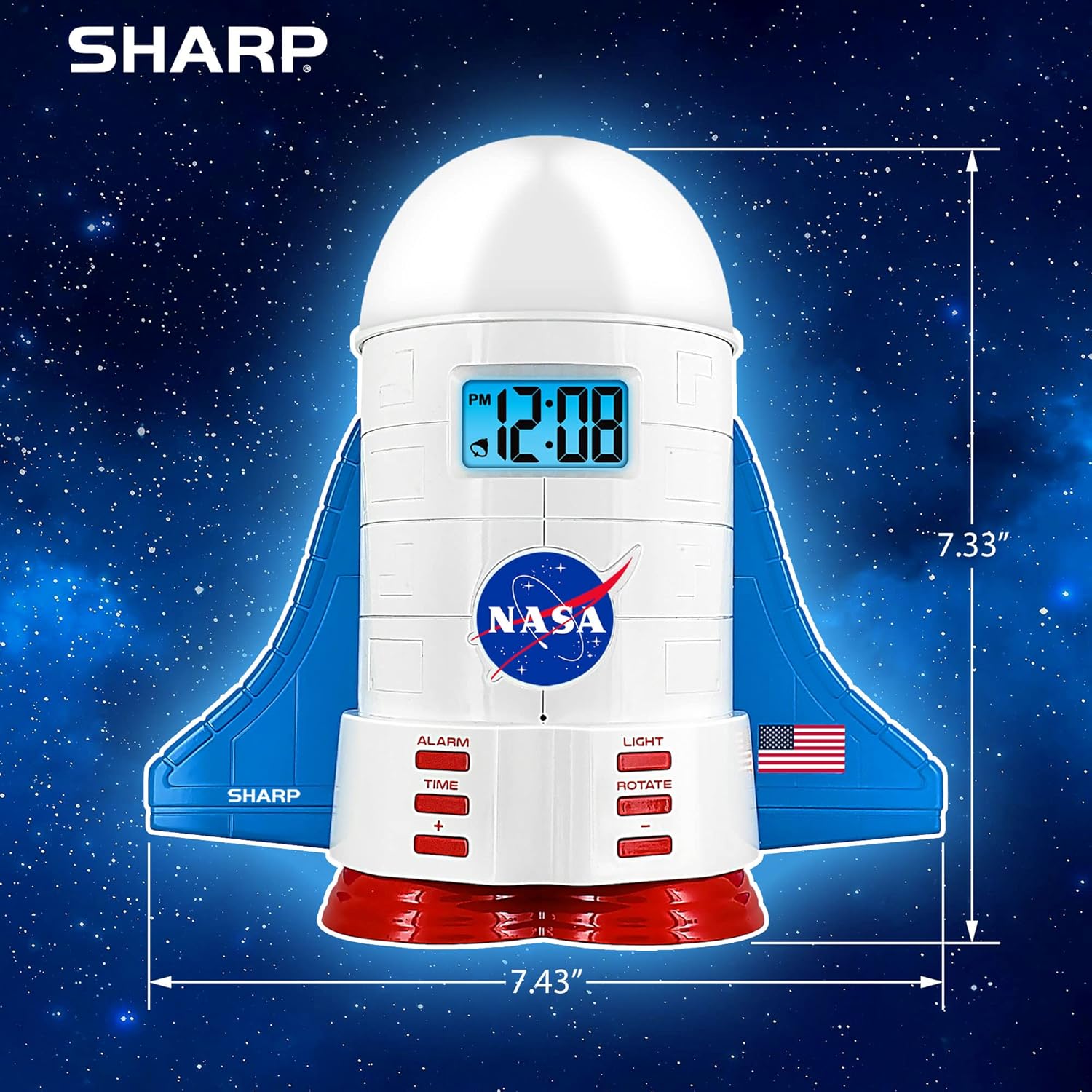
This manual provides instructions for the Sharp NASA Space Shuttle Night Light Alarm Clock. This device combines an alarm clock with a space-themed nightlight and projection feature, designed to enhance a child's bedroom environment.

Suidhich
A' dì-phapadh
- Thoir air falbh na pàirtean gu lèir bhon phacaid gu faiceallach.
- Dearbhaich gu bheil a h-uile rud a tha air an liostadh san earrann “Dè a tha sa bhogsa” an làthair.
Ceangal cumhachd
The alarm clock can be powered via the included electric adapter. For continuous operation of all features, including the nightlight and projection, direct power is recommended.
For battery backup, insert appropriate batteries (not included) into the battery compartment located at the base of the unit. This ensures timekeeping and alarm function during power outagtha.

Stiùireadh Obrachaidh
A 'suidheachadh an ama
- Brùth an AM FEAR-CIUIL putan.
- Cleachd an + agus - putanan gus an uair agus am mionaid atharrachadh.
- Brùth AM FEAR-CIUIL a-rithist airson a dhearbhadh.
A 'suidheachadh an Alarm
- Brùth an ALARM putan.
- Cleachd an + agus - putanan gus an ùine rabhaidh a tha thu ag iarraidh a shuidheachadh.
- Brùth ALARM a-rithist gus an inneal-rabhaidh a ghnìomhachadh. Nochdaidh ìomhaigh inneal-rabhaidh air an taisbeanadh.
Gnìomh Snooze
To temporarily silence the alarm, tap the top of the unit. The alarm will sound again after a short interval.
Nightlight and Projection Features
The unit features light-up wings and a rocket booster base, along with a rotating projection cap.

Solais a chuir an gnìomh
Brùth an LAOIDH button to cycle through the 4 color options for the wings and booster lights.
Projection Caps
The device includes two interchangeable space-themed projection caps and a frosted nightlight cap. Twist counter-clockwise to attach or remove caps.

Ro-shealladh rothlach
Brùth an ROTADH button to activate or deactivate the rotation of the projected images.
Cumail suas
- Clean the unit with a soft, dry cloth. Avoid abrasive cleaners or solvents.
- Ensure the projection caps are free from dust or smudges for clear image projection.
- Replace batteries in the backup compartment as needed to maintain time settings during power interruptions.
Fuasgladh thrioblaidean
| Trioblaid | Adhbhar a dh’fhaodadh a bhith ann | Fuasgladh |
|---|---|---|
| Clock not displaying time | Gun chumhachd | Ensure the electric adapter is securely plugged in. Check battery backup. |
| Alarm nach eil ri fuaim | Alarm not set or deactivated | Verify alarm time is set and activated (alarm icon visible). |
| Projection unclear or dim | Dust on cap or insufficient darkness | Clean the projection cap. Ensure the room is sufficiently dark for optimal projection. |
| Chan eil an ro-mheasadh a’ tionndadh | Rotate function off | Brùth an ROTADH button to activate the rotation feature. |
Sònrachaidhean
- Brand: biorach
- Àireamh Modail: Sharp NASA e Shuttle Alarm Clock
- Stòr cumhachd: Electric Adapter (Battery backup for timekeeping)
- Seòrsa Stòr Solais: LED
- Nightlight Colors: 4 roghainnean
- Projection Themes: 2 interchangeable space scenes
- Taisbeanadh: LCD le Blue Backlight
- Meudan: 7.43 x 1.5 x 7.43 òirleach
- Cuideam: 1.33 not
- Stuth: Plastaig
- Feartan sònraichte: Color Changing, Snooze Function, Rotating Projection
Barantas agus Taic
Airson fiosrachadh barantais no taic theicnigeach, thoir sùil air fiosrachadh oifigeil an neach-dèanamh. weblàrach-lìn no cuir fios chun t-seirbheis teachdaiche aca.
Dèanadair: biorach
UPC: 049353005447
ASIN: B08PL6K2C5