
Ro-ràdh
This manual provides essential instructions for the proper use and maintenance of your Vikefon Type C Charging and Data Cable. This 1-meter cable is designed for efficient charging and high-speed data transfer between your Type C enabled devices and compatible power sources or computers.

Image: The Vikefon Type C Charging and Data Cable, featuring a standard USB-A connector on one end and a reversible USB-C connector on the other.
Feartan toraidh
- USB Connector Quality: Ensures reliable charging and high-speed data transmission.
- Toradh cumhachd: Supports up to 5V, 3 Amp airson cosgais luath.
- Co-fhreagarrachd Uile-choitcheann: Fully compatible with all Type C mobile devices for fast charging and syncing.
- Ceanglaiche USB Seòrsa-C a ghabhas tionndadh: Allows for quick and easy connections in any orientation.
- Dealbhadh seasmhach: Features intricate nylon braiding for enhanced durability and longevity, outlasting standard cables.
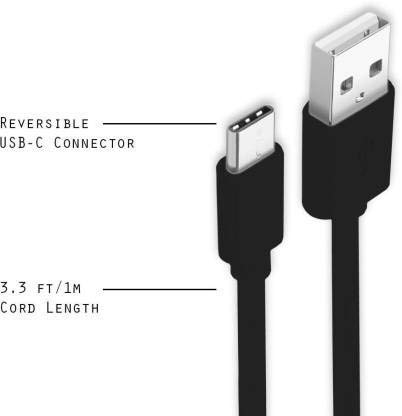
Image: A diagram illustrating the reversible nature of the USB-C connector and the cable's 1-meter (3.3 ft) cord length.
Suidhich
- Comharraich luchd-ceangail: The cable has a standard USB-A connector on one end and a smaller, oval-shaped USB Type-C connector on the other.
- Ceangail ri stòr cumhachd/coimpiutair: Insert the USB-A end of the cable into a compatible USB port on a wall adapter, power bank, car charger, or computer.
- Ceangail ris an inneal: Insert the USB Type-C end into the charging/data port of your smartphone, tablet, or other Type C enabled device. The USB Type-C connector is reversible, so it can be inserted in either orientation.
- Dearbhaich an ceangal: Ensure both ends are securely connected. Your device should indicate that it is charging or connected for data transfer.
Stiùireadh Obrachaidh
A 'cur cosgais air an inneal agad
- Connect the USB-A end of the cable to a compatible USB power adapter (e.g., wall charger, car charger, power bank).
- Connect the USB Type-C end to your device's charging port.
- Ensure the power adapter is plugged into a live power outlet. Your device should begin charging.
A' gluasad dàta
- Ceangail ceann USB-A a’ chàball ri port USB air a’ choimpiutair agad.
- Connect the USB Type-C end to your device.
- On your device, you may receive a prompt asking to allow data access or to select a USB connection mode (e.g., "File Transfer," "MTP"). Select the appropriate option to enable data transfer.
- Your device should appear as a removable drive or media device on your computer, allowing you to transfer files.
Cumail suas
- Làimhseachadh ceart: Always grasp the connector head when plugging or unplugging the cable. Avoid pulling directly on the cable itself to prevent damage to the internal wires.
- Seachain lùbadh: Do not excessively bend or crimp the cable, especially near the connectors, as this can cause internal wire breakage.
- Stòradh: Store the cable in a clean, dry place away from extreme temperatures and direct sunlight. Avoid tangling the cable.
- Glanadh: If necessary, gently wipe the cable and connectors with a dry, soft cloth. Do not use liquids or abrasive cleaners.

Ìomhaigh: Sealladh dlùth view highlighting the durable metal heads of the Vikefon Type C cable connectors, designed for anti-oxidation and corrosion resistance.
Fuasgladh thrioblaidean
- Inneal nach eil a’ cur cosgais:
- Dèan cinnteach gu bheil dà cheann a’ chàball ceangailte gu tèarainte.
- Dearbhaich gu bheil an inneal-atharrachaidh cumhachd ag obair gu ceart agus air a phlugaigeadh a-steach do phuing-socaid beò.
- Feuch ri inneal-atharrachaidh cumhachd eile no port USB a chleachdadh.
- Thoir sùil air port cosgais an uidheim agad airson sprùilleach no milleadh sam bith.
- Cìs slaodach:
- Ensure you are using a power adapter that supports fast charging (e.g., 3A output).
- Dùin aplacaidean cùl-fhiosrachaidh neo-riatanach sam bith air an inneal agad.
- Gun ghluasad dàta:
- Confirm the cable is properly connected to both your device and computer.
- On your device, check the notification panel for USB options and select "File Gluasad" no "MTP."
- Feuch ri ceangal a dhèanamh ri port USB eile air a’ choimpiutair agad.
- Ath-thòisich an dà chuid an inneal agus a’ choimpiutair agad.
Sònrachaidhean
| Feart | Mion-fhiosrachadh |
|---|---|
| Brand | Vikefon |
| Ainm Modail | Seòrsa C |
| Modail Àireamh | Seòrsa C 0129 |
| Seòrsa ceangail | USB Seòrsa C (Fireann gu Fireann) |
| Seòrsa càball | USB |
| Innealan co-fhreagarrach | Laptop, PC, Smartphone (e.g., Xiaomi Redmi 8A, Poco M2, Poco M2 Pro, Samsung, Motorola, Lenovo, Lava, Sony, HTC, LG, Karbonn, Maxx) |
| Feartan sònraichte | Charging Wire, Durable, High Data Transfer Rate, High Quality, Long Length |
| Ìre gluasad dàta | Up to 0.48 Gigabits Per Second (480 Mbps) |
| Teicneòlas ceangail | USB |
| Sònrachadh Met | ISO |
| Dath | Dubh |
| Cruth nì | Cruinn |
| Outer Material Type | Rubber (with Nylon Braiding) |
| Fad Càball | 1 Meatair |
Barantas agus Taic
Specific warranty details for the Vikefon Type C Charging and Data Cable are not provided in this manual. For information regarding warranty coverage, returns, or technical support, please refer to the product packaging or contact the manufacturer directly through their official channels.