
Ro-ràdh
This manual provides comprehensive instructions for the Elekpia Universal Remote Control, model CT-RC1US-18. This remote is designed for seamless compatibility with a wide range of Toshiba LED LCD HDTV models, including but not limited to CT-90325, CT-90326, CT-90329, CT-8037, CT-90302, CT-90275, CT-90, CT-90366, and CT-RC1US-18. Please read this manual carefully to ensure proper setup and operation of your new remote control.
Suidhich
Stàladh bataraidh
The Elekpia Universal Remote Control requires two (2) 1.5V AA batteries for operation. No programming is needed; simply install the batteries, and the remote will be ready to use with your compatible Toshiba TV.
- Lorg còmhdach roinn a’ bhataraidh air cùl an smachd iomallach.
- Brùth sìos air an taba agus sleamhnaich an còmhdach sìos gus an roinn fhosgladh.
- Cuir a-steach dà (2) bataraidh AA, a’ dèanamh cinnteach gu bheil na cinn-uidhe adhartach (+) agus àicheil (-) a’ freagairt gu ceart ris na comharran taobh a-staigh an roinn.
- Sleamhnaich còmhdach roinn a’ bhataraidh air ais na àite gus an cliog e gu tèarainte.

Figear 1: Aghaidh is cùl view of the Elekpia Universal Remote Control, highlighting the battery compartment on the rear.
Once batteries are installed, the remote is ready for immediate use with your Toshiba TV. No additional setup or code entry is required.
Stiùireadh Obrachaidh
This universal remote control is designed to replicate the functions of your original Toshiba TV remote. Point the remote directly at your television's infrared receiver for optimal performance.
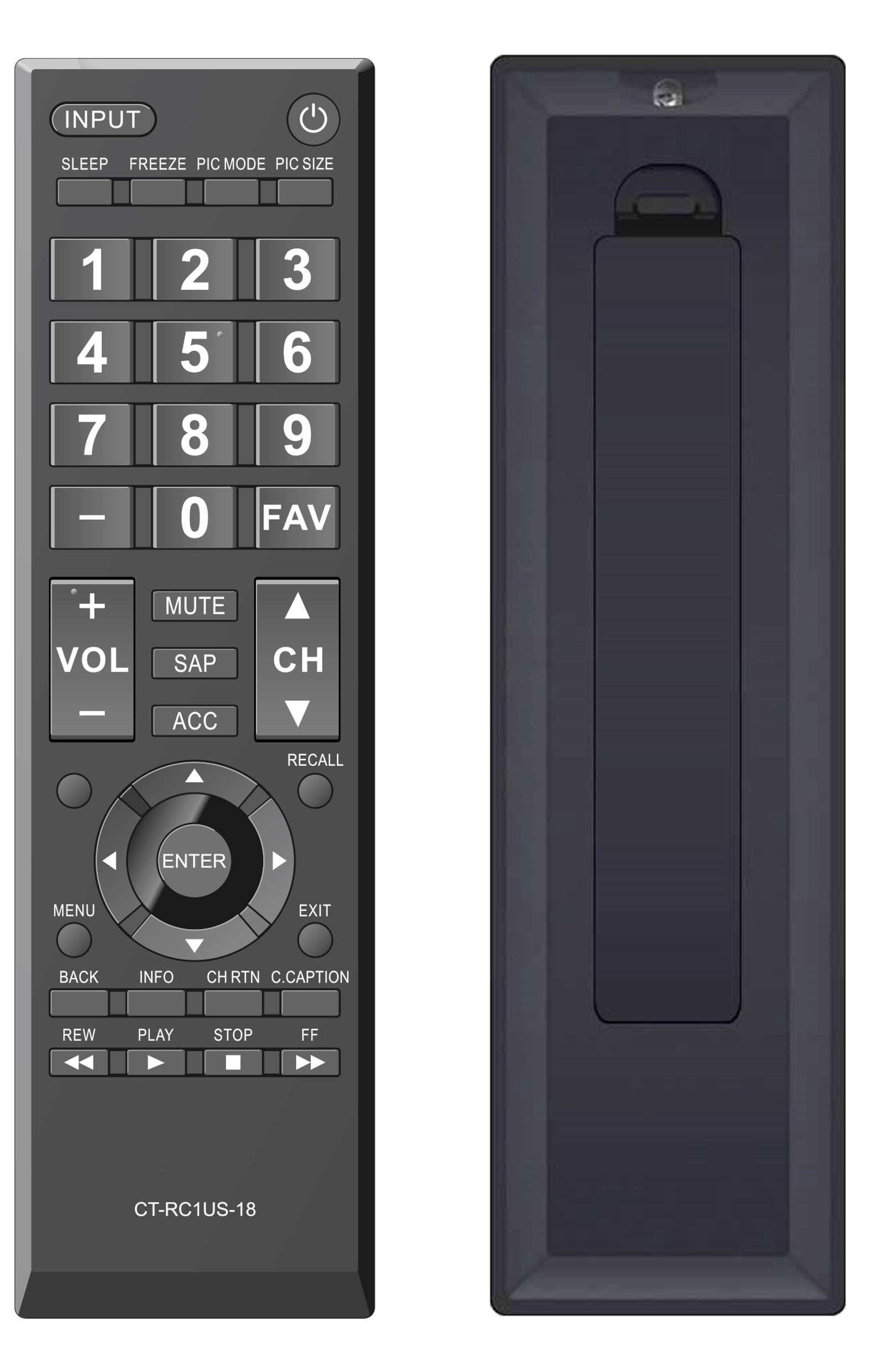
Figear 2: Aghaidh view of the Elekpia Universal Remote Control, displaying the layout of all buttons.
Gnìomhan Putan
- CUMHACHD (⏻): Cuiridh seo an telebhisean air no dheth.
- IOMPACHADH: Cycles through available input sources (HDMI 1, HDMI 2, AV, etc.).
- LAOIDH: Activates or adjusts the TV's sleep timer function.
- CREIDEAMH: Pauses the current image on the screen (functionality may vary by TV model).
- MODE PIC: Adjusts picture modes (e.g., Standard, Movie, Dynamic).
- PIC SIZE: Changes the aspect ratio or picture size.
- Pad Àireamh (0-9): A’ cur a-steach àireamhan seanail gu dìreach.
- - (Strìob)Air a chleachdadh airson fo-sheanalan a chur a-steach (m.e., 7-1).
- FAV: A’ faighinn cothrom air liosta nan seanalan as fheàrr leat.
- VOL (+/-): Àrdaichidh no lùghdaicheas an ìre fuaime.
- Mute: Silences the television audio.
- SAP: Selects Secondary Audio Program (SAP) or alternate audio tracks.
- ACC: Accesses accessibility features or audio settings.
- CH (Suas/Sìos): Changes the television channel up or down.
- ATH-LEASACHADH: Switches between the current and previously viewsianal ed.
- Pad Seòlaidh (Suas, Sìos, Clì, Deas, ENTER): Navigates through on-screen menus and confirms selections.
- MENU: Opens the main menu of the television.
- Exit: Closes the current menu or returns to the previous screen.
- DUAN: Tillidh e chun chlàr-taice no sgrion roimhe.
- FIOSRACHADH: A’ taisbeanadh fiosrachadh mun phrògram no an cuir-a-steach làithreach.
- CH RTN (Channel Return): Similar to RECALL, returns to the previous channel.
- C.CAPTION (Closed Caption): Cuiridh seo fo-thiotalan dùinte air no dheth.
- REW (Rewind), PLAY, STOP, FF (Fast Forward): Controls for media playback (e.g., when using a connected USB device or smart TV apps, if supported by the TV).
Cumail suas
A’ glanadh an iomallach
Gus coltas agus gnìomhachd an smachd iomallach a chumail suas, glan e gu cunbhalach:
- Cleachd clò bog, tioram gus uachdar an smachd iomallach a sguabadh.
- Airson salachar stòlda, beagan dampnigh an clò le uisge no le inneal-glanaidh tlàth, neo-sgrìobach. Seachain cus taiseachd.
- Na cleachd ceimigean cruaidh, fuasglaidhean, no padaichean glanaidh sgrìobach, oir faodaidh iad sin crìoch no pàirtean a-staigh an smachd iomallach a mhilleadh.
Ath-nuadhachadh bataraidh
Replace batteries when the remote's response becomes sluggish or stops working. Always replace both AA batteries at the same time with new ones. Do not mix old and new batteries, or different types of batteries, as this can lead to leakage or damage.
Stòradh
If the remote control will not be used for an extended period, remove the batteries to prevent potential leakage and damage to the device.
Fuasgladh thrioblaidean
If you encounter issues with your Elekpia Universal Remote Control, please refer to the following common solutions:
- Chan eil an inneal-iomallach a’ freagairt:
- Dèan cinnteach gu bheil na bataraidhean air an cur a-steach gu ceart leis a’ phòlaireachd cheart (+/-).
- Cuir bataraidhean AA ùra an àite na bataraidhean.
- Thoir sùil airson bacadh sam bith eadar an smachd iomallach agus mothachaire infridhearg an Tbh.
- Dèan cinnteach gu bheil thu a’ cur an smachd iomallach gu dìreach air an telebhisean.
- Chan eil cuid de na putanan ag obair:
- This remote is pre-programmed for Toshiba TVs. Verify your TV model is compatible.
- Clean the remote's surface, especially around the unresponsive buttons, to remove any dirt or debris that might be interfering with button presses.
- TV not turning on/off:
- Confirm the TV is plugged into a working power outlet.
- Try using the power button directly on the TV to confirm it is operational.
If these steps do not resolve the issue, please refer to the customer support section.
Sònrachaidhean
| Modail Àireamh | CT-RC1US-18 |
| Brand | Elekpia |
| Meudan toraidh | 7 x 2 x 0.6 òirleach |
| Cuideam nì | 3 unnsa |
| Stòr cumhachd | 2 x Bataraidhean AA 1.5V (nach eil air an toirt a-steach) |
| Innealan co-fhreagarrach | Toshiba LED LCD HDTVs |
| An àireamh as motha de dh’ innealan le taic | 1 |
| Dath | Dubh |
Fiosrachadh Barantais
Specific warranty details for the Elekpia Universal Remote Control CT-RC1US-18 are not provided in this manual. Please refer to the product packaging, the retailer's return policy, or the manufacturer's official weblàrach-lìn airson fiosrachadh a thaobh còmhdach agus teirmichean barantais.
Taic Luchd-cleachdaidh
For further assistance or inquiries regarding your Elekpia Universal Remote Control, please contact the retailer from whom you purchased the product. You may also visit the official Elekpia website for potential support resources or contact information.