
SUNMI TF700
SUNMI M2 MAX Industrial Tablet User Manual
Modail: TF700
Ro-ràdh
This manual provides comprehensive instructions for the safe and efficient use of your SUNMI M2 MAX Industrial Tablet, model TF700. Please read this manual thoroughly before operating the device and retain it for future reference.

Figear 1: Aghaidh view of the SUNMI M2 MAX Industrial Tablet, showing its display with various application icons.
Suidhich
1. Unboxing agus Sgrùdadh Tòiseachaidh
Thoir a h-uile pàirt a-mach às a’ phacaid gu faiceallach. Dèan cinnteach gu bheil na nithean gu h-ìosal an làthair agus gun mhilleadh:
- SUNMI M2 MAX Industrial Tablet (TF700)
- Adapter cumhachd
- Càball USB Type-C
- Hand Strap (optional, if included with your model)
2. A 'cur cosgais air an inneal
Before first use, fully charge the tablet. Connect the USB Type-C cable to the tablet's charging port and the other end to the power adapter. Plug the power adapter into a wall outlet. The charging indicator will illuminate.
The tablet is equipped with an 8360mAh non-removable lithium polymer battery. A full charge can provide over 12 hours of continuous operation.
3. Installing SIM Card and MicroSD Card (Optional)
The device supports MicroSIM or NanoSIM cards (Config 1) and an eSIM (Config 2). It also supports MicroSD cards up to 128GB for expanded storage.
- Lorg an t-sliotan cairt SIM/MicroSD air taobh an tablaid.
- Use the provided SIM ejector tool (if applicable) or a small paperclip to open the tray.
- Carefully place the SIM card(s) and/or MicroSD card into the tray according to the diagram on the tray.
- Brùth an treidhe air ais dhan t-slot gu socair gus an cliog e na àite.

Figear 2: Cùl view of the SUNMI M2 MAX, highlighting the camera, pogo pin charging interface, and the location of the SIM/MicroSD card slot.
4. Attaching the Hand Strap (Optional)
If your model includes a hand strap, attach it to the designated points on the back of the tablet for secure handling during mobile operations.
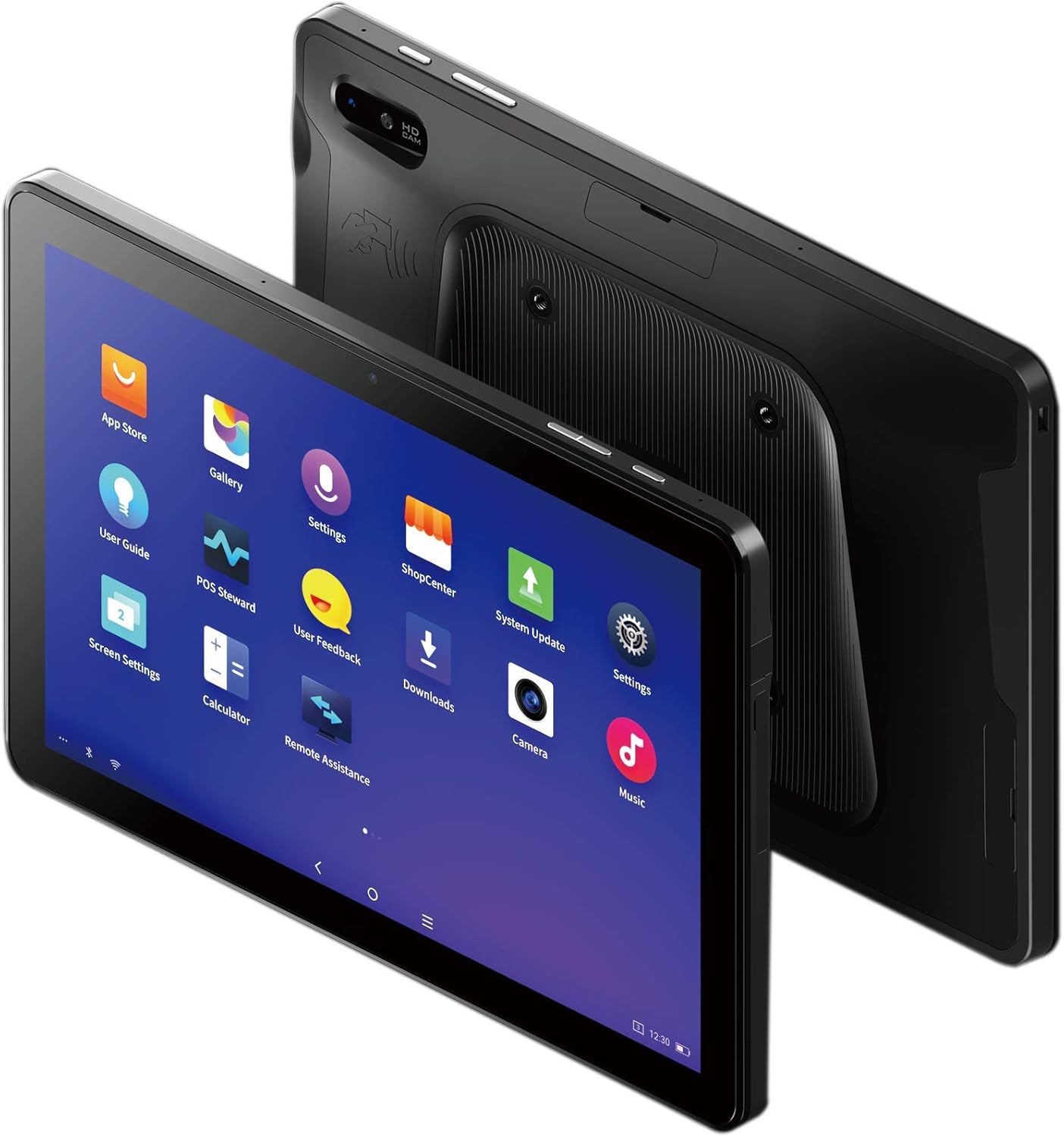
Figure 3: The SUNMI M2 MAX Industrial Tablet being held with an optional hand strap, demonstrating enhanced portability and secure grip.
Ag obrachadh an inneal
1. Cumhachd air / dheth
- Cumhachd air: Press and hold the Power button (located on the side) until the SUNMI logo appears on the screen.
- Cumhachd dheth: Press and hold the Power button until a power-off menu appears. Select "Power Off" and confirm.
- Ath-thòiseachadh: From the power-off menu, select "Restart" to reboot the device.
2. Seòladh Bunaiteach
The SUNMI M2 MAX runs on the Android operating system. Navigation is primarily touch-based:
- Tap: Gus nì a thaghadh no aplacaid fhosgladh.
- Swipe: Gus sgroladh tro liostaichean no atharrachadh eadar scrionaichean.
- Pinch-gu-zoom: Gus zoom a-steach no a-mach air ìomhaighean no web duilleagan.
- Putan Dachaigh: A ’tilleadh chun sgrion dachaigh.
- Putan air ais: Tilleadh chun sgrion roimhe.
- Putan Apps o chionn ghoirid: A’ taisbeanadh aplacaidean a chaidh a chleachdadh o chionn ghoirid.
3. A 'ceangal ri Lìonraidhean
The tablet supports Wi-Fi (2.4GHz/5GHz, 802.11 a/b/g/n/ac) and cellular networks (2G, 3G, 4G).
- Wi-Fi: Rach gu Roghainnean > Lìonra is eadar-lìon > Wi-FiCuir Wi-Fi air, tagh an lìonra a tha thu ag iarraidh, agus cuir a-steach am facal-faire ma tha feum air.
- Dàta ceallach: Ensure a valid SIM card is inserted. Go to Roghainnean> Lìonra & eadar-lìn> Lìonra gluasadach to enable mobile data and configure APN settings if necessary.
- Bluetooth: Rach gu Roghainnean > Innealan ceangailte > Bluetooth to pair with Bluetooth devices (supports Bluetooth 5.0).
4. Using NFC
The SUNMI M2 MAX is equipped with NFC (Near Field Communication) for contactless transactions and data exchange. To use NFC, ensure it is enabled in settings and hold the tablet near a compatible NFC reader or device.
5. Camara Obrachaidh
The tablet features a 13 MP rear camera with flash and autofocus, and a 5 MP front camera. Open the "Camera" application to capture photos or record videos.
Cumail suas
1. A ’glanadh an inneal
Cleachd clò bog, gun lint beagan dampened with water or a screen cleaner to wipe the display and exterior. Avoid using harsh chemicals, abrasive cleaners, or excessive moisture.
2. Cùram Bataraidh
- Avoid exposing the tablet to extreme temperatures (below -20°C or above 70°C).
- Na leig leis a’ bhataraidh a bhith air a dhì-luchdachadh gu tur gu tric.
- Use only the original or certified compatible power adapter and cable.
3. Ùrachaidhean bathar-bog
Thoir sùil gu cunbhalach airson ùrachaidhean siostaim agus stàlaich iad gus dèanamh cinnteach à coileanadh agus tèarainteachd as fheàrr. Rach gu Roghainnean > Siostam > Ùrachadh siostaim.
4. Dìon Àrainneachdail
The SUNMI M2 MAX is designed with IP68 protection and a 1m drop specification, making it suitable for demanding environments. However, avoid intentional drops or prolonged submersion in water.
Fuasgladh thrioblaidean
| Trioblaid | Adhbhar a dh’fhaodadh a bhith ann | Fuasgladh |
|---|---|---|
| Chan eil cumhachd aig an inneal. | Bataraidh ìosal; tubaist bathar-bog. | Cuir cosgais air an inneal airson co-dhiù 30 mionaid. Brùth is cum sìos am putan Cumhachd airson 10-15 diogan gus ath-thòiseachadh a thoirt gu buil. |
| Chan urrainn dhuinn ceangal a dhèanamh ri Wi-Fi. | Incorrect password; Wi-Fi disabled; router issue. | Verify password. Ensure Wi-Fi is enabled in settings. Restart router. Forget and reconnect to the network. |
| Touchscreen neo-fhreagairt. | Mearachd bathar-bog sealach. | Ath-thòisich an inneal le feachd le bhith a’ cumail a’ phutan Cumhachd. |
| Applications crashing. | Insufficient RAM; app bug. | Close background apps. Clear app cache/data (Settings > Apps). Update the app. |
Sònrachaidhean
The following table outlines the key technical specifications of the SUNMI M2 MAX Industrial Tablet (Model: TF700).

Figure 4: Comprehensive technical specifications for the SUNMI M2 MAX Industrial Tablet.
- Modail: TF700
- Siostam-obrachaidh: Android 9.0 (SUNMI OS)
- Pròiseasar: Kryo-260, Octa-core 2.2GHz (Qualcomm)
- Cuimhne: 3GB RAM + 32GB ROM (eMMC)
- Taisbeanadh: 10.1-inch FHD, 1920x1200, Capacitive multitouch, Corning Gorilla Glass 3
- Camara: Front: 5MP FF; Rear: 13MP AF + Flashlight, supports 1D/2D barcode recognition
- NFC: Type-A&B card, Mifare card, Felica card, ISO/IEC 14443 and ISO/IEC 15693 compliant
- Speaker/MIC: 1W Speaker, 2x MIC
- Slot cairt PSAM: 1x PSAM
- Slot Cairt SIM: 1x MicroSD (TF), 1x MicroSIM or 1x NanoSIM (TF700 Config 1), eSIM (TF700 Config 2)
- Lìonra: 2G & 3G & 4G
- Wi-Fi: 2.4GHz/5GHz, 802.11 a/b/g/n/ac
- Bluetooth: Supports Bluetooth 2.1/3.0/4.2/5.0 (BLE)
- GPS: Supports AGPS, GPS, GLONASS, Beidou (Config 2)
- Sensor: Gravity sensor, light sensor, compass, Hall
- Putanan: 1x Power (lock screen), 2x Volume (+/-)
- Puirt: 1x Type-C (supports OTG), 1x Audio Jack, 1x MicroSD (up to 128GB expansion)
- Bataraidh: Non-removable Lithium Polymer battery, 8360mAh
- Adaptor Cumhachd: Input: AC 100-240V, Output: DC 5V/2A
- Meudan (LxWxH): 249.8 x 160 x 9.9 mm (0.39 x 6.3 x 9.84 òirleach)
- Cuideam iomlan: 673g (1.48 not)
- Dìon: IP68, 1m drop spec
- Teòthachd obrachaidh: -20 ° C gu 55 ° C
- Teòthachd stòraidh: -40 ° C gu 70 ° C
Barantas agus Taic
For warranty information and technical support, please refer to the documentation provided with your purchase or visit the official SUNMI weblàrach. Cùm dearbhadh ceannach airson tagraidhean barantais.
SUNMI Official Weblàrach: www.sunmi.com
Ask a question about this manual
Ask about setup, troubleshooting, compatibility, parts, safety, or missing instructions. Manuals+ will review the question and use this page’s manual context to help answer it.