
1. Ro-ràdh
This manual provides essential information for the safe and efficient operation of your Cecotec Ready Warm 800 Thermal Connected 600W Digital Heater. Please read these instructions carefully before using the appliance and retain them for future reference. This heater is designed to provide supplementary heating for indoor spaces and features Wi-Fi connectivity for remote control.
2. Stiùireadh Sàbhailteachd
RABHADH: Dh’fhaodadh fàilligeadh ann a bhith a’ leantainn nan stiùiridhean sàbhailteachd seo teine, clisgeadh dealain no dochann adhbhrachadh.
- Dèan cinnteach gu bheil an voltagTha an tomhas-lìonaidh a tha air a chomharrachadh air an leubail rangachaidh a’ freagairt ris an tomhas-lìonaidh prìomh-loidhne agad.tage mus ceangal an inneal.
- Na còmhdaich an teasadair. Faodaidh cus teasachadh tachairt ma tha an teasadair còmhdaichte no dùinte.
- Keep flammable materials such as furniture, curtains, and bedding at least 1 meter (3 feet) away from the heater.
- Do not operate the heater with a damaged cord or plug, or after the appliance malfunctions or has been dropped or damaged in any manner.
- Chan eilear an dùil an inneal seo a chleachdadh le daoine (a’ toirt a-steach clann) le comasan corporra, mothachaidh no inntinn nas lugha, no dìth eòlas agus eòlas, mura d’ fhuair iad stiùireadh no stiùireadh a thaobh cleachdadh an inneil le neach le uallach airson an sàbhailteachd.
- Bu chòir clann a bhith fo stiùir gus dèanamh cinnteach nach cluich iad leis an inneal.
- Na cleachd an teasadair faisg air amar, fras no amar-snàmh.
- Tarraing a-mach am pluga an-còmhnaidh nuair nach eilear ga chleachdadh no mus tèid a ghlanadh.
- Do not insert any objects into the ventilation or exhaust openings as this may cause electric shock, fire, or damage to the heater.
3. Toradh thallview
Familiarize yourself with the components of your Cecotec Ready Warm 800 Digital Heater.

This image shows the Cecotec Ready Warm 800 Digital Heater from a side angle, highlighting its slim profile and the integrated control panel on the right side. The heater is white with black vents at the top and stands on two white feet.

The heater is shown in a home environment, positioned on a wooden floor next to a person seated on a black armchair, illustrating its compact size and how it fits into a living space.
Pannal smachd agus taisbeanadh
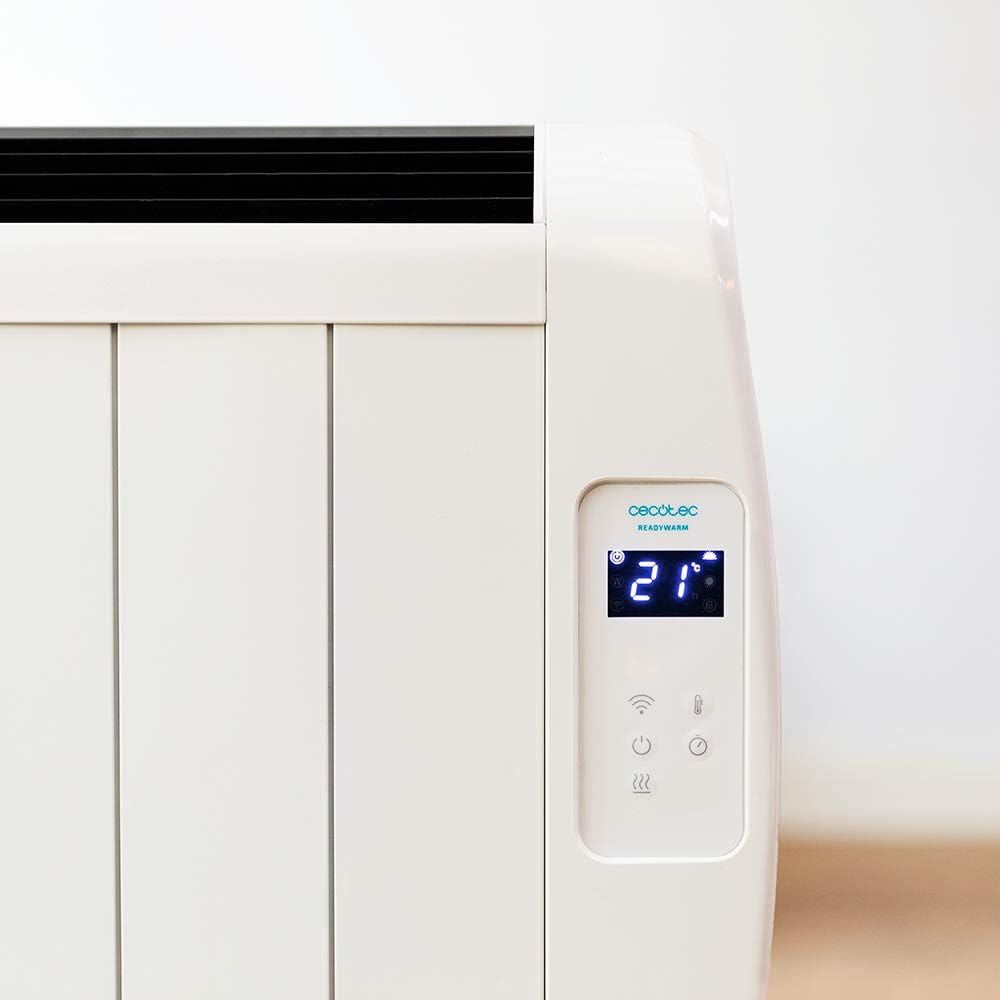
A mionaideach view of the heater's digital control panel, featuring a clear LCD screen showing '21' degrees Celsius, indicating the current temperature setting. Below the screen are touch-sensitive buttons for power, Wi-Fi, mode selection, and temperature adjustment.

This image focuses on the digital control panel, showing the LCD screen set to a timer function, displaying '04' hours. This indicates the heater is programmed to operate for a specific duration.
The digital display shows the current temperature, timer settings, and Wi-Fi status. The touch-sensitive buttons allow for easy control of the heater's functions.
Tionndadh cumhachd

A close-up shot of the heater's base, revealing the physical on/off power switch. This switch provides a direct way to cut power to the unit.
A physical power switch is located at the base of the unit for complete power disconnection.
4. Suidhich
- A' dì-phapadh: Thoir an teasadair a-mach às a phacaid gu faiceallach. Cùm am pacaigeadh airson stòradh no còmhdhail.
- Suidheachadh: Place the heater on a firm, level surface. Ensure there is at least 1 meter (3 feet) of clear space around the heater from walls, furniture, and other objects. Do not place it directly under a power outlet.
- Ceangal cumhachd: Plug the power cord into a suitable 230V AC power outlet. Ensure the main power switch at the base of the unit is in the 'OFF' position before plugging in.
- Cumhachd tùsail air adhart: Flip the main power switch at the base of the unit to the 'ON' position. The digital display on the control panel should illuminate.
Dimensions for Placement

This image provides a clear diagram of the heater's physical dimensions: 63 cm in width, 10.5 cm in depth, and 53.5 cm in height, useful for planning placement.
5. Stiùireadh Obrachaidh
Obrachadh Bunaiteach
- Cumhachd air / dheth: Brùth am putan cumhachd (U) on the control panel to turn the heater on or off.
- Atharrachadh teòthachd: Use the temperature up (+) agus sìos (-) buttons to set your desired room temperature. The display will show the set temperature.
- Taghadh Modh: Press the mode button to cycle through available heating modes (e.g., Low, Medium, High, or Eco, depending on the model's specific programming).
- Gnìomh timer: Press the timer button to set an operating duration. Use the temperature adjustment buttons to set the desired hours (e.g., 0-24 hours). The heater will automatically turn off after the set time.
Ceangal Wi-Fi agus Smachd Aplacaidean
The Cecotec Ready Warm 800 features Wi-Fi connectivity, allowing you to control the heater remotely via a smartphone application.

A hand holding a smartphone with the Cecotec Ready Warm mobile application open. The app interface shows a large dial indicating '33°C' and various control options, demonstrating remote control capabilities.
- Luchdaich sìos an App: Lorg airson the 'Cecotec Ready Warm' app in your smartphone's app store (iOS or Android).
- Clàraich/Log a-steach: Cruthaich cunntas no log a-steach ma tha fear agad mu thràth.
- Cuir inneal ris: Follow the in-app instructions to add your Ready Warm 800 heater. This typically involves putting the heater into pairing mode (often by pressing and holding the Wi-Fi button on the control panel) and connecting it to your home Wi-Fi network.
- Smachd air astar: Once connected, you can control the heater's power, temperature, modes, and timer functions from your smartphone.
6. Cumail suas
Bidh cumail suas cunbhalach a’ dèanamh cinnteach à coileanadh as fheàrr agus fad-beatha an teasadair agad.
- Glanadh: Thoir a-mach am pluga bhon teasadair an-còmhnaidh agus leig leis fuarachadh gu tur mus glan thu e. Cleachd clò bog, tioram.amp clò airson na h-uachdaran a-muigh a ghlanadh. Na cleachd innealan-glanaidh sgrìobach no fuasglaidhean.
- Toirt air falbh dust: Periodically use a vacuum cleaner with a brush attachment to remove dust from the air intake and exhaust vents.
- Stòradh: Ma bhios tu a’ stòradh an teasadair airson ùine mhòr, dì-phlugaich e, glan e gu mionaideach, agus stòraich e ann an àite fionnar, tioram, mas fheàrr san phacaid thùsail aige.
- Gun phàirtean le seirbheis cleachdaiche: Na feuch ri an teasadair fhosgladh no a chàradh thu fhèin. Thoir aire do luchd-obrach teisteanasach airson a h-uile seirbheiseachadh.
7. A ’dèanamh trioblaid
Ma thachras tu ri duilgheadasan leis an teasadair agad, thoir sùil air a’ chlàr a leanas airson duilgheadasan agus fuasglaidhean cumanta.
| Trioblaid | Adhbhar a dh’fhaodadh a bhith ann | Fuasgladh |
|---|---|---|
| Chan eil an teasadair a’ tionndadh air. | No power supply. Main power switch off. | Check if the power cord is securely plugged in. Ensure the main power switch at the base is ON. Check the wall outlet. |
| Gun toradh teas. | Temperature setting too low. Overheat protection activated. | Increase the desired temperature setting. Unplug the heater, let it cool for 30 minutes, then plug it back in. Ensure vents are not blocked. |
| Tha an ceangal Wi-Fi a’ fàiligeadh. | Incorrect Wi-Fi password. Heater too far from router. App issues. | Verify Wi-Fi password. Move heater closer to the router. Restart the app and heater. Ensure your router is 2.4GHz compatible. |
| Bidh an teasadair a’ tionndadh dheth gun dùil. | Timer function activated. Overheat protection. | Check if the timer is set. If not, unplug the heater, let it cool, and check for obstructions. |
8. Sònrachaidhean
| Feart | Mion-fhiosrachadh |
|---|---|
| Brand | Cecotec |
| Modail Àireamh | 05372 |
| Cumhachd / Wattage | 600W |
| Voltage | 230 Volt |
| Meudan toraidh | 63 x 10.5 x 53.5 cm |
| Cuideam | 3.4 kg |
| Feartan sònraichte | Portable, Wireless (Wi-Fi Control), LCD Screen |
| Modh teasachaidh | Radiantach |
| Cleachdadh a-staigh / a-muigh | A-staigh |
| Seòrsa stàladh | Wall Mount (optional, accessories not included) / Freestanding |
9. Barantas agus Taic
Your Cecotec Ready Warm 800 Digital Heater is covered by a manufacturer's warranty. Please refer to the warranty card included with your purchase for specific terms and conditions, including the warranty period and coverage details.
For technical support, troubleshooting assistance beyond this manual, or warranty claims, please contact Cecotec customer service. Contact information can typically be found on the Cecotec official weblàrach-lìn no air pacaigeadh an toraidh agad.
Nuair a chuireas tu fios gu taic, feuch an dèan thu cinnteach gu bheil àireamh modail an toraidh agad (05372) agus dearbhadh ceannach ri làimh.