
Ro-ràdh
This manual provides detailed instructions for the setup, operation, and maintenance of your groov e Atlas Radio Alarm Clock with Wireless Charger. Please read this manual thoroughly before using the device to ensure proper function and to maximize your user experience. Keep this manual for future reference.
Susbaint pacaid
Dèan cinnteach gu bheil a h-uile nì anns a’ phacaid:
- groov e Atlas Radio Alarm Clock
- Adapter cumhachd
- Leabhar-làimhe cleachdaiche
Feartan toraidh
- Wireless Charging (5W): Conveniently charge compatible smartphones by placing them on the top surface.
- Rèidio FM: Èist ris na stèiseanan FM as fheàrr leat.
- Taisbeanadh LED: Taisbeanadh ùine didseatach soilleir.
- Prìomh chumhachd: Reliable power supply for continuous operation.
- Stèisean cosgais USB: Additional USB port for charging other devices.
- Alarm dùbailte: Suidhich dà inneal-rabhaidh neo-eisimeileach airson diofar amannan dùsgadh.
- Dimmer taisbeanaidh: Adjust the brightness of the LED display.
Suidhich
- Ceangal cumhachd: Insert the power adapter into the 'DC IN' port on the back of the alarm clock, then plug the adapter into a wall outlet. The display will light up.
- Suidhich ùine:
- Press and hold the 'TIME SET' button located on the back of the unit.
- Use the 'TUN-' or 'TUN+' buttons on the top panel to adjust the hour.
- Press 'TIME SET' again to confirm the hour and move to minutes.
- Use 'TUN-' or 'TUN+' to adjust the minutes.
- Press 'TIME SET' once more to confirm and exit time setting.
- To switch between 12-hour and 24-hour format, press the '12/24H' button on the back.

Ìomhaigh: Cùl view of the groov e Atlas alarm clock, highlighting the DC IN power input and the USB charging port. The '12/24H TIME SET' and 'SLEEP' buttons are also visible.
Stiùireadh Obrachaidh
Setting Alarms (ALM1 / ALM2)
- Press the 'ALM1' or 'ALM2' button to select the alarm you wish to set. The alarm icon will flash on the display.
- Use the 'TUN-' or 'TUN+' buttons to adjust the alarm hour.
- Press the 'ALM1' or 'ALM2' button again to confirm the hour and move to minutes.
- Use 'TUN-' or 'TUN+' to adjust the alarm minutes.
- Press the 'ALM1' or 'ALM2' button a third time to confirm the alarm time. The alarm icon will remain lit, indicating the alarm is active.
- To deactivate an alarm, press the corresponding 'ALM1' or 'ALM2' button until the alarm icon disappears from the display.
Gnìomh rèidio FM
- Tionndaidh air / dheth: Press the 'ON/OFF' button to turn the radio on or off.
- Sgan Auto: Press the 'SCAN' button to automatically scan and save available FM stations.
- Tuning Stiùireadh: Use the 'TUN-' or 'TUN+' buttons to manually adjust the frequency. Press and hold for faster tuning.
- Stèiseanan Preset: Use 'MEM-' or 'MEM+' to cycle through saved preset stations.
- Atharraich an tomhas-lìonaidh: Use the 'VOL-' or 'VOL+' buttons to control the radio volume.
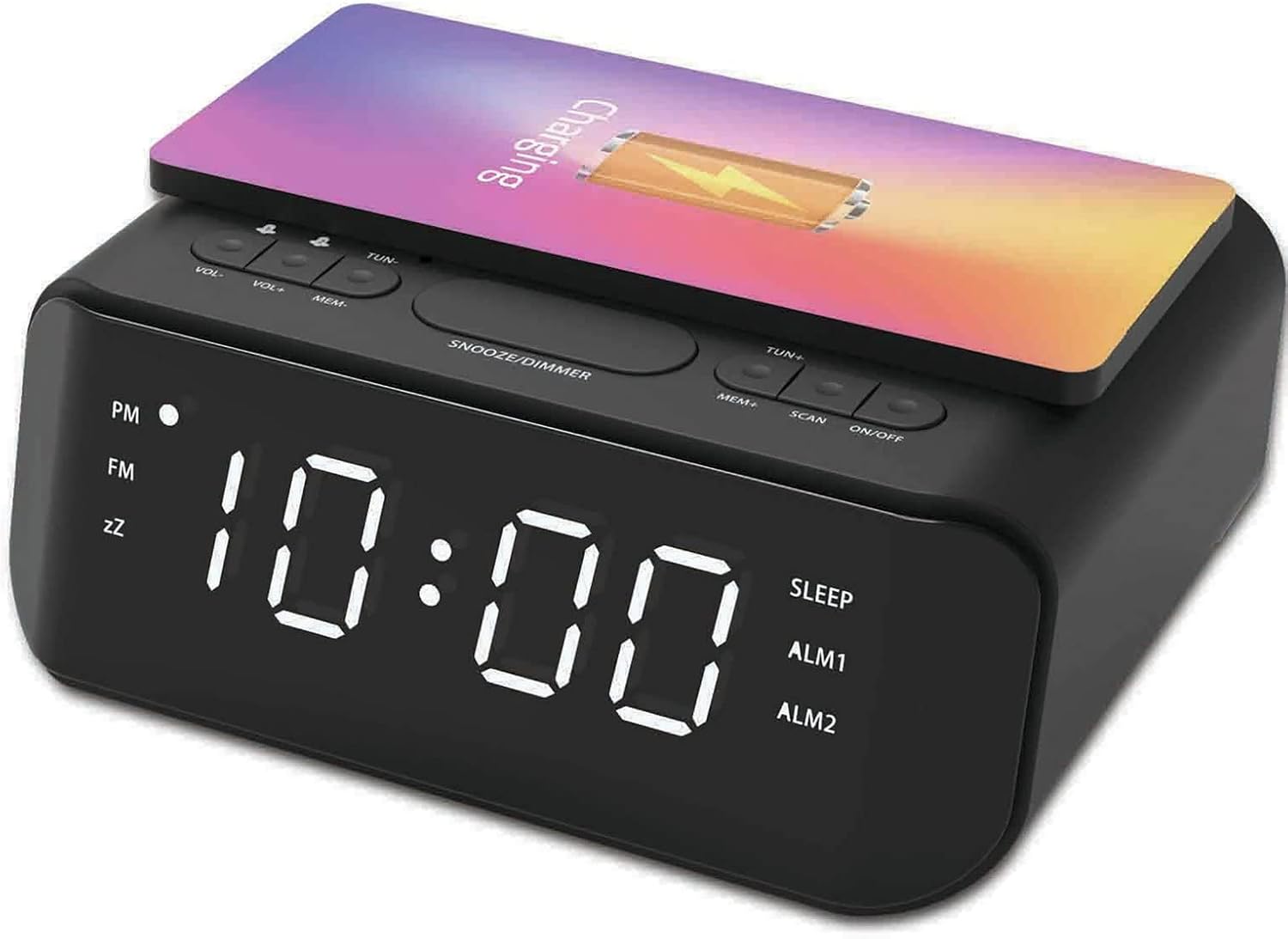
Ìomhaigh: Mullach view of the groov e Atlas alarm clock, illustrating the layout of the control buttons for volume, tuning, memory, scan, and power.
Cìs gun uèir
- Ensure your smartphone is compatible with 5W Qi wireless charging.
- Place your compatible smartphone centrally on the wireless charging pad located on the top surface of the alarm clock.
- The phone's display should indicate that charging has begun. If not, adjust the phone's position.

Image: A smartphone placed on the groov e Atlas alarm clock's top surface, showing the charging indicator on the phone's screen, confirming wireless charging is active.
USB cosgais
- Connect a USB charging cable (not included) to the USB port on the back of the alarm clock.
- Ceangail ceann eile a ’chàball ris an inneal agad.
- Tòisichidh an inneal agad a’ cur cosgais.
Taisbeanadh Dimmer
Press the 'SNOOZE/DIMMER' button to cycle through different brightness levels for the LED display. This allows you to adjust the display to your preferred visibility, especially in dark environments.
Cumail suas
- Glanadh: Cleachd clò bog, tioram gus uachdar a’ chloc-rabhaidh a ghlanadh. Na cleachd innealan-glanaidh leaghaidh no stuthan sgrìobach.
- Stòradh: Nuair nach eilear ga chleachdadh airson amannan fada, thoir air falbh an inneal agus stòraich e ann an àite fionnar, tioram.
- Sàbhailteachd: Do not expose the device to water, high humidity, or extreme temperatures. Avoid dropping or subjecting the device to strong impacts.
Fuasgladh thrioblaidean
| Trioblaid | Adhbhar a dh’fhaodadh a bhith ann | Fuasgladh |
|---|---|---|
| Chan eil cumhachd aig an inneal. | Chan eil an inneal-atharrachaidh cumhachd ceangailte no tha an socaid lochtach. | Ensure the power adapter is securely plugged into the device and a working wall outlet. Try a different outlet. |
| Chan eil cosgais gun uèir ag obair. | Phone not Qi-compatible or not positioned correctly. | Verify your phone supports Qi wireless charging. Reposition the phone centrally on the charging pad. Remove any thick phone cases. |
| Chan eil an inneal-rabhaidh a’ fuaimeachadh. | Cha deach an inneal-rabhaidh a ghnìomhachadh no tha an tomhas-lìonaidh ro ìosal. | Check if the alarm icon is lit on the display. Increase the alarm volume using the 'VOL+' button. |
| Tha fàilteachadh rèidio truagh. | Comharra no suidheachadh antenna lag. | Extend and adjust the position of the FM antenna wire on the back of the unit for better reception. |
Sònrachaidhean
- Àireamh Modail: GVWC06BK
- Brand: clais e
- Dath: Dubh
- Seòrsa taisbeanaidh: LED didseatach
- Stòr cumhachd: Mains Powered (AC Adapter included)
- Toradh cìs gun uèir: 5W
- Toradh cìs USB: 5V/1A
- Feartan rabhaidh: Alarma dùbailte, Snooze
- Rèidio: FM
- Stuth: Styrene acrylonitrile butadiene (ABS)
- Cruth: Ceart-cheàrnach
- Seòrsa stàladh: Sliabh Clàr
- Seòrsa gluasad: Ceathramh
- Bataraidhean: Not included (requires 1 battery for backup, type not specified in data)
Barantas agus Taic
Your groov e Atlas Radio Alarm Clock GVWC06BK comes with a standard manufacturer's warranty. Please refer to the warranty card included in your package for specific terms and conditions, including the warranty period and coverage details.
For technical support, troubleshooting assistance, or warranty claims, please contact groov e customer service through their official weblàrach-lìn no am fiosrachadh conaltraidh a tha air a thoirt seachad air a’ chairt barantais agad.
Cùm dearbhadh ceannach airson ceistean sam bith co-cheangailte ri barantas.