
PeakTech P 8005
Leabhar-làimhe Cleachdaiche airson Meatair Ìre Fuaim PeakTech P 8005
Modail: P 8005 | Brand: PeakTech
1. Ro-ràdh
The PeakTech P 8005 is a high-precision Class 2 sound level meter designed for accurate noise measurement and data logging. It is suitable for a wide range of applications including noise projects, quality control, disease prevention, and environmental sound measurements in factories, schools, offices, traffic, and households. This device features a 4-digit 20mm LCD multi-function display with a bargraph and backlight, a USB interface for continuous measurements, and AC/DC outputs for connection to frequency analyzers or X-Y wave recorders. This manual provides detailed instructions for the proper use, maintenance, and troubleshooting of your PeakTech P 8005.
2. Fiosrachadh Sàbhailteachd
Please read all safety instructions carefully before operating the device. Failure to follow these instructions may result in damage to the device or personal injury.
- Na nochd an inneal gu fìor theodhachd, taiseachd no solas dìreach.
- Seachain crithidhean no buaidhean làidir.
- Na feuch ris an inneal fhosgladh no atharrachadh. Cha bu chòir càradh a dhèanamh ach le luchd-obrach teisteanasach.
- Cùm an inneal air falbh bho raointean electromagnetic làidir.
- Ensure proper ventilation when using the AC adapter for extended periods.
- Cuir às do bataraidhean a rèir riaghailtean ionadail.
3. Pasgan-susbaint
Dèan cinnteach gu bheil na nithean gu lèir a tha air an liostadh gu h-ìosal air an toirt a-steach don phacaid agad:
- PeakTech P 8005 Sound Level Meter
- Cùis Giùlain
- 3m Additional Microphone Cable
- Càball eadar-aghaidh USB
- Software for Windows (on CD-ROM)
- Tripod beag
- Inneal-atharrachaidh Cumhachd AC 9V
- Bataraidh 9V
- Leabhar-làimhe cleachdaiche

4. Toradh thallview
The PeakTech P 8005 is designed for user-friendly operation while providing professional-grade accuracy. Familiarize yourself with the main components and controls.
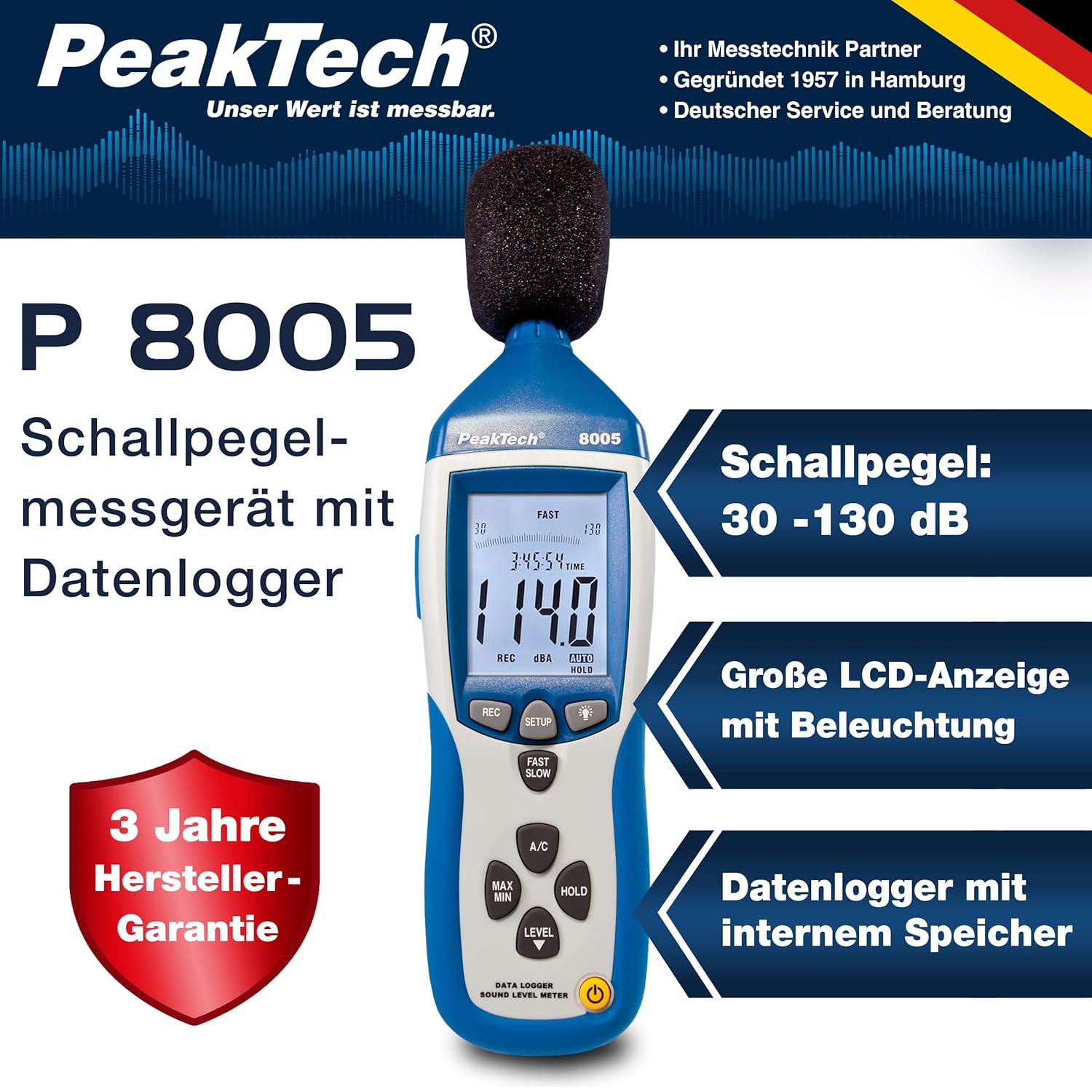
4.1. Prìomh fheartan
- Tomhas mionaideach: Class 2 sound level meter (IEC-61672-1 compliant) for accurate readings even in noisy environments.
- Raon tomhais farsaing: 30 to 130 dB across 4 ranges with 0.1 dB resolution.
- Logadh dàta: Internal memory for up to 32,000 readings (1x/sec to 1x/min).
- Ceangal: USB 2.0 interface for PC connection and data transfer.
- Toraidhean analog: AC/DC outputs for connecting to frequency analyzers or X-Y wave recorders.
- Taisbeanadh: 4-digit 20mm LCD with bargraph and backlight.
- Modhan Tomhais: Fast (125 ms) and Slow (1 s) response times, A and C weighting.
- Feartan a bharrachd: MIN/MAX measurements, over-range/under-range indication.

5. Suidhich
5.1. Stàladh bataraidh
The PeakTech P 8005 operates on a 9V battery or via the included 9V AC power adapter.
- Lorg an roinn bataraidh air cùl an inneil.
- Fosgail an còmhdach bataraidh.
- Cuir a-steach am bataraidh 9V, a’ dèanamh cinnteach gu bheil e ceart gu leòr.
- Dùin an còmhdach bataraidh gu tèarainte.
5.2. Cumhachd a thoirt don inneal
- Gus cumhachd a thoirt air adhart, brùth air an CUMHACHD putan.
- Gus cumhachd a thoirt air falbh, brùth agus cùm grèim air an CUMHACHD putan gus an tionndaidh an taisbeanadh dheth.
- For continuous operation, connect the 9V AC power adapter to the DC 9V input port on the side of the device.
5.3. Ceangal Micreofon
The device comes with a built-in microphone. For remote measurements or specific setups, you can use the included 3m additional microphone cable.
- Unscrew the microphone cap from the top of the device.
- Connect the 3m microphone cable to the microphone input.
- Attach the external microphone to the other end of the cable.
- For stable measurements, attach the device to the mini tripod using the threaded mount at the bottom.

Bhidio 5.1: Thar-chrìochview of the PeakTech 8005 Sound Level Meter, demonstrating its features and setup, including the use of the external microphone and power adapter.
6. Stiùireadh Obrachaidh
6.1. Tomhas Bunasach
After powering on, the device will immediately begin measuring sound levels.
- The current sound level in dB is displayed on the LCD.
- Cleachd an ÌRE button to cycle through the four measurement ranges (30-80 dB, 50-100 dB, 80-130 dB, Auto 30-130 dB).
- Brùth LUATH/SLOW to switch between fast (125 ms) and slow (1 s) response times. Fast is suitable for sudden noise changes, while slow is for average noise levels.
- Brùth A/C to select A-weighting (dBA) or C-weighting (dBC). A-weighting mimics human ear response, C-weighting is for mechanical noise.

6.2. Data Logging and PC Connection
The P 8005 can record up to 32,000 measurement values internally. To access and analyze this data, use the included Windows software.
- Install the software from the provided CD-ROM onto a Windows PC (Windows 95/98/NT/2000/XP/VISTA/7/8/10 supported).
- Connect the sound level meter to your PC using the USB interface cable.
- Open the software. The software allows for real-time data display, data import from the device's internal memory, and export to formats like Excel for further analysis.
- Refer to the software's help documentation for detailed instructions on data logging setup and analysis.

7. Cumail suas
7.1. Glanadh
Clean the device regularly to ensure optimal performance.
- Paisg an taobh a-muigh le clò bog, tioram.
- Na cleachd luchd-glanaidh sgudail no solventan.
- Keep the microphone free from dust and debris.
7.2. Stòradh
Nuair nach eilear ga chleachdadh, stòraich an inneal anns a’ bhogsa giùlain aige ann an àite fionnar, tioram, air falbh bho sholas dìreach na grèine agus teòthachd anabarrach.
7.3. Calabradh
The PeakTech P 8005 is a precision instrument. Regular calibration is recommended to maintain accuracy, especially for professional applications. Refer to the included test report for the last calibration date. Contact PeakTech support for calibration services.
8. A ’dèanamh trioblaid
| Trioblaid | Adhbhar a dh’fhaodadh a bhith ann | Fuasgladh |
|---|---|---|
| Chan eil cumhachd aig an inneal. | Low or dead battery; AC adapter not connected or faulty. | Replace the 9V battery or connect the AC adapter. Ensure the adapter is working. |
| Leughaidhean neo-mhearachdach. | Incorrect measurement range; microphone obstructed; device needs calibration. | Adjust the measurement range using the ÌRE button. Clear any obstructions from the microphone. Consider professional calibration. |
| Bathar-bog nach eil ag aithneachadh an inneil. | USB cable faulty; driver issue; software compatibility. | Try a different USB port or cable. Reinstall the software and drivers. Check software compatibility settings (e.g., Windows 98 compatibility mode for older systems). |
| Data logging issues. | Memory full; incorrect logging settings. | Download and clear data from the device. Review data logging settings in the software. |
9. Sònrachaidhean
| Paramadair | Luach |
|---|---|
| Inbhe gnìomhaichte | IEC-61672-1 Type 2, ANSI S1.4 Type 2 |
| Accuracy (1 kHz Sine; A, C) | ± 1.4 DB |
| Cruinneas (Raon tricead) | According to EN-61672-1 Class 2, max. ± 5.6 dB |
| Raon tricead | 31.5 Hz - 8 kHz |
| Raon dinamic | 50 dB |
| Raointean Ìre | Low: 30 dB ~ 80 dB, Med: 50 dB ~ 100 dB, High: 80 dB ~ 130 dB, Auto: 30 dB ~ 130 dB |
| Àm Freagairt | Fast: 125 ms / Slow: 1 s |
| Micreofon | ½-inch Electret Condenser Microphone |
| Fuasgladh | 0.1 dB |
| Ùrachadh taisbeanaidh | 2 uair / diog. |
| Toradh Analog | AC/DC Outputs, AC: 1 Veff = 10 mV/dB |
| Vol Obrachaidhtage | 9V Battery or 9V AC Power Adapter |
| Meudan (WxHxD) | 80 x 280 x 50 mm |
| Cuideam | 350 g |
| Data Logger Memory | Suas ri leughaidhean 32,000 |
10. Barantas agus Taic
PeakTech products are designed for reliability and performance. For warranty information and technical support, please refer to the documentation included with your product or visit the official PeakTech weblàrach. Cùm do chuidhteas ceannach mar dhearbhadh ceannach airson tagraidhean barantais.
Dèanadair: PeakTech
Weblàrach: PeakTech Official Store
Ask a question about this manual
Ask about setup, troubleshooting, compatibility, parts, safety, or missing instructions. Manuals+ will review the question and use this page’s manual context to help answer it.