
Ro-ràdh
This manual provides comprehensive instructions for the Lexmark MS431dw Monochrome Laser Printer. It covers setup, operation, maintenance, and troubleshooting to ensure optimal performance and longevity of your device. The Lexmark MS431dw is designed for efficient monochrome printing, offering speeds up to 40 pages per minute and automatic duplex printing.

Ìomhaigh: Aghaidh-deas view of the Lexmark MS431dw Monochrome Laser Printer.
Suidhich
1. A ’dì-phapadh an clò-bhualadair
Thoir am clò-bhualadair a-mach às a phacaid gu faiceallach. Dèan cinnteach gu bheil a h-uile stuth pacaidh, teipichean, agus filmichean dìon air an toirt air falbh bhon taobh a-muigh agus bhon taobh a-staigh den chlò-bhualadair. Cùm am pacaigeadh airson còmhdhail san àm ri teachd ma bhios feum air.
2. Installing the Toner Cartridge
- Fosgail còmhdach aghaidh a’ chlò-bhualadair.
- Thoir a’ chairt-chlàir toner ùr a-mach às a phacaid agus crathadh gu socair e gus an toner a sgaoileadh.
- Cuir a’ chairt-tonair a-steach don t-slot ainmichte gus an cliog e na àite.
- Dùin an còmhdach aghaidh.
3. Pàipear luchdachadh
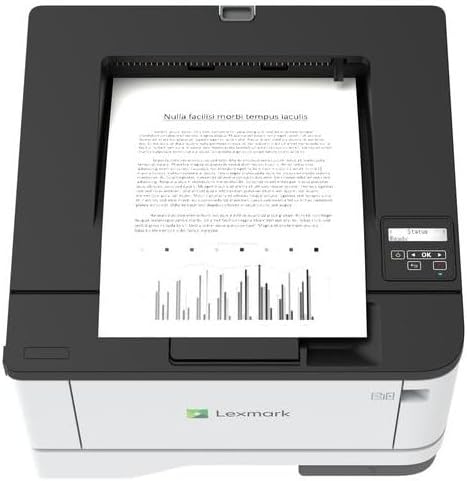
Ìomhaigh: Mullach view of the Lexmark MS431dw with paper loaded in the input tray.
Open the paper tray and adjust the paper guides to fit the size of your paper. Load the paper stack into the tray, ensuring it is flat and below the maximum fill line. Close the paper tray. The printer supports various media types, including card stock.
4. Cumhachd Ceangal
Connect the power cord to the printer's power input and then to a grounded electrical outlet.
5. Connecting to a Network/Computer
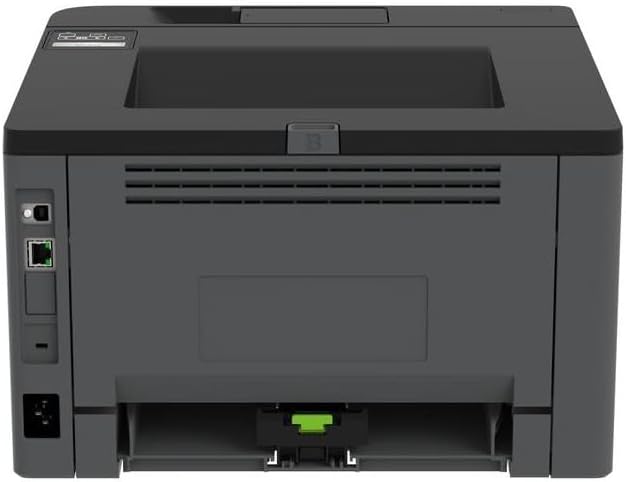
Ìomhaigh: Cùl view of the Lexmark MS431dw, highlighting the Ethernet and power connection ports.
The Lexmark MS431dw supports Ethernet connectivity. Connect an Ethernet cable from your network router or switch to the Ethernet port on the back of the printer. For direct connection to a computer, use a USB cable (not included) if available, or configure network printing.
6. Stàladh dràibhear
Turn on the printer. Insert the driver CD (if provided) into your computer, or download the latest drivers from the official Lexmark support weblàrach. Lean an stiùireadh air an sgrion gus stàladh an draibhear a chrìochnachadh.
Stiùireadh Obrachaidh
1. Pannal Smachd Tharview

Ìomhaigh: Mullach view of the Lexmark MS431dw, showing the printer's control panel with display and buttons.
The control panel features a display screen and navigation buttons (Up, Down, OK, Back) to access printer settings, status, and functions. Refer to the on-screen menus for specific options.
2. Clò-bhualadh Bunasach
- Dèan cinnteach gu bheil am clò-bhualadair air agus ceangailte ris a’ choimpiutair no an lìonra agad.
- Fosgail an sgrìobhainn a tha thu airson a chlò-bhualadh air a’ choimpiutair agad.
- Tagh Clò-bhuail bhon chlàr-taice aig an aplacaid (m.e., File > Clò-bhuail).
- Choose the Lexmark MS431dw from the list of available printers.
- Adjust print settings as desired (e.g., number of copies, paper size).
- Cliog Clò-bhuail.
3. Automatic Duplex Printing
The MS431dw supports automatic two-sided (duplex) printing. To enable this feature:
- In the print dialog box on your computer, navigate to the printer properties or preferences.
- Look for an option related to "Two-sided printing" or "Duplex printing."
- Tagh an roghainn dà-fhillte a tha thu ag iarraidh (m.e., ceangal oir fhada, ceangal oir ghoirid).
- Dearbhaich do roghainn agus lean air adhart leis a’ chlò-bhualadh.
Cumail suas
1. A’ cur a’ chairt-thonnair an àite
When the toner level is low, the printer's display will indicate a warning. To replace the cartridge:
- Dèan cinnteach gu bheil an clò-bhualadair air a stiùireadh.
- Fosgail an còmhdach aghaidh.
- Thoir air falbh an seann chairt-tonair le bhith ga tharraing a-mach.
- Unpack a new Lexmark-compatible toner cartridge and gently shake it.
- Cuir a-steach an cartus ùr gus an glac e na àite.
- Dùin an còmhdach aghaidh.
2. A 'glanadh a' chlò-bhualadair
Bidh glanadh cunbhalach a’ cuideachadh le bhith a’ cumail suas càileachd clò-bhualaidh agus a’ leudachadh beatha a’ chlò-bhualadair.
- Taobh a-muigh: Sguab na h-uachdaran a-muigh le bog, damp, clò gun lint. Na cleachd innealan-glanaidh sgrìobach no fuasglaidhean.
- Taobh a-staigh: Periodically open the front cover and gently remove any dust or paper debris from accessible areas using a dry, lint-free cloth. Avoid touching the fuser unit.
Fuasgladh thrioblaidean
This section addresses common issues you might encounter. For more detailed troubleshooting, refer to the Lexmark support weblàrach.
1. Pàipear a’ bacadh
- If a paper jam occurs, the printer display will show an error message indicating the location of the jam.
- Carefully open the indicated covers or trays.
- Tarraing am pàipear glaiste gu socair ann an taobh slighe a’ phàipeir. Seachain am pàipear a reubadh.
- Close all covers and trays. The printer should resume printing.
2. Droch Chàileachd Clò-bhualaidh
- Clò-bhualaidhean Seargte: Dh’fhaodadh gum bi an cartus toner ìosal. Cuir fear ùr na àite ma tha sin riatanach.
- Streagan no spotan: Clean the printer's interior as described in the Maintenance section. Ensure the toner cartridge is properly seated.
- Duilleagan falamh: Verify the toner cartridge is installed correctly and has toner. Check printer drivers and print settings.
3. Cùisean Ceangail
- Cha deach clò-bhualadair a lorg: Ensure the Ethernet cable is securely connected to both the printer and the network. Verify network settings on the printer and computer.
- Inbhe far loidhne: Check the printer's power and network connection. Restart both the printer and your computer.
Sònrachaidhean
| Feart | Mion-fhiosrachadh |
|---|---|
| Modail Àireamh | 29S0110 |
| Teicneòlas clò-bhualaidh | Laser |
| Toradh Clò-bhualadair | Monochrome |
| Astar Clò-bhualaidh as Motha (Moncromach) | Suas ri 40 ppm (duilleagan gach mionaid) |
| Teicneòlas ceangail | Ethernet |
| Feart sònraichte | Auto-Duplex (Automatic Two-sided Printing) |
| Comas duilleag cuir a-steach as àirde | 900 duilleagan |
| Print Media Support | Card stock, Plain paper |
| Cuideam nì | 9300 gram (timcheall air 20.5 lbs) |
| Dètage | 570 watt |
| UPC | 734646695558 |
Nota: Faodaidh mion-chomharrachaidhean atharrachadh gun rabhadh.
Barantas agus Taic
Fiosrachadh Barantais
Your Lexmark MS431dw printer is covered by a standard manufacturer's warranty. For specific terms, conditions, and duration of your warranty, please refer to the documentation included with your product or visit the official Lexmark weblàrach. Cùm dearbhadh ceannach airson tagraidhean barantais.
Taic Luchd-cleachdaidh
For technical assistance, driver downloads, or further support, please visit the official Lexmark support portal.
Visit the Lexmark Store for Support