
1. Ro-ràdh
This manual provides essential instructions for the safe and efficient operation of your Lenco DIR-250 Internet Radio. Please read this manual thoroughly before using the device and retain it for future reference. The Lenco DIR-250 is a versatile audio system offering Internet Radio, DAB+, FM radio, Bluetooth connectivity, Spotify Connect, and USB playback.
2. Fiosrachadh Sàbhailteachd
- Na cuir an aonad fosgailte do uisge no taiseachd gus casg a chur air teine no clisgeadh dealain.
- Dèan cinnteach gu bheil fionnarachadh ceart ann. Na cuir bacadh air fosglaidhean fionnarachaidh.
- Cleachd dìreach an inneal-atharrachaidh cumhachd a tha air a thoirt seachad leis an aonad.
- Na fosgail an casing. Thoir aire do luchd-obrach teisteanasach airson a h-uile seirbheis.
- Cùm an aonad air falbh bho sholas dìreach na grèine, stòran teas, agus raointean magnetach làidir.
- Seachain a bhith a’ cur nithean troma air mullach an aonaid.
3. Pasgan-susbaint
Dèan cinnteach gu bheil a h-uile nì an làthair nuair a dh’fhosglas tu a-mach e:
- Lenco DIR-250 Internet Radio Unit
- Adapter cumhachd
- Smachd Iomallach
- Leabhar-làimhe cleachdaiche (an sgrìobhainn seo)
- Antennas (2 included)
4. Toradh thallview

Figear 4.1: Aghaidh view of the Lenco DIR-250 Internet Radio and its remote control.

Figear 4.2: Close-up of the right side of the front panel, featuring the TFT LCD display, volume control knob, Dimmer, and Alarm buttons.
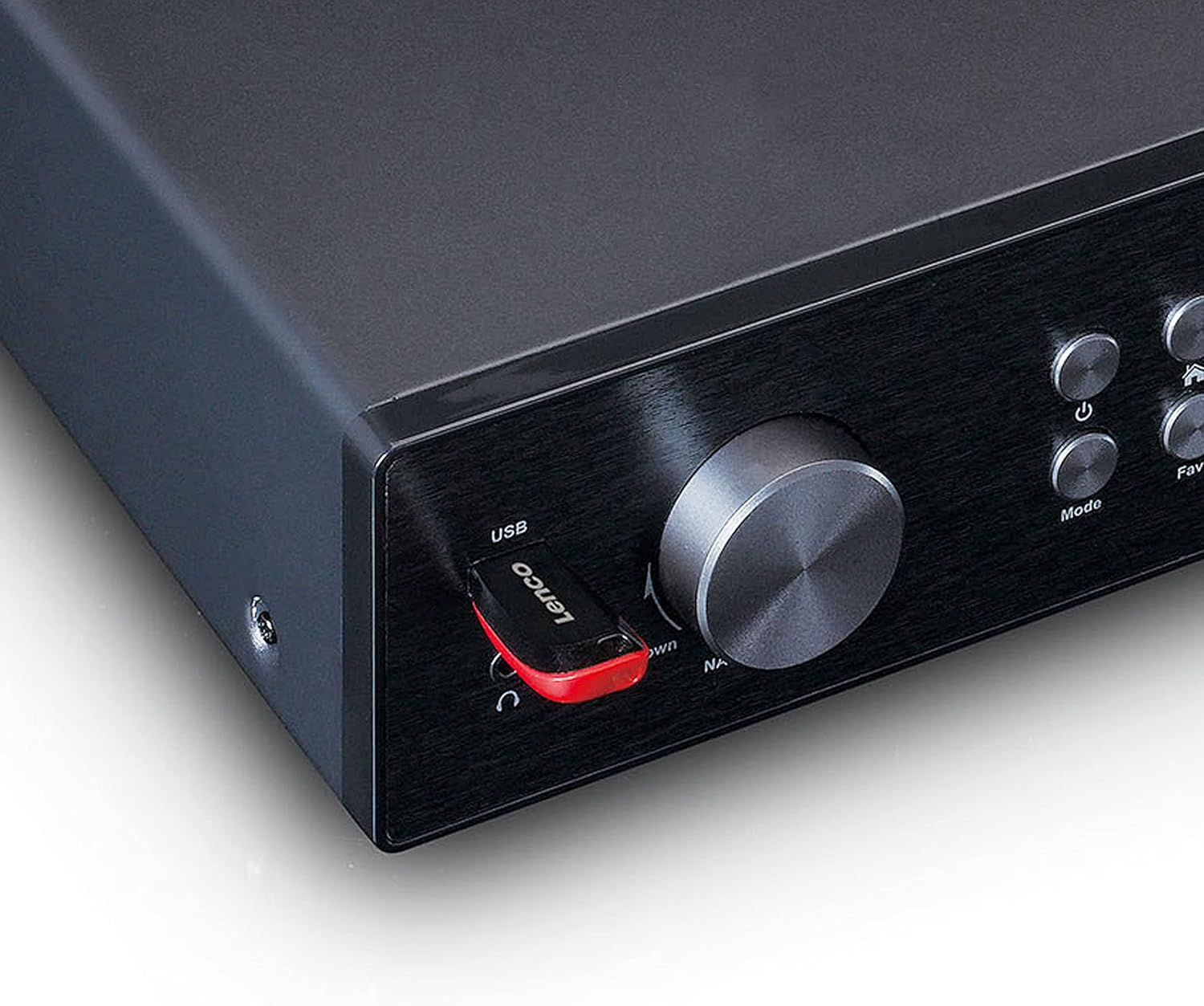
Figear 4.3: Close-up of the left side of the front panel, showing the USB port, headphone jack, Navigate/OK knob, Mode, and Favorite buttons.

Figear 4.4: Rear panel connections, including DC IN, Audio Output (RCA), Analog Input/Output, Optical Output, Coaxial Output, LAN (RJ45), and Antenna ports.
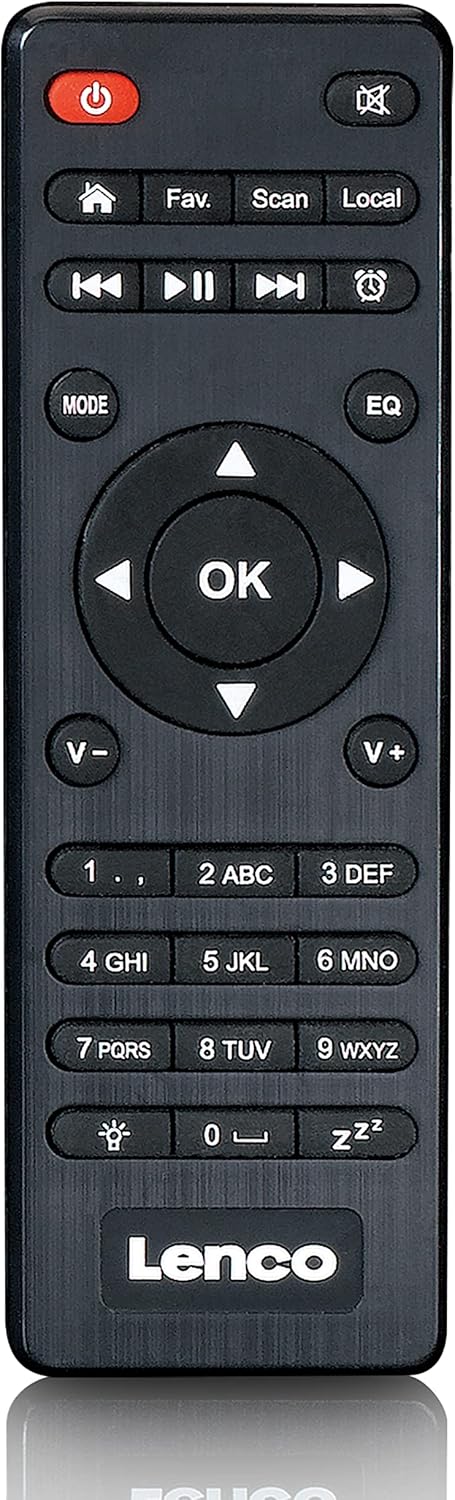
Figear 4.5: The included remote control for convenient operation of the Lenco DIR-250.
5. Suidhich
5.1. Ceangal Cumhachd
- Connect the supplied power adapter to the DC IN port on the rear of the unit.
- Plug an adapter cumhachd a-steach do bhalla a-muigh.
5.2. Ceangal Antenna
For optimal reception of DAB+ and FM radio, connect the provided antennas to their respective ports on the rear panel. Extend the telescopic antenna fully for best results.
5.3. Ceangal Lìonra
The DIR-250 supports both Wi-Fi and Ethernet connections for Internet Radio and Spotify Connect.
- Wi-Fi: Upon first power-on, the unit will guide you through the Wi-Fi setup. Select your network from the list and enter the password using the navigation knob and OK button, or the remote control.
- Ethernet: Connect an Ethernet cable from your router to the LAN port on the rear of the unit. The device will automatically detect the wired connection.
5.4. Tòiseachaidh Setup Wizard
The first time you power on the DIR-250, an initial setup wizard will appear on the display. Follow the on-screen prompts to configure language, time, date, and network settings. This ensures the device is ready for use.
6. Obrachadh
6.1. Smachdan Bunasach
The DIR-250 can be operated using the front panel controls or the included remote control.
- Putan Cumhachd: Turns the unit on/off or puts it into standby mode.
- Knob Volume: Rotate to adjust volume. Press to mute/unmute.
- Navigate/OK Knob: Rotate to scroll through menus and options. Press to confirm a selection.
- Putan Modh: Cycles through available modes (Internet Radio, DAB+, FM, Bluetooth, USB, AUX).
- Fav. Button: Accesses your list of favorite stations or saves the current station as a favorite.
- Putan Dimmer: Ag atharrachadh soilleireachd an taisbeanaidh.
- Putan-rabhaidh: Sets or manages alarms.
6.2. Rèidio Eadar-lìn
Access thousands of radio stations worldwide via your internet connection.
- Brùth an Modh gus an tèid “Rèidio Eadar-lìn” a thaghadh.
- Cleachd an Navigate/OK knob or remote control to browse stations by location, genre, or search.
- Brùth OK gus stèisean a thaghadh.
- To save a station as a favorite, press and hold the Fabh. putan.
6.3. Rèidio DAB+
Faigh tlachd à craolaidhean rèidio didseatach àrd-inbhe.
- Brùth an Modh button until "DAB+" is selected.
- Nì an rèidio sganadh gu fèin-ghluasadach airson stèiseanan DAB+ a tha rim faighinn.
- Cleachd an Navigate/OK knob or remote to select a station from the list.
6.4. Rèidio FM
Tune into traditional analog FM radio stations.
- Brùth an Modh button until "FM" is selected.
- Cleachd an Sgan putan air an smachd iomallach no an Navigate/OK knob to search for stations.
- Brùth OK to listen to a selected station.
6.5. Modh Bluetooth
Sruthaich claisneachd gun uèir bhon fhòn-smart, tablet no innealan eile le comas Bluetooth agad.
- Brùth an Modh button until "Bluetooth" is selected. The display will show "Pairing".
- On your external device, enable Bluetooth and search for "Lenco DIR-250".
- Select the device to pair. Once connected, you can play audio from your device through the radio.
6.6. Spotify Connect
Stiùirich do cheòl gu dìreach bhon aplacaid Spotify air an fhòn-smart no an tablet agad.
- Ensure your Lenco DIR-250 and your smartphone/tablet are connected to the same Wi-Fi network.
- Fosgail an aplacaid Spotify air an inneal agad.
- Cluich òran agus tap air an ìomhaigh “Innealan Ri Fhaotainn” (mar as trice ìomhaigh neach-labhairt no coimpiutair).
- Select "Lenco DIR-250" from the list of available devices.
6.7. USB Playback
Cluich fuaim files (MP3, WAV, AAC) from a USB flash drive.
- Cuir draibh flash USB a-steach don phort USB air a’ phannal aghaidh.
- Brùth an Modh button until "USB" is selected.
- Cleachd an Navigate/OK knob or remote to browse and select audio files.
6.8. In-chur AUX
Ceangail innealan claisneachd taobh a-muigh le bhith a’ cleachdadh càball claisneachd 3.5mm.
- Connect your external audio device to the AUX IN port on the rear panel.
- Brùth an Modh gus an tèid “AUX” a thaghadh.
- Cluich claisneachd bhon inneal ceangailte agad.
6.9. Inneal-rabhaidh agus Uaireadair Cadail
Set alarms to wake up to your favorite radio station or use the sleep timer to automatically turn off the radio.
- Alarm: Brùth an Alarm button on the front panel or remote. Follow the on-screen instructions to set alarm time, source, and volume.
- Timer cadail: Brùth an Cadal button on the remote control repeatedly to cycle through available sleep timer durations (e.g., 15, 30, 60 minutes, Off).
7. Cumail suas
7.1. Glanadh
To clean the unit, wipe it with a soft, dry cloth. Do not use abrasive cleaners, waxes, or solvents as these may damage the surface. Ensure the unit is unplugged before cleaning.
7.2. Stòradh
If you plan not to use the unit for an extended period, unplug it from the power outlet and store it in a cool, dry place, away from direct sunlight and extreme temperatures.
8. A ’dèanamh trioblaid
| Trioblaid | Adhbhar a dh’fhaodadh a bhith ann | Fuasgladh |
|---|---|---|
| Gun chumhachd | Chan eil an inneal-atharrachaidh cumhachd ceangailte no tha an socaid lochtach. | Thoir sùil air na ceanglaichean cumhachd. Feuch socaid eadar-dhealaichte. |
| Gun fhuaim | Volume too low, muted, or incorrect input selected. | Increase volume. Check if muted. Select correct input mode. |
| Chan urrainn dhuinn ceangal a dhèanamh ri Wi-Fi | Facal-faire ceàrr, taobh a-muigh raon, no duilgheadas leis an router. | Verify Wi-Fi password. Move unit closer to router. Restart router. |
| Internet Radio buffering/disconnecting | Weak Wi-Fi signal or slow internet connection. | Improve Wi-Fi signal strength. Check internet speed. Try wired Ethernet connection. |
| Droch ghlacadh DAB+/FM | Antenna not properly connected or extended. | Ensure antennas are fully extended and positioned for best reception. |
| Cùisean paidhir Bluetooth | Device not in pairing mode, or already paired with another device. | Ensure DIR-250 is in Bluetooth mode. Disconnect from other devices. |
| Bidh an aonad a’ reothadh no a’ fàs neo-fhreagairteach | Mearachd bathar-bog sealach. | Unplug the power adapter, wait 10 seconds, then plug it back in to restart the unit. |
9. Sònrachaidhean
| Brand | Lenco |
| Modail Àireamh | A004231 |
| Teicneòlas taisbeanadh | LCD |
| Ceangalachd | Bluetooth V5.0, Ethernet (RJ45), Wi-Fi |
| Còmhlan Rèidio le taic | Rèidio Eadar-lìn, DAB+, FM |
| Feartan sònraichte | Spotify Connect, USB Playback, Alarm, Sleep Timer |
| Meudan (L x W x H) | 43 x 28.7 x 7.2 cm |
| Cuideam | 1.5 cileagram |
| Stòr cumhachd | Wired (AC Adapter) |
| Innealan co-fhreagarrach | Tablet, Smartphone, USB storage devices |
10. Barantas
This product comes with a manufacturer's warranty of 24 months from the date of purchase. Please retain your proof of purchase for warranty claims. The warranty covers defects in materials and workmanship under normal use. It does not cover damage caused by misuse, accidents, unauthorized modifications, or normal wear and tear.
11. Taic
For technical support, service, or further inquiries regarding your Lenco DIR-250 Internet Radio, please visit the official Lenco website or contact their customer service department. Contact information can typically be found on the Lenco weblàrach no anns na sgrìobhainnean barantais a tha air an toirt a-steach leis an toradh agad.
Lenco Official Weblàrach: www.lenco.com