
GOKOO B08FMBHSWD
GOKOO Smart Watch B08FMBHSWD User Manual
Ro-ràdh
This manual provides essential information for the proper setup, operation, and maintenance of your GOKOO Smart Watch B08FMBHSWD. Please read it thoroughly before using the device to ensure optimal performance and longevity.
The GOKOO Smart Watch is a versatile fitness tracker and smartwatch designed to monitor various health metrics and assist with daily activities. It features a full touch screen, heart rate and blood oxygen monitoring, sleep tracking, multiple sports modes, and notification capabilities.
Bathar seachadview
The GOKOO Smart Watch B08FMBHSWD is equipped with advanced features to support your active lifestyle and health monitoring needs.
- All-day Activity Tracking: Records steps, calories, and mileage. Supports 10 sports modes including walking, running, yoga, and swimming.
- Sgrùdadh Slàinte coileanta: Continuously monitors heart rate and blood oxygen levels. Features automatic sleep tracking, breathing training, and sedentary reminders.
- Durable and Waterproof Design: IP68 waterproof rating suitable for daily use and swimming.
- Taisbeanadh gnàthaichte: 1.3-inch round high-definition screen with personalized UI interfaces.
- Fiosan snasail: Synchronizes messages and allows management of incoming calls.
- Beatha bataraidh fada: Up to 10 days of usage on a single charge (200MA battery).
- Co-fhreagarrachd farsaing: Works with Android 5.0+ and iOS 9.0+ devices.

Figure 1: GOKOO Smart Watch highlighting its design and core functionalities.
Suidhich
1. A 'cur cosgais air an inneal
Before initial use, fully charge your GOKOO Smart Watch. Connect the magnetic charging cable to the charging contacts on the back of the watch and plug the USB end into a power adapter (not included) or a computer's USB port. The watch display will indicate charging status.
A full charge typically takes approximately 2 hours and provides up to 10 days of usage, depending on individual use patterns.

Figure 2: Illustration of the watch's IP68 waterproof capability and its extended battery life.
2. Stàladh is Paidhreachadh Aplacaidean
- Luchdaich sìos an App: Lorg airson the official GOKOO companion app in your smartphone's app store (Apple App Store for iOS, Google Play Store for Android).
- Stàlaich is Clàraich: Stàlaich an aplacaid agus lean an stiùireadh air an sgrion gus cunntas a chruthachadh no logadh a-steach.
- Dèan comas air Bluetooth: Dèan cinnteach gu bheil Bluetooth air a chomasachadh air an fhòn-smart agad.
- Paidhir an Uaireadair: Open the GOKOO app, navigate to the device pairing section, and select your GOKOO Smart Watch from the list of available devices. Confirm the pairing request on both your phone and the watch if prompted.
- Ceadan Tabhartais: Leig leis na ceadan riatanach (me, fiosan, àite, dàta slàinte) gus am bi an aplacaid ag obair gu ceart.
The watch will synchronize its language with your phone upon successful connection.
Stiùireadh Obrachaidh
1. Seòladh Bunaiteach
- Sgrion-suathaidh: The watch features a full touch screen for interaction.
- Swipe Up / Down: Scrollaich tro chlàran-bìdh agus fiosan.
- Swipe clì/deas: Faigh cothrom air diofar widgets no gnìomhan luath.
- Tap: Tagh nì no dearbhaich gnìomh.
- Putan Taobh: Typically used to return to the home screen or activate/deactivate the display.

Figure 3: The watch interface displaying multiple functions and touch screen interaction methods.
2. Tracadh Gnìomhachd
The watch automatically tracks your daily steps, calories burned, and distance traveled. For specific activities, you can select from 10 sports modes:
- A' coiseachd
- A' ruith
- Ioga
- Snàmh
- Rothaireachd
- Sreap
- Ball-basgaid
- Ball-coise
- Badmantan
- A' sgapadh
To start a workout, navigate to the 'Sports' menu on your watch, select the desired activity, and tap to begin. The watch will record your exercise data, which can be reviewair a dheasachadh san aplacaid co-cheangailte.

Figure 4: The watch interface showing available sports monitoring modes.

Figure 5: The watch tracking an outdoor run, displaying distance, calories, and a trajectory map.
3. Sgrùdadh Slàinte
- Ìre cridhe: Bidh an uaireadair a’ cumail sùil leantainneach air ìre do chridhe. View dàta fìor-ùine air an uaireadair no dàta eachdraidheil mionaideach san aplacaid.
- Ocsaidean fala (SpO2): Monitor your blood oxygen levels throughout the day.
- Rianachd cadail: The watch automatically records your sleep quality, including deep sleep, light sleep, and wake times. Review sleep patterns in the app to help adjust your habits.
- Trèanadh anail: Access guided breathing exercises on the watch to help reduce stress and improve relaxation.
- Cuimhneachain Sedentary: Set reminders in the app to prompt you to move after periods of inactivity.

Figure 6: The watch displaying real-time heart rate and blood oxygen data during exercise.
4. Fiosan agus Feartan Snasail
Once paired with your smartphone, the GOKOO Smart Watch can display notifications for incoming calls, messages, and various app alerts. You can read messages directly on your wrist and manage incoming calls (answer/reject) without reaching for your phone.
- Riaghladh Call: Swipe on the watch screen to accept or reject incoming calls.
- Message Display: View text messages and app notifications.
- Aimsir na sìde: Access current weather information.
- Smachd Ciùil: Smachd air ath-chluich ciùil air an fhòn-smart agad.
- Iomallach a ’chamara: Cleachd an uaireadair mar inneal-camara iomallach airson camara an fhòn agad.
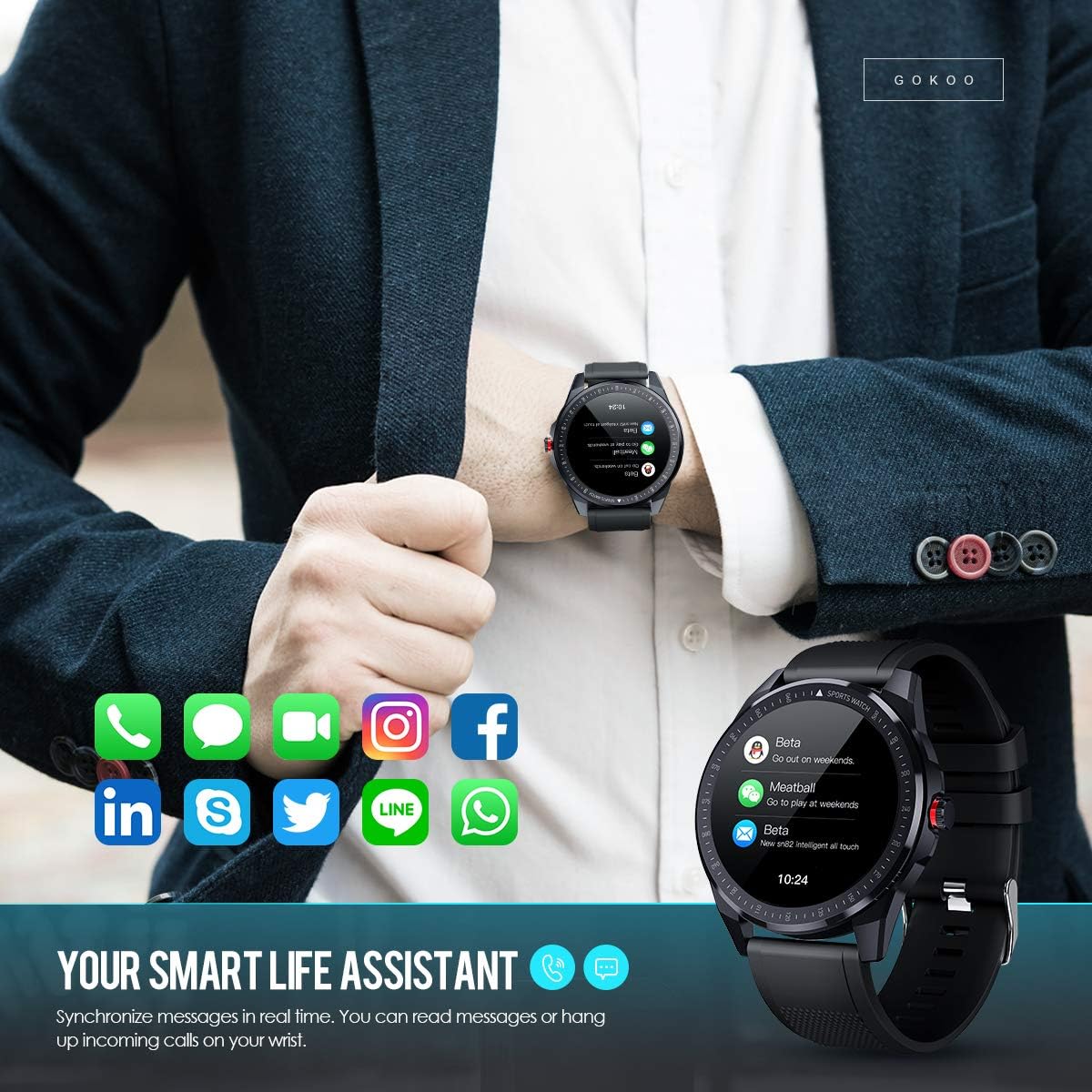
Figure 7: The watch showing synchronized notifications from a smartphone.
5. Gnàthachadh
The GOKOO Smart Watch allows for personalization of its interface. You can select from various pre-installed watch faces or download additional styles through the companion app to match your preference.
Cumail suas
1. Glanadh
Regularly clean your watch and strap to prevent skin irritation and maintain device hygiene. Use a soft, lint-free cloth. If necessary, slightly dampnigh an clò le uisge. Seachain ceimigean cruaidh, innealan-glanaidh sgrìobach, no spraeirean aerosol a chleachdadh.
2. Stiùiridhean airson Dìon-uisge
The GOKOO Smart Watch has an IP68 waterproof rating, meaning it is resistant to dust and can withstand immersion in water up to 1.5 meters for 30 minutes. It is suitable for daily use, hand washing, rain, and swimming.
Cudromach: Do not use the watch in hot water baths, saunas, or during diving. High temperatures and high pressure can compromise the waterproof seals and cause damage.
3. Cùram Bataraidh
- Seachain a bhith a’ leigeil às a’ bhataraidh gu tur gu tric.
- Cuir cosgais air an uaireadair leis a’ chàball cosgais magnetach a tha air a thoirt seachad.
- Stòraich an uaireadair ann an àite fionnar, tioram nuair nach eilear ga chleachdadh airson ùine mhòr.
Fuasgladh thrioblaidean
- Uaireadair nach eil a’ tionndadh air: Dèan cinnteach gu bheil an uaireadair làn-luchdaichte. Ceangail e ris an charger airson co-dhiù 30 mionaid.
- Chan urrainnear paidhir a dhèanamh leis a’ fòn:
- Dèan cinnteach gu bheil Bluetooth air a chomasachadh air an fhòn agad.
- Dèan cinnteach gu bheil an uaireadair taobh a-staigh raon Bluetooth an fhòn agad.
- Ath-thòisich an dà chuid am fòn agad agus an uaireadair.
- Check if the app has necessary permissions.
- Dàta slàinte neo-mhearachdach: Dèan cinnteach gu bheil an uaireadair air a chaitheamh gu teann air do chaol-dùirn, mu leud aon mheòir os cionn cnàimh na caol-dùirn. Glan am mothachair air cùl an uaireadair.
- Fiosan nach eil a’ nochdadh:
- Verify that notification permissions are granted in the app and your phone's settings.
- Dèan cinnteach gu bheil an uaireadair ceangailte tro Bluetooth.
- Thoir sùil a bheil modh ‘Na Cuir Dragh Air’ gnìomhach air an uaireadair no air a’ fòn.
- Beatha bataraidh goirid: Reduce screen brightness, disable continuous heart rate monitoring if not needed, and limit the number of active notifications.
Sònrachaidhean
| Feart | Mion-fhiosrachadh |
|---|---|
| Brand | GOGACH |
| Modail | B08FMBHSWD |
| Meud sgrion | 1.3 òirlich |
| Siostam-obrachaidh | Android 5.0 no nas àirde, iOS 9.0 no nas àirde |
| Innealan co-fhreagarrach | Fòn-smart |
| Beatha bataraidh | Suas ri 10 latha (a rèir cleachdadh) |
| Seòrsa bataraidh | Polymer lithium |
| Frith-aghaidh uisge | IP68 |
| Ceangal gun uèir | Bluetooth |
| Cur a-steach eadar-aghaidh daonna | Sgrion-touch |
| Meudan toraidh | 27 x 5 x 1.08cm; 168g |

Figure 8: Detailed product dimensions of the GOKOO Smart Watch.
Barantas agus Taic
For warranty information or technical support, please refer to the contact details provided with your purchase or visit the official GOKOO website. If you require a copy of this manual or have any questions regarding your GOKOO Smart Watch B08FMBHSWD, please contact customer service.
Ask a question about this manual
Ask about setup, troubleshooting, compatibility, parts, safety, or missing instructions. Manuals+ will review the question and use this page’s manual context to help answer it.