
ELECDER D19
Leabhar-làimhe Cleachdaiche Fònaichean-cluaise gun Uèir ELECDER D19
Model: D19 | Brand: ELECDER
1. Ro-ràdh
The ELECDER D19 True Wireless Earbuds are designed to provide a superior audio experience with advanced features such as Bluetooth 5.0 connectivity, noise cancellation, and IPX7 waterproofing. This manual provides comprehensive instructions for setting up, operating, and maintaining your earbuds to ensure optimal performance and longevity.
Prìomh fheartan:
- Bluetooth 5.0: Fast and stable wireless transmission with CVC8.0 noise cancellation for clear calls.
- Premium Hi-Fi Stereo Audio: APTX audio for lossless transmission, delivering immersive sound with crystal clarity and deep bass.
- Uisge-dìon IPX7: Resistant to sweat, water, and rain, ideal for workouts and outdoor activities.
- Dealbhadh ergonomic: Lightweight (5g per earbud) with flexible silicone ear-fins and S/M/L ear caps for a secure and comfortable fit.
- Quick Pairing Technology: Automatic power-on and pairing upon removal from the charging case.
- USB Quick Charge & Wireless Charging: Up to 4.5 hours of music on a single charge, with an additional 18 hours from the charging case, supporting both USB and wireless charging.
2. Toradh thallview

Figure 2.1: ELECDER D19 True Wireless Earbuds in their charging case. The earbuds are black, sleek, and designed for in-ear use, while the compact charging case is also black with a smooth finish.
Dè tha sa bhogsa:
- ELECDER D19 True Wireless Earbuds (Left and Right)
- Cùis Cìse
- Càball cosgais USB
- Molaidhean-cluaise (meudan S/M/L)
- Leabhar-làimhe cleachdaiche (an sgrìobhainn seo)
3. Stiùirich rèiteachaidh
3.1 A’ cur cosgais air na cluasan-cluaise agus a’ chùis
Before first use, fully charge the earbuds and the charging case. The charging case supports both USB cable charging and wireless charging.
- Cìs USB: Connect the provided USB cable to the charging port on the case and plug the other end into a USB power source (e.g., computer, wall adapter). The indicator light on the case will show charging status.
- Cìs gun uèir: Place the charging case on a compatible wireless charging pad. The indicator light will flash to confirm charging.

Figure 3.1: The ELECDER D19 charging case being charged wirelessly on a charging pad, also showing the Micro USB port for wired charging. This image highlights the dual charging capabilities of the case.
A full charge for the earbuds provides approximately 4.5 hours of music playback, and the charging case provides an additional 18 hours of battery life.
3.2 A’ paidhreachadh leis an inneal agad
The ELECDER D19 earbuds feature quick pairing technology for seamless connection.
- Ceum 1: Fosgail a’ chùis cosgais agus thoir a-mach an dà chluas-cinn. Bidh iad a’ tionndadh air gu fèin-ghluasadach agus a’ paidhreachadh ri chèile.
- Ceum 2: Air an fhòn-smart no an inneal agad le comas Bluetooth, rach gu na roghainnean Bluetooth.
- Ceum 3: Lorg airson available devices and select "Elecder D19" from the list to connect.
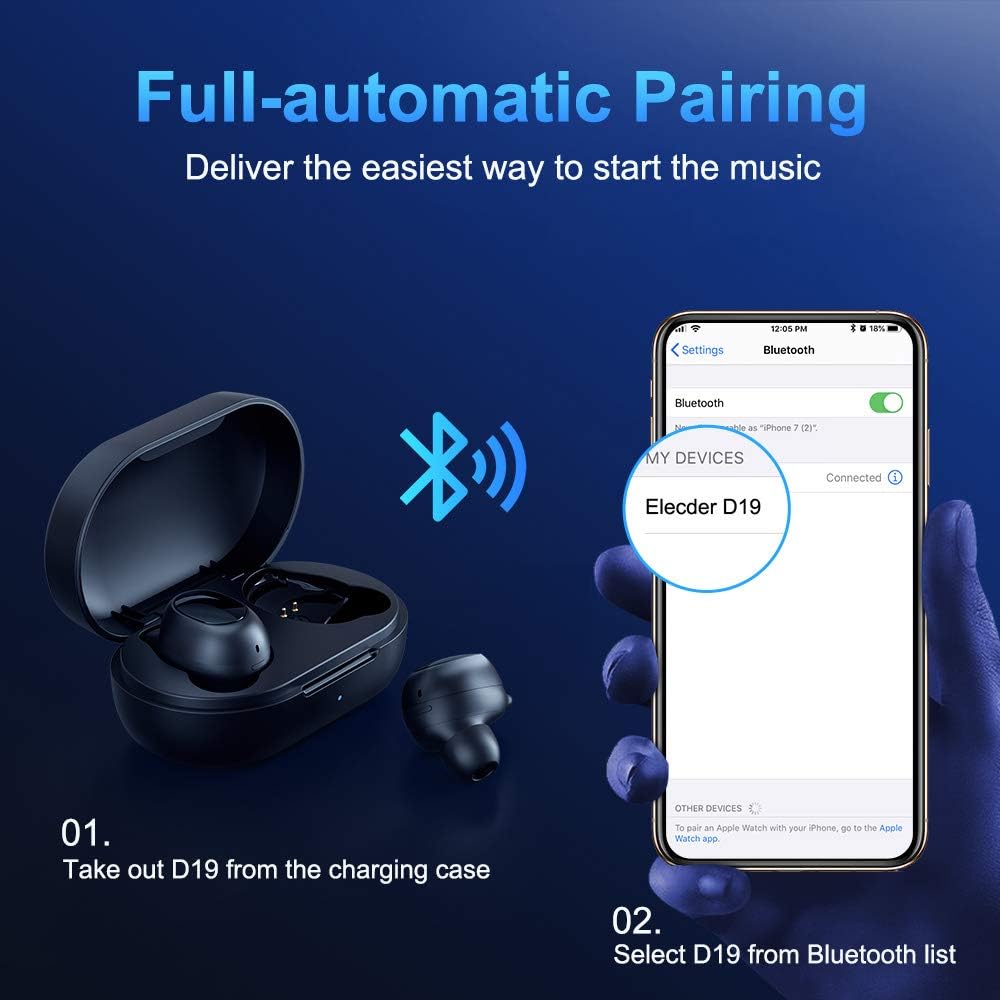
Figure 3.2: A visual guide demonstrating the automatic pairing process. The image shows the earbuds being taken out of the case and then the "Elecder D19" option appearing in a smartphone's Bluetooth settings for connection.
After the initial pairing, the earbuds will automatically connect to the last paired device when taken out of the charging case.

Figure 3.3: An illustration showing the stable Bluetooth connection between the ELECDER D19 earbuds and various smart devices, including smartphones and tablets.
4. Stiùireadh Obrachaidh
4.1 A’ caitheamh nan cluasan-cluaise
For optimal sound quality and comfort, choose the ear tips that best fit your ears. The earbuds come with S, M, and L sizes. Insert the earbuds into your ears and gently rotate them to find a secure and comfortable fit. The ergonomic ear-fin design helps ensure stability during movement.
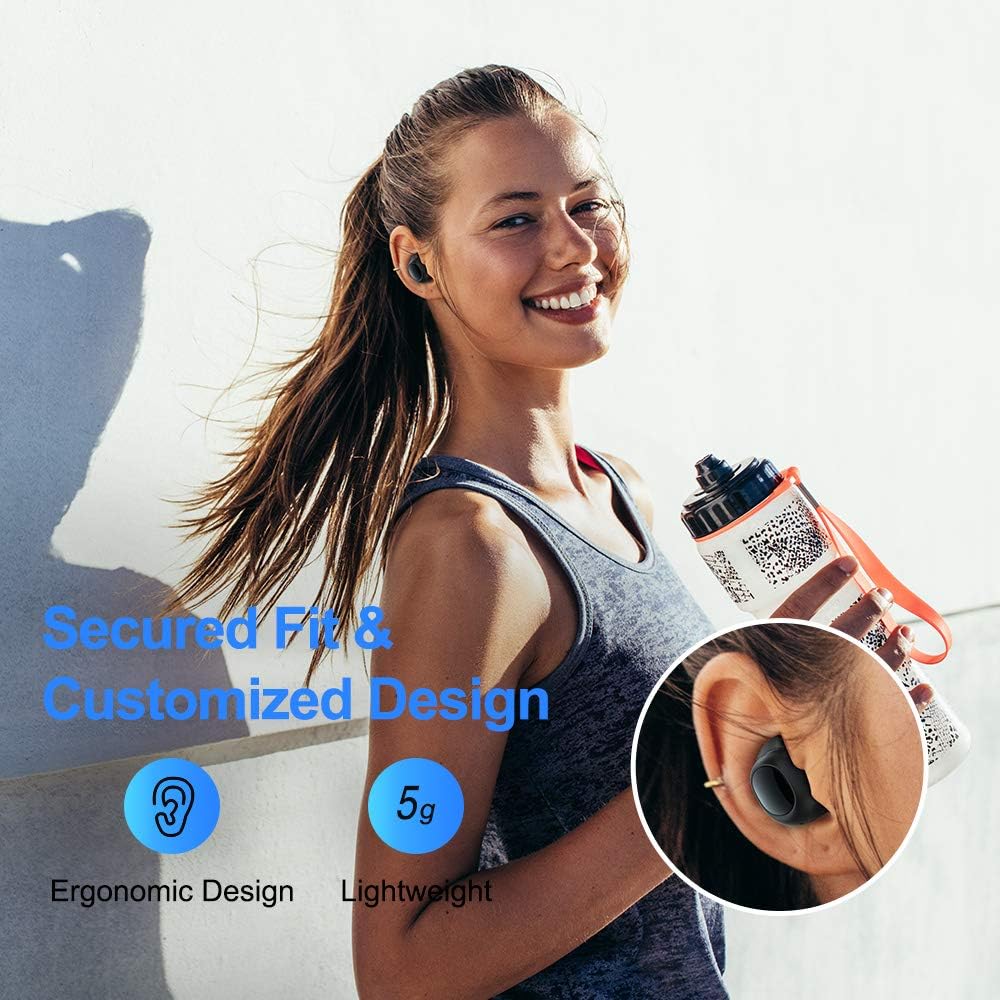
Figure 4.1: A person wearing the ELECDER D19 earbuds during a workout, demonstrating the secure and comfortable fit provided by the ergonomic design and customizable ear tips.
4.2 Smachd nam Meadhanan
The ELECDER D19 earbuds feature physical buttons for media control. Specific button functions may vary slightly based on the device and operating system, but common controls include:
- Cluich / Stad: Brùth aon uair air gach cluais-fòn.
- An ath cheum: Brùth dà uair air a’ chluas-cinn dheas.
- Rian roimhe: Brùth dà uair air a’ chluas-cinn chlì.
- Meud suas: Triple press on the right earbud.
- Meud sìos: Triple press on the left earbud.
4.3 Riaghladh Ghairmean
Stiùirich na gairmean agad gu dìreach bho na fònaichean-cluaise:
- Freagairt/Cuireadh Call: Brùth aon uair air gach cluais-fòn.
- Call a dhiùltadh: Brùth agus cum an dàrna cuid earbud airson 2 dhiog.
- Cuir an gnìomh neach-taic guth: Brùth is cum sìos aon seach aon de na cluais-fònaichean airson 3 diogan (m.e., Siri, Neach-taic Google).
5. Cumail suas agus Cùram
Proper maintenance ensures the longevity and optimal performance of your ELECDER D19 earbuds.
5.1 Glanadh
- Glan na fònaichean-cluaise agus a’ chùis cosgais gu cunbhalach le clò bog, tioram, gun lint.
- Thoir air falbh cinn-cluaise agus glan iad le siabann is uisge tlàth, an uairsin tiormaich gu mionaideach mus cuir thu iad air ais.
- Cleachd swab cotain no bruis bheag gus na ceanglaichean cosgais air na fònaichean-cluaise agus a’ chùis a ghlanadh gu socair.
- Seachain a bhith a’ cleachdadh stuthan sgrìobach, deoch làidir, no innealan-glanaidh ceimigeach.
5.2 Dìon-uisge (IPX7)
The ELECDER D19 earbuds are IPX7 waterproof, meaning they can withstand submersion in up to 1 meter of water for 30 minutes. This makes them suitable for protection against sweat, rain, and accidental splashes.

Figure 5.1: The ELECDER D19 earbuds shown with water droplets, illustrating their IPX7 waterproof rating, which protects them from sweat, rain, and splashes.
Thoir an aire: The charging case is not waterproof. Ensure earbuds are dry before placing them back into the charging case.
5.3 Stòradh
Nuair nach eilear gan cleachdadh, stòraich na cluas-cinn anns a’ chùis cosgais aca gus an dìon agus an cumail fo chasaid. Stòraich a’ chùis ann an àite fionnar, tioram air falbh bho theodhachd anabarrach agus solas dìreach na grèine.
6. A ’dèanamh trioblaid
If you encounter issues with your ELECDER D19 earbuds, refer to the following common solutions:
| Trioblaid | Adhbhar a dh’fhaodadh a bhith ann | Fuasgladh |
|---|---|---|
| Chan eil na cluasan-cluaise a’ paidhreachadh leis an inneal. | Tha Bluetooth dheth air an inneal; chan eil fònaichean-cluaise ann am modh càraideachaidh; inneal a bha càraideachaidh roimhe a’ cur bacadh air. | Ensure Bluetooth is enabled. Place earbuds back in case, then take them out to re-enter pairing mode. Forget "Elecder D19" from your device's Bluetooth list and re-pair. |
| Aon chluas-cinn a-mhàin ag obair. | Earbuds not paired with each other; low battery on one earbud. | Place both earbuds back into the charging case, close the lid, wait a few seconds, then open and take them out again. Ensure both earbuds are charged. |
| Gun fhuaim no meud ìosal. | Device volume too low; ear tips not properly sealed; debris in earbud nozzle. | Increase volume on your device. Adjust earbud position or try different sized ear tips for a better seal. Clean earbud nozzles. |
| Chan eil a’ chùis cosgais a’ cur cosgais. | Faulty cable/charger; improper placement on wireless charger. | Try a different USB cable and power adapter. Ensure the case is correctly aligned on the wireless charging pad. |
| Ceangal Bluetooth neo-sheasmhach. | Interference; distance from device; low earbud battery. | Reduce distance between earbuds and device. Avoid environments with strong Wi-Fi or other Bluetooth signals. Ensure earbuds are fully charged. |
7. Sònrachaidhean
Detailed technical specifications for the ELECDER D19 True Wireless Earbuds:
| Feart | Mion-fhiosrachadh |
|---|---|
| Ainm Modail | ELECDER D19 |
| Teicneòlas ceangail | Gun Uèir (Bluetooth 5.0) |
| Raon Bluetooth | 33 troigh |
| Suidheachadh cluais | Anns an Ear |
| Factor foirm | Anns an Ear |
| Smachd fuaim | Active Noise Cancellation (CVC8.0) |
| Micreofon | Air a ghabhail a-steach |
| Ìre an aghaidh uisge | IPX7 uisge-dhìonach |
| Beatha Bataraidh (Cluais-fònaichean) | Up to 4.5 hours (music) / 4 hours (calling) |
| Ùine cluiche a bharrachd airson a’ chùis cosgais | 18 uairean |
| Ùine cosgais | Mu 2 uair a thìde |
| Eadar-aghaidh cosgais | Micro USB, Wireless Charging |
| Cuideam nì | 1.92 ounces (total) / 5g (each earbud) |
| Meudan toraidh | 3.89 x 3.89 x 1.65 òirleach |
| Innealan co-fhreagarrach | Fònaichean sgairteil iOS agus Android |
| Stuth | Silicone (cluais-mheudan) |
| Dath | Dubh |

Figure 7.1: An infographic detailing the battery life of the ELECDER D19 earbuds and charging case, showing 4 hours for calls, 4.5 hours for music, and a total of 18 hours with the 500mAh charging case.
8. Barantas agus Taic
ELECDER products are manufactured to high quality standards. For information regarding warranty coverage, technical support, or service inquiries, please refer to the contact information provided with your product packaging or visit the official ELECDER weblàrach.
For further assistance, you may also contact the retailer where you purchased the product.
Ask a question about this manual
Ask about setup, troubleshooting, compatibility, parts, safety, or missing instructions. Manuals+ will review the question and use this page’s manual context to help answer it.