
Ro-ràdh
This manual provides detailed instructions for the installation, operation, maintenance, and troubleshooting of the HP ProDesk 400 G3 MS-7957 motherboard. Please read this manual thoroughly before proceeding with any installation or operation to ensure proper functionality and safety.
Fiosrachadh Sàbhailteachd
Cùm na ceumannan sàbhailteachd a leanas an-còmhnaidh gus casg a chur air milleadh air a’ bhòrd-màthar no leòn ort fhèin:
- Dì-cheangail an solar cumhachd bhon t-socaid balla mus cuir thu a-steach no mus toir thu air falbh co-phàirtean sam bith.
- Cuir ort strap dùirn an-aghaidh statach no bean ri nì meatailt talmhaichte gu tric gus dealan statach a leigeil ma sgaoil mus làimhsich thu am bòrd-màthar.
- Làimhsich am bòrd-màthar leis na h-oirean aige gus nach bean thu ri pàirtean mothachail.
- Dèan cinnteach gu bheil fionnarachadh ceart ann an cùis a’ choimpiutair gus casg a chur air cus teasachadh.
- Cùm am bòrd-màthar air falbh bho taiseachd agus teòthachd anabarrach.
Bathar seachadview
The HP ProDesk 400 G3 MS-7957 is a MicroATX motherboard designed for Intel processors with an LGA 1151 socket. It supports DDR4 RAM and features a B250 chipset, offering a reliable foundation for desktop computing.
Prìomh fheartan
- Compatible CPU Brand: Intel
- Seòrsa Socket: LGA 1151/Socket H4
- Factor foirm: MicroATX
- Luchd-ceangail I/O: Ethernet (RJ-45), USB 2.0, USB 3.0, VGA, DisplayPort, HD Audio Jack
Comharrachadh co-phàirt
Familiarize yourself with the layout of the motherboard to facilitate proper installation and connection of components.

Figear 1: Ceàrnach view of the HP ProDesk 400 G3 MS-7957 motherboard. This image highlights the CPU socket (LGA 1151), four DDR4 RAM slots, PCIe slots, and various headers for front panel connections and storage devices.
Stàladh agus stàladh
Mus tòisich thu
- Ensure your computer case is compatible with the MicroATX form factor.
- Gather all necessary components: CPU, RAM, CPU cooler, power supply, storage devices, and graphics card (if not using integrated graphics).
- Prepare your workspace by ensuring it is clean, well-lit, and static-free.
Stàladh motherboard
- Install the CPU into the LGA 1151 socket. Carefully align the CPU with the socket's notch and gently lower it into place. Close the retention arm.
- Cuir pasgain teirmeach air an CPU agus stàlaich an fhuaradair CPU a rèir stiùiridhean an neach-dèanamh.
- Install the DDR4 RAM modules into the designated slots. Ensure they are fully seated until the clips lock into place.
- Mount the motherboard into the computer case using the appropriate standoffs and screws.
- Ceangail am prìomh cheangal cumhachd ATX 24-prìne agus an ceangal cumhachd CPU 4-prìne no 8-prìne bhon t-solar cumhachd agad ris a’ bhòrd-màthar.
- Install any expansion cards (e.g., graphics card) into the PCIe slots.

Figear 2: Ceàrnach bho mhullach gu bonn view of the HP ProDesk 400 G3 MS-7957 motherboard. This perspective provides a clear view of the processor socket, memory slots, and the layout of the various internal connectors and components.
Ceangal Peripherals
- Connect SATA storage devices (HDDs/SSDs) to the SATA ports on the motherboard.
- Connect front panel headers (power button, reset button, USB ports, audio jacks) to their respective pins on the motherboard. Refer to your case manual for specific pin assignments.
- Connect external peripherals such as monitor, keyboard, mouse, and Ethernet cable to the rear I/O panel.
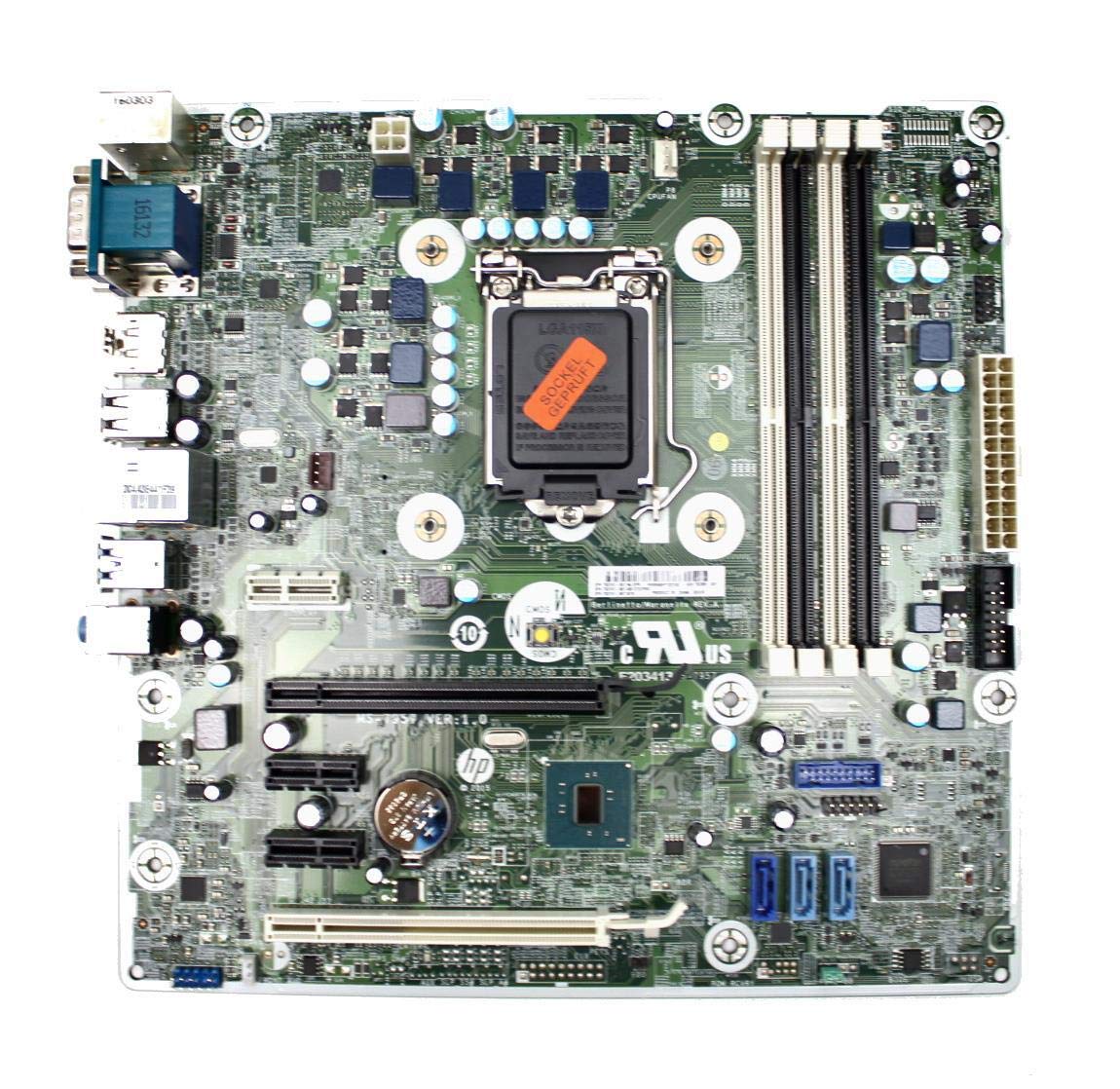
Figure 3: Rear I/O panel of the HP ProDesk 400 G3 MS-7957 motherboard. This image displays the available external connectivity options, including PS/2 ports, serial port, VGA, DisplayPort, USB 2.0, USB 3.0, Ethernet (RJ-45), and HD audio jacks.
Stiùireadh Obrachaidh
Cumhachd tùsail air adhart
After all components are installed and connected, connect the power cable to the power supply and press the power button on your computer case. The system should initiate the boot process.
Rèiteachadh BIOS/UEFI
Gus faighinn chun ghoireas rèiteachaidh BIOS/UEFI, brùth air an iuchair ainmichte (mar as trice Del, F2, F10, or F12) during the initial boot sequence. Here you can configure boot order, system time, and other hardware settings.
Stàladh driver
After installing your operating system, it is crucial to install the latest drivers for your motherboard's chipset, integrated graphics, audio, and network adapter. These drivers can typically be found on the HP support website or the chipset manufacturer's weblàrach.
Cumail suas
- Glanadh: Glan duslach bhon bhòrd-màthar agus na co-phàirtean gu cunbhalach le bhith a’ cleachdadh èadhar teannaichte. Dèan cinnteach gu bheil an siostam dheth agus gun a bhith a’ cleachdadh a’ phluga mus glan thu e.
- Ùrachaidhean BIOS/UEFI: Periodically check for BIOS/UEFI updates from HP's official support website. Updates can improve stability, compatibility, and performance. Follow update instructions carefully to avoid system damage.
- Ùraich na draibhearan: Keep all system drivers updated to ensure optimal performance and compatibility with new software and hardware.
Fuasgladh thrioblaidean
Tha an earrann seo a’ toirt seachad fuasglaidhean air cùisean cumanta a dh’ fhaodadh tu a thighinn tarsainn orra:
- Gun chumhachd: Check all power connections, including the 24-pin ATX and CPU power cables. Ensure the power supply is switched on and the wall outlet is functional.
- Gun taisbeanadh: Verify that your monitor is connected to the correct video output (VGA or DisplayPort) and is powered on. Reseat the graphics card (if applicable) and RAM modules.
- Neo-sheasmhachd/Tubaistean an t-siostaim: This could be due to overheating, faulty RAM, or outdated drivers. Check CPU and GPU temperatures, run memory diagnostic tools, and update drivers.
- Innealan-iomaill gun lorg: Ensure the peripheral is properly connected. Try a different port or update the relevant drivers.
- Cùisean BIOS/UEFI: If you encounter issues after changing BIOS settings, try resetting the CMOS by removing the CMOS battery for a few minutes or using the clear CMOS jumper (refer to motherboard diagram for location).
Sònrachaidhean
| Feart | Sònrachadh |
|---|---|
| Brand | HP |
| Socaid CPU | LGA 1151 |
| Innealan co-fhreagarrach | Coimpiutair Deasg |
| Teicneòlas RAM | DDR4 |
| Pròiseasairean Co-chòrdail | Intel Core i3-6xxx, Intel Core i5-6xxx, Intel Core i7-6xxx, Intel Core i3-7xxx, Intel Core i5-7xxx, Intel Core i7-7xxx, Intel Core i3-8xxx, Intel Core i5-8xxx, Intel Core i7-8xxx |
| Seòrsa Chipset | Intel B250 |
| Àrd-ùrlar | Windows |
| Ainm Modail | MS-7957 |
| Modail CPU | Core i3 (Note: Supports i3, i5, i7 as listed above) |
| Prìomh Seòrsa Power Connector | 24 prìne |
| Eadar-aghaidh cairt grafaigeachd | PCI Express |
| Sliotan Cuimhne a tha rim faighinn | 4 |
| Puirt SATA Iomlan | 6 |
| Gu h-iomlan puirt USB | 2 (Note: Refers to internal headers, rear I/O has more) |
| Puirt Ethernet Iomlan | 1 |
| Total PCIe Ports | 3 |
| Dèanadair | Computer Store Berlin (Reseller/Supplier) |
| Pàirt Àireamh | 4061435962741 |
| ASIN | B08CS13PTQ |
Barantas agus Taic
Tha an toradh seo a’ tighinn le a Barantas 1-bliadhna bhon cheann-latha ceannach. Tha am barantas seo a’ còmhdach uireasbhaidhean ann an stuthan agus obair-obrach fo chleachdadh àbhaisteach.
For technical support, warranty claims, or further assistance, please contact your point of purchase or refer to the official HP support resources for the ProDesk 400 G3 series.