
1. Ro-ràdh
This manual provides detailed instructions for the safe and effective use of the Walfront PM6508 Digital Temperature Humidity Meter. This device is designed for high-precision measurement of ambient temperature and relative humidity, offering features such as data hold, backlight display, and wet bulb/dew point temperature calculations. It is suitable for various applications including home, office, industrial settings, and environmental monitoring.
2. Fiosrachadh Sàbhailteachd
Please read and understand all safety warnings and operating instructions before using this instrument. Failure to follow these instructions may result in electric shock, fire, or injury.
- Na cleachd am meatair ma tha coltas millte air no mura h-eil còmhdach a’ bhataraidh dùinte gu ceart.
- Avoid exposing the meter to extreme temperatures, direct sunlight, or high humidity for prolonged periods.
- Na feuch ri càradh no atharrachadh a dhèanamh air a’ mheatair. Thoir aire do luchd-obrach teisteanasach airson a h-uile seirbheiseachadh.
- Thoir air falbh bataraidhean mura tèid am meatair a chleachdadh airson ùine mhòr gus casg a chur air aodion.
- Keep the sensor area clean and free from obstructions to ensure accurate readings.
3. Toradh thallview
The Walfront PM6508 is a compact and portable digital meter designed for accurate environmental measurements. It features an easy-to-read LCD display with backlight and intuitive button controls.

Figear 3.1: Aghaidh view of the Walfront PM6508 meter with key components labeled. This includes the temperature and humidity sensor at the top, the HD display, various control buttons (Power, Max/Min, Data Hold, Data Storage, Unit Switch, Backlight), and an anti-fall protective sleeve.
3.1 Prìomh fheartan
- Sensor àrd-chruinneas: Provides accurate temperature and humidity readings.
- Taisbeanadh LCD le solas cùil: Ensures clear readability in various lighting conditions.
- Gnìomh cumail dàta: Reothaidh e an leughadh làithreach air an taisbeanadh.
- Stòradh dàta: A’ stòradh suas ri 100 buidheann de dhàta tomhais.
- Wet Bulb & Dew Point Temperature: Calculates and displays these critical environmental parameters.
- Atharrachadh aonad: Gluais gu furasta eadar Celsius (°C) agus Fahrenheit (°F).
- Dùnadh sìos fèin-ghluasadach: A’ sàbhaladh beatha bataraidh.
- Comharra cumhachd ìosal: Rabhaidhean nuair a dh’ fheumar bataraidhean ùra a chur nan àite.
3.2 Susbaint a’ phacaid

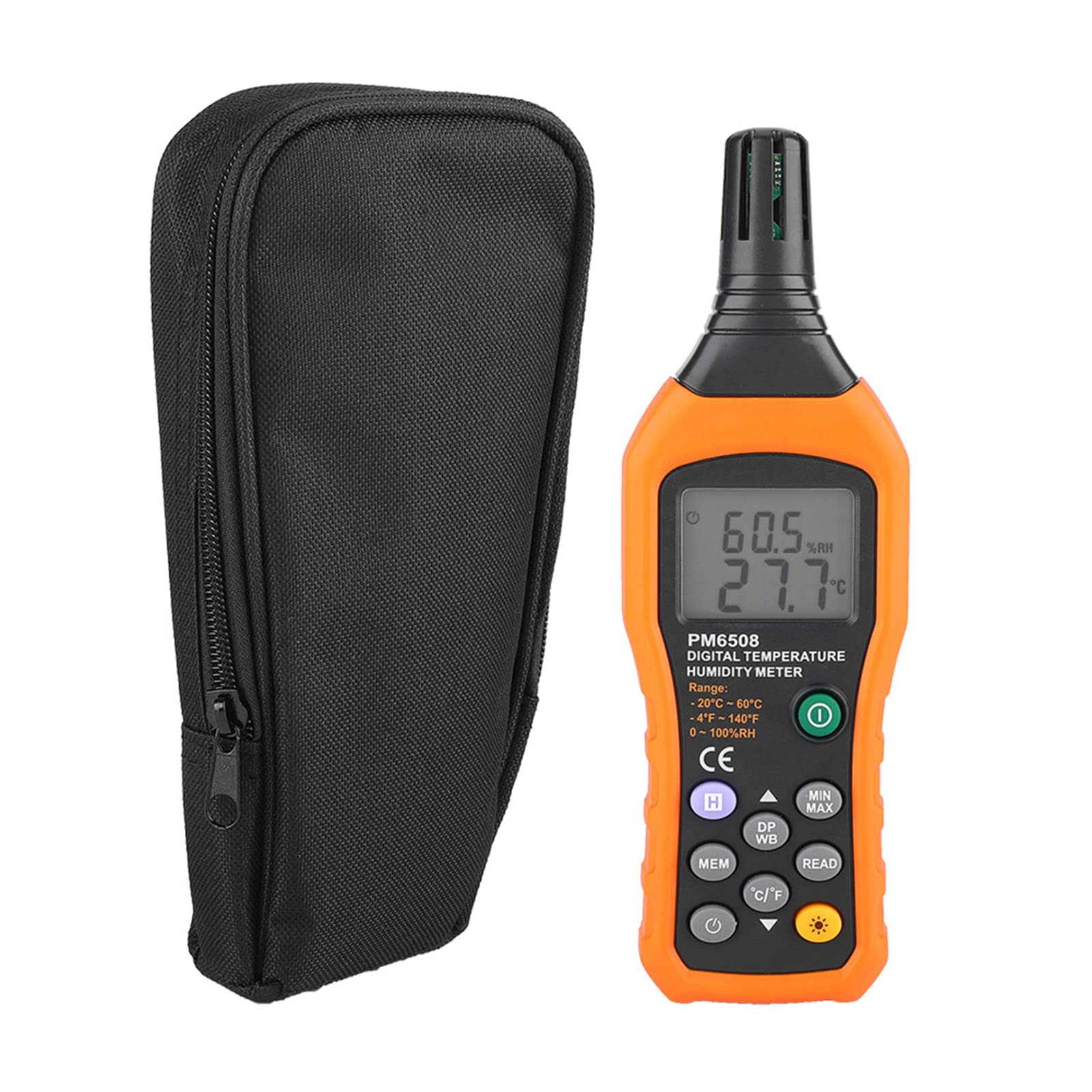
Figear 3.2: The Walfront PM6508 meter shown alongside its portable storage bag, indicating typical package contents.
- Walfront PM6508 Digital Temperature Humidity Meter
- Bag stòraidh so-ghiùlain
- Leabhar-làimhe cleachdaiche
4. Suidhich
4.1 Stàladh bataraidh
The PM6508 meter requires 4 x 1.5V AAA batteries (not included) for operation.
- Lorg còmhdach roinn a’ bhataraidh air cùl a’ mheatair.
- Sleamhnaich còmhdach a’ bhataraidh sìos gus a fhosgladh.
- Insert four AAA batteries, ensuring correct polarity (+ and -) as indicated inside the compartment.
- Cuir còmhdach a’ bhataraidh air ais na àite le bhith ga shleamhnadh air ais gus an cliog e gu tèarainte.
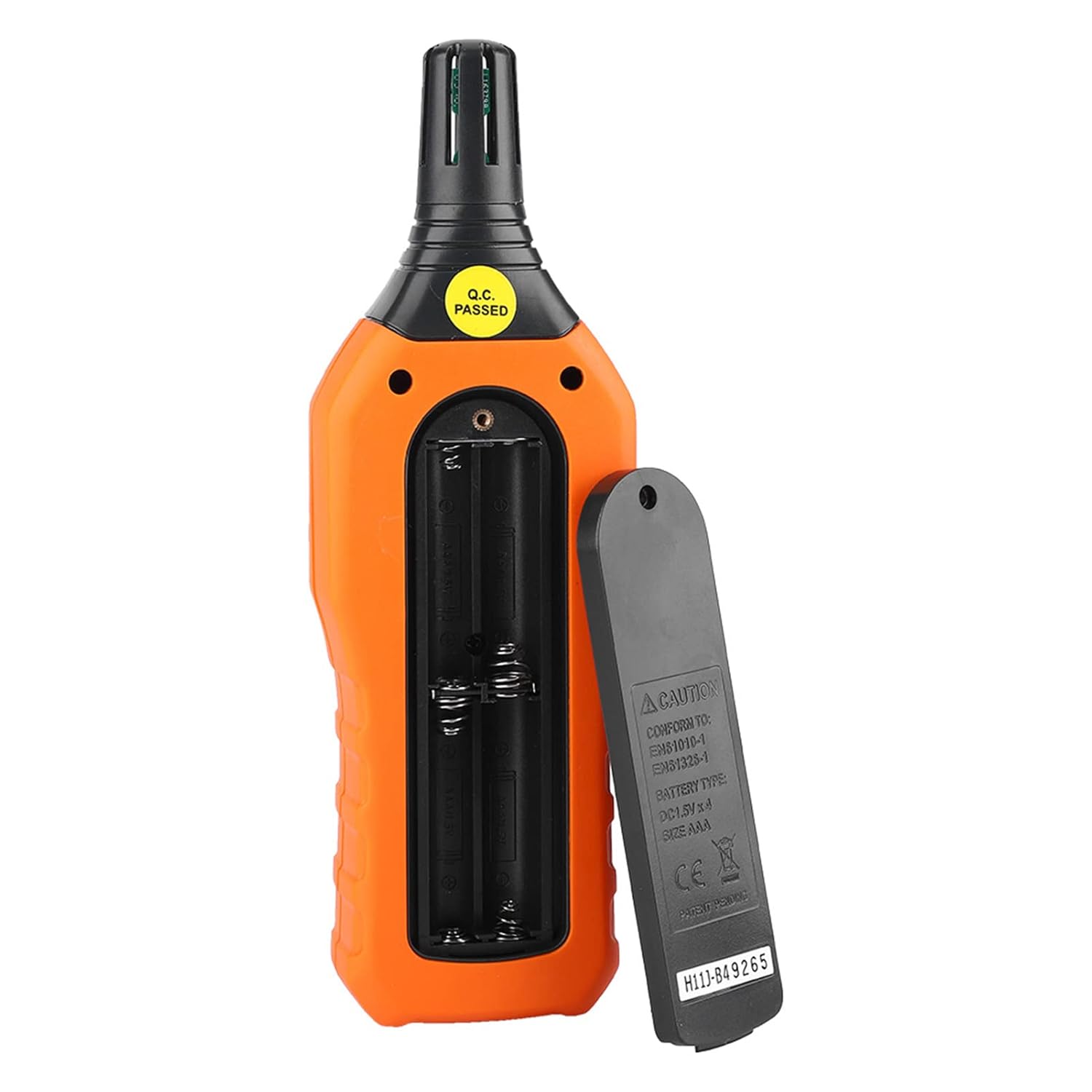
Figear 4.1: Cùl view of the meter showing the open battery compartment for AAA battery installation.
5. Stiùireadh Obrachaidh
5.1 Cumhachd air / dheth
- Brùth an green power button (
 ) to turn the meter on.
 - Brùth agus cùm an gray power button () for approximately 2 seconds to turn the meter off. The meter also features an automatic shut-down function to conserve battery life.
5.2 A’ gabhail Tomhais
Once powered on, the meter will immediately begin displaying real-time temperature and humidity readings on the LCD screen. Ensure the sensor at the top of the device is exposed to the environment you wish to measure.

Figear 5.1: The meter in use, displaying temperature and humidity readings on its LCD screen.
5.3 Atharrachadh Aonaid (°C/°F)
To switch between Celsius (°C) and Fahrenheit (°F) temperature units:
- Brùth an ° C/°F putan () located on the keypad. The display will update to show readings in the selected unit.
5.4 Gnìomh Solais-cùil
To activate or deactivate the display backlight:
- Brùth an putan backlight () to toggle the backlight on or off. This is useful for reading in low-light conditions.
5.5 Data Hold (H)
Gus na leughaidhean làithreach air an taisbeanadh a reothadh:
- Brùth an H putan (). The "H" icon will appear on the display, indicating that the data is held.
- Brùth an H putan again to release the data hold and resume real-time measurements.
5.6 Maximum/Minimum (MIN/MAX) Measurement
Gu view the maximum or minimum recorded values:
- Brùth an Putan MIN/MAX () once to display the maximum temperature and humidity recorded since the meter was powered on or the function was reset.
- Brùth an Putan MIN/MAX again to display the minimum temperature and humidity.
- Brùth an Putan MIN/MAX a third time to exit the MIN/MAX mode and return to real-time readings.
5.7 Data Storage (MEM) and Retrieval (READ)
The meter can store up to 100 groups of measurement data.
- Gus dàta a stòradh: Brùth an Putan MEM () to save the current temperature and humidity readings. The display will briefly show a memory location number.
- Gus dàta fhaighinn air ais: Brùth an LEUGHADH putan () to enter data retrieval mode. Use the Putan MEM to scroll through stored data records.
- To Exit Retrieval: Brùth an LEUGHADH putan again to exit data retrieval mode.
5.8 Wet Bulb (WB) and Dew Point (DP) Temperature
To display Wet Bulb or Dew Point temperatures:
- Brùth an DP/WB button () once to display the Dew Point temperature.
- Brùth an DP/WB button again to display the Wet Bulb temperature.
- Brùth an DP/WB button a third time to return to standard temperature and humidity display.
6. Cumail suas
6.1 Glanadh
- Sguab c a’ mheatairasing le bog, damp aodach. Na cleachd luchd-glanaidh sgudail no solventan.
- Keep the sensor area clean and free from dust or debris to ensure accurate readings. Do not insert any objects into the sensor opening.
6.2 Stòradh
- Nuair nach eilear ga chleachdadh airson ùine mhòr, thoir a-mach na bataraidhean gus casg a chur air aodion agus milleadh air an inneal.
- Stòraich am meatair ann an àite fionnar, tioram, air falbh bho sholas dìreach na grèine agus teòthachd anabarrach.
- Utilize the provided portable storage bag for protection during storage and transport.
7. A ’dèanamh trioblaid
| Trioblaid | Adhbhar a dh’fhaodadh a bhith ann | Fuasgladh |
|---|---|---|
| Chan eil am meatair a’ dol air. |
|
|
| Leughaidhean neo-mhearachdach. |
|
|
| Tha an taisbeanadh dorcha no a’ priobadh. |
|
|
| Cannot store or retrieve data. |
|
|
8. Sònrachaidhean
The following table outlines the technical specifications for the Walfront PM6508 Digital Temperature Humidity Meter.


Figear 8.1: Detailed technical specifications including ranges, resolution, and precision for temperature, humidity, wet bulb, and dew point measurements, along with general parameters.
| Paramadair | Luach |
|---|---|
| Modail | PM6508 |
| Raon Teòthachd Ambient | -20 gu 60 ° C (-4 gu 140 ° F) |
| Ambient Temperature Precision | ±1.5 °C (-20 to 0 °C, 45 to 60 °C), ±0.5 °C (0 to 45 °C) |
| Raon Taiseachd Coibhneil | 0% - 100% RH |
| Relative Humidity Precision | ±4.0% (0-20%, 80-100%), ±3.0% (20-80%) |
| Raon Teòthachd bulb fliuch | -20 gu 60 ° C (4 gu 140 °F) |
| Wet Bulb Temperature Precision | ±1.5 °C (-20 to 0 °C, 45 to 60 °C), ±0.5 °C (0 to 45 °C) |
| Raon Teòthachd Dew Point | -50 gu 60 ° C (-58 gu 140 ° F) |
| Dew Point Temperature Precision | ±1.5 °C (-50 to 0 °C, 45 to 60 °C), ±0.5 °C (0 to 45 °C) |
| Fuasgladh | 0.1 °C / °F / %RH |
| Stòradh Dàta | 100 buidheann |
| Solar cumhachd | 4 x 1.5V AAA Battery (not included) |
| Meudan (L x W x H) | 180 x 60 x 29 mm (7.1 x 2.4 x 1.1 a-steach) |
| Cuideam | 254 g (9 oz) |
| Taiseachd obrachaidh | 0% - 100% (gun dùmhlachd) |
9. Iarrtasan
The Walfront PM6508 is suitable for a wide range of applications requiring accurate temperature and humidity monitoring.

Figear 9.1: Examples of environments where the PM6508 meter can be effectively used for temperature and humidity monitoring.
- Residential and Office Environments: Monitoring indoor climate for comfort and health.
- Industrial Production: Ensuring optimal conditions for manufacturing processes.
- Warehousing and Storage: Protecting goods sensitive to temperature and humidity, such as in wine cellars or general storage.
- Àiteachas: Monitoring conditions in planting sheds, greenhouses, and aquaculture.
- Research and Development Laboratories: Maintaining precise environmental controls for experiments.
- Siostaman HVAC: Assisting in the evaluation and maintenance of heating, ventilation, and air conditioning systems.
10. Barantas agus Taic
Walfront products are designed for reliability and performance. For warranty information, technical support, or service inquiries, please refer to the contact information provided with your purchase or visit the official Walfront weblàrach. Cùm dearbhadh ceannach airson tagraidhean barantais.