
Ro-ràdh
Welcome to your new Gembird GHS-U-5.1-01 USB 5.1 Surround Headset. This manual provides essential information for setup, operation, and maintenance to ensure optimal performance and an immersive audio experience.
Susbaint pacaid
Bu chòir na stuthan a leanas a bhith sa phacaid:
- Gembird GHS-U-5.1-01 USB 5.1 Surround Headset

Image: Retail packaging for the Gembird GHS-U-5.1-01 USB 5.1 Surround Headset, showing the headset inside a clear window.
Bathar seachadview
The Gembird GHS-U-5.1-01 is a USB headset designed for immersive audio experiences with 5.1 surround sound. It features an adjustable microphone, built-in volume control, comfortable ear pads, and an adjustable headband for extended use.
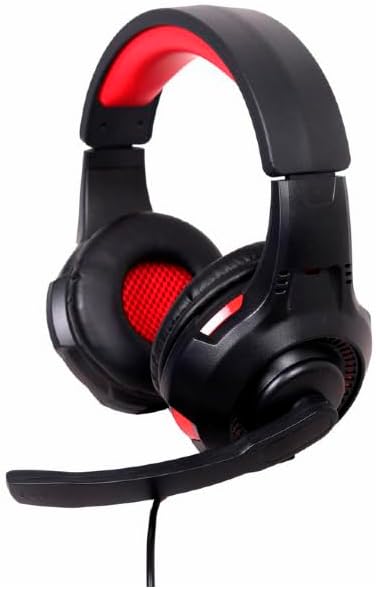
Ìomhaigh: Ceàrnach view of the Gembird GHS-U-5.1-01 USB 5.1 Surround Headset, showcasing its black and red design with the microphone boom extended.

Ìomhaigh: Aghaidh view of the Gembird GHS-U-5.1-01 USB 5.1 Surround Headset, highlighting the adjustable headband and earcups.

Image: Close-up of the in-line control unit for the Gembird GHS-U-5.1-01 headset, showing volume up/down and microphone mute buttons.
Suidhich
A 'ceangal an headset
The Gembird GHS-U-5.1-01 headset connects via a standard USB port.
- Lorg port USB a tha ri fhaighinn air do choimpiutair.
- Plug the USB connector of the headset into the USB port.
- Bu chòir don t-siostam obrachaidh agad na draibhearan riatanach a lorg agus a stàladh gu fèin-ghluasadach. Dh’ fhaodadh gun toir am pròiseas seo beagan mhionaidean.
- Once installed, the headset will be ready for use as an audio input and output device.
Audio Settings Configuration
For optimal 5.1 surround sound experience, you may need to configure your computer's audio settings.
- Windows: Go to "Sound Settings" (right-click speaker icon in taskbar) > "Sound Control Panel" > "Playback" tab. Select the Gembird headset, click "Configure," and choose "5.1 Surround."
- macOS: Go to "System Preferences" > "Sound" > "Output" tab. Select the Gembird headset.
Stiùireadh Obrachaidh
Smachd tomhas-lìonaidh
The headset features an in-line remote control for easy volume adjustment.
- Cleachd an "+" putan gus an tomhas-lìonaidh àrdachadh.
- Cleachd an "-" putan gus an tomhas-lìonaidh a lughdachadh.
Cleachdadh microfòn
The adjustable microphone boom allows for precise positioning.
- Position the microphone approximately 1-2 inches from your mouth for clear voice capture.
- Use the microphone mute button on the in-line remote to toggle the microphone on or off.
Atharrachadh comhfhurtachd
Adjust the headband to fit comfortably on your head. The ear pads are designed for extended use.
Cumail suas
To ensure the longevity and performance of your headset, follow these maintenance guidelines:
- Glanadh: Use a soft, dry cloth to wipe the headset. Do not use harsh chemicals or abrasive cleaners.
- Stòradh: Store the headset in a clean, dry place away from extreme temperatures.
- Cùram càball: Seachain lùban biorach no tarraing cus air a’ chàball USB gus casg a chur air milleadh.
Fuasgladh thrioblaidean
Gun fhuaim no micreofon nach eil ag obair
- Thoir sùil air a’ cheangal USB: Ensure the USB connector is fully inserted into the port. Try a different USB port.
- Thoir sùil air na h-ìrean fuaime: Verify that the volume on the in-line control, your computer's system volume, and application-specific volumes are not muted or set too low.
- Thoir sùil air Roghainnean Fuaime: Confirm that the Gembird headset is selected as the default playback and recording device in your computer's sound settings.
- Ath-thòisich an coimpiutair: Sometimes a simple restart can resolve driver or software conflicts.
Cùisean Càileachd Fuaim
- Ùraich an driver: Dèan cinnteach gu bheil draibhearan an t-siostaim obrachaidh agad ùraichte.
- Càileachd stòr: Poor audio quality may stem from the audio source itself. Test with different audio files no iarrtasan.
Sònrachaidhean
| Ainm Modail | GHS-U-5.1-01 |
| Ceangalachd | USB uèirleas |
| Factor foirm | Air Cluas |
| Dath | Dubh |
| Stuth | Aluminum (Enclosure) |
| Cuideam | 0.4 cileagram |
| Feartan a bharrachd | Adjustable microphone boom, Built-in volume control, Comfortable ear pads, Adjustable headband |
Fiosrachadh Barantais
This Gembird headset comes with a 24 Month Manufacturer Guarantee. Please retain your proof of purchase for warranty claims. For detailed warranty terms and conditions, refer to the documentation provided with your product or contact Gembird customer support.
Taic
If you encounter issues not covered in this manual or require further assistance, please visit the official Gembird website or contact their customer support for technical assistance.