
Maxcom MM471
Maxcom MM471 Senior Portable Phone User Manual
1. Ro-ràdh
This manual provides detailed instructions for the safe and efficient use of your Maxcom MM471 Senior Portable Phone. Designed with ease of use in mind, this device features large characters, big buttons, and an ergonomic design, making it ideal for seniors. Please read this manual thoroughly before operating your phone.

Figear 1: Aghaidh view of the Maxcom MM471 Senior Portable Phone.
2. Suidhich
2.1 Susbaint a’ phacaid
Dèan cinnteach gu bheil a h-uile nì anns a’ phacaid:
- Maxcom MM471 Senior Portable Phone
- Bataraidh
- Adapter cosgais luchdadh a-nuas
- Leabhar-làimhe cleachdaiche
2.2 A’ cur a-steach a’ chairt SIM agus a’ bhataraidh
The Maxcom MM471 supports dual SIM cards. Follow these steps to install your SIM card(s) and battery:
- Turn off the phone and disconnect it from any power source.
- Thoir air falbh còmhdach cùil a’ fòn gu faiceallach.
- Insert your SIM card(s) into the designated slot(s) with the gold contacts facing down.
- Cuir a-steach am bataraidh, a’ dèanamh cinnteach gu bheil na ceanglaichean co-thaobhadh gu ceart.
- Cuir an còmhdach cùil air ais gus an cliog e na àite gu tèarainte.

Figear 2: Air ais view with battery and SIM card area.
2.3 A’ cur cosgais air a’ bhataraidh
Before first use, fully charge the phone's battery:
- Connect the charging adapter to the phone's charging port or place the phone in its charging dock.
- Plug an adapter a-steach don ionad cumhachd.
- Seallaidh comharra a’ bhataraidh air an sgrion inbhe na cosgais.
- Aon uair ‘s gu bheil e làn chosgais, dì-cheangail an charger.
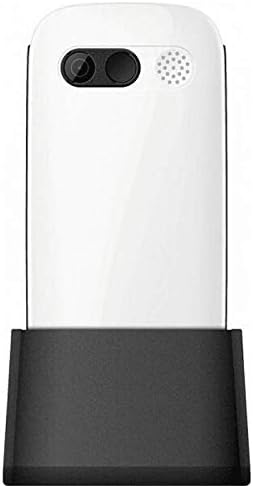
Figure 3: Phone in charging dock.
3. Stiùireadh Obrachaidh
3.1 A’ cur cumhachd air/dheth
- Gus cumhachd a thoirt air: Brùth agus cùm an Cuir Cumhachd/Crìochnaich Gairm putan gus am bi an scrion a’ lasadh suas.
- Gus cumhachd a thoirt dheth: Brùth agus cùm an Cuir Cumhachd/Crìochnaich Gairm button until the power-off options appear, then select 'Power Off'.
3.2 A’ dèanamh ghairmean
- Bhon sgrìn dachaigh, cuir a-steach an àireamh fòn a’ cleachdadh a’ mheur-chlàir.
- Brùth an Call button (green button) to initiate the call.
- Gus crìoch a chuir air a’ ghairm, brùth air a’ phutan Cuir Cumhachd/Crìochnaich Gairm button (red button).
3.3 A’ faighinn ghairmean
- When a call comes in, the phone will ring and display the caller's number or name.
- Brùth an Call button (green button) to answer.
- Gus an gairm a dhiùltadh, brùth air an Cuir Cumhachd/Crìochnaich Gairm button (red button).
3.4 A’ cur is a’ faighinn teachdaireachdan
- Seòl chun chlàr-taice ‘Teachdaireachdan’ bhon phrìomh sgrion.
- Tagh 'Teachdaireachd Ùr' gus teachdaireachd teacsa a sgrìobhadh.
- Enter the recipient's number and your message.
- Brùth 'Cuir'.
- Received messages will appear in your 'Inbox'.
3.5 A’ riaghladh Caraidean
The phonebook can store up to 300 names.
- Go to the 'Contacts' or 'Phonebook' menu.
- Select 'Add New Contact' to save a new number.
- Cuir a-steach an t-ainm agus an àireamh fòn, agus an uairsin sàbhail.
- To call a contact, select their name from the list and press the Call putan.
3.6 A’ cleachdadh Bluetooth
Gus ceangal ri innealan Bluetooth:
- Rach gu 'Roghainnean' > 'Bluetooth'.
- Cuir Bluetooth 'Air'.
- Tagh 'Lorg airson devices' to find available Bluetooth accessories.
- Select the desired device and pair them.
3.7 A’ cleachdadh an Flashlight
Tha lòchran togte anns a’ fòn airson goireasachd.
- To turn on the flashlight, locate the dedicated flashlight button (if available) or access it through the 'Tools' menu.
- Press the button or select the option again to turn it off.
4. Cumail suas agus Cùram
To ensure the longevity and optimal performance of your Maxcom MM471 phone, follow these maintenance guidelines:
- Glanadh: Cleachd clò bog, tioram gus uachdar a’ fòn a ghlanadh. Seachain innealan-glanaidh leaghaidh no stuthan sgrìobach.
- Teòthachd: Do not expose the phone to extreme temperatures (hot or cold) or direct sunlight for extended periods.
- Taiseachd: Cùm am fòn tioram. Na cuir ann an uisge e agus na cuir e ann an taiseachd àrd.
- Stòradh: When not in use for a long time, store the phone in a cool, dry place with the battery partially charged.
- Buaidh: Seachain am fòn a leigeil sìos no a chur fo bhuaidhean làidir.
5. A ’dèanamh trioblaid
If you encounter issues with your phone, refer to the table below for common problems and solutions:
| Trioblaid | Adhbhar a dh’fhaodadh a bhith ann | Fuasgladh |
|---|---|---|
| Chan eil am fòn a’ tionndadh air | Tha am bataraidh air a leigeil sìos no chan eil e air a chur a-steach gu ceart. | Cuir cosgais air a’ bhataraidh. Dèan cinnteach gu bheil am bataraidh air a chur a-steach gu ceart. |
| Chan urrainnear gairmean a dhèanamh no fhaighinn | No network signal, SIM card not inserted, or SIM card faulty. | Check network coverage. Reinsert SIM card(s). Contact your service provider. |
| Càileachd call call | Weak network signal, interference. | Gluais gu àite le comharra nas fheàrr. Seachain bacadh. |
| Bidh bataraidh a’ drèanadh gu sgiobalta | Excessive usage, background applications, old battery. | Lùghdaich soilleireachd na sgrìn. Dùin aplacaidean nach eilear a’ cleachdadh. Smaoinich air bataraidh ùr a chur na àite ma tha i sean. |
| Meur-chlàr neo-fhreagairt | Mearachd bathar-bog, milleadh corporra. | Restart the phone. If the problem persists, contact support. |
6. Sònrachaidhean Teicnigeach
Key technical details of the Maxcom MM471 Senior Portable Phone:
- Modail: MM471
- Brand: Maxcom
- Dath: Geal
- Ceangal: Bluetooth
- Taic SIM: SIM dùbailte
- Comas leabhar-fòn: 300 names
- Ùine còmhraidh: Suas ri 14 uairean a thìde
- Eadar-aghaidh: Putanan fiosaigeach
- Feartan sònraichte: Large characters, Big buttons, Ergonomic design, Speaker, Flashlight
7. Fiosrachadh mu Bharantais agus Taic
For detailed warranty information, please refer to the warranty card included with your product or visit the official Maxcom website. For technical support or service inquiries, please contact your retailer or the manufacturer's customer service department.
Ask a question about this manual
Ask about setup, troubleshooting, compatibility, parts, safety, or missing instructions. Manuals+ will review the question and use this page’s manual context to help answer it.