
Altec Lansing AL-5003
Altec Lansing AL-5003 Multimedia DJ Trolly Speaker User Manual
Modail: AL-5003
Ro-ràdh
Tapadh leibh airson ceannachasing the Altec Lansing AL-5003 Multimedia DJ Trolly Speaker. This speaker is designed to deliver powerful audio for various applications, including parties and surround sound systems. Featuring wireless connectivity, a built-in trolley for portability, and multiple input options, the AL-5003 offers a versatile audio experience. Please read this manual carefully to ensure proper setup, operation, and maintenance of your speaker.
Stiùireadh sàbhailteachd cudromach
- Read these instructions thoroughly before operating the speaker.
- Cùm an leabhran seo airson iomradh san àm ri teachd.
- Na cuir an neach-labhairt fosgailte do uisge no taiseachd.
- Na cuir bacadh air fosglaidhean fionnarachaidh sam bith.
- Na cuir a-steach faisg air stòran teas sam bith leithid rèididheatoran, clàran teas, stòbhaichean, no uidheam eile (a 'gabhail a-steach ampliifiers) a bheir teas.
- Dìon an sreang cumhachd bho bhith air a choiseachd air no air a phronnadh, gu sònraichte aig plugaichean, gabhadan goireasachd, agus an àite far am fàg iad bhon inneal.
- Na cleachd ach ceanglachan / goireasan a chaidh a shònrachadh leis an neach-dèanamh.
- Na cuir a-steach an inneal seo aig àm stoirmean dealanach no nuair nach eilear ga chleachdadh airson ùine mhòr.
- Thoir iomradh air a h-uile seirbheis gu luchd-seirbheis le teisteanas.
Susbaint pacaid
Thoir sùil air a’ phacaid airson nan nithean a leanas:
- Altec Lansing AL-5003 Multimedia DJ Trolly Speaker
- Corda cumhachd
- Smachd Iomallach
- Leabhar-làimhe cleachdaiche
- Càball Taice (dh’ fhaodadh e atharrachadh a rèir sgìre)
Bathar seachadview
The AL-5003 speaker features a robust design with integrated wheels and a handle for easy transport. It includes a powerful 10-inch speaker and a 1-inch tweeter, providing clear and dynamic sound. The control panel is located on the top of the unit, offering easy access to various functions.
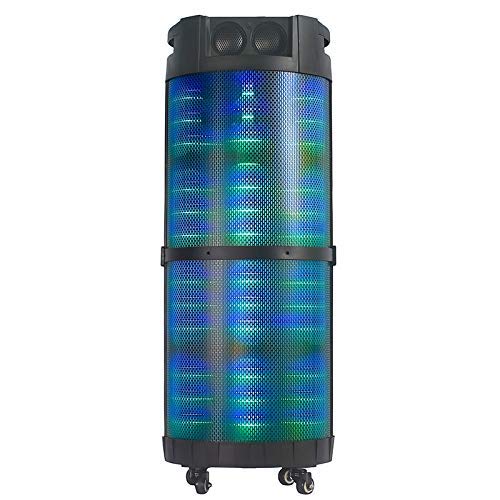
Dealbh 1: Aghaidh view of the Altec Lansing AL-5003 speaker, showcasing its cylindrical design and illuminated grille. The speaker features a sturdy build with integrated wheels at the base for portability.
Pannal Smachd agus Ceanglaichean
The top panel of the speaker houses the main controls and input/output ports.
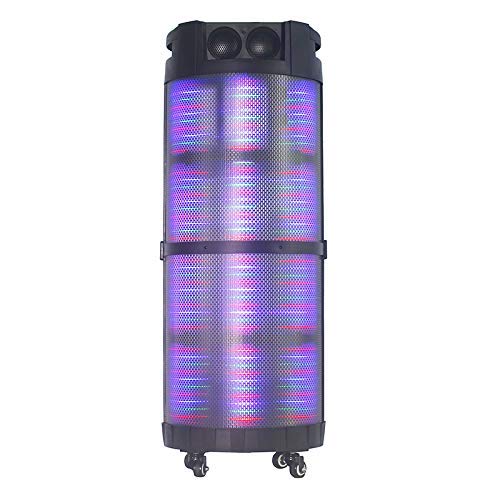
Dealbh 2: Top-sìos view of the AL-5003 speaker, highlighting the control panel with various buttons and knobs, along with the top-mounted speakers. This view also shows the integrated handle for easy transport.
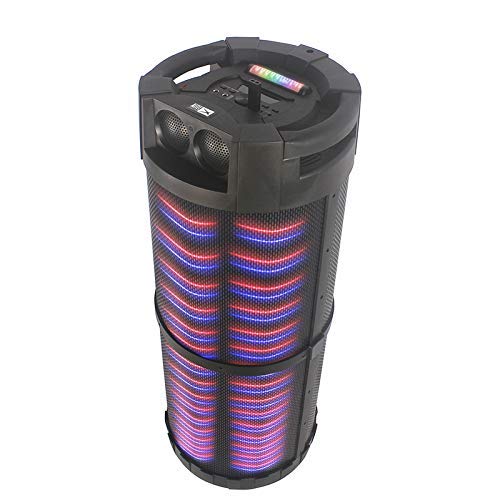
Dealbh 3: Cearcallach view of the AL-5003 speaker, providing a perspective of its overall structure, including the side grille and the top control area. The dynamic lighting effects are visible through the mesh.
Common controls include Power, Volume, Mode selection, Play/Pause, Track Skip, and inputs for USB, Auxiliary, and potentially Microphone (if available on the model).
Stiùiridhean rèiteachaidh
- A' dì-phapadh: Carefully remove the speaker and all accessories from the packaging. Retain the packaging for future transport or storage.
- Suidheachadh: Place the speaker on a stable, flat surface. Ensure there is adequate ventilation around the unit. For optimal sound, position the speaker in a central location within the listening area.
- Ceangal cumhachd: Connect the provided power cord to the AC input on the speaker and then plug it into a standard wall outlet (AC 100-240V, 50/60Hz).
- Cosgais Tùsail (mas iomchaidh): If the speaker has an internal battery (Lead Acid battery mentioned in specs), it is recommended to fully charge it before first use. The charging indicator light will typically show charging status.
- Cumhachd air: Press the Power button on the control panel or remote control to turn on the speaker.
Stiùireadh Obrachaidh
1. Modh Bluetooth
- Cuir an gnìomh Bluetooth: Turn on the speaker. Press the "Mode" button on the control panel or remote until "Bluetooth" or "BT" is displayed (or indicated by a blue LED). The speaker will enter pairing mode, indicated by a flashing light or audible prompt.
- Càradh le inneal: On your mobile device (smartphone, tablet, laptop), go to Bluetooth settings and enable Bluetooth. Lorg airson available devices. You should see "AL-5003" or "Altec Lansing" in the list. Select it to pair.
- Dearbhadh ceangail: Once successfully paired, the speaker will emit a confirmation sound, and the Bluetooth indicator light will become solid.
- Ath-chluich: Start playing audio on your connected device. Use the speaker's volume controls or your device's volume controls to adjust the sound level. Use the Play/Pause, Next, and Previous buttons on the speaker or remote to control playback.
2. Auxiliary (AUX) Mode
- Ceangail càball AUX: Insert one end of a 3.5mm auxiliary cable into the AUX input port on the speaker. Connect the other end to the headphone jack or audio output of your external audio device (e.g., MP3 player, laptop).
- Tagh Modh AUX: Press the "Mode" button on the speaker or remote until "AUX" is displayed or indicated.
- Ath-chluich: Play audio from your connected device. Adjust volume using both the speaker's controls and your device's volume.
3. Modh Ath-chluich USB
- Cuir a-steach draibh USB: Cuir a-steach draibh USB anns a bheil fuaim MP3 filea-steach don phort USB air an neach-labhairt.
- Tagh Modh USB: The speaker may automatically switch to USB mode. If not, press the "Mode" button until "USB" is displayed or indicated.
- Ath-chluich: Tòisichidh an neach-labhairt a’ cluich claisneachd gu fèin-ghluasadach files from the USB drive. Use the Play/Pause, Next, and Previous buttons to control playback.
4. Karaoke Function (if applicable)
If your AL-5003 model includes a microphone input, you can use it for karaoke:
- Ceangail Micreofon: Plug a wired microphone into the designated microphone input jack.
- Atharraich an tomhas-lìonaidh: Use the dedicated Microphone Volume knob (if present) to adjust the microphone's volume.
- Smachd mac-talla: Some models may have an Echo knob to add an echo effect to the microphone audio.
5. Gnìomhachd smachd iomallach
Tha an smachd iomallach a tha air a ghabhail a-steach a’ toirt cothrom goireasach air na prìomh ghnìomhan uile:
- Cumhachd: Turn the speaker On/Off.
- Modh: Switch between Bluetooth, AUX, USB, and other available modes.
- Leabhar +/-: Suidhich am prìomh fhuaim.
- Cluich / Stad: Tòisich no stad air ath-chluich.
- Roimhe/Air adhart: Gabh air adhart chun an t-slighe roimhe no an ath cheum.
- EQ: Select different equalizer presets (if available).
- Balbh: Cuir am fuaim air falbh no cuir dheth e.
Cumail suas
- Glanadh: Cleachd clò bog, tioram gus taobh a-muigh an neach-labhairt a ghlanadh. Na cleachd innealan-glanaidh leaghaidh no stuthan sgrìobach.
- Stòradh: Nuair nach eilear ga chleachdadh airson ùine mhòr, stòraich an neach-labhairt ann an àite fionnar, tioram, air falbh bho sholas dìreach na grèine agus teòthachd anabarrach.
- Cùram Bataraidh: If the speaker has a built-in rechargeable battery, avoid fully discharging it frequently. For long-term storage, charge the battery to approximately 50-70% every few months to prolong its lifespan.
- Fionnarachadh: Dèan cinnteach nach tèid na fosglaidhean fionnarachaidh a bhacadh gus casg a chuir air cus teasachadh.
Fuasgladh thrioblaidean
| Trioblaid | Adhbhar a dh’fhaodadh a bhith ann | Fuasgladh |
|---|---|---|
| Gun chumhachd | Power cord not connected; Power outlet not working; Speaker is off; Battery drained. | Ensure power cord is securely connected. Try a different outlet. Press the Power button. Charge the battery. |
| Gun fhuaim | Volume too low; Incorrect mode selected; Device not connected properly; Mute function active. | Increase volume on speaker and source device. Select the correct input mode (Bluetooth, AUX, USB). Reconnect device. Check if mute is active on remote. |
| Dh'fhàillig paidhir Bluetooth | Speaker not in pairing mode; Device Bluetooth off; Speaker too far from device; Interference. | Ensure speaker is in Bluetooth pairing mode. Turn on Bluetooth on your device. Move device closer to speaker. Turn off other Bluetooth devices nearby. |
| Chan eil ath-chluich USB ag obair | Draibh USB nach deach a chur a-steach gu ceart; Neo-fhreagarrach file cruth; draibh USB truaillte. | Reinsert USB drive. Ensure fileTha na faidhlichean ann an cruth MP3. Feuch draibh USB eadar-dhealaichte. |
| Chan eil smachd iomallach ag obair | Batteries drained; Obstruction between remote and speaker; Remote not pointed at sensor. | Replace remote control batteries. Remove any obstructions. Point remote directly at the speaker's IR sensor. |
Sònrachaidhean
| Feart | Mion-fhiosrachadh |
|---|---|
| Ainm Modail | Altec Lansing AL-5003 Multimedia DJ Trolly Speaker |
| Seòrsa neach-labhairt | Fuaim mun cuairt |
| Feart sònraichte | Uèirleas |
| Cleachdaidhean Molta | For Surround Sound Systems, Party |
| Innealan co-fhreagarrach | Gaming Console, Karaoke Machine, Laptop, MP3 Player, Smartphone, Tablet |
| Rèiteachadh Sianal Fuaim timcheall | 1.0 |
| Modh smachd | iomallach |
| Teicneòlas conaltraidh gun uèir | Bluetooth |
| Meud neach-labhairt | 10 òirlich |
| Stòr cumhachd | Electric Corded |
| Trast-thomhas an Tweeter | 1 òirlich |
| Co-chòrdail ri Cuir-a-steach Fuaime | Taic, USB |
| Ceangal neach-labhairt | Wired (for power), Wireless (Bluetooth) |
| Fuaim Wattage | 100 watt |
| Co-chruinneachadh cealla bataraidh | Acid luaidhe |
| Seòrsa stàladh | Dimàirt |
Barantas agus Taic
Altec Lansing products are manufactured to the highest quality standards. For information regarding warranty coverage, technical support, or service inquiries, please refer to the warranty card included with your product or visit the official Altec Lansing website. Please have your model number (AL-5003) and purchase details ready when contacting support.
Weblàrach: www.alteclansing.com (This is a generic link, actual link might vary by region)
Ask a question about this manual
Ask about setup, troubleshooting, compatibility, parts, safety, or missing instructions. Manuals+ will review the question and use this page’s manual context to help answer it.