
SENTRY KX200
Sentry Industries Inc. HPXKX200 Gaming Keyboard + Mouse 2 Pack
Model: KX200 User Manual
Ro-ràdh
Tapadh leibh airson ceannachasing the Sentry Industries Inc. HPXKX200 Gaming Keyboard and Mouse 2 Pack. This combo kit is designed to enhance your gaming and computing experience with its responsive keyboard and precise mouse. The keyboard features 104 keys with RGB backlighting, while the mouse offers 7200 DPI sensitivity and RGB lighting. Both devices connect via USB for reliable performance.
This manual provides detailed instructions for setup, operation, maintenance, and troubleshooting to ensure optimal use of your new gaming peripherals.
Susbaint pacaid
- 1 x Sentry HPXKX200 104-Key RGB USB Gaming Keyboard
- 1 x Sentry HPXKX200 7200 DPI RGB Gaming Mouse
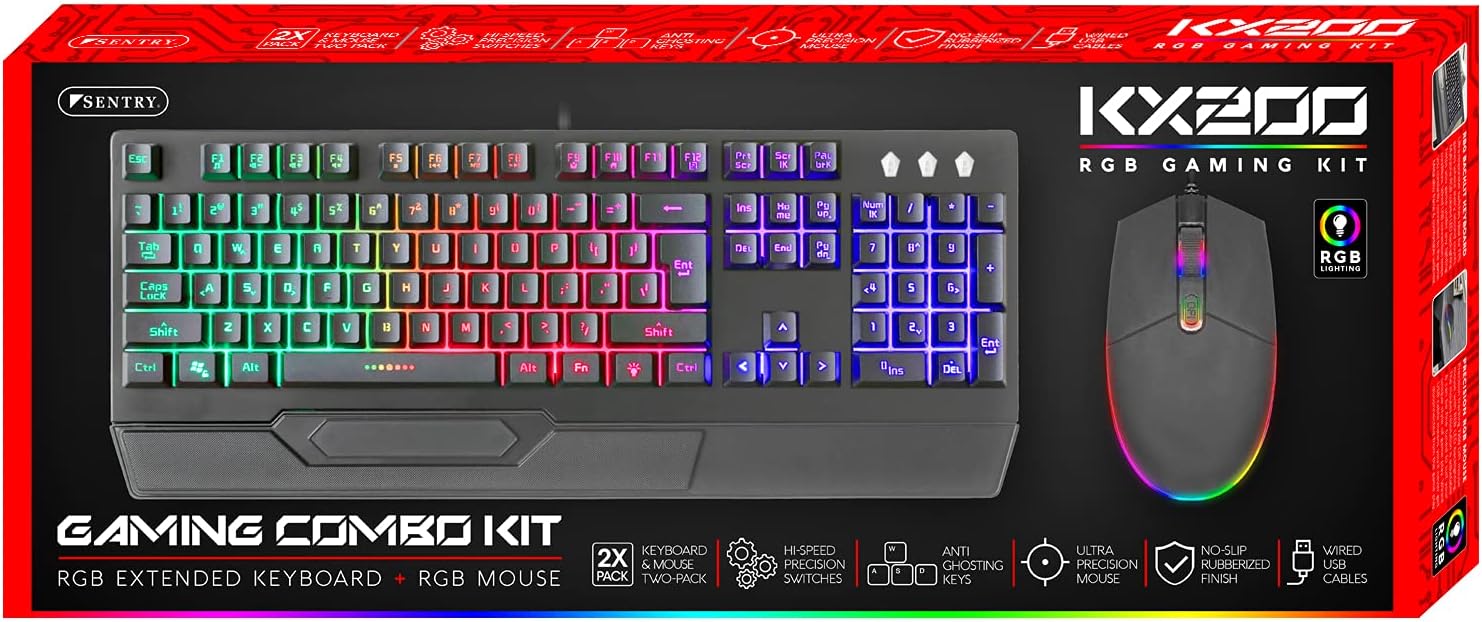
Image: The retail packaging for the Sentry HPXKX200 Gaming Keyboard and Mouse combo kit, showing both devices and key features.
Stiùiridhean rèiteachaidh
Follow these steps to connect your Sentry HPXKX200 Gaming Keyboard and Mouse to your computer:
- Fosgail na h-innealan: Thoir am meur-chlàr agus an luchag a-mach às a’ phacaid aca gu faiceallach.
- Ceangail am Meur-chlàr: Lorg port USB ri fhaighinn air a’ choimpiutair agad. Cuir ceanglaiche USB a’ mheur-chlàir gu daingeann a-steach don phort USB.
- Ceangail an luchag: Locate another available USB port on your computer. Insert the USB connector of the mouse firmly into the USB port.
- Stàladh an dràibhear: Your operating system (e.g., Windows) should automatically detect and install the necessary drivers. This process may take a few moments.
- Dearbhaich an ceangal: Once drivers are installed, the keyboard and mouse RGB lighting should illuminate, indicating they are ready for use.

Image: The Sentry HPXKX200 Gaming Keyboard, showcasing its full layout and attached USB cable for connection.

Image: The Sentry HPXKX200 Gaming Mouse, highlighting its ergonomic design and attached USB cable.

Ìomhaigh: Sealladh dlùth view of a standard USB-A connector, which is used to connect both the keyboard and mouse to a computer.
Stiùireadh Obrachaidh
Cleachdadh Meur-chlàr
The 104-key layout provides a full range of standard typing and function keys. The RGB backlighting enhances visibility and aesthetics.
- A' sgrìobhadh: Use the alphanumeric keys for standard text input.
- Iuchraichean Gnìomh (F1-F12): These keys perform various functions, often in combination with the 'Fn' key, depending on your operating system and applications.
- Smachd Solais RGB: Specific key combinations (e.g., Fn + Scroll Lock, Fn + Home/End) may cycle through different RGB lighting modes or adjust brightness. Refer to the keyboard's specific key legends for lighting controls.
Cleachdadh na luchaige
The 7200 DPI RGB mouse offers precise tracking and comfortable use.
- Cliog air chlì: Prìomh ghnìomh, taghadh.
- Cliog deas: Clàr-taice co-theacsa.
- Cuibhle Scroll: Sgrolaich tro sgrìobhainnean agus web duilleagan. Bidh an roth-sgrolaidh ag obair mar phutan cliog meadhanach cuideachd.
- Atharrachadh DPI: The DPI button (often located near the scroll wheel) allows you to cycle through different sensitivity settings (DPI levels) to match your preference for various tasks or games. The mouse supports up to 7200 DPI.
- Solais RGB: The mouse features integrated RGB lighting that typically changes based on DPI settings or cycles through colors automatically.

Image: The Sentry HPXKX200 Gaming Keyboard and Mouse side-by-side, illustrating their design and illuminated RGB features.
Cumail suas
Proper care will extend the life of your gaming peripherals:
- Glanadh: Cleachd clò bog, tioram gus uachdar a’ mheur-chlàir agus na luchaige a sguabadh sìos. Airson salachar stòlda, cuir beagan uisge air.ampnigh an clò le uisge no le inneal-glanaidh tlàth, neo-sgrìobach. Seachain cus taiseachd.
- Toirt air falbh dust: Use compressed air to remove dust and debris from between the keyboard keys and from the mouse's optical sensor.
- Seachain Liquids: Do not immerse the devices in water or expose them to excessive liquids.
- Stòradh: Store the keyboard and mouse in a cool, dry place when not in use.
Fuasgladh thrioblaidean
If you encounter issues with your Sentry HPXKX200 Gaming Keyboard and Mouse, try the following solutions:
| Trioblaid | Fuasgladh comasach |
|---|---|
| Chan eil am meur-chlàr/luchag a’ freagairt |
|
| Chan eil solais RGB ag obair |
|
| Cursair na luchaige neo-riaghailteach no gun ghluasad |
|
| Keys not registering on keyboard |
|
Sònrachaidhean
| Feart | Mion-fhiosrachadh |
|---|---|
| Brand | SEALLADH |
| Modail Àireamh | KX200 |
| Teicneòlas ceangail | USB (Wired) |
| Seòrsa meur-chlàr | 104-Key RGB USB Keyboard |
| DPI na luchaige | 7200 DPI RGB Mouse |
| Dath | Dubh |
| Co-fhreagarrachd siostam-obrachaidh | Windows (and generally compatible with other OS supporting USB peripherals) |
| Meudan Bathar (Meur-chlàr) | Mu 21.65 x 9.84 x 3.15 òirleach |
| Cuideam nì | Approximately 2.2 pounds (combined) |
Barantas agus Taic
Sentry Industries Inc. products are manufactured to high-quality standards. For information regarding warranty coverage, technical support, or service inquiries, please refer to the warranty card included with your product or visit the official Sentry Industries Inc. weblàrach. Cùm dearbhadh ceannach airson tagraidhean barantais.