
AM alphamount APPSLTK2
Tilting TV Wall Mount Bracket Instruction Manual
Model: APPSLTK2 - Brand: AM alphamount
Bathar seachadview
This AM alphamount Tilting TV Wall Mount Bracket (Model: APPSLTK2) is designed to securely hold LCD, OLED, flat screen, and curved TVs ranging from 37 to 82 inches. It features a low-profile design, keeping your TV close to the wall while offering a convenient tilt adjustment for optimal viewing. The mount is compatible with 16-24 inch wood studs and supports VESA patterns up to 600x400mm. All necessary hardware for installation is included.

Figure 1: The AM alphamount Tilting TV Wall Mount Bracket, showing its main components and low-profile dealbhadh.
Fiosrachadh Sàbhailteachd
Please read all instructions carefully before installation. If you have any doubts about the installation process, consult a qualified professional. Improper installation may result in serious injury or damage to your TV and property.
- Comas cuideam: Do not exceed the maximum weight capacity of 132 lbs (60 kg). This mount is constructed from durable alloy steel.
- Co-fhreagarrachd meud Tbh: Designed for TVs between 37 and 82 inches.
- Co-fhreagarrachd VESA: Ensure your TV's VESA mounting pattern is between 200x100mm and 600x400mm.
- Seòrsa Balla: This mount is primarily designed for installation on 16-24 inch wood studs, concrete walls, or brick walls. Do not install on drywall alone.
- Innealan: Cleachd innealan iomchaidh airson an stàladh. Cuir ort speuclairean sàbhailteachd an-còmhnaidh.
- Clann is Peataichean: Ensure the TV is securely mounted and out of reach of children and pets to prevent accidental tipping.
Susbaint pacaid
Verify that all components are present before beginning installation. If any parts are missing or damaged, contact AM alphamount customer service.
- Co-chruinneachadh Plàta Balla
- Bracaid Tbh (2x)
- Assorted TV Screws (M4, M6, M8)
- Spacers and Washers
- Concrete Anchors (for concrete/brick installation)
- Lag Bolts (for wood stud installation)
- Ìre builgean
- Ceangal càball Velcro
- Leabhar-stiùiridh (an sgrìobhainn seo)
Sònrachaidhean
| Feart | Mion-fhiosrachadh |
|---|---|
| Modail Àireamh | APPSLTK2 |
| Brand | AM alphamount |
| Co-fhreagarrachd meud Tbh | 37 - 82 òirlich |
| Comas cuideam as àirde | 132 lbs (60 kg) |
| Co-fhreagarrachd VESA | 200x100mm gu 600x400mm |
| Ceàrn Teilt | 0 - 10 Degrees |
| Profile bho Bhalla | 1.5 òirleach (3.8 cm) |
| Stuth | Alloy Steel |
| Stud Spacing Compatibility | 16-24 inches (wood studs) |
Stàladh agus stàladh
This mount is designed for quick and easy installation, often completed in under 15 minutes. For detailed, step-by-step instructions, please refer to the official Leabhar-làimhe Stàlaidh (PDF) provided by AM alphamount.
Prìomh Bheachdachaidhean Stàlaidh:
- Wall Type Verification:
Identify your wall type (wood stud, concrete, or brick) to ensure you use the correct hardware and installation method. The mount is suitable for 16", 18", and 24" wood studs, as well as concrete and brick walls.

Figure 2: Illustration of compatible wall types for mounting, including wood studs, concrete, and brick.
- Wall Plate Placement:
The open-shaped wall plate design provides ample space for electrical outlets or other obstacles behind the TV. This design also allows for easy horizontal adjustment of the TV after mounting to achieve perfect centering.
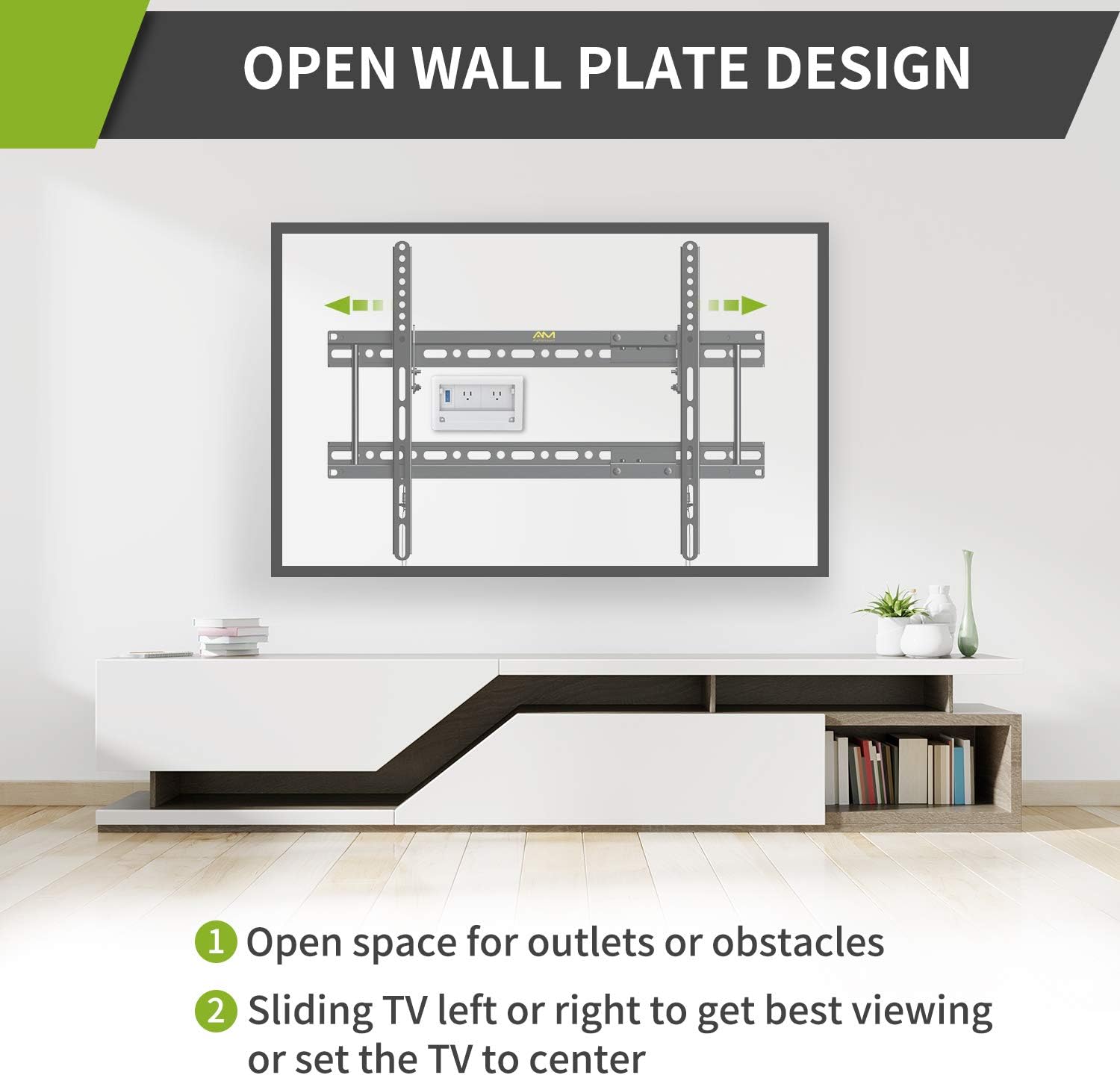
Figure 3: The open wall plate design facilitates access to outlets and allows for sliding the TV left or right for optimal positioning.
- Attaching TV Brackets:
Attach the two TV brackets to the back of your television using the appropriate screws and spacers from the included hardware kit. Ensure the brackets are securely fastened and aligned with your TV's VESA pattern.

Figear 4: Mionaideach view of the detachable wall plate and VESA dimensions, including extension for wider stud spacing.
- Stàladh an telebhisean:
Carefully lift the TV with the attached brackets and hook them onto the wall plate. The quick-release pull-down straps allow for easy removal of the TV from the mount if needed.

Figure 5: The quick release and lock mechanism ensures secure attachment and easy detachment of the TV.
Stiùireadh Bhidio Stàlaidh:
Video 1: An official AM alphamount video demonstrating the features and installation process of the tilting TV wall mount. This video highlights the low-profile design, tilt adjustment, and quick release mechanism, showcasing its use in various settings like living rooms, bedrooms, and exhibition spaces.
Stiùireadh Obrachaidh
Once installed, the AM alphamount Tilting TV Wall Mount allows for easy adjustment to enhance your viewann an eòlas.
- Atharrachadh teilt: This mount offers a 0-10° tilt adjustment. To adjust the tilt, loosen the tilt adjusting bolts on the side of the TV brackets, set your desired angle, and then securely tighten the bolts. This feature helps in reducing glare and relieving neck pain by allowing you to choose the most comfortable viewan suidheachadh.
- Ìosal-Profile Dealbhadh: The mount holds your TV only 1.5 inches from the wall, providing a sleek and space-saving appearance.
- Quick Release Pull-Downs: The integrated quick release pull-down straps allow for easy and safe removal of the TV from the wall mount when access to cables or the back of the TV is required.

Figure 6: Demonstrates the low-profile design and the 0-10 degree tilt adjustment for flexible viewing ceàrnan.
Cumail suas
Bidh cumail suas cunbhalach a’ dèanamh cinnteach gum mair balla-suidhe an telebhisean agad fad-beatha agus gum bi e ag obair gu sàbhailte.
- Glanadh: Sguab an sliabh le clò bog, tioram gus duslach a thoirt air falbh. Seachain innealan-glanaidh no fuasglaidhean sgrìobach a chleachdadh.
- Sgrùdaidhean ràitheil: Periodically check all screws and bolts to ensure they remain tight and secure. Over time, vibrations or adjustments can cause fasteners to loosen.
- Riaghladh càbaill: Use the provided Velcro cable ties to keep cables tidy and prevent them from being pinched or damaged.
Fuasgladh thrioblaidean
Ma thachras tu ri duilgheadasan leis a’ chuibhle-suidhe Tbh agad, thoir sùil air na duilgheadasan agus na fuasglaidhean cumanta a leanas:
| Trioblaid | Adhbhar a dh’fhaodadh a bhith ann | Fuasgladh |
|---|---|---|
| Chan eil an telebhisean rèidh. | Wall plate or TV brackets are not level. | Adjust the wall plate using the integrated leveling feature or re-level the TV brackets before tightening. |
| Difficulty tilting the TV. | Tilt adjusting bolts are too tight. | Slightly loosen the tilt adjusting bolts, adjust the angle, then re-tighten firmly. |
| Tha am beinn a’ faireachdainn neo-sheasmhach. | Stàladh neo-iomchaidh no ceanglaichean sgaoilte. | Immediately remove the TV. Re-check all mounting points and fasteners on both the wall and the TV. Ensure you are mounting into appropriate wall structures (studs, concrete, brick) and not just drywall. |
| Pàirtean a dhìth. | Mearachd pacaidh. | Contact AM alphamount customer service for replacement parts. |
Barantas agus Taic
AM alphamount stands behind the quality of its products. This TV wall mount comes with a 10-year manufacturer's service warranty, ensuring long-term reliability and support.
For further assistance, technical support, or warranty claims, please visit the official AM alphamount Store on Amazon no thoir sùil air an fhiosrachadh conaltraidh a tha air a thoirt seachad air pasgan an toraidh agad.