
1. Ro-ràdh
Thank you for choosing the IMILAB EC2 Outdoor IP Security Camera. This manual provides essential information for the proper installation, operation, and maintenance of your device. The IMILAB EC2 is a versatile security camera designed for both indoor and outdoor use, featuring Full HD resolution, infrared night vision, motion detection, and two-way audio communication. Please read this manual thoroughly before using the product to ensure optimal performance and safety.
2. Pasgan-susbaint
Dearbhaich gu bheil na nithean uile a tha air an liostadh gu h-ìosal air an toirt a-steach sa phacaid agad. Ma tha nithean sam bith a dhìth no millte, cuir fios gu taic luchd-cleachdaidh.
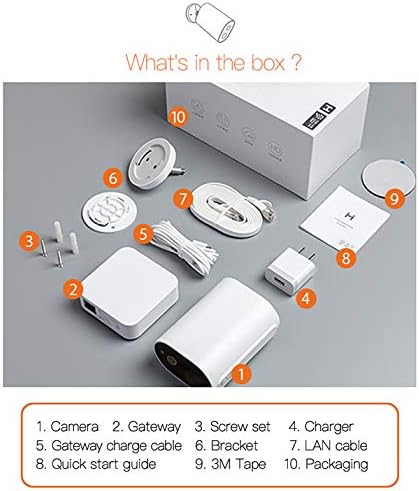
Image: Contents of the IMILAB EC2 package, including the camera, gateway, and accessories.
- Camara
- Geata
- Seata sgriubha
- Charger
- Gateway charge cable
- Bracag
- Càball LAN
- Stiùireadh tòiseachaidh luath
- Teip 3M
- Pacadh
3. Toradh thallview
The IMILAB EC2 camera is designed for robust security monitoring with several key features:
- Dealbhadh gun sreang: Offers flexible placement without power cable limitations.
- AI Scanning: Advanced artificial intelligence for improved detection accuracy.
- Beatha bataraidh leudaichte: Up to 4 months on a single charge under typical usage conditions.
- Gun chosgais mìosail: Cloud storage for recorded events is available without subscription.
- IP66 Dìon-sìde: Certified for dust and water resistance, suitable for outdoor environments.
- Passive IR Detection: Utilizes Passive Infrared (PIR) for motion sensing.
- Sealladh na h-oidhche: Integrated infrared LEDs for clear monitoring in low-light or dark conditions.
- Fuasgladh HD 1080P: A ’toirt seachad foo bhidio soilleir agus mionaideachtage.
- Crioptachadh AES128: Ensures secure data transmission and storage.

Image: Visual representation of the IMILAB EC2's main features.
4. Suidhich
Follow these steps to set up your IMILAB EC2 camera:
- Cuir cosgais air a’ chamara: Before initial use, fully charge the camera using the provided charger and gateway charge cable.
- Luchdaich sìos an App: Download the official IMILAB Home app (or compatible Xiaomi Home app) from your smartphone's app store (available for Android and iOS).
- Cumhachd air a’ gheata: Connect the Gateway to a power source and to your router via the LAN cable. Wait for the indicator light to show it's ready for pairing.
- Pair the Camera: Open the app, create an account, and follow the on-screen instructions to add the Gateway and then the EC2 camera. Ensure your smartphone is connected to a 2.4GHz Wi-Fi network during setup.
- Stàlaich an camara: Choose a suitable location for mounting. The camera can be mounted on a wall or other flat surface using the provided bracket, screws, and 3M tape. Ensure the camera has a clear field of view and is within Wi-Fi range of the Gateway.

Image: The IMILAB EC2 camera shown mounted on a wall, illustrating its installation flexibility.
5. Stiùireadh Obrachaidh
5.1 Beò View agus Clàradh
Access the live video feed from your camera through the IMILAB Home app. You can manually record video or capture screenshots directly from the live view eadar-aghaidh.
5.2 Lorgaireachd Gluasaid agus Rabhaidh
The camera features a PIR motion sensor and AI-powered human detection to minimize false alarms. When motion is detected, the camera can automatically record a short video clip and send a notification to your smartphone.
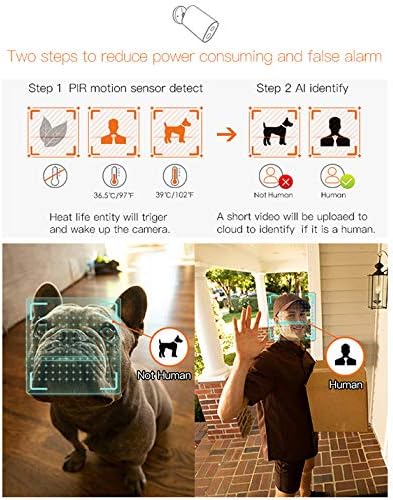
Image: Illustration of the camera's PIR motion detection and AI human identification process.
5.3 Sealladh na h-Oidhche
The IMILAB EC2 is equipped with infrared night vision, allowing it to capture clear video footage even in complete darkness. This feature activates automatically in low-light conditions.

Image: Comparison demonstrating the superior night vision capabilities of the IMILAB EC2 camera.
5.4 Fuaim Dà-shligheach
Utilize the built-in microphone and speaker to communicate with individuals near the camera, directly through the app.
5.5 Stòradh Neòil
The camera offers free cloud storage for recorded events for a limited duration (e.g., 7 days), eliminating the need for a local memory card. This ensures your footage is securely backed up.

Image: The IMILAB EC2 camera highlighting its free cloud storage feature.
6. Cumail suas
6.1 Seasmhachd an aghaidh sìde
The IMILAB EC2 camera has an IP66 rating, making it resistant to dust and powerful water jets. It is designed to withstand various outdoor weather conditions, including heat, wind, snow, and rain.

Image: The IMILAB EC2 camera's internal structure and its resilience to extreme weather conditions.
6.2 Bataraidh cosgais
The camera is powered by a rechargeable Lithium Polymer battery. When the battery level is low, you will receive a notification via the app. Recharge the camera using the provided charging cable and adapter. A full charge can last up to 4 months, depending on usage and environmental factors.

Image: The IMILAB EC2 camera demonstrating its long battery life, capable of 4 months on a single charge.
6.3 Glanadh
Periodically clean the camera lens and housing with a soft, dry cloth to ensure clear image quality and proper operation. Do not use harsh chemicals or abrasive materials.
7. A ’dèanamh trioblaid
If you encounter issues with your IMILAB EC2 camera, refer to the following common solutions:
- Cha robh an camara a’ ceangal ri Wi-Fi: Ensure the Gateway is powered on and connected to your router. Verify your Wi-Fi network is 2.4GHz. Restart the camera and Gateway, then attempt pairing again.
- Càileachd bhidio truagh: Check your Wi-Fi signal strength at the camera's location. Ensure the camera lens is clean and free from obstructions.
- Lorgaireachd gluasad nach eil ag obair: Verify motion detection settings are enabled in the app. Adjust sensitivity levels if necessary. Ensure the camera's view chan eil bacadh air.
- Bidh bataraidh a’ drèanadh gu sgiobalta: Tachartasan tric airson gluasad a lorg, beò view access, or poor Wi-Fi signal can increase battery consumption. Reduce detection sensitivity or optimize camera placement.
- Gun fiosan: Check your smartphone's app notification settings and ensure they are enabled for the IMILAB Home app.
8. Sònrachaidhean
Detailed technical specifications for the IMILAB EC2 Outdoor IP Security Camera (Model CMSXJ11A):
| Feart | Sònrachadh |
|---|---|
| Ainm Modail | Xiaomi CMSXJ11A |
| Fuasgladh glacadh bhidio | 1080p (Làn-HD) |
| Fuasgladh bhidio èifeachdach | 1080 |
| Ìre frèam | 30 frèamaichean gach dàrna |
| Teicneòlas ceangail | Wireless (Wi-Fi) |
| Teicneòlasan Conaltraidh gun Uèir | Wi-Fi |
| Pròtacal ceangail | Wi-Fi |
| Cleachdadh a-staigh / a-muigh | A-staigh, a-muigh |
| Feartan sònraichte | Night Vision, Motion Detector |
| Stòr cumhachd | Cumhachd bataraidh |
| Bataraidhean | 1 bataraidh lithium polymer a dhìth (air a ghabhail a-steach) |
| Susbaint Cumhachd Bataraidh Lithium | Uairean 0.6 Watt |
| Bataraidh Lithium Voltage | 5 Volt |
| Cuideam Bataraidh Lithium | 0.9 gram |
| Rangachadh IP | IP66 (Dust and Water Resistance) |
| Innealan co-fhreagarrach | Fòn-làimhe (Android, iOS) |
| Seòrsa stàladh | Srath balla |
| Dath | Geal |
| Meudan nì (L x W x H) | 3 x 2 x 4 cm |
| Cuideam nì | 530 g |
9. Barantas agus Taic
For warranty information, please refer to the documentation provided with your purchase or contact your retailer. Specific warranty terms may vary by region and seller.
For technical support or further assistance, please visit the official IMILAB website or contact their customer service. You may also find support resources on the IMILAB brand page on Amazon.