
1. Toradh thallview
The Baseus W09 TWS Wireless Earphones (Model: Encok W09) are designed for convenient audio playback and communication. These in-ear earphones feature touch control and connect wirelessly via Bluetooth, offering a stereo bass sound experience.

Image 1: The Baseus W09 TWS Wireless Earphones securely placed within their charging case. The case is open, revealing both earbuds.
2. Suidhich
2.1 A’ cur cosgais air na fònaichean-cluaise agus a’ chùis
Before initial use, ensure both the earphones and the charging case are fully charged. The charging case contains a built-in Lithium Ion battery.
- Cuir na fònaichean-cluaise a-steach don chùis cosgais.
- Connect the charging case to a power source using a compatible charging cable (not specified, assume USB).
- Mar as trice bheir làn chosgais timcheall air 1.5 uairean a thìde.
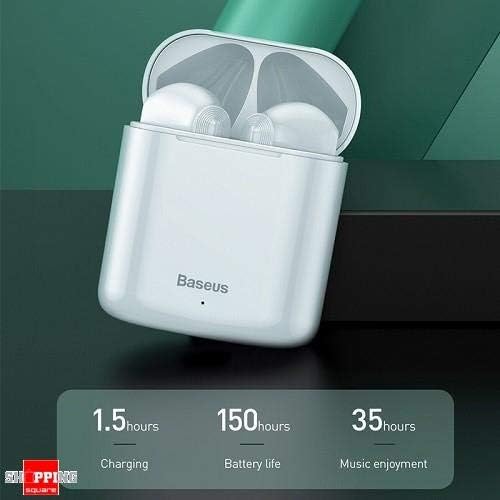
Image 2: The Baseus W09 charging case, illustrating its charging time of 1.5 hours, a standby battery life of 150 hours, and 35 hours of music enjoyment.
2.2 Pairing Bluetooth
The Baseus W09 earphones are designed for quick and instant connection.
- Dèan cinnteach gu bheilear a’ cur cosgais air na fònaichean-cluaise.
- Fosgail am bogsa cosgais.
- Thoir na fònaichean-cluaise a-mach às a’ chùis cosgais. Thèid iad a-steach don mhodh paidhreachaidh gu fèin-ghluasadach.
- Air an inneal agad (fòn cliste, tablet, msaa.), cuir Bluetooth an gnìomh agus rannsaich airson innealan a tha rim faighinn.
- Select "Baseus Encok W09" or a similar name from the list to connect.
- Cho luath ‘s a bhios e ceangailte, cluinnidh tu fuaim, agus bidh na fònaichean-cluaise deiseil airson an cleachdadh.
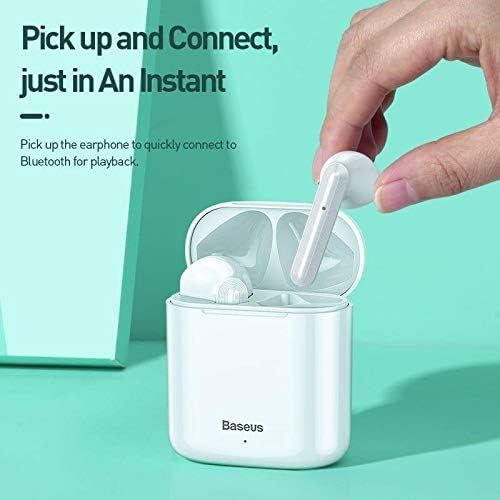
Image 3: A hand demonstrating the "Pick up and Connect" feature, showing an earphone being removed from its charging case, initiating quick Bluetooth connection.
3. Stiùireadh Obrachaidh
3.1 A’ caitheamh nan cluasan-cluaise
Gently insert each earphone into the corresponding ear canal (L for left, R for right). Adjust them for a comfortable and secure fit to ensure optimal sound quality and stability.
3.2 Gnìomhan Smachd Suathaidh
The Baseus W09 earphones feature intelligent touch controls for various functions. Specific gestures may vary; please refer to the product packaging or the official Baseus website for detailed touch control instructions.
- Cluich / Stad: Typically a single tap on either earphone.
- Freagairt/Cuireadh Call: Usually a single tap during an incoming call.
- An ath cheum / an t-slighe roimhe: Often a double or triple tap on a specific earphone.
- Cuir an gnìomh neach-taic guth: May involve a long press or specific tap sequence.
3.3 Beatha Bataraidh
The Baseus W09 earphones and charging case offer extended usage times:
- Tlachd Ciùil: Up to 35 hours (with charging case).
- Am Fuireach: Suas ri 150 uairean a thìde.
4. Cumail suas
4.1 Glanadh
- Cleachd clò bog, tioram, gun lint gus na fònaichean-cluaise agus a’ chùis cosgais a ghlanadh.
- Na cleachd innealan-glanaidh sgrìobach, deoch làidir, no fuasglaidhean ceimigeach.
- Ensure no moisture enters the earphone speakers or charging ports.
4.2 Stòradh
- Nuair nach eilear gan cleachdadh, stòraich na fònaichean-cluaise anns a’ chùis cosgais aca gus an dìon agus an cumail fo chasaid.
- Bùth ann an àite fionnar, tioram air falbh bho sholas dìreach agus teòthachd anabarrach.
5. A ’dèanamh trioblaid
If you encounter issues with your Baseus W09 earphones, try the following steps:
- Gun fhuaim: Ensure earphones are charged, connected to your device, and volume is up on both the earphones and your device.
- Chan urrainnear paidhir a dhèanamh: Make sure Bluetooth is enabled on your device and the earphones are in pairing mode. Try turning Bluetooth off and on again on your device.
- Ceangal eadar-amail: Ensure there are no obstructions between the earphones and your device. Try moving closer to your device.
- Cùisean Cìsean: Check the charging cable and power adapter. Ensure the charging contacts on the earphones and case are clean.
- Ath-shuidhich: If issues persist, try resetting the earphones. Refer to the official Baseus website or product packaging for specific reset instructions.
6. Sònrachaidhean
| Feart | Mion-fhiosrachadh |
|---|---|
| Brand | Baseus |
| Modail Àireamh | Fosgail W09 |
| Seòrsa | Anns an Ear |
| Teicneòlas ceangail | Wireless (Bluetooth) |
| Modh smachd | Suathadh |
| Micreofon air a thoirt a-steach | Tha |
| Fuaim a' cur dheth | Chan eil |
| Seòrsa bataraidh | Lithium Ion (air a ghabhail a-steach) |
| Ùine cosgais | Mu thuairmeas. 1.5 uairean |
| Music Enjoyment Time | Suas ri 35 uairean (le cùis cosgais) |
| Am Fuireach | Suas ri 150 uairean a thìde |
| Co-chòrdail ri | A h-uile inneal le comas Bluetooth |
| Dath | Geal |
| Meud pacaid | 14.6 x 11 x 4 cm |
| Cuideam nì | 170 g |
7. Barantas agus Taic
For warranty information, technical support, or further assistance, please refer to the documentation included with your product or visit the official Baseus weblàrach. Cùm dearbhadh ceannach airson tagraidhean barantais.