
Launch CRP239
LAUNCH CRP239 PREMIUM CODE READER SCANNER User Manual
Model: CRP239
1. Ro-ràdh
The LAUNCH CRP239 is an intelligent and networkable automotive diagnostic tool designed for passenger cars. It offers comprehensive OBD II full functionality and rapid testing capabilities for four major vehicle systems: Engine, Automatic Transmission (A/T), Anti-lock Braking System (ABS), and Supplemental Restraint System (SRS). Additionally, the CRP239 includes advanced reset functions such as Oil Reset, Steering Angle Reset, Brake-Pad Reset, Battery Matching, Throttle Adaptation, and Diesel Particulate Filter (DPF) Regeneration, catering to the needs of professional technicians and DIY enthusiasts.
2. Fiosrachadh Sàbhailteachd
Always observe the following safety precautions when operating the LAUNCH CRP239:
- Ensure the vehicle's ignition is off before connecting or disconnecting the diagnostic tool.
- Na cleachd an inneal ann an suidheachaidhean fliuch no faisg air lionntan no gasaichean lasanta.
- Wear appropriate personal protective equipment, such as safety glasses, when working on vehicles.
- Refer to the vehicle's service manual for specific diagnostic procedures and safety warnings.
- Keep the tool away from strong magnetic fields.
- Only use the provided cables and accessories.
3. Pasgan-susbaint
Dèan cinnteach gu bheil a h-uile nì anns a’ phacaid:
- LAUNCH CRP239 Main Unit
- Càball Diagnostic OBD II
- Càball USB
- Leabhar-làimhe cleachdaiche
- Cùis Giùlain

Figure 3.1: Contents of the LAUNCH CRP239 package, showing the diagnostic tool, cables, and storage case.
4. Toradh thallview
The LAUNCH CRP239 features a robust design with a 5.0-inch 720p touch screen for intuitive navigation. It includes physical buttons for common operations and a durable rubber exterior for protection.

Figear 4.1: Aghaidh view of the LAUNCH CRP239, highlighting the touch screen display and navigation buttons.
4.1. Com-pàirtean
- Sgrion-suathaidh 5.0-òirleach: High-resolution display for clear data presentation and touch input.
- Putanan seòlaidh: Directional pad, OK button, and Return button for menu navigation.
- OBD II Connector: Standard 16-pin connector for vehicle communication.
- Port USB: For connecting to a computer for updates or data transfer.
- Comharra cumhachd: Solas LED a’ comharrachadh inbhe cumhachd.
5. Suidhich
Follow these steps for initial setup of your LAUNCH CRP239:
- Cuir cosgais air an inneal: Connect the CRP239 to a power source using the provided USB cable to ensure the internal 4000mAh lithium-polymer battery is fully charged before first use.
- Cumhachd air: Brùth agus cum air a 'phutan cumhachd gus an inneal a thionndadh.
- Taghadh Cànain: On the initial setup screen, select your preferred language. The device supports multilingual operation.
- Ceangal Wi-Fi: Navigate to the 'Settings' menu and select 'Wi-Fi'. Connect to an available wireless network to enable online updates and diagnostic report sharing.
- Ùrachadh bathar-bog: It is recommended to perform a software update immediately after connecting to Wi-Fi to ensure you have the latest features and vehicle coverage. Navigate to the 'Update' section and follow the on-screen prompts.

Figure 5.1: The LAUNCH CRP239 with its diagnostic cable connected, ready for vehicle communication.
6. Stiùireadh Obrachaidh
The LAUNCH CRP239 provides a comprehensive suite of diagnostic functions. Below are instructions for common operations.
6.1. A’ ceangal ris a’ charbad
- Locate the vehicle's 16-pin OBD II diagnostic port (usually under the dashboard).
- Dèan cinnteach gu bheil lasadh a’ charbaid dheth.
- Connect the OBD II diagnostic cable to the vehicle's OBD II port and to the CRP239.
- Turn the vehicle's ignition to the ON position (engine off). The CRP239 will power on automatically.
6.2. Seòladh Prìomh chlàr
From the main menu, you can access various functions:
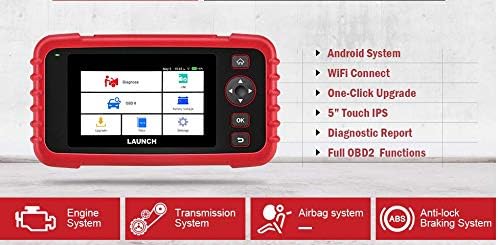
Figure 6.1: The main menu interface of the LAUNCH CRP239, providing access to all primary functions.
- Diagnosis: For full system diagnostics (Engine, A/T, ABS, SRS).
- Mise/M: Readiness status for emissions.
- OBD II: Standard OBD II functions (read/clear DTCs, live data, freeze frame, O2 sensor test, etc.).
- Ath-shuidhich: Access various maintenance reset functions.
- Bataraidh Voltage: Displays real-time vehicle battery voltage.
- Ùraich: For software and firmware updates via Wi-Fi.
- Dàta: Review saved diagnostic data and reports.
- Roghainnean: Configure device settings such as language, Wi-Fi, and display.
6.3. Performing a Diagnostic Scan
- Bhon phrìomh chlàr, tagh "Dèan breithneachadh".
- The tool will attempt to automatically identify the vehicle via VIN scan. If unsuccessful, you may need to manually select the vehicle make, model, and year.
- Choose the system you wish to diagnose (e.g., Engine, Transmission, ABS, SRS).
- Tagh "Read Fault Codes" gu view Diagnostic Trouble Codes (DTCs).
- Tagh "Clear Fault Codes" to erase DTCs after repairs have been made. Caution: Clearing codes without addressing the underlying issue will result in the codes reappearing.
- Tagh "Read Data Stream" gu view live sensor data.
6.4. Using Reset Functions
The CRP239 supports several common maintenance reset functions:
- Ath-shuidheachadh ola: Ath-shuidhichidh seo cuimhneachan beatha na h-ola às dèidh atharrachadh ola.
- Steering Angle Reset: Resets the steering angle sensor after alignment or component replacement.
- Brake-Pad Reset (EPB): Ath-shuidhichidh seo an siostam breic pàircidh dealanach às dèidh pada breic a chur nan àite.
- Battery Matching (BMS): Registers a new battery with the vehicle's Battery Management System.
- Atharrachadh Throttle: Relearns the throttle body position after cleaning or replacement.
- DPF Regeneration: Initiates the Diesel Particulate Filter regeneration process.
To use a reset function, select "Reset" from the main menu, then choose the desired function and follow the on-screen instructions.
6.5. Ùrachaidhean bathar-bog
The CRP239 supports one-click Wi-Fi updates for software and vehicle coverage, ensuring you always have the latest diagnostic capabilities.
- Dèan cinnteach gu bheil an inneal ceangailte ri lìonra Wi-Fi seasmhach.
- Bhon phrìomh chlàr, tagh "Update".
- The device will check for available updates. Select the updates you wish to install and confirm.
- Allow the update process to complete without interruption. The device may restart during this process.

Figure 6.2: The update screen on the LAUNCH CRP239, showing available software updates for various vehicle brands.
6.6. Diagnostic Report Generation
The CRP239 can automatically generate diagnostic reports, which can be shared via email.
- After completing a diagnostic session, the tool will prompt you to generate a report.
- Confirm to generate the report.
- Seòl gu na "Data" clàr-taice gu view saved reports.
- Select a report and choose the option to share via email. Ensure your Wi-Fi is connected and email settings are configured in the 'Settings' menu.
7. Cumail suas
Proper maintenance ensures the longevity and optimal performance of your LAUNCH CRP239:
- Glanadh: Cleachd clò bog, tioram airson an inneal a ghlanadh. Na cleachd innealan-glanaidh sgrìobach no fuasglaidhean.
- Stòradh: Stòraich an inneal anns a’ chùis giùlain aige ann an àite fionnar, tioram nuair nach eilear ga chleachdadh. Seachain teòthachd anabarrach.
- Cùram Bataraidh: Charge the battery regularly, even if the device is not in frequent use, to maintain battery health. Avoid fully discharging the battery for extended periods.
- Sgrùdadh càball: Periodically inspect the diagnostic and USB cables for any signs of damage. Replace damaged cables immediately.
8. A ’dèanamh trioblaid
This section addresses common issues you might encounter with the LAUNCH CRP239.
| Trioblaid | Adhbhar a dh’fhaodadh a bhith ann | Fuasgladh |
|---|---|---|
| Chan eil cumhachd aig an inneal. | Low battery; faulty connection to vehicle. | Charge the device fully. Ensure the OBD II cable is securely connected to both the CRP239 and the vehicle. Check vehicle's ignition is ON. |
| Chan urrainnear conaltradh a dhèanamh leis a’ charbad. | Incorrect vehicle protocol; faulty OBD II port; damaged cable. | Verify vehicle compatibility. Check the vehicle's OBD II port for power. Try a different vehicle or cable if available. Ensure vehicle ignition is ON. |
| Dh’fhàillig ùrachadh bathar-bog. | Ceangal Wi-Fi neo-sheasmhach; stòradh gu leòr. | Ensure a strong and stable Wi-Fi connection. Check available storage space on the device. Restart the update process. |
| Tha an sgrion neo-fhreagairt. | Mearachd bathar-bog; milleadh corporra. | Perform a soft reset by holding the power button until the device restarts. If the issue persists, contact customer support. |
9. Sònrachaidhean
| Feart | Mion-fhiosrachadh |
|---|---|
| Modail | CRP239 (CREADER PROFESSIONAL 239) |
| Taisbeanadh | 5.0-inch 720p Touch Screen |
| Bataraidh | Bataraidh Lithium Polymer Ath-luchdaichte 4000mAh (air a ghabhail a-steach) |
| Ceangalachd | OBD II, Wi-Fi, USB |
| Còmhdach Carbaid | Domestic, Asian, European vehicles (1996 and newer OBD2) |
| Siostaman le taic | Engine, Automatic Transmission (A/T), ABS, SRS |
| Feartan sònraichte | Oil Reset, Steering Angle Reset, Brake-Pad Reset (EPB), Battery Matching (BMS), Throttle Adaptation, DPF Regeneration |
| Meudan | 32.4 x 25.4 x 8 cm (Pasgan) |
| Cuideam nì | 560 g |
| Stuth taobh a-muigh | Rubair |
10. Fiosrachadh Barantais
The LAUNCH CRP239 comes with a standard manufacturer's warranty. For specific warranty terms and conditions, please refer to the warranty card included in your product package or visit the official Launch weblàrach. Cùm do chuidhteas ceannach mar dhearbhadh ceannach airson tagraidhean barantais.
Dh’fhaodadh gum bi roghainnean barantais leudaichte rim faighinn bho sholaraichean treas-phàrtaidh. Mar eisimpleirampTha Barantas Leudaichte 1-bliadhna agus 2-bhliadhna le Salama Care air an tabhann airson an toraidh seo.
11. Taic
For technical assistance, product inquiries, or support, please contact Launch customer service through their official website or the contact information provided in your product documentation. Ensure you have your product model number (CRP239) and serial number ready when contacting support.
Airson goireasan a bharrachd, tadhail air Launch Official Weblàrach.