
Lorex W463AQD-E
Leabhar-làimhe Cleachdaiche Camara Tèarainteachd Wi-Fi a-staigh Lorex 2K le Lionsa Dùbailte W463AQD-E
Model: W463AQD-E
1. Ro-ràdh
This manual provides detailed instructions for the installation, configuration, and operation of your Lorex 2K Dual Lens Indoor Wi-Fi Security Camera, model W463AQD-E. Please read this manual thoroughly before using the product to ensure proper functionality and safety. Keep this manual for future reference.

Image 1.1: Lorex 2K Dual Lens Indoor Wi-Fi Security Camera with its retail packaging.
2. Pasgan-susbaint
Verify that all items listed below are included in your package. If any items are missing or damaged, please contact Lorex customer support.
- 1 × 2K Dual-Lens Indoor Pan-Tilt Camera
- 1 × 32GB MicroSD Card (pre-installed)
- 1 × 6.5 ft (2 m) Power Cable
- 1 × Bracaid sreap
- 3 × Acraichean & sgriothan
- 1 × Adaptor Cumhachd
3. Toradh thallview
Familiarize yourself with the components and features of your Lorex security camera.
3.1 Pàirtean a’ Chamara

Dealbh 3.1: Aghaidh view of the camera, showing the dual lenses and call button.

Ìomhaigh 3.2: Taobh view of the camera, highlighting its dome shape.

Ìomhaigh 3.3: Cùl view of the camera, showing the power input and reset button.

Image 3.4: Bottom label displaying model number W463AQD-E and other regulatory information.
3.2 Prìomh fheartan
- Bhidio Quad HD 2K: A’ glacadh foo bhidio soilleir agus mionaideachtage.
- Dealbhadh Lionsa Dùbailte: Provides enhanced surveillance capabilities.
- 360° Pan-Tilt: Atharraich an camara air astar viewing angle to cover a full 360-degree area.
- Lorg-fèin-ghluasadach: Automatically follows detected movement within its field of view.
- Smart Person & Pet Detection: Differentiates between human and pet activity to reduce false alerts.
- Lèirsinn Oidhche IR: Provides clear video in low-light conditions up to 33 feet.
- Còmhradh Dà-shligheach: Allows for real-time communication through the camera's built-in microphone and speaker.
- Quick Call Button: Enables visitors to initiate a call to your connected device.
- Stòradh sùbailte: Supports local storage via an included 32GB MicroSD card and optional cloud storage or Lorex Fusion recorders.
- Modh dìomhaireachd: Physically hides the camera lens for enhanced privacy when needed.
- Ceangal Wi-Fi: Connects to your home network wirelessly (2.4GHz).
4. Suidhich
4.1 Suidheachadh Tùsail agus Ceangal Aplacaid
- Cumhachd air: Connect the power adapter to the camera and plug it into a power outlet. The camera will power on and begin its startup sequence.
- Luchdaich sìos aplacaid Lorex Home: Luchdaich sìos an aplacaid Lorex Home bhon App Store (iOS) no Google Play Store (Android) air an fhòn-smart no an tablet agad.
- Cruthaich cunntas: Fosgail an aplacaid Lorex Home agus lean an stiùireadh air an sgrion gus cunntas ùr a chruthachadh no log a-steach gu cunntas a tha ann mu thràth.
- Cuir inneal ris: Tap the '+' icon in the app to add a new device. Scan the QR code located on the bottom of your camera or on its packaging.
- Ceangail ri Wi-Fi: Follow the app's prompts to connect the camera to your 2.4GHz Wi-Fi network. Ensure your mobile device is connected to the same Wi-Fi network during setup.
- Suidheachadh coileanta: Once connected, follow the remaining steps in the app to name your camera and finalize the setup process.

Image 4.1: The Lorex Home application interface for managing camera feeds.
4.2 A ’dìreadh a’ chamara
The camera can be placed on a flat surface or mounted to a ceiling or wall using the included mounting bracket.
- Tagh Àite: Select a suitable indoor location with a clear view and within range of your Wi-Fi network.
- Comharraich Tuill: Place the mounting bracket at the desired location and mark the screw holes with a pencil.
- tuill drile: Drill pilot holes at the marked spots. If mounting on drywall, insert the included anchors.
- Bracaid tèarainte: Align the mounting bracket with the holes and secure it using the provided screws.
- Ceangail Camara: Twist the camera onto the mounting bracket until it clicks securely into place.
5. Obrachadh
5.1 Beò View agus Smachdan
Faigh a-steach gu beò view of your camera through the Lorex Home app. From the live view screen, you can control various camera functions.
- Pan agus Tilt: Use the directional controls in the app to remotely adjust the camera's horizontal (pan) and vertical (tilt) angles.
- Zoom didseatach: Pinch to zoom in or out on the live video feed.
- Lionsa dùbailte View: The app may offer options to switch between or combine views from the dual lenses.

Image 5.1: Camera shown with a smartphone displaying the dual lens live view anns an app Lorex Home.
5.2 Two-Way Talk and Call Button
The camera features two-way audio for communication and a physical call button.
- Còmhradh Dà-shligheach: Anns a 'bheatha view, tap the microphone icon to speak through the camera's speaker. Tap again to end.
- Putan Call: A person near the camera can press the physical call button on the camera to initiate a call to your connected mobile device.

Image 5.2: Demonstrating two-way talk functionality via the Lorex Home app.

Image 5.3: A user pressing the quick call button on the camera.
5.3 Lorgaireachd Gluasaid agus Rabhaidhean
The camera uses smart detection to identify important events.
- Dearbhadh Glic: The camera can detect and differentiate between people and pets, sending specific alerts to your phone.
- Lorg-fèin-ghluasadach: When motion is detected, the camera can automatically pan and tilt to follow the subject.
- Gnàthachadh: Adjust motion detection zones and sensitivity settings within the Lorex Home app to minimize unwanted alerts.

Image 5.4: Auto-tracking feature following a baby's movement.

Ìomhaigh 5.5: Fear eile view of the auto-tracking feature in action.

Image 5.6: Smart motion detection alerting to a person's presence.

Image 5.7: Pet detection and auto-tracking following a dog.
5.4 Night Vision and Smart Lighting
Bidh an camara a’ toirt seachad sgrùdadh soilleir eadhon ann an suidheachaidhean solais ìosal.
- Lèirsinn Oidhche IR: Infrared LEDs provide black and white video up to 33 feet in complete darkness.
- Solais Tèarainteachd Glic: The camera features integrated lighting that can be configured to activate upon motion detection or on a schedule.

Image 5.8: Comparison of daytime and IR night vision footage de leanabh na chadal.

Image 5.9: Clear night vision image of a baby sleeping.

Image 5.10: The camera's smart security lighting feature in action.
5.5 Clàradh agus Stòradh
Your camera offers multiple options for storing recorded video footage.
- Stòradh Ionadail: A 32GB MicroSD card is pre-installed for local recording. This ensures your footage is stored directly on the device.
- Stòradh Cloud: Optional cloud storage plans are available for off-site backup of your recordings. Refer to the Lorex Home app for details.
- Clàrairean Lorex Fusion: The camera is compatible with Lorex Fusion recorders for integrated system storage.

Image 5.11: The included 32GB MicroSD card for private and secure local storage.
5.6 Modh prìobhaideachd
Activate Privacy Mode to physically conceal the camera lens when surveillance is not desired.
- Gnìomhachadh: Privacy Mode can be activated through the Lorex Home app. When active, the camera lens will rotate downwards, blocking its view.
- Cur dheth: Deactivate Privacy Mode via the app to resume normal operation.
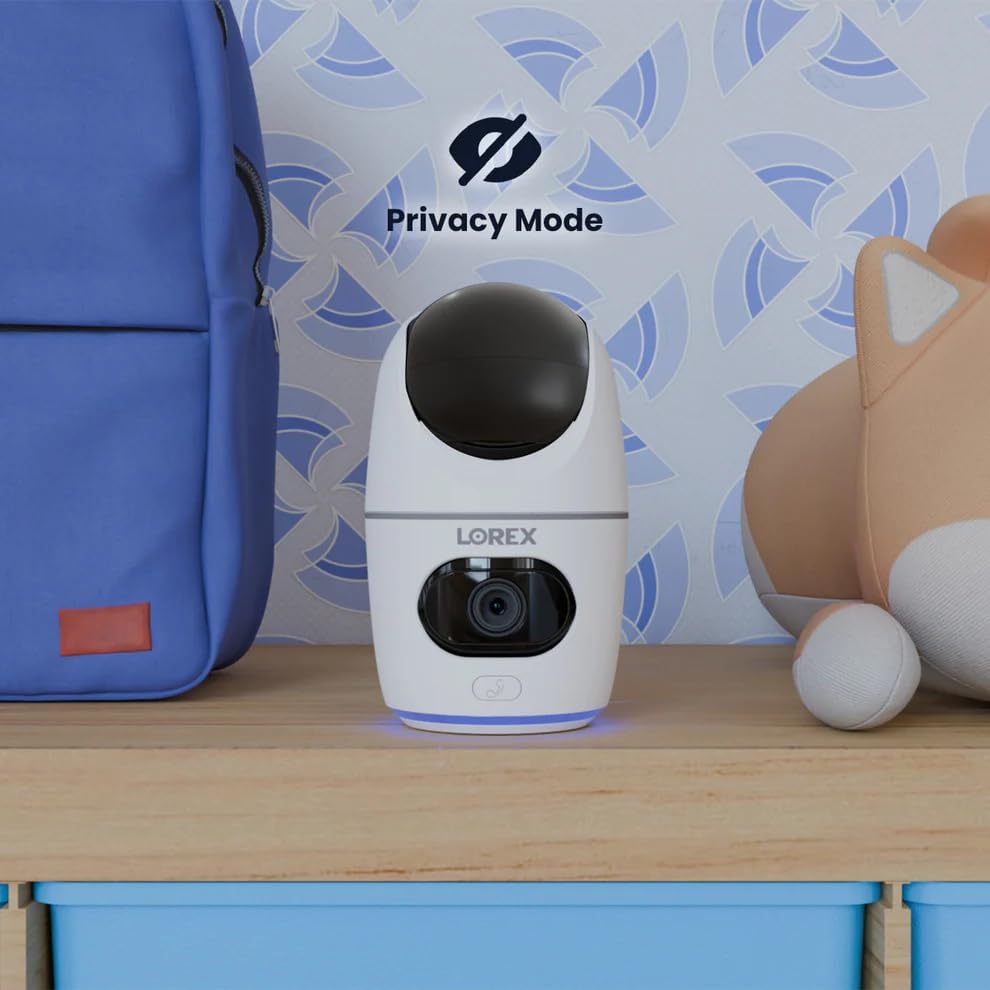
Image 5.12: The camera in Privacy Mode, with the lens retracted.
6. Cumail suas
- Glanadh: Cleachd clò bog, tioram gus lionsa agus bodhaig a’ chamara a ghlanadh. Seachain innealan-glanaidh no fuasglaidhean sgrìobach.
- Ùrachaidhean firmware: Regularly check the Lorex Home app for available firmware updates to ensure optimal performance and security.
- Cairt MicroSD: Periodically check the status of the MicroSD card in the app. If the card is full and continuous recording is enabled, older footage will be overwritten. Back up important footage mar a tha feum air.
- Solar cumhachd: Ensure the camera is connected to a stable power source. Avoid using third-party power adapters that are not specified for this device.
7. A ’dèanamh trioblaid
| Trioblaid | Fuasgladh |
|---|---|
| Tha an camara far-loidhne no neo-cheangailte. |
|
| Chan urrainn dhuinn ceangal a dhèanamh ri Wi-Fi. |
|
| No video or poor video quality. |
|
| Tha rabhaidhean gluasaid ro thric no chan fhaighear iad idir. |
|
8. Sònrachaidhean
| Feart | Mion-fhiosrachadh |
|---|---|
| Modail Àireamh | W463AQD-E |
| Fuasgladh bhidio | 2K (1440p) |
| Fuasgladh fhathast èifeachdach | 4 BP |
| Viewann an Ceàrn | 360 Degrees (Pan-Tilt), 135 Degrees (Field of View) |
| Raon Lèirsinn Oidhche | 33 Feet (IR Night Vision) |
| Ceangalachd | Wi-Fi (2.4GHz) |
| Stòradh | 32GB MicroSD Card (included), supports up to 256GB, Cloud Storage (optional), Lorex Fusion compatible |
| Fuaim | Two-Way Talk (Built-in Mic & Speaker) |
| Dearbhadh | Smart Person & Pet Detection, Auto-Tracking |
| Stòr cumhachd | Corded Electric (5V=2A) |
| Meudan (L x W x H) | 5 x 6 x 5 òirleach |
| Cuideam nì | 15.2 unnsa |
| Cleachdadh a-staigh / a-muigh | Taobh a-staigh a-mhàin |
| Co-phàirtean air an toirt a-steach | Camera, 32GB MicroSD Card, Power Cable, Mounting Bracket, Power Adapter |
9. Barantas agus Taic
For warranty information, technical support, or additional resources, please visit the official Lorex weblàrach-lìn no cuir fios chun roinn seirbheis teachdaiche aca.
- Lorex Weblàrach: www.lorex.com
- Taic teachdaiche: Thoir sùil air an Lorex website for contact details and support hours.
Product registration is recommended to receive updates and support.
Ask a question about this manual
Ask about setup, troubleshooting, compatibility, parts, safety, or missing instructions. Manuals+ will review the question and use this page’s manual context to help answer it.