
1. Ro-ràdh
Thank you for choosing the SUNSHINE P-1503T Analog Power Supply. This manual provides essential information for the safe and efficient operation, setup, maintenance, and troubleshooting of your device. Please read this manual thoroughly before using the product and keep it for future reference.
The SUNSHINE P-1503T is a versatile 15-volt, 3-amp analog power supply designed primarily for mobile phone maintenance. It features touch-sensitive controls and includes two USB ports for convenient mobile testing and charging.
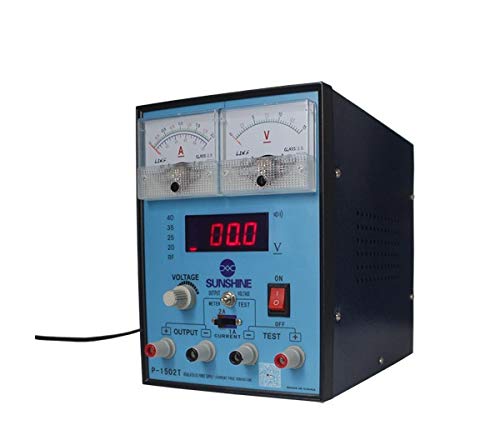
Figear 1: Aghaidh view of the SUNSHINE P-1503T Analog Power Supply. This image shows the device's display, control knobs, and output terminals, including the two USB ports.
2. Fiosrachadh Sàbhailteachd
RABHADH: Dh’fhaodadh fàilligeadh ann a bhith a’ leantainn nan stiùiridhean sàbhailteachd seo clisgeadh dealain, teine no dochann dona adhbhrachadh.
- Always connect the power supply to a grounded electrical outlet.
- Na obraich an inneal ann am fliuch no damp cumhachan.
- Dèan cinnteach gu bheil fionnarachadh ceart ann gus casg a chuir air cus teasachadh. Na cuir bacadh air fosglaidhean fionnarachaidh.
- Na fosgail an casing den t-solar cumhachd. Chan eil pàirtean sam bith a dh’ fhaodas an neach-cleachdaidh a chàradh a-staigh. Thoir aire do luchd-obrach teisteanasach airson a h-uile seòrsa seirbheiseachaidh.
- Avoid touching output terminals when the device is powered on.
- Disconnect the power cord from the outlet before cleaning or if the device will not be used for an extended period.
- Cleachd an tomhas-lìonaidh cuir-a-steach ainmichte a-mhàintage (15 Volts) as indicated on the device.
3. Suidhich
3.1 A’ dì-phapadh
- Thoir an solar cumhachd a-mach às a phacaid gu faiceallach.
- Inspect the device for any signs of damage during transit. If damaged, do not use and contact your supplier.
- Ensure all accessories are present (e.g., power cord, test leads if included).
3.2 A ’ceangal ri cumhachd
- Place the power supply on a stable, level surface with adequate ventilation.
- Connect the provided power cord to the power input socket on the rear of the device.
- Cuir ceann eile a’ chorda cumhachd a-steach do socaid dealain talmhaichte iomchaidh.
4. Stiùireadh Obrachaidh
4.1 A’ cur cumhachd air/dheth
- To power on the device, press the power switch located on the front panel. The display will illuminate.
- To power off, press the power switch again.
4.2 Adjusting Output
The P-1503T is an analog power supply, typically meaning voltage and current are set via rotary knobs.
- Cleachd an Voltage Knob Atharrachaidh gus an tomhas-lìonaidh toraidh a tha thu ag iarraidh a shuidheachadhtage. Monitor the voltage taisbeanadh.
- Cleachd an Knob rèiteachaidh gnàthach to set the desired current limit. Monitor the current display.
- The device emits a sound upon touch, indicating interaction with its controls.
4.3 A’ cleachdadh phuirt USB
The power supply features two USB ports on the front panel:
- USB Port 1 (Mobile Testing): Connect a mobile device here for diagnostic purposes. This port is designed to provide stable power for testing mobile phone circuits.
- USB Port 2 (Mobile Charging): Connect a mobile device here for charging. This port delivers power suitable for recharging mobile phone batteries.
Note: Always ensure the output voltage and current settings are appropriate for the device being connected to prevent damage.
5. Cumail suas
5.1 Glanadh
- Ensure the power supply is turned off and disconnected from the main power outlet before cleaning.
- Cleachd clò bog, tioram gus taobh a-muigh an inneil a ghlanadh.
- Do not use liquid cleaners, aerosols, or solvents, as these may damage the casing no co-phàirtean a-staigh.
- Cùm fosglaidhean fionnarachaidh saor bho dhuslach is sprùilleach.
5.2 Stòradh
Nuair nach eilear ga chleachdadh, stòraich an solar cumhachd ann an àite fionnar, tioram, air falbh bho sholas dìreach na grèine agus teòthachd anabarrach.
6. A ’dèanamh trioblaid
| Trioblaid | Adhbhar a dh’fhaodadh a bhith ann | Fuasgladh |
|---|---|---|
| Chan eil cumhachd aig an inneal. |
|
|
| Gun toradh voltage / gnàthach. |
|
|
| Puirt USB nach eil ag obair. |
|
|
7. Sònrachaidhean
| Feart | Mion-fhiosrachadh |
|---|---|
| Brand | SOISGEUL |
| Modail | P-1503T |
| Innealan co-fhreagarrach | Fòn-làimhe |
| Seòrsa ceangail | ATX |
| Factor foirm | ATX |
| Modh fuarachaidh | Air |
| Input Vol as àirdetage | 15 Volt |
| Input Vol as ìsletage | 15 Volt |
| Dèanadair | SOISGEUL |
| System Bus Connector Type | Ceanglaichean 2 |
| Stòr cumhachd | Taobh a-muigh |
| ASIN | B0847QS2FX |
8. Barantas agus Taic
This product is covered by a standard manufacturer's warranty. Please refer to the warranty card included with your purchase for specific terms and conditions. For technical support, service, or warranty claims, please contact your retailer or the manufacturer directly.
For the latest information and support, please visit the official SUNSHINE weblàrach (ma tha e ri fhaighinn).