
Hyperkin M07399-bk
Hyperkin Armor3 NuWave Controller User Manual
Model: M07399-bk
Ro-ràdh
The Hyperkin Armor3 NuWave Controller is designed to provide accurate and fluid motion control for your Nintendo Wii U and Wii consoles. Featuring built-in Nu+ technology, this controller enhances your gaming experience by offering a wider range of motion in compatible titles. This manual provides essential information on setting up, operating, maintaining, and troubleshooting your NuWave Controller.
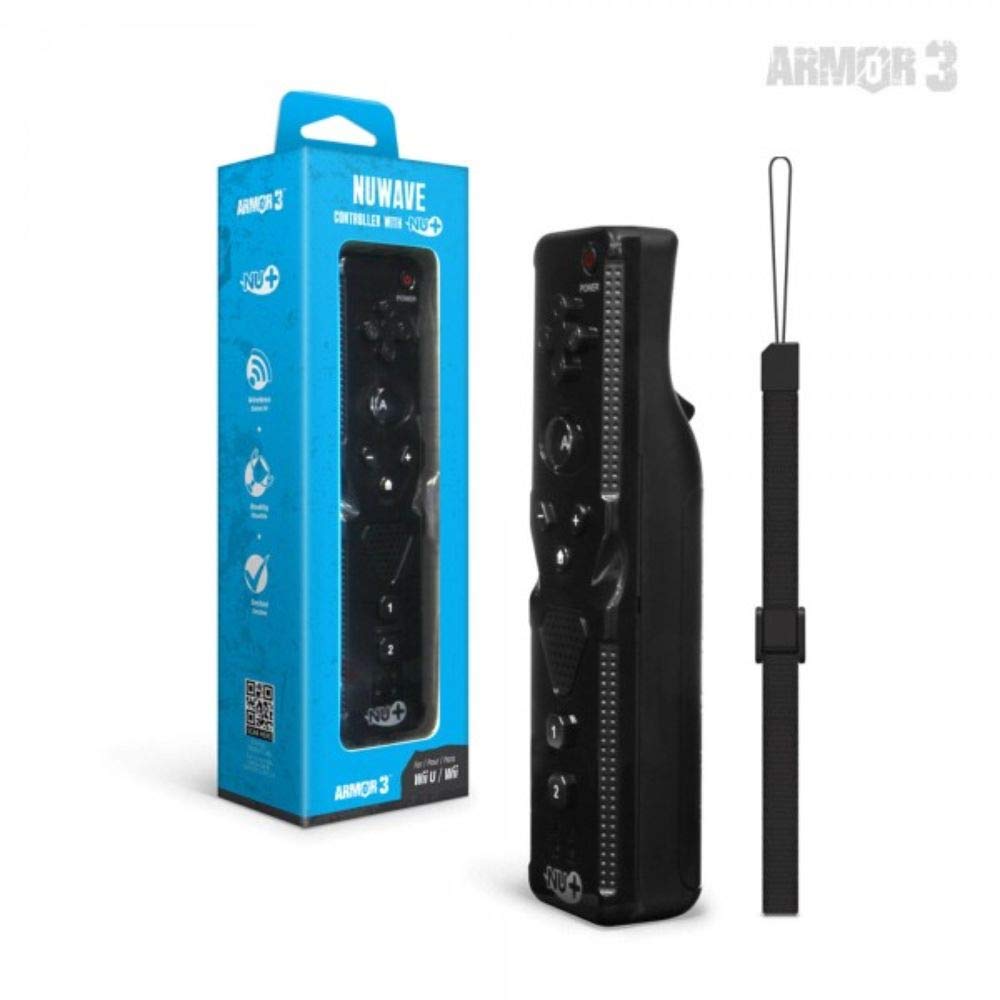
Figear 1: Hyperkin Armor3 NuWave Controller and its packaging. The controller is black with a wrist strap, and the packaging highlights its Nu+ technology and compatibility with Wii U and Wii.
Bathar seachadview
The Armor3 NuWave Controller is a motion-sensing controller compatible with both Wii U and Wii systems. It integrates advanced Nu+ technology for enhanced motion detection and precision in supported games.
Prìomh fheartan:
- Co-chòrdalachd: Fully compatible with Nintendo Wii U and Nintendo Wii consoles.
- Nu+ Technology: Built-in technology for a wider range of motion and improved accuracy in compatible titles.
- Dealbhadh ergonomic: Designed for comfortable grip and extended gameplay sessions.
- Stòr cumhachd: Feumaidh 2 bataraidh AA (gun a thoirt a-steach).
Suidhich
1. Stàladh bataraidh
- Lorg roinn a’ bhataraidh air cùl an rianadair.
- Sleamhnaich còmhdach a’ bhataraidh sìos gus a fhosgladh.
- Cuir a-steach dà (2) bataraidh AA, a’ dèanamh cinnteach gu bheil am polarachd cheart (+/-) mar a tha air a chomharrachadh taobh a-staigh a’ bhataraidh.
- Replace the battery cover by sliding it upwards until it clicks into place.
2. Connecting to Your Console
To connect the NuWave Controller to your Wii U or Wii console, follow these steps:
- Dèan cinnteach gu bheil an consol agad air a chumhachdachadh.
- On your Wii U or Wii console, press the SYNC button (usually located near the SD card slot or battery compartment).
- On the NuWave Controller, open the battery cover and locate the small red SYNC button inside the battery compartment.
- Press and release the SYNC button on the controller.
- The player indicator lights on the bottom of the controller will flash. Once a single light remains lit, the controller is successfully connected.
- If connection fails, repeat steps 2-5. Ensure the controller is within range of the console.
Stiùireadh Obrachaidh
Smachdan bunaiteach:
- Pad Treòrachaidh (D-Pad): Used for menu navigation and character movement.
- Putan: Primary action button, often used for selection or interaction.
- B Button (Trigger): Located on the underside, typically used for grabbing or firing.
- 1 & 2 Buttons: Auxiliary action buttons, functions vary by game.
- Putan Dachaigh: Returns to the console's Home Menu.
- Plus (+) & Minus (-) Buttons: Often used for zooming, adjusting settings, or specific in-game actions.
- Putan Cumhachd: A’ tionndadh an rianadair air/dheth.
Motion Sensing with Nu+ Technology:
The built-in Nu+ technology provides enhanced motion tracking. For games that support it, you will experience more precise and responsive movements. Hold the controller firmly and ensure clear line of sight to the sensor bar for optimal performance.
- Calibration: Some games may require initial calibration. Follow on-screen prompts.
- Strap gualainn: Always use the included wrist strap to prevent accidental drops during active gameplay.
Cumail suas
Glanadh:
- Sguab an rianadair le clò bog, tioram.
- Airson salachar stòlda, beagan dampnigh an clò le uisge. Na cleachd ceimigean cruaidh no innealan-glanaidh sgrìobach.
- Ensure no liquid enters the controller's openings.
Stòradh:
- Stòraich an rianadair ann an àite fionnar, tioram air falbh bho sholas dìreach na grèine agus teòthachd anabarrach.
- Ma tha thu ga stòradh airson ùine mhòr, thoir air falbh na bataraidhean gus casg a chur air aodion.
Cùram Bataraidh:
- Always use new, high-quality AA batteries.
- Na bi a’ measgachadh bataraidhean sean is ùr, no diofar sheòrsaichean bataraidhean.
- Cuir às do bataraidhean cleachdte gu ciallach a rèir riaghailtean ionadail.
Fuasgladh thrioblaidean
| Trioblaid | Adhbhar a dh’fhaodadh a bhith ann | Fuasgladh |
|---|---|---|
| Chan eil an rianadair a’ tionndadh air. | Bataraidhean marbh no air an cur a-steach gu ceàrr. | Cuir bataraidhean AA ùra nan àite, a’ dèanamh cinnteach gu bheil am polarachd cheart. |
| Controller does not sync with console. | Incorrect syncing procedure; out of range; console interference. | Ensure console is on. Repeat syncing steps (press SYNC on console, then on controller). Move closer to console. Check for other wireless device interference. |
| Chan eil putanan a’ freagairt no tha dàil ann. | Low battery; connection issue; physical obstruction. | Replace batteries. Re-sync the controller. Ensure buttons are not stuck. |
| Motion control is inaccurate. | Sensor bar obstruction; improper calibration; environmental factors. | Ensure clear line of sight to the sensor bar. Re-calibrate in-game if prompted. Avoid strong light sources directly facing the sensor bar. |
Sònrachaidhean
- Modail: M07399-bk
- Brand: Hyperkin
- Co-chòrdalachd: Nintendo Wii U, Nintendo Wii
- Stòr cumhachd: 2 x Bataraidhean AA (gun a thoirt a-steach)
- Meudan: 2.8 x 1.8 x 8 òirleach (tuairmse)
- Cuideam: 3.88 unnsa (tuairmseach, gun bataraidhean)
- Teicneòlas: Built-in Nu+ motion technology
- Dath: Dubh
Barantas agus Taic
For specific warranty information and terms, please refer to the documentation included with your purchase or visit the official Hyperkin website. Hyperkin provides customer support for their products.
Taic air-loidhne: Visit the official Hyperkin weblàrach-lìn airson Ceistean Cumanta, stiùireadh fuasgladh cheistean, agus fiosrachadh conaltraidh. www.hyperkin.com
Cuir fios gu: Refer to the Hyperkin website for the most current customer service contact methods (phone, email, etc.).
Ask a question about this manual
Ask about setup, troubleshooting, compatibility, parts, safety, or missing instructions. Manuals+ will review the question and use this page’s manual context to help answer it.