
1. Ro-ràdh agus Toradh Tharview
This manual provides comprehensive instructions for the assembly, operation, and maintenance of your Hemudu HT07B-002P Universal Swivel Tabletop TV Stand. This stand is designed to securely hold televisions ranging from 19 to 39 inches, with a maximum weight capacity of 35 kg (77 lbs). It features a 90-degree swivel capability (45 degrees left and 45 degrees right) and 4 levels of height adjustment to optimize your viewing experience. The robust construction includes a durable steel elliptical panel and an 8mm tempered glass base, ensuring stability and safety for your television.

Figure 1: Hemudu HT07B-002P Universal Swivel Tabletop TV Stand.
2. Fiosrachadh Sàbhailteachd
- Comas cuideam: Do not exceed the maximum weight capacity of 35 kg (77 lbs). Ensure your TV's weight is within this limit.
- Co-fhreagarrachd meud Tbh: This stand is suitable for TVs between 19 and 39 inches. Verify your TV's screen size and VESA mounting pattern before assembly.
- Co-fhreagarrachd VESA: The stand supports VESA patterns from 75x75mm to 200x200mm. Check your TV's VESA pattern.
- uachdar seasmhach: Always place the TV stand on a flat, stable, and level surface to prevent tipping.
- Clann is Peataichean: Keep children and pets away from the TV stand during assembly and ensure the TV is securely mounted to prevent accidents.
- Co-chruinneachadh ceart: Follow all assembly instructions carefully. Incorrect assembly can lead to product failure and injury.
- Dèan teannachadh air luchd-ceangail: Dèan cinnteach gu bheil na sgriothan agus na ceanglaichean uile air an teannachadh gu tèarainte. Na teannaich cus.
- Riaghladh càbaill: Utilize the integrated cable management system to prevent tripping hazards and maintain a tidy setup.
3. Pasgan-susbaint
Please verify that all components are present and undamaged before proceeding with assembly. If any parts are missing or damaged, contact customer support.
- Bun-stèidh glainne Tempered
- Prìomh Cholbh Taic
- Plàta Suidheachaidh VESA
- VESA Extension Arms (if applicable for larger VESA patterns)
- Hardware Kit (various screws, washers, spacers for TV mounting)
- Innealan cruinneachaidh (me, iuchair Allen)
- Anti-slip Rubber Feet for Base
- Cliopaichean/Ceanglaichean Riaghlaidh Càbaill
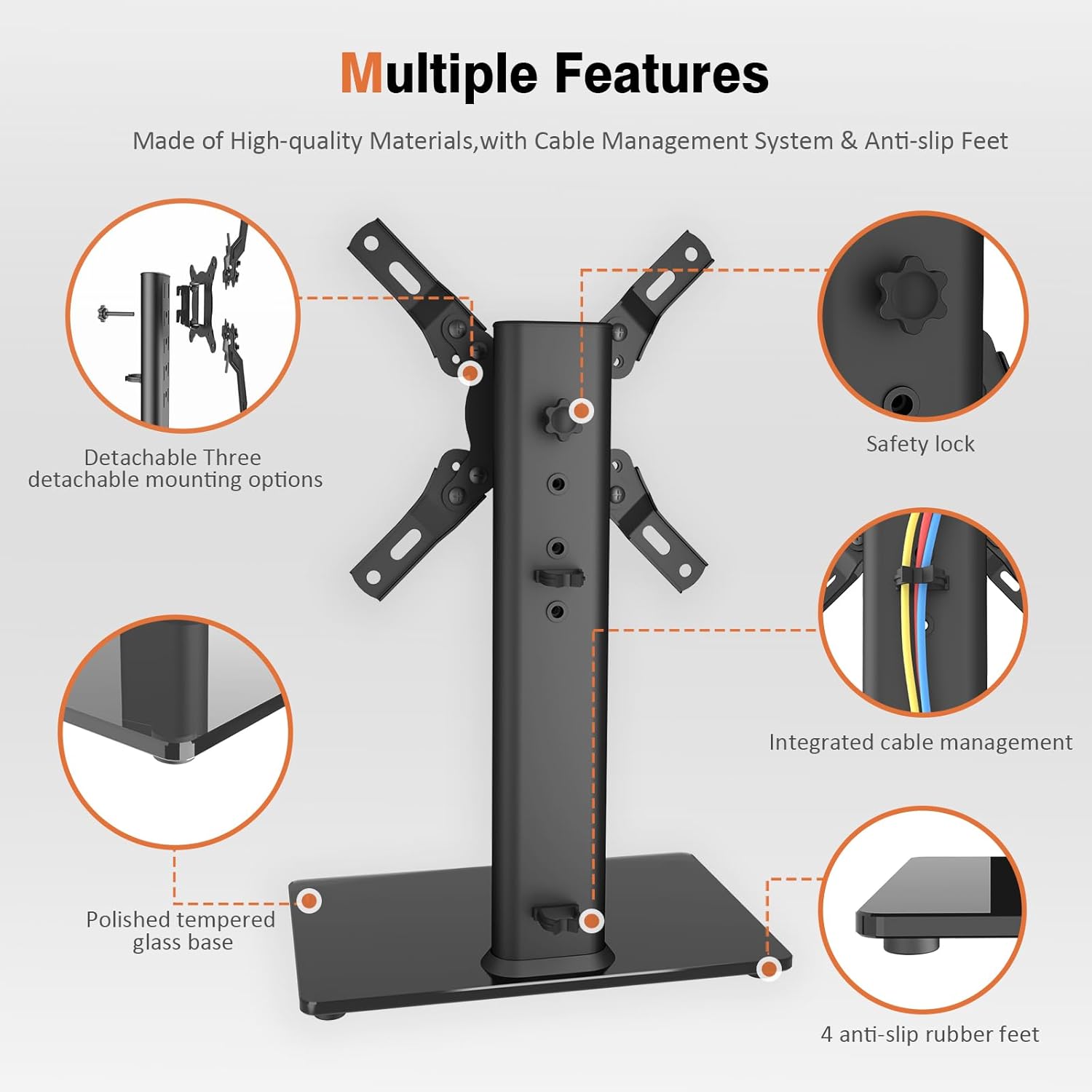
Figure 2: Key components of the TV stand, including the polished tempered glass base, safety lock, integrated cable management, and anti-slip rubber feet.
4. Stiùireadh airson Suidheachadh agus Cruinneachadh
Follow these steps carefully to assemble your Hemudu HT07B-002P TV Stand. It is recommended to have a second person assist with mounting the TV.
- Attach the Main Support Column to the Base:
Place the tempered glass base (A) on a soft, clean surface to prevent scratches. Align the main support column (B) with the holes on the base. Secure it using the provided screws and washers. Ensure the column is oriented correctly for cable management access.

Figure 3: Illustration of attaching the main support column to the tempered glass base.
- Assemble the VESA Mounting Plate:
Attach the VESA arms to the central VESA plate using the designated screws. Ensure the arms are configured to match your TV's VESA pattern (e.g., 75x75mm, 100x100mm, 200x100mm, 200x200mm). The stand supports various VESA patterns.

Figure 4: Different configurations for the VESA mounting plate to accommodate various VESA patterns.
- Attach the VESA Mounting Plate to Your TV:
Carefully place your TV face down on a soft, clean surface. Align the assembled VESA mounting plate with the mounting holes on the back of your TV. Select the appropriate screws, washers, and spacers from the hardware kit that fit your TV's specific requirements. Securely fasten the VESA plate to the TV. Do not overtighten.
- Mount the TV onto the Stand:
With assistance, carefully lift the TV with the attached VESA plate. Hook the VESA plate onto the main support column. Ensure it is properly seated and engaged. Secure the TV to the column using the safety lock mechanism (typically a screw or knob) to prevent accidental dislodgement.
- Riaghladh càbaill:
Route your TV cables through the integrated cable management system on the main support column. Use the provided clips or ties to keep cables neat and organized, preventing tangles and improving aesthetics.


