
1. Ro-ràdh
This manual provides detailed instructions for the installation, operation, and maintenance of your BINIZE Android 13 Car Stereo. This 9-inch touchscreen head unit is designed for Toyota Camry models from 2006 to 2011, offering advanced features such as Wireless CarPlay, Android Auto, GPS navigation, WiFi connectivity, and support for a backup camera.
Leugh an leabhar-làimhe seo gu faiceallach mus cleachd thu an toradh gus dèanamh cinnteach gu bheil e ag obair gu ceart agus gu bheil e sàbhailte.
2. Setup agus Stàladh
Tha stàladh ceart deatamach airson coileanadh as fheàrr. Mura h-eil thu cinnteach mu cheumannan sam bith, thathar a’ moladh gun iarr thu cuideachadh proifeasanta.
2.1 Susbaint a’ phacaid
Dèan cinnteach gu bheil na pàirtean uile anns a’ phacaid:
- BINIZE Android 13 Car Stereo Head Unit (9-inch)
- Càball cumhachd
- Càbaill Cuir-a-steach/Toraidh RCA
- 2 càball USB
- Antenna GPS
- Leabhar-stiùiridh (an sgrìobhainn seo)
- Càball cuir a-steach camara
- Camara cùl-taic

Figure 2.1: Included components of the BINIZE Android 13 Car Stereo.
2.2 Co-chòrdalachd charbadan
This head unit is specifically designed for Toyota Camry models manufactured between 2006 and 2011.

Figure 2.2: BINIZE Car Stereo installed in a compatible Toyota Camry dashboard.

Figure 2.3: Before and after installation view of the BINIZE Car Stereo in a Toyota Camry.
2.3 Uèir agus Ceanglaichean
Connect the power harness, RCA cables, USB cables, GPS antenna, and backup camera input as per the wiring diagram provided with your unit. Ensure all connections are secure to prevent malfunctions.
Thoir an aire: If the provided wiring harness is incompatible with your vehicle, contact customer service for an appropriate replacement.
2.4 Cumhachd Tòiseachaidh Air adhart
After installation, turn on your vehicle's ignition. The head unit should power on automatically. Follow any on-screen prompts for initial setup.
3. Stiùireadh Obrachaidh
3.1 Sgrion Dachaigh agus Seòladh
The home screen provides access to all main functions and applications. Swipe left or right to navigate through app pages. Tap on an icon to launch the corresponding application.

Figure 3.1: Main interface of the BINIZE Android 13 Car Stereo.
3.2 CarPlay gun uèir agus Android Auto
The unit supports both Wireless CarPlay and Wireless Android Auto for seamless smartphone integration. Connect your phone via Bluetooth and Wi-Fi to access navigation, music, calls, and messaging apps directly on the car stereo.

Figear 3.2: Gnìomhachd CarPlay gun uèir agus Android Auto.
3.3 Gnìomh Ceangal Sgàthan
For apps not supported by CarPlay or Android Auto, use the Mirror Link function to display your smartphone screen (both iOS and Android) on the car stereo. This allows for viewing videos and other content.

Figure 3.3: Mirror Link feature in action.
Video 3.1: Demonstration of the Binize car stereo's features, including screen mirroring.
3.4 Seòladh GPS
The unit features a built-in GPS receiver and antenna. You can use pre-installed navigation apps or download others from the Play Store. Both online and offline maps are supported.

Figear 3.4: Eadar-aghaidh seòlaidh GPS.
Rèidio 3.5 FM
Access FM radio stations with a tuning range of 87.5-108 MHz. Save your favorite stations for quick access.
Figear 3.5: Eadar-aghaidh rèidio FM.
3.6 Ath-chluich Ceòl is Bhideothan
Enjoy lossless music playback and high-definition video. The unit supports various audio and video formats. You can download media apps from the Play Store.
Figure 3.6: Music and Video playback interfaces.
3.7 Digital Signal Processor (DSP) and Equalizer
Customize your audio experience with the built-in DSP. Adjust multi-band EQ settings, equal loudness, and sound field to achieve true stereo surround sound through the 6-speaker output.

Figure 3.7: DSP and Equalizer settings.
Bhidio 3.2: Tharview of the Binize 10 Inch Double Din Touchscreen Android Car Stereo features.
3.8 Backup Camera Functionality
The unit supports AHD HD reversing cameras. When the vehicle is in reverse, the screen automatically displays the camera feed with reversing guidelines for safer parking.
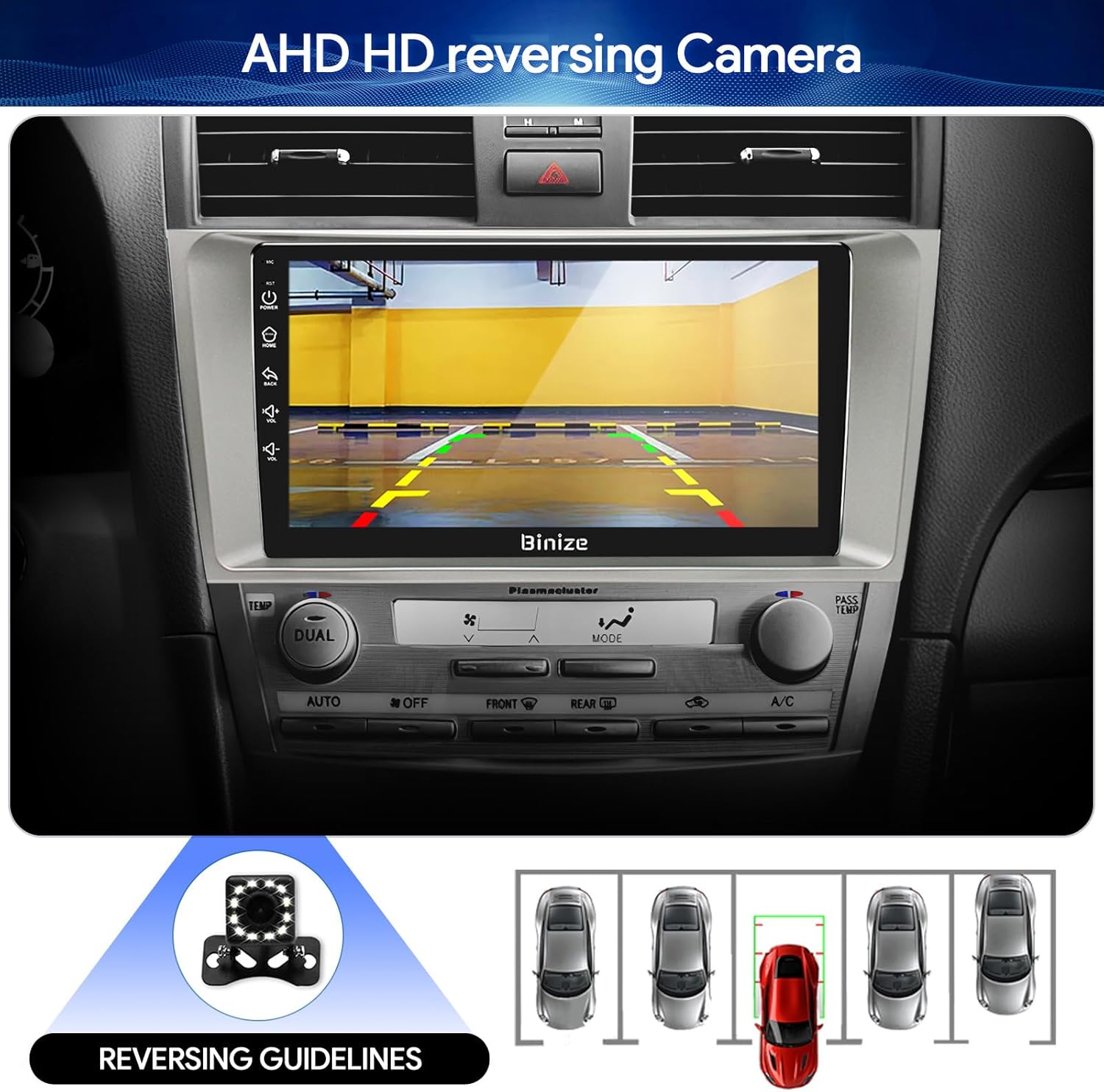
Figure 3.8: Backup camera display with reversing guidelines.
3.9 Bluetooth 5.0 for Hands-Free Calling
Connect your phone via Bluetooth 5.0 for faster network transmission and hands-free calling. Dial, answer, or receive calls directly from the head unit.
Figear 3.9: Eadar-aghaidh gairm gun làmhan Bluetooth.
4. Cumail suas
4.1 Glanadh na Sgrion
Cleachd clò bog, gun lint, gus an sgrion-suathaidh a sguabadh gu socair. Seachain innealan-glanaidh sgrìobach no ceimigean cruaidh a dh’ fhaodadh milleadh a dhèanamh air an taisbeanadh.
4.2 Ùrachaidhean bathar-bog
Periodically check for software updates to ensure optimal performance and access to new features. Updates can typically be performed via Wi-Fi or USB.
5. A ’dèanamh trioblaid
- Gun chumhachd: Thoir sùil air na ceanglaichean cumhachd uile agus bogsa fiùs a’ charbaid. Dèan cinnteach gu bheil an lasadh air.
- Gun fhuaim: Verify speaker connections, volume levels, and EQ settings. Check if the unit is muted.
- Cùisean Comharran GPS: Dèan cinnteach gu bheil an antenna GPS air a stàladh gu ceart agus gu bheil solas soilleir ann. view nan speur.
- Duilgheadasan ceangail Bluetooth: Dèan cinnteach gu bheil Bluetooth air a chomasachadh air an aonad ceann agus air an fhòn agad. Feuch ri na h-innealan a dhì-phaidhreachadh agus ath-phaidhreachadh.
- Smachdan Cuibhle Stiùiridh nach eil ag Obrachadh: Refer to the "SW Learning" or "Steering Wheel Setting" in the unit's settings menu to configure the controls.
- Screen Lag/Unresponsiveness: Restart the unit. If issues persist, consider a factory reset (note: this will erase personal data).
- Wiring Harness Incompatibility: If the provided wiring harness does not fit your vehicle, contact BINIZE customer service for assistance.
6. Sònrachaidhean
| Feart | Sònrachadh |
|---|---|
| Cuideam nì | 2.84 not |
| Meud pacaid | 11.2 x 7.2 x 3.7 òirleach |
| Meud taisbeanaidh | 10.1 òirlich |
| Guth àithne | Putanan, Micreofon, Sgrion-suathaidh |
| Brand | BINIZE |
| Seòrsa Seirbheis Carbaid | Càr |
| Feart sònraichte | Bluetooth, Sgrion-suathaidh |
| Teicneòlas ceangail | Bluetooth, USB, Wi-Fi |
| Seòrsa Mapa | Online and Offline |
| Modh Toraidh Fuaim | Neach-labhairt, Stereo |
| Seòrsa stàladh | Deas-bhòrd mount |
| Fuasgladh | 1024 x 600 |
| Siostam-obrachaidh | Android |
7. Barantas agus Taic
BINIZE offers top-notch customer service. If you encounter any problems before or after sale, please contact the BINIZE customer service team via Amazon email. They are committed to assisting you with any issues and can provide support for online updates and warranty information.
For further assistance, please refer to the contact information provided with your purchase or visit the official BINIZE store on Amazon.