
Ro-ràdh
The NEDIS Universal Programmable Remote Control (model TVRC1140BK) is designed to manage up to 4 different devices. This remote can be programmed via a personal computer (PC) to replace original remote controls for various electronic devices, including televisions (TV), video cassette recorders (VCR), digital versatile disc players (DVD), and digital video broadcasting terrestrial receivers (DVB-T). It is engineered to replicate most functions of your original remotes, providing a consolidated control solution.
Fiosrachadh Sàbhailteachd
- Do not expose the remote control to direct sunlight, heat, or moisture.
- Seachain a bhith a’ leigeil an inneal-iarainn sìos no ga chur fo bhuaidhean làidir.
- Na feuch ri smachd iomallach a thoirt às a chèile no atharrachadh. Cuiridh seo às don bharantas.
- Cùm bataraidhean a-mach à ruigsinn chloinne. Ma thèid a shlugadh, iarr aire mheidigeach sa bhad.
- Tilg bataraidhean cleachdte a-mach a rèir riaghailtean ionadail. Na tilg bataraidhean ann an teine.
- Use only the specified battery type (2x AAA Alkaline).
Susbaint pacaid
Thoir sùil air a’ phacaid airson nan nithean a leanas:
- NEDIS Universal Programmable Remote Control (TVRC1140BK)
- Càball prògramadh USB
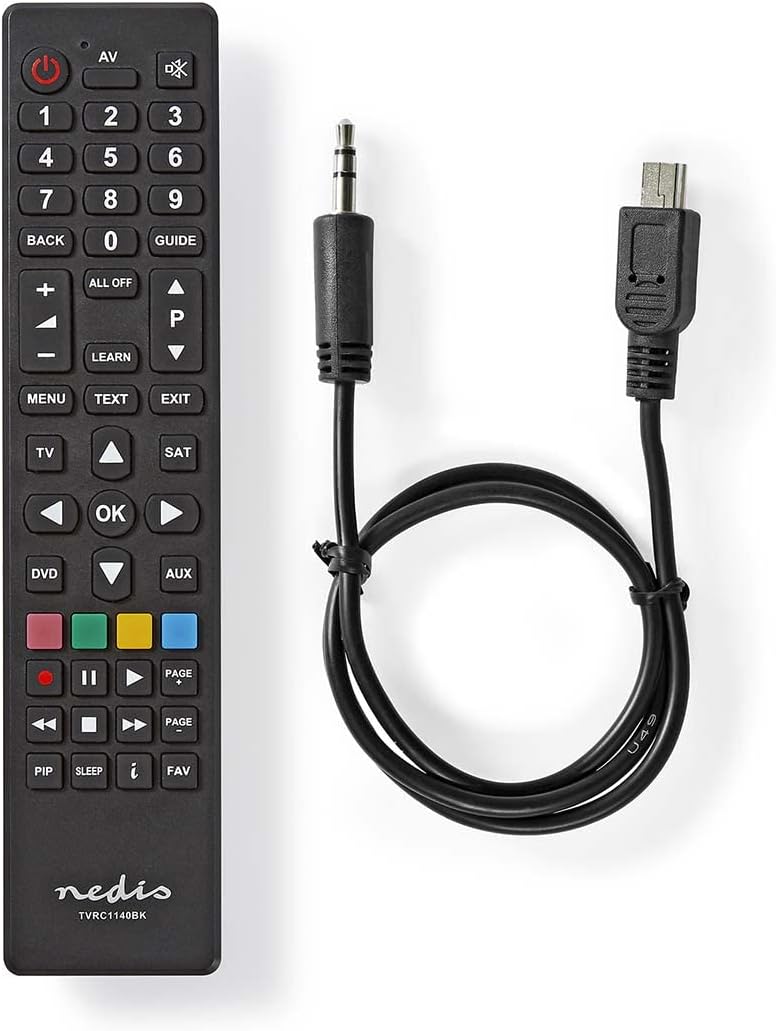
Image: The NEDIS Universal Remote Control TVRC1140BK shown alongside its USB programming cable.
Bathar seachadview
The remote control features a clear button layout for intuitive operation. Familiarize yourself with the various buttons and their functions before use.

Ìomhaigh: Aghaidh view of the NEDIS Universal Remote Control TVRC1140BK, displaying all control buttons.
Prìomh Phutanan agus Gnìomhan:
- Putan Cumhachd (): Turns devices on or off.
- Device Selection Buttons (TV, DVD, SAT, AUX): Selects the device you wish to control.
- Meur-chlàr àireamhach (0-9): For channel selection and data input.
- Meud suas / sìos (+/-): Atharraich an tomhas-lìonaidh.
- Sianal Suas/Sìos (P/P): Ag atharrachadh sianalan.
- Putanan Seòlaidh (Suas, Sìos, Clì, Deas, Ceart gu leòr): Airson seòladh is taghadh clàr-taice.
- Clàr-taice/A-mach: Accesses or exits device menus.
- Ionnsaich Putan: Used for programming functions from an original remote.
- Putanan Dathte (Dearg, Uaine, Buidhe, Gorm): Often used for specific functions in menus or teletext.
Suidhich
1. Stàladh bataraidh
- Fosgail an còmhdach cuibhreann bataraidh air cùl an smachd iomallach.
- Insert two (2) AAA Alkaline batteries, ensuring the correct polarity (+ and -) as indicated inside the compartment.
- Dùin an còmhdach roinn bataraidh gu tèarainte.
2. Prògramadh PC
The NEDIS TVRC1140BK remote control is programmed using dedicated software on a PC. This method allows for comprehensive device code loading and customization.
- Luchdaich sìos bathar-bog: Visit the official NEDIS support website to download the latest programming software for the TVRC1140BK model.
- Stàladh bathar-bog:
- If you have previously installed an older version of the software, uninstall it completely before proceeding.
- For new users, install the downloaded software directly by following the on-screen instructions.
- Ceangail an Remote: Use the provided USB programming cable to connect the remote control to an available USB port on your PC.
- Programming Process: Follow the instructions within the software to select your device types (TV, DVD, VCR, DVB-T, etc.) and load the appropriate control codes onto the remote. The software typically guides you through the process of assigning functions to buttons.
Thoir an aire: For optimal performance and access to the latest device codes, always use the most current version of the programming software available from the manufacturer.
Ag obrachadh an Remote Control
Once programmed, the remote control functions similarly to your original device remotes.
- Tagh inneal: Brùth air a’ phutan co-fhreagarrach air an inneal (m.e., TV, DVD, SAT, AUX) to select the device you wish to control. The indicator light on the remote may illuminate to confirm selection.
- Point and Operate: Point the remote control directly at the device's infrared receiver.
- Use Functions: Press the desired function buttons (e.g., Power, Volume, Channel, Menu, Play, Pause) to control your selected device.
Cumail suas
- Glanadh: Sguab an smachd iomallach le clò bog, tioram. Na cleachd innealan-glanaidh sgrìobach no fuasglaidhean.
- Ath-nuadhachadh bataraidh: Replace batteries when the remote's performance degrades or if the indicator light does not illuminate. Always replace both batteries at the same time with new AAA Alkaline batteries.
- Stòradh: Mura tèid an smachd iomallach a chleachdadh airson ùine mhòr, thoir a-mach na bataraidhean gus casg a chur air aodion.
Fuasgladh thrioblaidean
- Chan eil an inneal-iomallach a’ freagairt:
- Thoir sùil a bheil na bataraidhean air an cur a-steach gu ceart agus gu bheil iad làn-chumhachdach. Cuir an àite iad ma tha sin riatanach.
- Ensure there is a clear line of sight between the remote control and the device's infrared receiver.
- Verify that the correct device mode (TV, DVD, etc.) is selected on the remote.
- Device functions not working correctly after programming:
- The device code may be incorrect or incomplete. Re-program the remote using the PC software, ensuring you select the correct manufacturer and model for your device.
- Some specific functions might not be available if the original remote had unique features not supported by the universal remote's code database.
- Consult the NEDIS support website for updated software or additional programming tips.
- PC programming software issues:
- Ensure you have uninstalled any previous versions of the software before installing the latest one.
- Check your PC's operating system compatibility with the software.
- Feuch ri port USB eadar-dhealaichte a chleachdadh no ath-thòiseachadh a’ choimpiutair agad.
Sònrachaidhean
| Brand | NEDIS |
| Modail Àireamh | TbhRC1140BK |
| Teicneòlas ceangail | Fo-dhearg |
| Innealan le Taic as Àireamh as Àireamh | 4 |
| Innealan co-fhreagarrach | TV, DVD/Blu-ray Player, Set-top Box, VCR |
| Seòrsa Rianadair | Smachd putan |
| Raon as àirde | 10 Meatair |
| Bataraidhean a dhìth | 2x AAA Alkaline (gun a thoirt a-steach) |
| Dath | Dubh |
Barantas agus Taic
For warranty information, please refer to the terms and conditions provided by your retailer at the time of purchase or contact NEDIS customer support directly. For technical assistance, software updates, and additional resources, please visit the official NEDIS weblàrach.