
Ro-ràdh
This manual provides essential information for setting up, operating, maintaining, and troubleshooting your VAIO SX12 laptop. Please read this manual thoroughly to ensure proper use and to maximize the performance and longevity of your device.

Figear 1: Aghaidh view of the VAIO SX12 laptop with the screen open.
Suidhich
1. Dì-phapadh agus sgrùdadh tùsail
Thoir a h-uile pàirt a-mach às a’ phacaid gu faiceallach. Dèan cinnteach gu bheil a h-uile rud a tha air a liostadh san earrann ‘Dè a tha sa bhogsa’ an làthair agus gun mhilleadh. Ma tha rud sam bith a dhìth no millte, cuir fios gu taic luchd-cleachdaidh.
- VAIO SX12 Laptop
- Adaptor AC
- Aodach glanaidh
2. Connecting the AC Adapter
Connect the AC adapter to the power input port on the laptop and then plug the adapter into a wall outlet. The battery will begin charging automatically.
3. A’ chiad chumhachd air
Press the power button located on the top right of the keyboard. The laptop will boot up and guide you through the initial Windows 10 Pro setup process.
Ag obrachadh
1. Meur-chlàr agus Pad-suathaidh
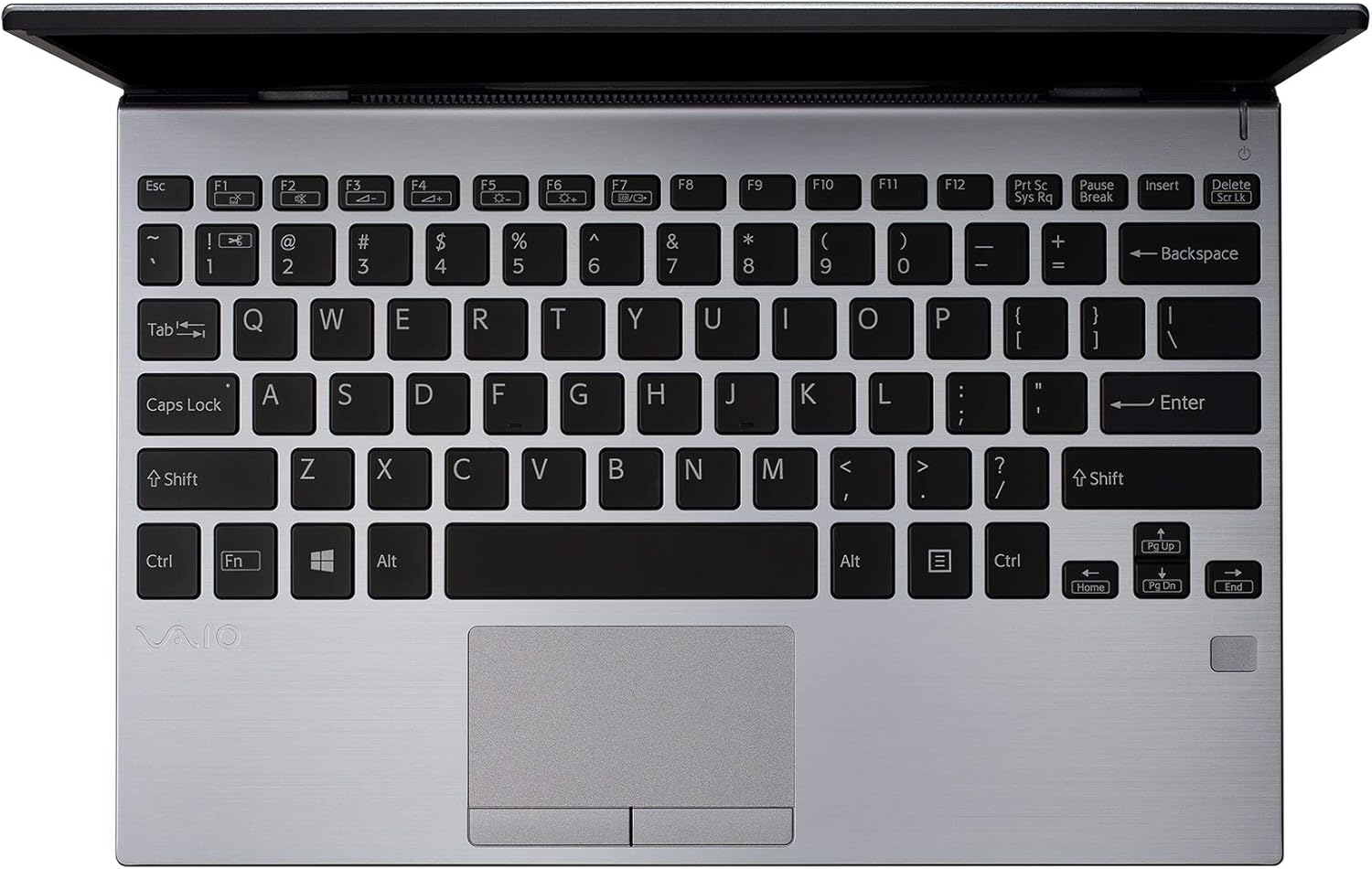
Figear 2: Suas gu h-àrd view of the VAIO SX12 keyboard and touchpad.
The VAIO SX12 features a full-sized keyboard and a precision touchpad. Familiarize yourself with the function keys (F1-F12) which control various system settings such as screen brightness, volume, and wireless connectivity.
- Iuchraichean gnìomh: Use the 'Fn' key in combination with F1-F12 for secondary functions.
- Touchpad: Supports multi-touch gestures for scrolling, zooming, and navigating.
2. Ceangal Peripherals
The VAIO SX12 offers a variety of ports for connecting external devices.

Figear 3: Taobh clì view of the VAIO SX12, showing the power input, USB ports, HDMI, Ethernet, and VGA ports.

Figear 4: Taobh ceart view of the VAIO SX12, showing the SD card slot, USB ports, and audio jack.
- Puirt USB: Ceangail innealan USB leithid draibhearan taobh a-muigh, meur-chlàran no luchagan.
- Port HDMI: Ceangail ri taisbeanadh no proiseactair taobh a-muigh.
- Port VGA: Connect to older external displays or projectors.
- Port Ethernet: Ceangail ri lìonra uèirleas.
- Slot cairt SD: Cuir a-steach cairt SD airson gluasad dàta.
- Seacaid claisneachd: Ceangail fònaichean-cluaise no luchd-labhairt taobh a-muigh.
Cumail suas
1. Glanadh an Laptop
- Use the provided cleaning cloth or a soft, lint-free cloth to wipe the screen and exterior surfaces.
- Na cleachd ceimigean cruaidh, innealan-glanaidh sgrìobach, no fuasglaidhean.
- Dèan cinnteach gu bheil an laptop dheth agus gun a bhith a’ cleachdadh a’ phlug mus glan thu e.
2. Cùram Bataraidh
- Gus beatha bataraidh a leudachadh, seachain a bhith ga leigeil ma sgaoil gu tur gu tric.
- Stòraich an laptop ann an àite fionnar, tioram mura tèid a chleachdadh airson ùine mhòr.
- The battery is internal and not user-replaceable. Contact authorized service for battery replacement.
3. Ùrachaidhean bathar-bog
Thoir sùil gu cunbhalach airson ùrachaidhean air an t-siostam obrachaidh agus draibhearan agus stàlaich iad gus dèanamh cinnteach à coileanadh agus tèarainteachd as fheàrr.
Fuasgladh thrioblaidean
1. Chan eil an laptop a’ dol air
- Dèan cinnteach gu bheil an inneal-atharrachaidh AC ceangailte gu tèarainte ris an laptop agus ri socaid cumhachd a tha ag obair.
- Dearbhaich gu bheil an socaid cumhachd ag obair le bhith a’ cur inneal eile a-steach.
- Ma tha am bataraidh air a dhrèanadh gu tur, leig leis cosgais a chuir air airson co-dhiù 30 mionaid mus feuch thu ri cumhachd a chuir air.
2. Cùisean Taisbeanaidh
- If the screen is blank, try adjusting the brightness using the function keys.
- If an external monitor is connected, ensure the display output is correctly configured (e.g., duplicate, extend).
- Ath-thòisich an laptop.
3. Peripheral Not Recognized
- Dèan cinnteach gu bheil an inneal-iomaill ceangailte gu ceart ris a’ phort cheart.
- Try connecting the peripheral to a different port or another computer to rule out device malfunction.
- Check the device manager in Windows for driver issues.
Sònrachaidhean
| Feart | Sònrachadh |
|---|---|
| Ainm Modail | VAIO SX12 |
| Àireamh Modail Nì | VJS121C11L |
| Pròiseasar | Intel Core i5-8265U (3.9 GHz max) |
| RAM | 8 GB LPDDR3 |
| Dràibhear cruaidh | 512 GB PCIe SSD |
| Siostam-obrachaidh | Windows 10 pro |
| Meud sgrion | 12.5 òirlich |
| Fuasgladh sgrion | 1920 x 1080 piogsail (làn HD) |
| Cairt grafaigeachd | Grafaigean Intel aonaichte |
| Ceangal gun uèir | 802.11a/b/g/n/ac, Bluetooth |
| Puirt USB 3.0 | 4 |
| Cuideam nì | 1.97 not |
| Meudan toraidh | 11.3 x 8 x 0.62 òirleach |
| Dath | Airgiod |
| Bataraidhean | 1 bataraidh lithium-ion (air a ghabhail a-steach) |
Barantas agus Taic
For warranty information and technical support, please refer to the documentation included with your product or visit the official VAIO support weblàrach. Cùm do chuidhteas ceannach mar dhearbhadh ceannach airson tagraidhean barantais.