
Ro-ràdh
This manual provides instructions for the Extreme Networks Summit X460-24p, a high-performance, managed Layer 3 Ethernet switch designed for enterprise and data center environments. It features 24 Gigabit Ethernet ports with Power over Ethernet (PoE) capabilities, along with additional SFP and shared Gigabit SFP ports for flexible connectivity.
Fiosrachadh Sàbhailteachd
Stiùireadh Sàbhailteachd
- Always disconnect all power supply inputs before removing any panel for servicing.
- This device contains a Class 1 Laser product. Avoid direct eye exposure to beam.
- Dèan cinnteach gu bheil an talamh ceart rè an stàladh.
- Refer to the installation manual for power cord selection and additional compliance markings.
Susbaint pacaid
Dè th' anns a' Bhocsa
- Extreme Networks Summit X460-24p Switch
- Power Cord (region-specific)
- Uidheam sreap raca
- Sgrìobhainnean (an leabhar-làimhe seo)
Bathar seachadview
The Summit X460-24p switch is designed for efficient network management and high-speed data transfer.
Pannal cùil

This image displays the rear panel of the Summit X460-24p switch, highlighting the power input, fan modules, and the SummitStack ports. The overall chassis is purple.

A mionaideach view of the SummitStack ports (Stack Port 1 and Stack Port 2) located on the rear of the switch, used for stacking multiple switches.
Label Bathar
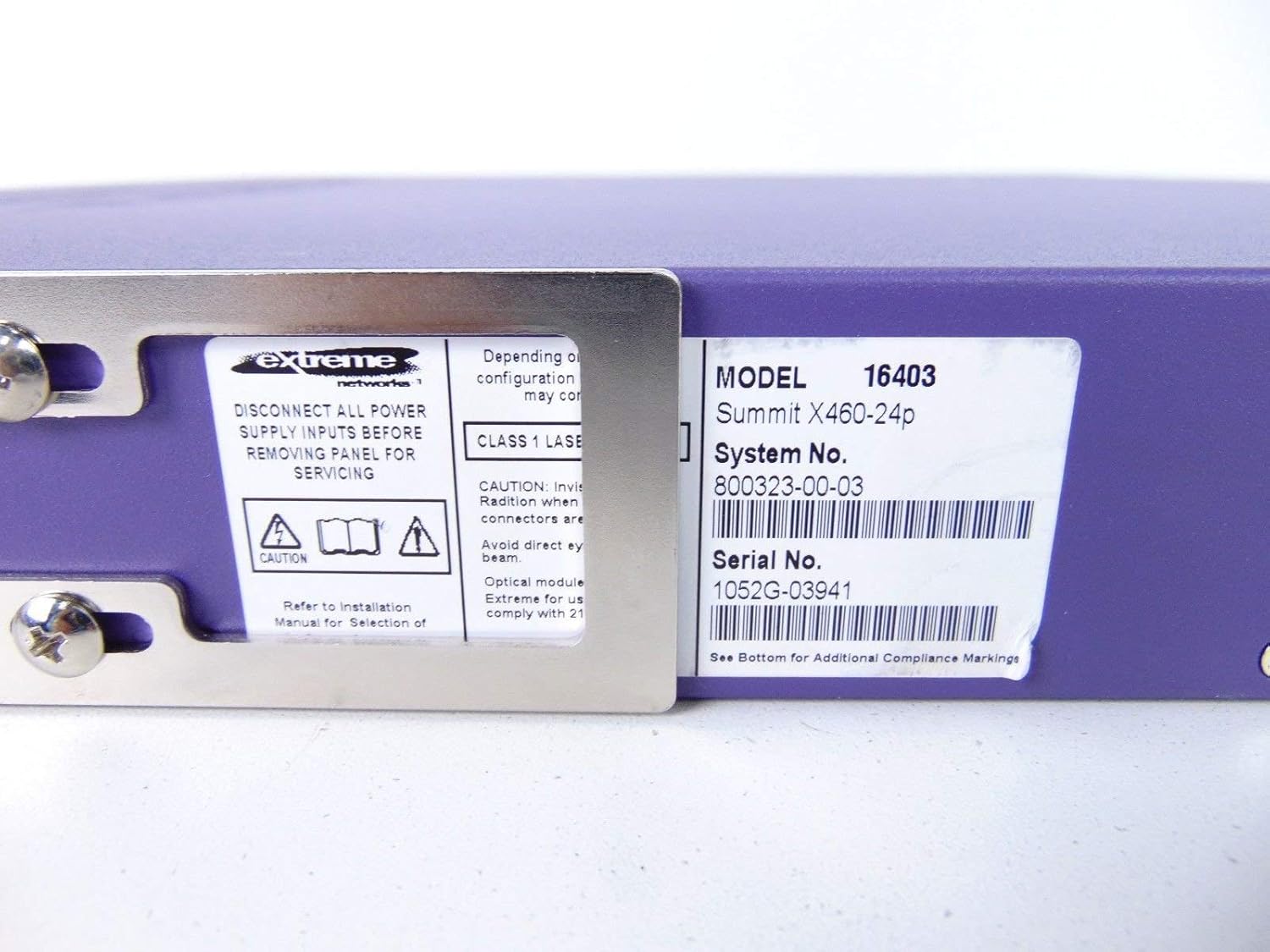
This label provides critical identification information for the switch, including Model: 16403, Summit X460-24p, System No.: 800323-00-03, and Serial No.: 1052G-03941.
Co-phàirtean Roghainneil

This image shows the label for an optional Extreme Networks Summit 750W PoE AC Power Supply Unit (PSU), Model 10931, System No. 800382-00-03, Serial No. 1053A-41986.

This image displays the label for an optional Extreme Networks SummitStack Module, Model 16419, System No. 800384-00-01, Serial No. 1122G-02565.
Suidhich
Stiùireadh stàlaidh
Stàladh raca
The Summit X460-24p is designed for standard 19-inch rack mounting. Use the provided rack-mounting kit to secure the switch in a server rack. Ensure adequate ventilation around the unit.
Cumhachd ceangail
Connect the power cord to the AC power inlet on the rear of the switch and then to a grounded electrical outlet. The switch will power on automatically.
Ceangal càball lìonra
- Connect Ethernet cables from your network devices to the 24 10/100/1000Base-T PoE ports on the front panel.
- For uplink or fiber connections, use the SFP or shared Gigabit SFP ports.
- For stacking, connect SummitStack ports on multiple switches using appropriate stacking cables.
Initial Configuration Access
Access the switch's management interface via a console cable connected to the console port, or through a web browser if the switch has a default IP address configured. Refer to the Extreme Networks documentation for detailed initial setup procedures.
Stiùireadh Obrachaidh
Obrachadh Bunaiteach
Cumhachd air / dheth
The switch powers on automatically when connected to a power source. To power off, disconnect the power cord. For proper shutdown, it is recommended to use the software-based shutdown command if available.
Comharran LED
Observe the LED indicators on the front panel for status information regarding power, system health, port activity, and PoE status. Consult the full product documentation for a detailed explanation of each LED's behavior.
Eadar-aghaidh riaghlaidh
The switch can be managed via a Command Line Interface (CLI) accessible through the console port or Telnet/SSH, or through a web-based graphical user interface (GUI).
Cumail suas
Cùram is cumail suas
Glanadh
Keep the switch clean and free of dust. Use a soft, dry cloth for external cleaning. Do not use liquid or aerosol cleaners.
Ùrachaidhean firmware
Periodically check the Extreme Networks support website for firmware updates to ensure optimal performance and security. Follow the provided instructions for firmware upgrade procedures.
Modalan Fan agus Solar Cumhachd
The switch may feature hot-swappable fan and power supply modules. Refer to the Extreme Networks documentation for instructions on replacement if necessary.
Fuasgladh thrioblaidean
Cùisean Coitcheann
Gun chumhachd
- Dèan cinnteach gu bheil an càball cumhachd ceangailte gu tèarainte ris an suidse agus ris an t-socaid cumhachd.
- Dèan cinnteach gu bheil an t-ionad cumhachd obrachail.
Port Link Down
- Thoir sùil air ceangal a’ chàball Ethernet aig gach ceann.
- Dearbhaich gu bheil an inneal ceangailte air agus ag obair ceart.
- Check the port status via the management interface.
Cùisean Ceangail Lìonra
- Verify IP configuration and network settings.
- Check for conflicting IP addresses.
- Consult network diagnostics tools.
Sònrachaidhean
Sònrachaidhean Teicnigeach
| Feart | Tuairisgeul |
|---|---|
| Modail | Summit X460-24p (Part Number: 16403) |
| Puirt | 24 x 10/100/1000Base-T PoE+ ports, 4 x shared Gigabit SFP, 4 x SFP |
| Sreath | Sreath 3 Switch air a riaghladh |
| Brand | Lìonraidhean air leth |
| Seòrsa eadar-aghaidh | PoE, SFP |
| Àireamh siostaim | 800323-00-03 |
| Àireamh sònraichte | 1052G-03941 |
| UPC | 683332278646 |
Barantas agus Taic
Fiosrachadh Barantais
This product typically comes with a 90-day limited warranty. For specific warranty terms and conditions, please refer to the official Extreme Networks warranty statement or contact your vendor.
Taic Teicnigeach
For technical assistance, visit the official Extreme Networks support weblàrach-lìn no cuir fios chun t-seirbheis teachdaiche aca. Biodh modail agus àireamh sreathach an toraidh agad deiseil nuair a bhios tu a’ sireadh taic.