
GYS 29668
GYSFLASH 30.12 PL Smart Charger User Manual
Brand: GYS | Model: 29668
1. Ro-ràdh
Welcome to the user manual for the GYSFLASH 30.12 PL, a versatile smart charger designed for 12V lead-acid and lithium iron phosphate (LiFePO4) batteries. This manual provides essential information for safe and effective operation, setup, and maintenance of your charger. Please read this manual thoroughly before using the device.
2. Stiùireadh Sàbhailteachd Cudromach
To ensure safe operation and prevent damage to the charger or battery, observe the following safety precautions:
- Always read the entire instruction manual before operating the charger.
- Dèan cinnteach gu bheil fionnarachadh iomchaidh ann fhad ’s a tha thu a’ cur cosgais gus casg a chuir air teas bho bhith a’ cruinneachadh.
- Avoid short-circuiting the charging clamps.
- The charger is equipped with reverse polarity protection; however, always connect the red (+) clamp chun an teirmineil dheimhinneach (+) agus an teirmineil dhubh (-)amp chun cheann-uidhe àicheil (-).
- Disconnect the charger from the mains power before connecting or disconnecting the battery clamps.
- Na cuir a-mach an charger gu uisge no cus taiseachd.
- Cùm a-mach à ruigsinn chloinne.
- Na feuch ri bataraidhean nach gabh ath-luchdachadh a ghearradh.
3. Toradh thallview
The GYSFLASH 30.12 PL is a high-power, auto-sensing battery support unit with advanced features for various battery types and applications.
Prìomh fheartan:
- Double Technology: Compatible with both 12V lead-acid (GEL, AGM, liquid, calcium) and lithium iron phosphate (LiFePO4) batteries.
- Toradh cumhachd àrd: Delivers a continuous 30 A at 100% duty cycle (40°C).
- Three Charging Currents: Selectable charging currents of 7 A, 15 A, and 30 A to match battery capacity.
- Modh seòmar taisbeanaidh: Provides a stable power supply of up to 30A for maintaining battery charge in exhibited vehicles or during diagnostic procedures.
- Modh Solarachaidh: Offers a stable on-board power supply, useful for maintaining vehicle electronics during battery changes or software updates.
- Wide Battery Capacity Range: Charges 12V lead-acid batteries from 15 Ah to 375 Ah and LiFePO4 batteries from 7 Ah to 375 Ah.
- Cùl-taic Cuimhne: Retains vehicle memory information during battery removal.
- Optimized Battery Retention: Can remain connected to the battery during hibernation with an auto-restart function in case of power failure.
- Ìosal Voltage A' cur cosgais: Capable of initiating charging for batteries as low as 2 V.

Figure 1: Front panel of the GYSFLASH 30.12 PL charger, displaying mode selection, battery type indicators, and charging current options.
4. Setup agus Ceangal
4.1 A’ dì-phapadh
Carefully unpack the GYSFLASH 30.12 PL charger and inspect for any visible damage. Retain the packaging for future storage or transport.
4.2 A’ ceangal ris a’ bhataraidh
- Ensure the charger's power cord is disconnected from the mains power outlet.
- Ceangail an dearg (+) cosgais clamp gu tèarainte ris an deimhinneach (+) terminal a’ bhataraidh.
- Ceangail an dubh (-) cosgais clamp gu tèarainte ris an àicheil (-) terminal a’ bhataraidh.
- Verify that both connections are firm and free from corrosion.
4.3 Connecting to Mains Power
Aon uair 's gu bheil am bataraidh clamps are securely connected, plug the charger's power cord into a suitable 230V AC, 50/60Hz power outlet.
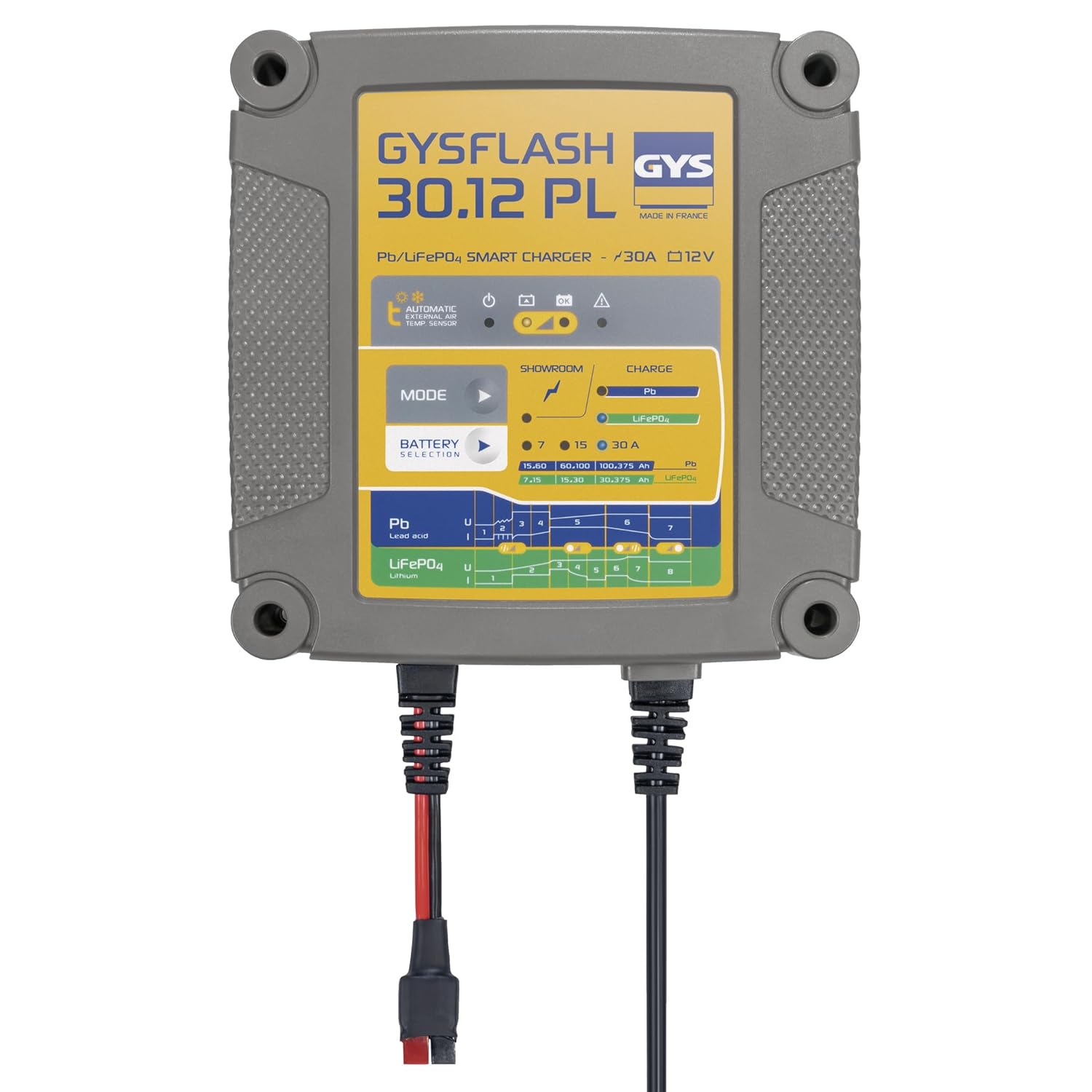
Figure 2: GYSFLASH 30.12 PL connected to a vehicle battery for charging or support.
5. Stiùireadh Obrachaidh
5.1 Cosgais fèin-ghluasadach
The GYSFLASH 30.12 PL features an integrated temperature sensor that automatically adjusts charging parameters based on the ambient temperature, optimizing charging efficiency and battery life.
5.2 Taghadh Modh
Cleachd an "MOD" button on the charger's front panel to select the appropriate charging program for your battery type:
- Pb (Luaidh-Aigéad): Select this mode for 12V lead-acid batteries, including GEL, AGM, liquid, and calcium types. Suitable for capacities from 15 Ah to 375 Ah.
- LiFePO4 (Lithium Iron Phosphate): Select this mode for 12V lithium iron phosphate batteries. Suitable for capacities from 7 Ah to 375 Ah.
5.3 Charging Current Selection
After selecting the battery type, choose one of the three available charging currents (7 A, 15 A, or 30 A) based on the battery's capacity and desired charging speed. Higher currents charge faster but should be appropriate for the battery's specifications.
5.4 Showroom Mode
This mode is designed to provide a stable power supply of up to 30A. It is ideal for maintaining the battery charge in vehicles displayed in showrooms or during diagnostic procedures, preventing battery drain without overcharging.
5.5 Modh Solarachaidh
The Supply Mode provides a stable on-board power supply to the vehicle's electrical system. This is particularly useful for maintaining power to vehicle electronics when the battery is being changed or during software updates, preventing loss of settings or data.
6. Pròiseas Cìsean
- Connect the charger to the battery terminals, ensuring correct polarity (red to positive, black to negative).
- Plug the charger's power cord into a mains power outlet.
- Brùth an "MOD" button to select the appropriate battery type (Pb for lead-acid or LiFePO4 for lithium).
- Select the desired charging current (7 A, 15 A, or 30 A) based on your battery's requirements.
- The charger will automatically begin the charging cycle. Monitor the progress indicators on the display.
- Once the charging cycle is complete, first disconnect the charger from the mains power outlet.
- Then, disconnect the black (-) clamp bhon bhataraidh, agus an uair sin an clò dearg (+)amp.
7. Cumail suas
- Keep the charger clean and dry. Wipe the casing le bog, damp aodach. Na cleachd ceimigean cruaidh no sgrìoban.
- Stòraich an charger ann an àite fionnar, tioram nuair nach eilear ga chleachdadh, air falbh bho sholas dìreach na grèine agus teòthachd anabarrach.
- Do not attempt to open the charger casing or perform any internal repairs. Refer all servicing to qualified personnel.
- Dèan sgrùdadh cunbhalach air na càbaill cosgais agus an clamps for any signs of damage, wear, or corrosion. Replace damaged components immediately.
8. A ’dèanamh trioblaid
If you encounter issues with your GYSFLASH 30.12 PL, refer to the table below for common problems and solutions.
| Trioblaid | Adhbhar a dh’fhaodadh a bhith ann | Fuasgladh |
|---|---|---|
| Cha bhith an charger a’ tionndadh air | No mains power; Faulty power cord/outlet | Check power connection; Try a different outlet; Inspect power cord for damage. |
| Gun a bhith a’ tòiseachadh a’ cur cosgais air bhog | Incorrect battery connection (reverse polarity); Battery voltage too low; Incorrect mode selected | Verify correct polarity; Ensure secure connections; Select correct battery type and current. |
| Error indicator light is on | Internal fault; Battery fault; Overheating | Disconnect charger from mains and battery, then reconnect; Allow charger to cool down; If problem persists, contact support. |
| Bidh an charger a’ fàs teth | Normal operation; Insufficient ventilation; Overload | Ensure adequate ventilation around the charger; Reduce charging current if possible. |
9. Sònrachaidhean Teicnigeach
| Sònrachadh | Luach |
|---|---|
| Brand | GAIDHEAL |
| Modail Àireamh | 29668 |
| Input Voltage | 230V AC, 50/60Hz |
| Toradh Voltage | 12 bholt (DC) |
| A 'cur cosgais an-dràsta | 7A, 15A, 30A |
| Seòrsan bataraidh co-fhreagarrach | 12V Lead-Acid (GEL, AGM, Liquid, Calcium), 12V LiFePO4 |
| Lead-Acid Battery Capacity | 15 Ah gu 375 Ah |
| LiFePO4 Battery Capacity | 7 Ah gu 375 Ah |
| Meudan toraidh (LxWxH) | 7.3 x 19 x 19 cm |
| Cuideam nì | 2.21 kg |
| Inbhean Sàbhailteachd | CE |
10. Barantas agus Taic
The GYSFLASH 30.12 PL is covered by a Barantas ionadail 2-bliadhna. For technical assistance, warranty claims, or service inquiries, please contact your authorized GYS dealer or the official GYS support center. Please retain your proof of purchase for warranty validation.
For additional information and resources, please visit the official GYS weblàrach.
Ask a question about this manual
Ask about setup, troubleshooting, compatibility, parts, safety, or missing instructions. Manuals+ will review the question and use this page’s manual context to help answer it.