
1. Ro-ràdh
This manual provides essential instructions for the safe and effective use of your Fujifilm INSTAX 210 Instant Wide Photo Camera. Please read this manual thoroughly before operating the camera and retain it for future reference. The INSTAX 210 is designed to produce instant wide-format photographs with ease.
2. Rùintean Sàbhailteachd
To ensure safe operation and prevent damage to the camera or injury to yourself and others, observe the following precautions:
- Do not disassemble, modify, or attempt to repair the camera. This may cause electric shock or injury.
- Keep the camera away from water or other liquids. Do not operate with wet hands.
- Do not expose the camera to extreme temperatures, direct sunlight for prolonged periods, or high humidity.
- Use only specified batteries and film. Incorrect use can lead to leakage, overheating, or explosion.
- Cùm bataraidhean agus film a-mach à ruigsinneachd chloinne bheaga.
- Avoid direct eye contact with the flash.
3. Ainmean Pàirt agus Gnìomhan
Familiarize yourself with the main components of your INSTAX 210 camera.

Figear 3.1: Aghaidh view of the Fujifilm INSTAX 210 Instant Wide Photo Camera.
This image shows a general front-side view of the Fujifilm INSTAX 210 Instant Wide Photo Camera, illustrating its overall design and the large lens assembly.
- Lionsa: A 'glacadh an dealbh.
- Putan Shutter: Brùth gus dealbh a thogail.
- Flash: A’ toirt seachad solas ann an suidheachaidhean solais ìosal.
- Viewlorgadair: Air a chleachdadh airson frèam a chur air na dealbhan agad.
- Slot Ejection Film: Far a bheil dealbhan clò-bhuailte a’ nochdadh.
- Pannal Smachd LCD: Displays focal distance, film count, and exposure settings.
- Putan Cumhachd: Turns the camera on and off.
- Focus Range Button: Switches between 0.9-3m and 3m-Infinity focus modes.
- Lighten/Normal/Darken (L/N/D) Button: Bidh seo ag atharrachadh dìoladh nochdaidh.
4. Suidhich
4.1. Stàladh bataraidh
The INSTAX 210 requires four AA-size alkaline batteries.
- Fosgail còmhdach roinn a’ bhataraidh a tha suidhichte air taobh a’ chamara.
- Insert four AA batteries, ensuring the correct polarity (+/-) as indicated inside the compartment.
- Dùin an còmhdach roinn bataraidh gu tèarainte.
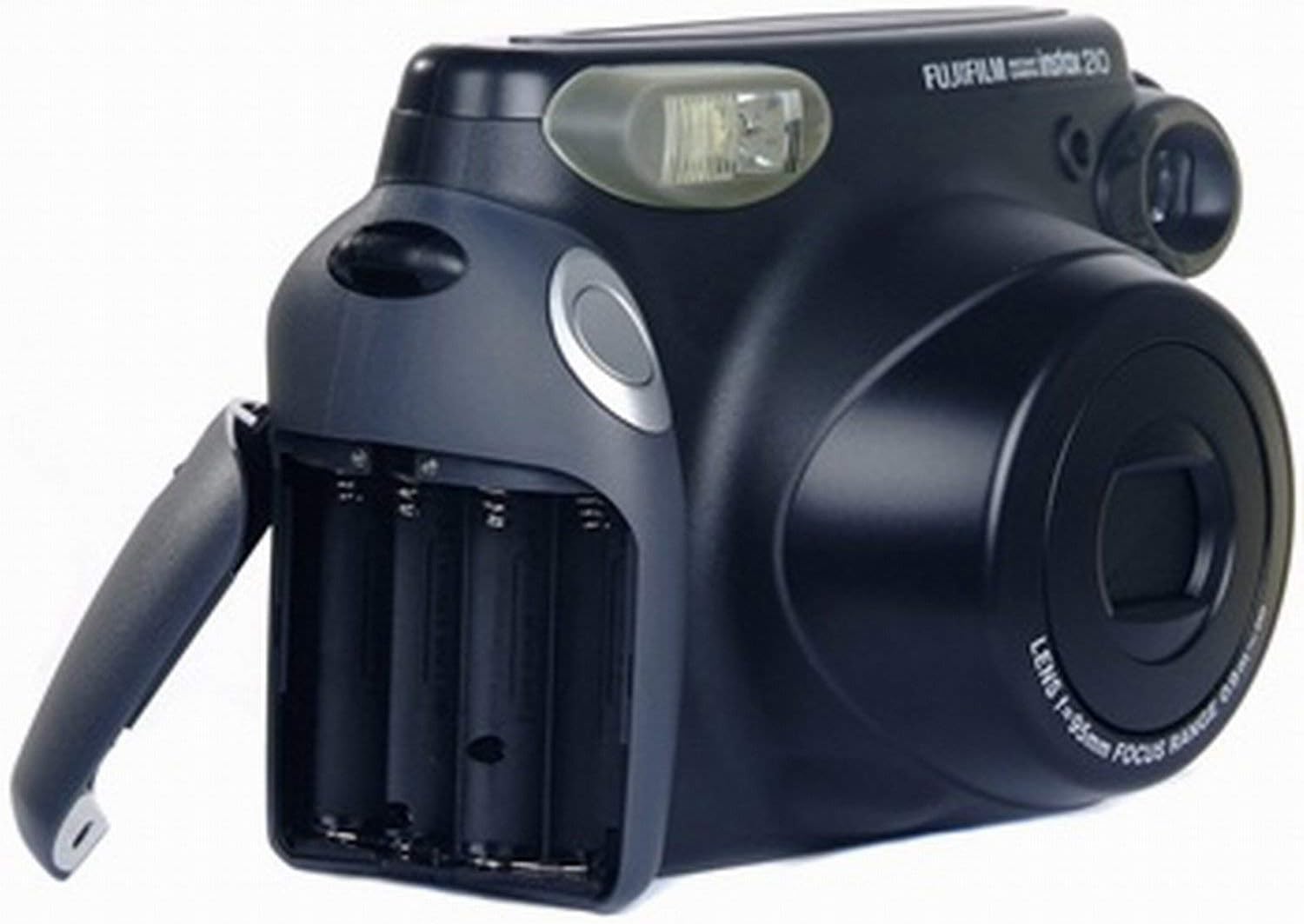
Figear 4.1: Roinn a’ bhataraidh.
This image displays the Fujifilm INSTAX 210 camera from the side, with the battery compartment door open, showing the slots for AA batteries and their correct orientation.
4.2. Luchdadh Film
Use only Fujifilm INSTAX Wide Instant Film.
- Brùth am putan cumhachd gus an camara a thionndadh air.
- Fosgail còmhdach roinn an fhilm air cùl a’ chamara.
- Cuir a’ chomharra bhuidhe air a’ phacaid film còmhla ris a’ chomharra bhuidhe air corp a’ chamara.
- Cuir am pasgan film dìreach a-steach don roinn. Na brùth sìos air a’ phacaid film.
- Dùin còmhdach roinn an fhilm. Cuiridh an camara a-mach duilleag còmhdaich an fhilm dhubh gu fèin-ghluasadach.
- The film counter on the LCD panel will display "10", indicating 10 exposures are available.

Figure 4.2: Film compartment.
This image shows the Fujifilm INSTAX 210 camera with its rear film compartment door open, revealing the area where the instant film pack is inserted. The internal mechanism for film loading is visible.
5. A’ cleachdadh a’ chamara
5.1. A’ togail dhealbhan
- Turn on the camera by pressing the Power button. The lens will extend.
- Seall tron viewlorgadair gus frèam a chur air do chuspair.
- Select the appropriate focus range using the Focus Range button (0.9-3m for close-ups, 3m-Infinity for landscapes).
- Adjust exposure compensation if needed using the L/N/D button (Lighten, Normal, Darken).
- Press the Shutter button firmly. The flash will fire automatically if required, and the photo will be ejected from the film slot.
- Allow the photo to develop naturally. Do not shake or bend the print.

Figure 5.1: Control panel.
Tha an dealbh seo a’ toirt seachad taobh view of the Fujifilm INSTAX 210 camera, highlighting the control panel with buttons for power, flash, focus range (0.9-3m and 3m-infinity), and exposure adjustment (Lighten, Normal, Darken). The LCD screen is also visible.
5.2. Automatic Flash
The INSTAX 210 features an automatic flash that fires in low-light conditions to ensure proper exposure. There is no manual flash override.
5.3. Focus Range Selection
The camera offers two focus ranges:
- 0.9m - 3m: Use for subjects that are relatively close to the camera.
- 3m - Infinity: Use for subjects that are further away, such as landscapes or group shots.
Select the appropriate range using the dedicated button on the control panel.
5.4. Exposure Compensation
The L/N/D button allows you to adjust the brightness of your photos:
- L (Lighten): Makes the photo brighter. Useful for backlit subjects or darker environments.
- N (Normal): Standard exposure.
- D (Darken): Makes the photo darker. Useful for bright environments or to achieve a specific mood.
6. Cumail suas agus Cùram
- A 'glanadh an lens: Gently wipe the lens with a soft, dry, lint-free cloth. Do not use abrasive cleaners or solvents.
- Glanadh Bodhaig a’ Chamara: Wipe the camera body with a soft, dry cloth. For stubborn dirt, dampnigh an clò beagan le uisge agus an uairsin sguab tioram.
- Stòradh: When not in use, store the camera in a cool, dry place away from direct sunlight and extreme temperatures. Remove batteries if the camera will not be used for an extended period.
- Cùram Film: Store film packs in a cool, dry place. Do not expose film to high temperatures or direct sunlight before use.
7. A ’dèanamh trioblaid
| Trioblaid | Adhbhar / Fuasgladh a dh’fhaodadh a bhith ann |
|---|---|
| Chan eil an camara a’ tionndadh air. |
|
| Chan eil am film a’ tilgeil a-mach. |
|
| Tha na dealbhan ro dhorcha/ro shoilleir. |
|
| Tha na dealbhan doilleir. |
|
8. Sònrachaidhean
| Feart | Tuairisgeul |
|---|---|
| Film format | Fujifilm INSTAX Wide Instant Film |
| Meud Film | 108 x 86 mm (4.25 x 3.4 òirleach) |
| Meud Dealbh | 99 x 62 mm (3.9 x 2.4 òirleach) |
| Lionsa | Retracting lens, 2 components, 2 elements, f=95mm, 1:14 |
| A 'cuimseachadh | Motor-driven 2-range switching (0.9m - 3m / 3m - ∞) |
| Luas Shutter | Programmed electronic shutter, 1/64 - 1/200 sec. |
| Flash | Built-in automatic electronic flash (Auto Exposure) |
| Smachd nochdaidh | Automatic, Interlocking range (ISO 800): LV 10.5 - LV 15. EV adjustment: ±2/3 EV |
| Solar cumhachd | Four AA-size 1.5V alkaline batteries |
| Meudan (W x H x D) | 178.5 x 117.5 x 94.5 mm (7 x 4.6 x 3.7 òirleach) |
| Cuideam | 650g (excluding batteries, strap, and film pack) |
9. Barantas agus Taic
This product is sold as "Renewed" and may come with a specific warranty from the seller or platform. Please refer to your purchase documentation for details regarding warranty coverage and return policies.
For technical support or service inquiries, please contact the retailer or the official Fujifilm support channels. Keep your proof of purchase for any warranty claims.
Note: As this is a renewed product, specific warranty terms may vary from new products.