
BOAVISION 1080P WiFi PTZ Camera
BOAVISION 1080P WiFi PTZ Security Camera User Manual
Model: 1080P WiFi PTZ Camera
Ro-ràdh
This manual provides detailed instructions for the installation, operation, and maintenance of your BOAVISION 1080P WiFi PTZ Security Camera. Please read this manual thoroughly before using the product to ensure proper functionality and safety.
Liosta pacaidh
Dèan cinnteach gu bheil a h-uile nì anns a’ phacaid:
- BOAVISION WiFi PTZ IP Camera
- Càball lìonra
- Leabhar-làimhe sgiobalta
- Solar cumhachd
- Screws Bag (for mounting)
- Waterproof Port Kit
- CD stàlaidh

Image: Contents of the BOAVISION PTZ Camera package, including the camera, network cable, power supply, mounting screws, waterproof port, and manual.
Stàladh agus stàladh
1. Ceangal Cumhachd
Connect the provided power adapter to the camera's power input port and then plug it into a power outlet. The camera will initiate its startup sequence.
2. Ceangal Lìonra
The camera supports 2.4GHz Wi-Fi connectivity. Ensure your Wi-Fi network is 2.4GHz, as 5GHz networks are not supported. For initial setup or a stable connection, you may use the provided network cable to connect the camera directly to your router.
3. Stàladh is Paidhreachadh Aplacaidean
Download the "CamHiPro" application from the Google Play Store (for Android devices) or the Apple App Store (for iOS devices). The camera is also compatible with PC (Mac OS, Windows) software available on the included CD or for download.
- Install the CamHiPro app on your smartphone or tablet.
- Open the app and follow the on-screen instructions to add your camera. This typically involves scanning a QR code on the camera or manually entering its ID.
- Configure Wi-Fi settings within the app if connecting wirelessly.

Image: The CamHiPro app interface shown on various devices, including smartphones, tablets, and computers, highlighting multi-platform compatibility.
4. Stàladh corporra
The camera is designed for outdoor wall mounting. Use the provided screws and waterproof port kit to secure the camera in your desired location. Ensure the mounting surface is stable and can support the camera's weight.

Image: A BOAVISION PTZ camera mounted, illustrating its 355-degree pan and 90-degree tilt capabilities, controlled via a mobile application.
Stiùireadh Obrachaidh
Pan/Tilt and Optical Zoom
Control the camera's movement and zoom directly from the CamHiPro app. The camera offers 355 degrees of horizontal pan and 90 degrees of vertical tilt, providing a wide 328-foot view. The 5x optical zoom allows for detailed observation without loss of image quality.

Image: Comparison showing a scene at 1X optical zoom versus 5X optical zoom, demonstrating the camera's ability to magnify distant objects clearly.
HD Color Night Vision
The camera features 1080P resolution and is equipped with 6 array infrared LEDs and 2 white supplement lights, enabling clear color night vision up to 196 feet. You can switch between normal (infrared), smart, and full-color night vision modes via the app.
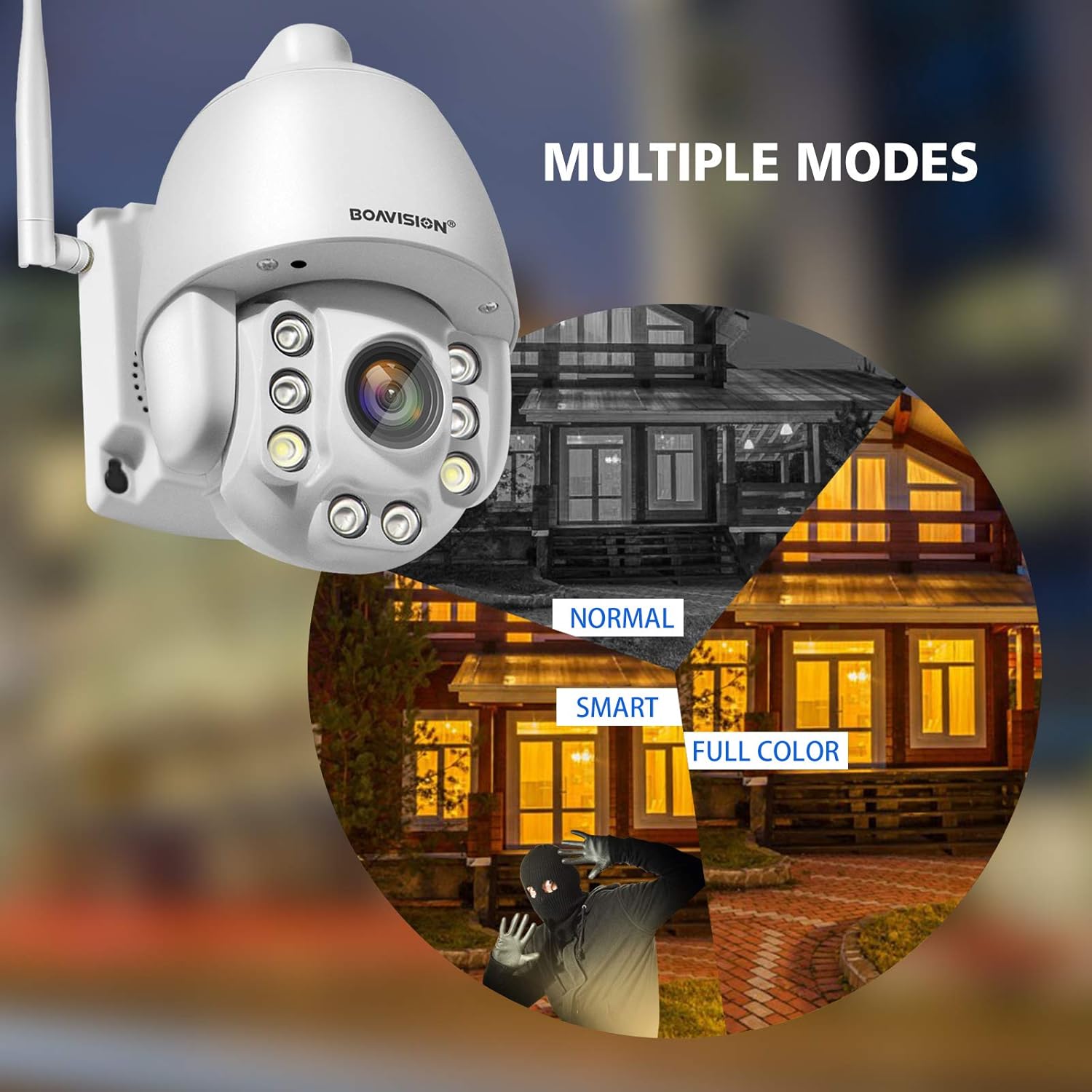
Image: Illustrates the three night vision modes: Normal (infrared black and white), Smart (activates white light upon motion), and Full Color (constant white light for color video at night).
Fuaim dà-shligheach
Utilize the built-in microphone and speaker for two-way communication. The anti-noise technology ensures clear audio. This feature allows you to speak with visitors or deter intruders remotely through the app.

Image: A delivery person at a door, with speech bubbles indicating two-way audio communication between the person and someone viewing through the camera app on a smartphone.
Brath gluasad agus rabhaidhean
Configure motion detection zones and sensitivity within the CamHiPro app. Upon detecting motion, the camera can send push notifications to your phone or email alerts, providing real-time security updates.

Image: Depicts a person triggering motion detection at night, with the camera's spotlight activating and an alert shown on a smartphone screen.
Stòradh
The camera supports local storage via a TF card slot (microSD card, not included). Ensure the card is inserted correctly for continuous recording or event-triggered recording. Cloud storage options may also be available through the app.
Cumail suas
- Glanadh: Glan lionsa a’ chamara gu cunbhalach le clò bog, tioram gus dèanamh cinnteach à càileachd ìomhaigh shoilleir. Na cleachd ceimigean làidir.
- Ùrachaidhean firmware: Check the CamHiPro app periodically for firmware updates to ensure optimal performance and security.
- Solar cumhachd: Ensure the power supply is securely connected and free from damage.
- Uisge-dhìonach: Verify that all connections, especially the waterproof port, are sealed correctly to maintain the IP66 weather resistance.
Fuasgladh thrioblaidean
- Cha robh an camara a’ ceangal ri Wi-Fi:
- Dèan cinnteach gu bheil an lìonra Wi-Fi agad 2.4GHz. Chan eil an camara a’ toirt taic do Wi-Fi 5GHz.
- Dearbhaich gu bheil am facal-faire Wi-Fi ceart.
- Place the camera closer to the Wi-Fi router to improve signal strength.
- Ath-thòisich an camara agus an router agad.
- Try connecting via Ethernet cable for initial setup.
- Gun ìomhaigh no droch chàileachd ìomhaigh:
- Thoir sùil air ceangal cumhachd.
- Glan an lionsa camara.
- Dèan cinnteach gu bheil solas gu leòr ann airson càileachd ìomhaigh as fheàrr, gu h-àraidh air an oidhche.
- Verify network stability and bandwidth.
- Motion detection alerts not received:
- Check app notification settings on your phone and within the CamHiPro app.
- Ensure motion detection is enabled and sensitivity is adjusted correctly.
- Dearbhaich gu bheil ceangal eadar-lìn seasmhach aig a’ chamara.
- Cùisean claisneachd dà-shligheach:
- Ensure microphone and speaker permissions are granted to the CamHiPro app.
- Check volume settings on your device and within the app.
- Minimize background noise for clearer communication.
Sònrachaidhean
| Modail | 1080P WiFi PTZ Camera |
| Fuasgladh | 1080p (1920x1080) |
| Zoom Optical | 5x |
| Raon Pan / Teilt | Pan: 355 degrees, Tilt: 90 degrees |
| Raon Lèirsinn Oidhche | Suas gu 196 troigh (60 meatairean) |
| Seòrsa lèirsinn oidhche | HD Color Night Vision (Infrared, Smart, Full Color modes) |
| Fuaim | Two-Way Audio with Anti-Noise Technology |
| Ceangalachd | 2.4GHz Wi-Fi (IEEE 802.11b/g/n), Ethernet |
| Stòradh | TF Card Slot (MicroSD, up to 128GB, not included) |
| Co-fhreagarrachd | iOS, Android, Mac OS, Windows (via CamHiPro app/software) |
| Stòr cumhachd | Adaptor AC / DC |
| Cur an aghaidh na h-aimsire | IP66 (Dìon-duslach agus dìon-uisge) |
| Meudan (L x W x H) | 6.89 x 4.53 x 4.33 òirleach |
| Cuideam | 1.76 not |
| Seòrsa stàladh | Srath balla |
| Cruth glacadh bhidio | MPEG-4 |
Fiosrachadh Barantais
Mar as trice bidh mion-fhiosrachadh sònraichte mun bharantas air a thoirt seachad leis na sgrìobhainnean ceannach agad no air sgrìobhainnean oifigeil an neach-dèanamh. weblàrach. Thoir sùil air na goireasan seo airson fiosrachadh a thaobh fad agus teirmichean a’ bharantais.
Taic Luchd-cleachdaidh
For technical assistance, troubleshooting not covered in this manual, or further inquiries, please contact BOAVISION customer support. Refer to the contact information provided in your product packaging or on the official BOAVISION weblàrach.
Faodaidh tu cuideachd tadhal air an BOAVISION Store on Amazon airson fiosrachadh toraidh agus goireasan a bharrachd.
Ask a question about this manual
Ask about setup, troubleshooting, compatibility, parts, safety, or missing instructions. Manuals+ will review the question and use this page’s manual context to help answer it.