
1. Toradh thallview
The MEAN WELL HDR-150-24 is a 150W Ultra Slim Step Shape DIN Rail Power Supply designed for industrial control applications. It provides a stable +24V DC output at 6.25 Amps, converting AC input power efficiently. Its compact design allows for easy integration into control cabinets and systems.

Figear 1: Aghaidh view of the HDR-150-24 DIN Rail Power Supply.
2. Sònrachaidhean
| Feart | Tuairisgeul |
|---|---|
| Modail Àireamh | HDR-150-24 |
| Input Voltage | 100-240VAC (50/60Hz) |
| Toradh Voltage | 24VDC |
| Toradh gnàthach | 6.25 Amps |
| Cumhachd Toraidh | 150W |
| Meudan | 4 x 5 x 4 òirleach (tuairmse) |
| Cuideam | 0.31 cileagram |
| A' cur suas | Rèile DIN |
| Fuarachadh | Passive (vented enclosure) |
| Comharran | DC OK LED |
| Adjustability | Toradh voltage adjustable via potentiometer |
3. Fiosrachadh Sàbhailteachd
Please read and understand all safety instructions before installing or operating the power supply. Failure to follow these instructions may result in electric shock, fire, or serious injury.
- Sgiobachd le teisteanas: Cha bu chòir ach luchd-obrach teisteanasach an stàladh agus an cumail suas a dhèanamh.
- Àrainneachd fo smachd: This device is intended for use in a controlled environment.
- Dì-cheangal cumhachd: Always disconnect power before performing any installation, wiring, or maintenance.
- Suidheachadh ceart: Ensure the power supply is properly grounded to prevent electric shock.
- Fionnarachadh: Maintain adequate clearance around the unit for proper passive cooling. Do not block ventilation holes.
- Torc crìochnachaidh: Ensure all terminal screws are tightened to the specified torque (typically 3.0 Lb-In for input/output terminals) to prevent loose connections and overheating.
4. Suidhich
4.1 Stàladh
The HDR-150-24 is designed for mounting on a standard DIN rail. Locate the DIN rail clip on the back of the unit. To mount, hook the top edge of the power supply onto the DIN rail, then push the bottom edge firmly until it clicks into place. To remove, pull down the release lever at the bottom of the clip and lift the unit off the rail.
4.2 Uèir
Refer to the wiring diagram below for proper connection of input and output terminals. Ensure all wires are stripped to the appropriate length and securely inserted into the screw terminals before tightening.
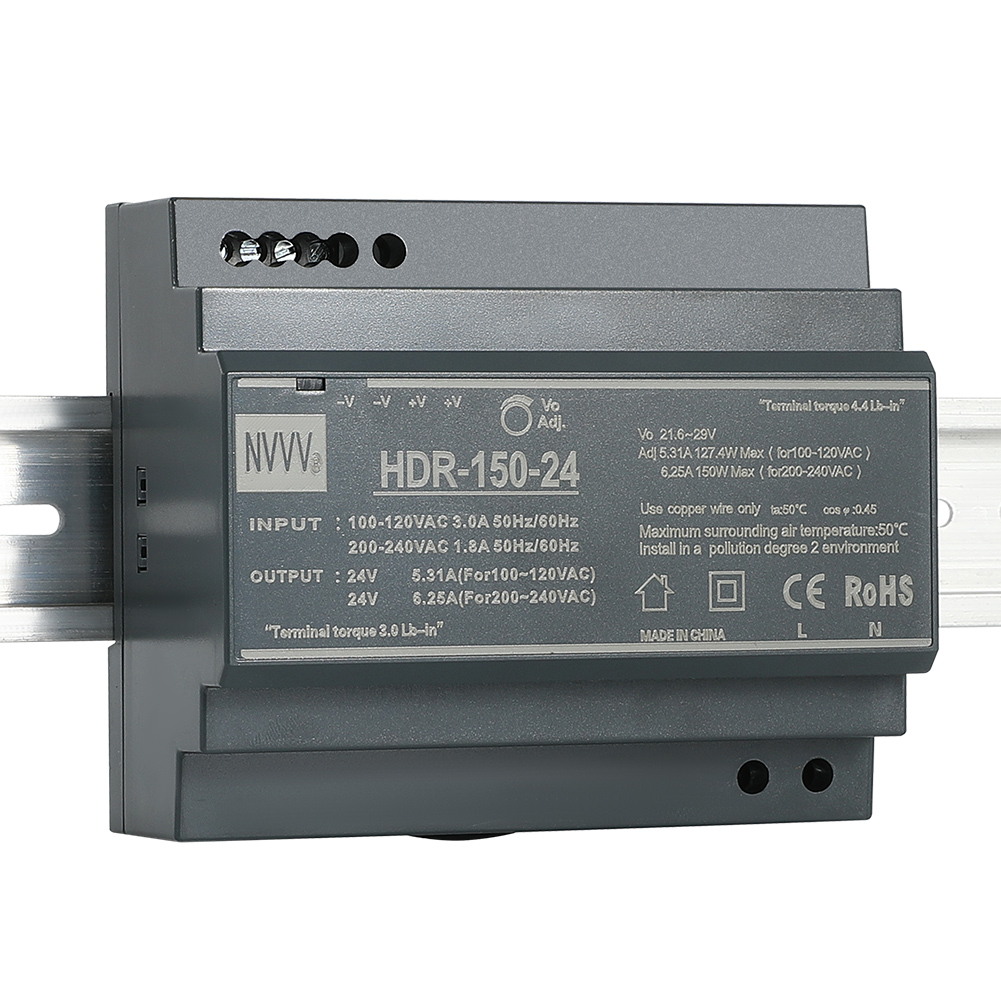
Figure 2: Wiring Diagram for HDR-150-24. Input terminals (L, N, PE) are at the bottom, and output terminals (+V, -V) are at the top. An adjustable potentiometer is also visible.
- Ceanglaichean a-steach: Connect the AC Line (L), Neutral (N), and Protective Earth (PE) wires to the corresponding input terminals.
- Ceanglaichean toraidh: Connect the positive (+V) and negative (-V) DC load wires to the corresponding output terminals. The unit provides multiple output terminals for convenience.
4.3 Toradh Voltage Atharrachadh
An toradh voltage can be finely adjusted using the potentiometer located on the front panel. Use a small screwdriver to turn the potentiometer clockwise to increase the voltage or counter-clockwise to decrease it. Always verify the output voltage with a multimeter after adjustment.
Video 1: This video demonstrates the physical features, unboxing, and basic wiring of the HDR-150-24 DIN Rail Power Supply, including the terminal connections and voltage rèiteachadh.
5. Stiùireadh Obrachaidh
Once properly installed and wired, the power supply is ready for operation.
- Cumhachd air: Apply AC input power to the L and N terminals.
- DC OK Indicator: Observe the 'DC OK' LED on the front panel. A green light indicates that the output voltagTha e taobh a-staigh an raoin obrachaidh àbhaisteach.
- Cumhachd dheth: Disconnect the AC input power to shut down the unit.
6. Cumail suas
To ensure optimal performance and longevity of your HDR-150-24 power supply, follow these maintenance guidelines:
- Sgrùdadh cunbhalach: Periodically inspect the unit for any signs of damage, loose connections, or excessive dust accumulation.
- Glanadh: If dust accumulates, gently clean the ventilation holes and the unit's surface with a soft, dry cloth or compressed air. Ensure power is disconnected before cleaning.
- Suidheachaidhean Àrainneachdail: Dèan cinnteach gu bheil an àrainneachd obrachaidh taobh a-staigh nan raointean teòthachd is taiseachd ainmichte gus casg a chur air fàilligeadh ro-luath.
7. A ’dèanamh trioblaid
If you encounter issues with your power supply, refer to the following troubleshooting steps:
- No Power / No DC OK LED:
- Check the AC input power source and connections.
- Dèan cinnteach gu bheil an cuir a-steach voltagTha e taobh a-staigh an raon ainmichte (100-240VAC).
- Inspect for any tripped circuit breakers or blown fuses in the input line.
- Gun Toradh Voltage / DC OK LED Off:
- Check the output connections for shorts or open circuits.
- Ensure the load connected does not exceed the power supply's maximum output current (6.25A) or power (150W). Overload protection may have activated.
- If the unit has been overloaded, disconnect the load, power cycle the unit, and re-test with a reduced load.
- Meud Toraidh Mearachdachtage:
- Cleachd multimeter gus tomhas toraidh a thomhastage.
- Atharraich an toradh voltage potentiometer as described in Section 4.3.
8. Barantas agus Taic
The MEAN WELL HDR-150-24 power supply comes with a standard manufacturer's warranty. For warranty claims, technical support, or service inquiries, please contact your authorized MEAN WELL distributor or visit the official MEAN WELL weblàrach-lìn airson fiosrachadh conaltraidh.
9. Goireasan a Bharrachd
Video 2: This video provides a comprehensive full view of the product, highlighting its design and features.