
1. Ro-ràdh
This manual provides comprehensive instructions for the setup, operation, maintenance, and troubleshooting of your Canyon CNS-SW71SS Smartwatch. Please read this manual carefully before using your device to ensure proper function and longevity.
The Canyon CNS-SW71SS Smartwatch is designed to help you monitor your fitness activities and stay connected. It features a 1.22-inch color screen, multi-sport modes, heart rate monitoring, sleep tracking, and notification alerts. Its IP68 water resistance makes it suitable for various environments.
2. Toradh thallview
2.1 Prìomh fheartan
- 1.22-inch color touch screen display.
- Multi-sport mode for tracking various activities.
- Daily activity monitoring: calories, steps, heart rate, and sleep.
- Notifications for incoming calls, SMS, emails, calendar events, and social media.
- Music control and remote camera function.
- Smart alarm and weather data display.
- Suas ri 7 latha de bheatha bataraidh.
- IP68 water resistance (submersible up to 1 meter for 30 minutes).
- Ceangal Bluetooth 4.0.
- Compatible with iOS and Android operating systems.
- Comes with two interchangeable wristbands: metal and TPU.
2.2 Co-phàirtean
The Canyon CNS-SW71SS Smartwatch consists of the main watch unit, interchangeable wristbands, and a charging cable.

Figear 1: Aghaidh view of the Canyon CNS-SW71SS Smartwatch, showing the display with steps, distance, calories, and heart rate data.

Figear 2: Ceàrnach view of the Canyon CNS-SW71SS Smartwatch, featuring a silver metal mesh strap and a round display.
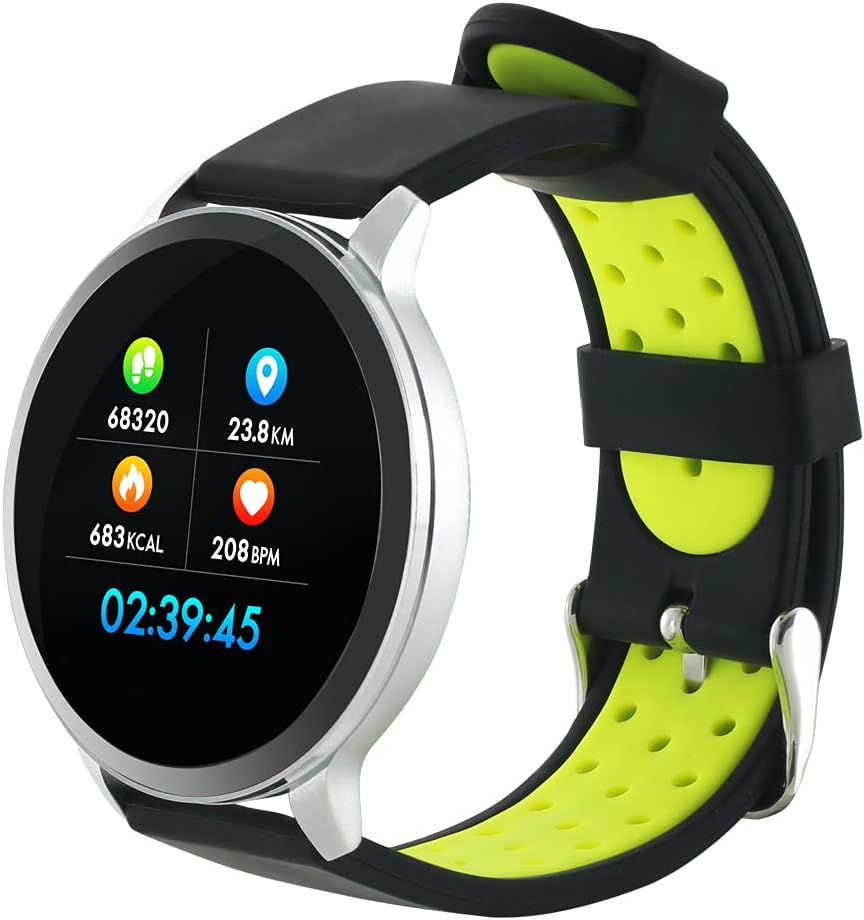
Figure 3: The Canyon CNS-SW71SS Smartwatch shown with an alternative black and lime green TPU strap, highlighting its interchangeable design.

Figear 4: Cùl view of the Canyon CNS-SW71SS Smartwatch, displaying the optical heart rate sensor and magnetic charging contacts.

Figure 5: The retail packaging for the Canyon CNS-SW71SS Smartwatch, illustrating key features and the included two straps.
3. Suidhich
3.1 A’ cur cosgais air an uaireadair-smart
- Connect the charging cable to a USB power adapter (not included) or a computer's USB port.
- Align the magnetic charging pins of the cable with the charging contacts on the back of the smartwatch. The watch will vibrate and display a charging icon.
- Allow approximately 2-3 hours for a full charge. A full charge provides up to 7 days of usage.
3.2 Installing the Canyon Fit Application
- Scan the QR code provided in the packaging or search for "Canyon Fit" in your smartphone's app store (Google Play Store for Android, Apple App Store for iOS).
- Luchdaich sìos agus stàlaich an aplacaid.
- Open the Canyon Fit app and follow the on-screen instructions to create an account and set up your profile.
3.3 A’ paidhreachadh leis an fhòn-smart agad
- Dèan cinnteach gu bheil an uaireadair smart agad air a ghearradh agus air a chumhachdachadh
- Dèan comas air Bluetooth air an fhòn-smart agad.
- Fosgail an aplacaid Canyon Fit.
- Navigate to the device pairing section within the app (usually found under 'Device' or 'Profile').
- Select your smartwatch (e.g., "CNS-SW71SS") from the list of available devices.
- Dearbhaich an t-iarrtas paidhreachaidh air an fhòn-smart agus an uaireadair smart agad ma thèid iarraidh ort.
3.4 Attaching/Changing Wristbands
The smartwatch comes with two wristbands (metal and TPU) that can be interchanged. To attach or change a wristband, locate the quick-release pins on the underside of the strap. Slide the pin to detach the current strap and then align and slide the pin of the new strap into the corresponding holes on the watch body until it clicks into place.
4. Stiùireadh Obrachaidh
4.1 Seòladh Bunaiteach
- Sgrion-suathaidh: Swipe left/right to navigate through different functions and menus. Swipe up/down to view notifications or quick settings.
- Putan Taobh: Press the side button to return to the main watch face or to wake up the screen. A long press may access power options or specific features depending on the context.
4.2 Tracadh Fallaineachd
- Modh ioma-spòrs: Access the 'Workout' or 'Sport' menu on your watch. Select your desired activity (e.g., running, cycling, walking) to start tracking. The watch will record duration, distance, calories burned, and heart rate.
- Gnìomh làitheil: Bidh an uaireadair gu fèin-ghluasadach a’ cumail sùil air na ceumannan, an astar agus na calaraidhean a loisgeas tu tron latha. View these statistics on the watch face or in the Canyon Fit app.
- Sgrùdadh Ìre Cridhe: The watch continuously monitors your heart rate. You can also manually initiate a heart rate measurement from the heart rate interface.
- Rianachd cadail: Wear the smartwatch to bed, and it will automatically track your sleep patterns, including deep sleep, light sleep, and wake times. View detailed sleep analysis in the Canyon Fit app.
4.3 Brathan
Once paired with your smartphone and with notification permissions granted in the Canyon Fit app, your smartwatch will display alerts for:
- Glaodhan a’ tighinn a-steach
- Teachdaireachdan SMS
- Puist-d
- Tachartasan Mìosachan
- Social Media Apps (e.g., WhatsApp, Facebook, Instagreithe)
Swipe suas air aghaidh an uaireadair gus view recent notifications. You can dismiss notifications from the watch.
4.4 Gnìomhan a bharrachd
- Smachd Ciùil: While music is playing on your phone, you can use the watch to play/pause, skip tracks, and adjust volume.
- Camara Iomallach: Open the camera function in the Canyon Fit app. Use your smartwatch as a remote shutter button to take photos on your phone.
- Larum glic: Set alarms through the Canyon Fit app. The watch will vibrate to wake you up gently.
- Dàta Aimsir: Once connected to your phone, the watch will display current weather conditions and forecasts for your location.
5. Cumail suas
5.1 Glanadh
- Sguab scrion is corp an uaireadair le clò bog, tioram.amp aodach.
- For the metal strap, use a soft brush to gently clean any debris. For the TPU strap, wash with mild soap and water.
- Dèan cinnteach gu bheil na ceanglaichean cosgais glan agus tioram mus cuir thu cosgais orra.
- Seachain a bhith a’ cleachdadh cheimigean cruaidh no stuthan sgrìobach airson glanadh.
5.2 Dìon-uisge (IP68)
The Canyon CNS-SW71SS Smartwatch is IP68 rated, meaning it is resistant to dust and can be immersed in water up to 1 meter deep for a maximum of 30 minutes. While it can withstand splashes, rain, and brief immersion, it is not recommended for hot showers, saunas, or diving, as steam and high water pressure can compromise the seals.
- Do not press any buttons while the watch is submerged.
- Tiormaich an uaireadair gu mionaideach an dèidh a bhith fosgailte do uisge.
5.3 Cùram Bataraidh
- Seachain a bhith a’ leigeil às a’ bhataraidh gu tur gu tric.
- Cuir cosgais air an inneal gu cunbhalach, fiù mura h-eil e ga chleachdadh, gus slàinte a’ bhataraidh a chumail suas.
- Stòraich an uaireadair ann an àite fionnar, tioram nuair nach eilear ga chleachdadh airson ùine mhòr.
6. A ’dèanamh trioblaid
- Uaireadair nach eil a’ tionndadh air: Dèan cinnteach gu bheil an uaireadair làn-luchdaichte. Ceangail e ris an charger airson co-dhiù 30 mionaid.
- Chan urrainnear paidhir a dhèanamh le fòn cliste:
- Dèan cinnteach gu bheil Bluetooth air a chomasachadh air an fhòn agad.
- Ensure the Canyon Fit app has necessary permissions.
- Ath-thòisich an dà chuid am fòn agad agus an uaireadair smart.
- Feuch ri dì-phaidhreachadh agus ath-phaidhreachadh an inneil tron aplacaid.
- Fiosan nach eil a’ nochdadh:
- Check notification settings in the Canyon Fit app and your phone's system settings.
- Dèan cinnteach gu bheil an uaireadair ceangailte tro Bluetooth.
- Inaccurate heart rate/activity data:
- Dèan cinnteach gu bheil an uaireadair air a chaitheamh gu teann air do chaol-dùirn, gun a bhith ro theann no ro sgaoilte.
- Glan an sensor air cùl an uaireadair.
- Environmental factors or certain movements can affect accuracy.
- Sgrion gun fhreagairt: Try restarting the smartwatch by holding down the side button. If unresponsive, allow the battery to fully drain and then recharge.
7. Sònrachaidhean
| Ainm Modail | CNS-SW71SS |
| Brand | CANAIN |
| Meud taisbeanaidh | 1.22 òirlich |
| Co-fhreagarrachd siostam-obrachaidh | Android, iOS |
| Teicneòlas ceangail | Bluetooth 4.0 |
| Ìre an aghaidh uisge | IP68 |
| Feartan sònraichte | Wireless Charging (implied by product data), Multi-Sport Mode, Heart Rate Monitor, Sleep Tracker, Notifications |
| Innealan co-fhreagarrach | Fòn-smart |
| Bataraidh | Ath-luchdaichte (1 air a ghabhail a-steach) |
| Roghainnean dath | Black, Lime Green, Silver |
8. Barantas agus Taic
For warranty information and technical support, please refer to the documentation included with your purchase or visit the official Canyon website. You can also contact Canyon customer service for assistance with product issues or inquiries.
Taic air-loidhne: https://canyon.eu/support/ (exampan ceangal, feuch an dearbhaich thu duilleag taic oifigeil)