
1. Ro-ràdh
This manual provides essential instructions for the installation, operation, and maintenance of your FSP iFP600 Uninterruptible Power Supply (UPS). Please read this manual thoroughly before installing or operating the unit to ensure proper function and safety. The FSP iFP600 is designed to provide reliable power backup and surge protection for your electronic devices.

Dealbh 1.1: Aghaidh view of the FSP iFP600 UPS, showcasing an dealbhadh teann agus an taisbeanadh LCD togte aige.
2. Stiùireadh Sàbhailteachd
Please adhere to these important safety guidelines during installation, operation, and maintenance of the UPS:
- Na fosgail an UPS casing. Chan eil pàirtean sam bith a dh’ fhaodas an neach-cleachdaidh a chàradh a-staigh. Thoir aire do luchd-obrach seirbheis teisteanasach airson a h-uile seòrsa seirbheis.
- Na ceangail innealan a dh’ fhaodadh cus cus a chur air an UPS, leithid clò-bhualadairean leusair, innealan-glanaidh falamh no teasadairean.
- Dèan cinnteach gu bheil an UPS ceangailte ri socaid cumhachd AC le talamh.
- Seachain an UPS a chur ann an solas dìreach na grèine, faisg air stòran teas, no ann an àrainneachdan le cus duslach, taiseachd no stuthan creimneach.
- Position the UPS in a well-ventilated area to prevent overheating.
- In case of fire, use a dry chemical extinguisher. Water can be hazardous.
- The battery inside the UPS is not user-replaceable. Battery replacement should only be performed by qualified personnel.
3. Toradh thallview
The FSP iFP600 UPS provides reliable power protection for your critical electronics. It features a compact design and an intuitive LCD display for monitoring status.
3.1 Susbaint a’ phacaid
Nuair a dh’fhosglas tu am pasgan, dèan cinnteach gu bheil na pàirtean uile an làthair agus gun mhilleadh:
- FSP iFP600 UPS Unit
- Leabhar-làimhe cleachdaiche (an sgrìobhainn seo)
- Corda cumhachd
- Càball conaltraidh USB
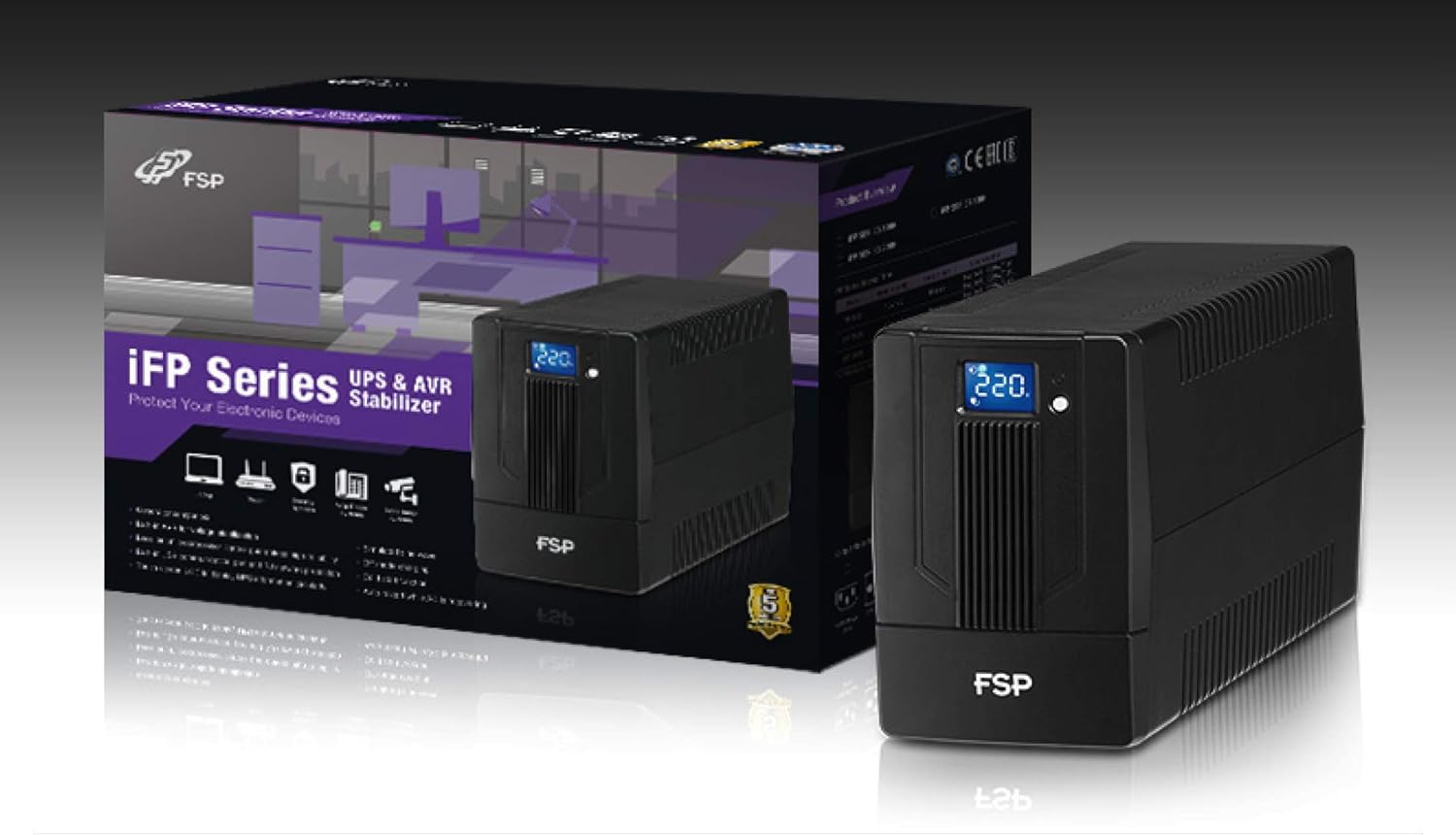
Image 3.1: The FSP iFP600 UPS shown alongside its retail packaging, illustrating the product's presentation.
3.2 Pàirtean a’ Phannail Chùil
Familiarize yourself with the connections on the rear panel of the UPS:

Ìomhaigh 3.2: Mion-fhiosrachadh view of the FSP iFP600 UPS rear panel, highlighting connection points.
- Stuthan a-muigh: Two SCHUKO type outlets for connecting protected equipment.
- Cur a-steach AC: A’ ceangal an UPS ris a’ phrìomh chumhachd goireis.
- Fuse/Breaker: Overcurrent protection for the UPS.
- Conaltradh USB: Port for connecting to a computer for monitoring and management.
- Combo RJ11/RJ45 Surge Protection: Provides surge protection for telephone/network lines.
4. Setup agus Stàladh
Follow these steps to set up your FSP iFP600 UPS:
- A' dì-phapadh: Thoir an UPS a-mach às a phacaid gu faiceallach. Thoir sùil air a’ phròiseas luingeis airson milleadh sam bith.
- Suidheachadh: Place the UPS on a flat, stable surface in a clean, cool, and well-ventilated area. Ensure adequate clearance around the unit for airflow.
- Cìs tòiseachaidh: Connect the UPS to a standard grounded AC outlet using the provided power cord. Allow the unit to charge for at least 4-6 hours before initial use to ensure optimal battery performance. The UPS will charge whether it is turned on or off.
- Innealan ceangail: Plug your computer, monitor, and other critical electronic devices into the UPS outlets (A). Do not connect surge suppressors or power strips to the UPS outlets.
- Conaltradh USB (Roghainneil): Connect the USB cable from the UPS USB port (D) to your computer's USB port to enable power management software features (software not included, typically downloaded from manufacturer's weblàrach).
- RJ11/RJ45 Protection (Optional): For surge protection of your telephone or network line, connect the incoming line to the 'IN' port of the Combo RJ11/RJ45 (E) and connect the 'OUT' port to your device.
5. Stiùireadh Obrachaidh
5.1 A’ cur cumhachd air/dheth
- Gus cumhachd a thoirt air: Brùth is cum sìos am putan cumhachd air a’ phannal aghaidh airson timcheall air 2 diogan gus an cluinn thu bìp agus gus an las an taisbeanadh LCD suas.
- Gus cumhachd a thoirt dheth: Press and hold the power button for approximately 2 seconds until you hear a beep and the LCD display turns off.
5.2 Fiosrachadh Taisbeanaidh LCD
The FSP iFP600 features an LCD display that provides real-time status information. The display is touch-sensitive for navigating information.

Image 5.1: The LCD display of the FSP iFP600 UPS, indicating voltage output and its touch-screen functionality.
The LCD display typically shows:
- Input Voltage
- Toradh Voltage
- Ìre cosgais bataraidh
- Ìre luchdaidh
- Operating Mode (e.g., AC mode, Battery mode)
- Warning/Fault Indicators
5.3 Obrachadh Modh Bataraidh
When the utility power fails or fluctuates outside acceptable limits, the UPS will automatically switch to battery mode. During battery mode, the UPS will provide power to connected equipment from its internal battery. An audible alarm will sound to indicate battery operation.
6. Cumail suas
Proper maintenance ensures the longevity and reliability of your UPS.
- Glanadh: Cleachd clò bog, tioram gus taobh a-muigh an UPS a ghlanadh. Na cleachd innealan-glanaidh leaghaidh no aerosol.
- Cùram Bataraidh: To maximize battery life, ensure the UPS is connected to AC power and fully charged. If the UPS is stored for an extended period, recharge it every three months to prevent battery degradation.
- Ath-nuadhachadh bataraidh: The internal battery (12V / 7Ah x1) is not user-serviceable. Battery replacement should only be performed by FSP-certified service personnel or a qualified technician. Incorrect battery replacement can pose a risk of explosion or injury.
- Stòradh: Stòraich an UPS ann an àite fionnar, tioram le deagh fhionnarachadh. Dèan cinnteach gu bheil am bataraidh làn-luchdaichte mus tèid a stòradh.
7. A ’dèanamh trioblaid
Refer to the following table for common issues and their solutions. If the problem persists, contact FSP support.
| Comharradh | Inneal-rabhaidh claisneachd | Adhbhar a dh’fhaodadh a bhith ann | Fuasgladh |
|---|---|---|---|
| UPS operating on battery power | Beeps a h-uile 10 diog | Utility power failure or fluctuation | Save work and shut down equipment if power outage is prolonged. UPS will return to AC mode when power is restored. |
| Rabhadh bataraidh ìosal | Beeps a h-uile diog | Tha cosgais a’ bhataraidh gu math ìosal | Immediately save work and shut down connected equipment. |
| Suidheachadh overload | Beeps gach 0.5 diog | Connected equipment exceeds UPS capacity | Disconnect non-essential equipment until the alarm stops. Ensure total load is within UPS capacity. |
| UPS mearachd | A 'seinn gu leantainneach | Sgàineadh taobh a-staigh no mì-ghnàthachadh | Turn off the UPS and disconnect it from the AC outlet. Contact FSP technical support. |
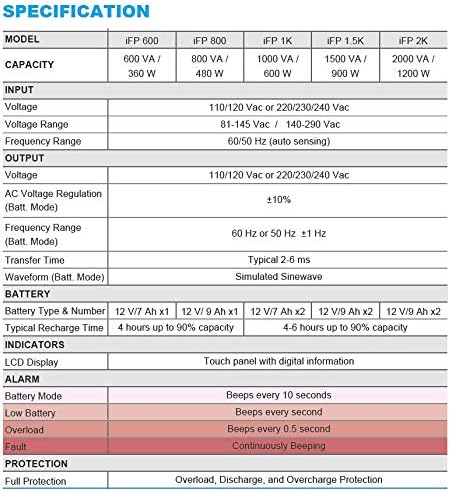
Image 7.1: Excerpt from the FSP iFP series specification table, detailing alarm indicators and their meanings.
8. Sònrachaidhean
Detailed technical specifications for the FSP iFP600 UPS:
| Feart | Sònrachadh |
|---|---|
| Modail | iFP 600 |
| Comas | 600 VA / 360 W |
| Input Voltage | 110/120 Vac or 220/230/240 Vac |
| Input Voltage Raon | 81-145 Vac / 140-290 Vac |
| Raon tricead cuir a-steach | 60/50 Hz (mothachadh fèin-ghluasadach) |
| Toradh Voltage | 110/120 Vac or 220/230/240 Vac |
| AC Voltage Riaghailt (Modh Bat.) | ±10% |
| Output Frequency Range (Batt. Mode) | 60 Hz or 50 Hz ±1 Hz |
| Uair Gluasad | Àbhaisteach 2-6 ms |
| Waveform (Modh Batt.) | Sinewave samhlaichte |
| Seòrsa & àireamh bataraidh | 12V / 7Ah x1 |
| Àm àbhaisteach ath-lìonadh | 4 uairean a thìde suas gu 90% comas |
| Comharran | LCD Display (Touch panel with digital information) |
| Dìon | Overload, Discharge, and Overcharge Protection |
| Cuideam nì | 9.24 not (4.2 kg) |
| Meudan toraidh (LxWxH) | 11.81 x 3.98 x 5.59 òirleach |
| Dath | Dubh |
| Stuth | Meatailt |
9. Barantas agus Taic
FSP products are designed for reliability and performance. For warranty information, please refer to the warranty card included with your product or visit the official FSP website. For technical support, troubleshooting assistance, or service inquiries, please contact FSP customer service through their official channels.
Gheibh thu barrachd fiosrachaidh agus goireasan taic air an FSP Store on Amazon.