
1. Ro-ràdh
This manual provides instructions for the AULCMEET AKB33871414 Replacement Remote Control, designed for use with various LG TV models. This remote control offers a straightforward solution for replacing your original LG TV remote without the need for complex programming.
2. Co-fhreagarrachd
The AULCMEET AKB33871414 remote control is compatible with the following LG TV models:
- 22LS4D-ZD, 19LS4D-ZD, 32LG2000-ZA, 26LG3050-ZA, 37LG2000-ZA, 42LG2000-ZA
- 19LG3000-ZA, 22LG3000-ZA, 26LG3000-ZA, 32LG3000-ZA, 37LG3000-ZA, 42LG3000-ZA
- 32LG5000-ZA, 37LG5000-ZA, 42LG5000-ZA, 47LG5000-ZA, 52LG5000-ZA
- 52LG5010-ZD, 47LG5010-ZD, 42LG5010-ZD, 37LG5010-ZD, 32LG5010-ZD
- 52LG5020-ZB, 47LG5020-ZB, 42LG5020-ZB, 37LG5020-ZB, 32LG5020-ZB
- 52LG5030-ZE, 47LG5030-ZE, 42LG5030-ZE, 37LG5030-ZE, 32LG5030-ZE
- 32LG5700-ZF, 19LG3050-ZA, 22LG3050-ZA, 19LG3060-ZB, 22LG3060-ZB
- 32LG5600-ZB, 32LG3200-ZA, 42LG3200-ZA
- LG20 series (32LG20, 37LG20, 42LG20), LS4D series (22LS4D)
- LG30 series (19LG30, 22LG30, 26LG30, 32LG30, 37LG30, 42LG30)
- LG32 series (32LG32, 42LG32)
- LG5 series (32LG5), LG50 series (37LG50, 42LG50, 47LG50, 52LG50)
- 42CS560, 32CS460, 32CS560, 32LS3400, 42LS3400, 37CS560
- Also replaces AKB33871401 and AKB33871410.
3. Suidhich
Before using your new remote control, you will need to install batteries.

Figear 1: Aghaidh view of the AULCMEET AKB33871414 remote control.
- Fosgail an còmhdach bataraidh: Locate the battery compartment on the back of the remote control and slide the cover open.
- Install New Alkaline Batteries: Insert two (2) AAA alkaline batteries, ensuring the positive (+) and negative (-) terminals align correctly with the markings inside the compartment.
- Dùin an còmhdach bataraidh: Sleamhnaich còmhdach roinn a’ bhataraidh air ais na àite gus an cliog e gu tèarainte.
The remote control does not require any programming and is ready for use once batteries are installed.
4. Stiùireadh Obrachaidh
To operate your LG TV with this remote control:
- Point the Remote: Direct the remote control towards the infrared (IR) sensor on your LG TV.
- Ensure Clear Path: Make sure there are no obstructions between the remote control and the TV's IR sensor.
- Gnìomhan putan: Use the buttons on the remote control as you would with your original LG TV remote. Common functions include:
- CUMHACHD: Tionndaidh an telebhisean air no dheth.
- IONTRACHD: A’ taghadh stòran cuir-a-steach (HDMI, AV, msaa.).
- VOL +/-: Ag atharrachadh tomhas-lìonaidh.
- CH/PR +/-: Ag atharrachadh sianalan.
- MUTE: Mutes or unmutes sound.
- Putanan Àireamh (0-9): Taghadh sianal dìreach.
- Pad Seòlaidh (Suas, Sìos, Clì, Deas, Ceart gu leòr): A’ seòladh clàran-bìdh agus a’ dearbhadh roghainnean.
- MENU/LIST/GUIDE/INFO/EXIT/BACK: Accesses various TV functions and menus.
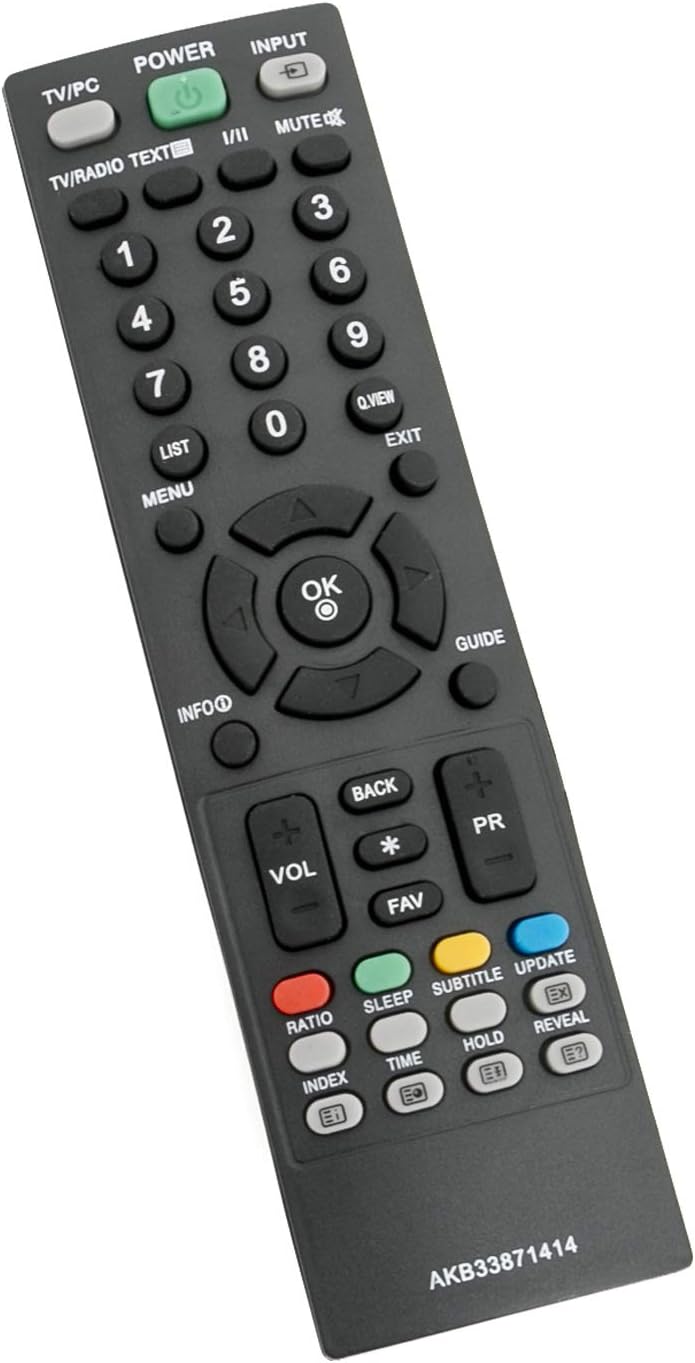
Figear 2: Ceàrnach view den smachd iomallach, a’ sealltainn cruth nam putanan.
5. Cumail suas
- Ath-nuadhachadh bataraidh: Replace batteries when the remote control's response becomes sluggish or stops working. Always use new AAA alkaline batteries. Do not mix old and new batteries, or different types of batteries.
- Glanadh: Sguab an smachd iomallach le clò bog, tioram. Na cleachd innealan-glanaidh leaghaidh no stuthan sgrìobach, oir faodaidh iad sin uachdar no pàirtean a-staigh an smachd iomallach a mhilleadh.
- Stòradh: Mura tèid an smachd iomallach a chleachdadh airson ùine mhòr, thoir air falbh na bataraidhean gus casg a chur air aodion agus milleadh a dh’ fhaodadh a bhith ann.
6. A ’dèanamh trioblaid
| Trioblaid | Adhbhar a dh’fhaodadh a bhith ann | Fuasgladh |
|---|---|---|
| Chan eil smachd iomallach ag obair. | Bataraidhean marbh no air an stàladh gu ceàrr. | Cuir bataraidhean alcaileach AAA ùra nan àite, a’ dèanamh cinnteach gu bheil am polarachd cheart. |
| Remote control has short range or intermittent response. | Weak batteries; obstruction between remote and TV; remote too far from TV. | Replace batteries. Remove any objects blocking the line of sight to the TV's IR sensor. Ensure you are within the maximum operating range (up to 33 feet). |
| Chan eil putanan sònraichte a’ freagairt. | Button malfunction or debris under button. | Gently clean around the button. If the issue persists, the remote may be faulty. |
7. Sònrachaidhean
| Brand | AULCMEET |
| Modail Àireamh | AKB33871414 |
| Innealan co-fhreagarrach | Television (LG TVs) |
| Teicneòlas ceangail | In-dhearg (IR) |
| Seòrsa Rianadair | Smachd putan |
| Àireamh de phutanan | 30 |
| Raon as àirde | 33 troigh (mu 10 meatairean) |
| Bataraidhean a dhìth | 2 x bataraidh AAA |
| Seòrsa bataraidh | Alcaileach |
| Cuideam nì | 3 unnsa (timcheall air 85 gram) |
| Meudan nì (L x W x H) | 5"F x 1"L x 0.5"À (mu 12.7cm x 2.5cm x 1.3cm) |
| Dath | Dubh |
| Feart sònraichte | Ergonomic |
8. Taic
If you encounter any issues or have questions regarding the AULCMEET AKB33871414 Replacement Remote Control, please contact the seller or manufacturer for assistance. Provide your product model number (AKB33871414) and a detailed description of the issue for faster support.