
Stiùireadh sàbhailteachd cudromach
To ensure safe operation and prolong the life of your monitor, please read and follow these instructions carefully:
- Dì-cheangail an càball cumhachd bhon t-socaid dealain an-còmhnaidh mus glan thu an monitor.
- Na cuir am monitor fo uisge no taiseachd gus clisgeadh dealain a sheachnadh.
- Dèan cinnteach gu bheil fionnarachadh ceart timcheall air an sgrìn gus casg a chur air cus teasachadh. Na cuir bacadh air fosglaidhean fionnarachaidh.
- Cleachd an inneal-atharrachaidh cumhachd agus na càbaill a thug an neach-dèanamh seachad a-mhàin.
- Seachain nithean troma a chur air a’ chorda cumhachd no air an monitor.
- If the monitor is damaged or malfunctions, do not attempt to repair it yourself. Contact qualified service personnel.
Susbaint pacaid
Before proceeding with the setup, please check the contents of your package to ensure all items are present:
- Acer CB272U smiiprx LED Monitor
- Seasamh Monitor (Bonn agus Gàirdean)
- Corda cumhachd
- Càball HDMI
- Stiùireadh Tòiseachaidh Luath / Cairt Bharantais
Suidhich
1. A’ cur an Seasamh Sgrùdaidh ri chèile
- Carefully remove the monitor from its packaging. Place the monitor face down on a soft, clean cloth or surface to prevent scratches to the screen.
- Attach the stand arm to the back of the monitor panel. Ensure it is securely fastened, typically by sliding it into place until it clicks or by tightening screws.
- Connect the stand base to the bottom of the stand arm. Secure the base by tightening the captive screw located underneath the base.

Figear 1: Cùl view of the Acer CB272U smiiprx monitor with the stand attached, illustrating the assembly points.
2. Connecting the Monitor to Your Computer
- Connect one end of the provided HDMI cable to the HDMI port on the monitor.
- Connect the other end of the HDMI cable to the HDMI output port on your computer or graphics card.
- Plug the power cord into the monitor's power input, then plug the other end into a grounded electrical outlet.

Figear 2: Cùl ceàrnach view showing the input ports of the monitor, including HDMI and power connections.
Ag obrachadh an Monitor
A’ cur cumhachd air is dheth
Locate the power button on the monitor's bezel. Press it once to turn the monitor on. The power indicator light will illuminate. Press it again to turn the monitor off.
Adjusting Display Settings (OSD Menu)
The On-Screen Display (OSD) menu allows you to customize various monitor settings. Use the control buttons (usually located on the back or bottom right of the monitor) to navigate the OSD menu. Common adjustments include:
- Gile / coimeas: Atharraich an soilleireachd iomlan agus an diofar eadar raointean soilleir is dorcha.
- Roghainnean dath: Atharraich teòthachd dath, gamma, agus ìrean RGB fa leth.
- Tobar a-steach: Tagh an cuir-a-steach bhidio le làimh (m.e., HDMI).
- Fuaim: Smachd air meud nan luchd-labhairt togte.
Atharrachaidhean ergonomic
The Acer CB272U smiiprx monitor stand offers multiple ergonomic adjustments to optimize your viewann an comhfhurtachd:
- Atharrachadh àirde: Tog no ìsleaich am monitor gu ìre na sùla.
- Teilt: Adjust the screen angle forward or backward to reduce glare.
- Sluasaid: Rotate the monitor horizontally to share your screen or adjust viewceàrn ing.
- Pivot: Rotate the screen to a portrait orientation for document viewing no còdachadh.
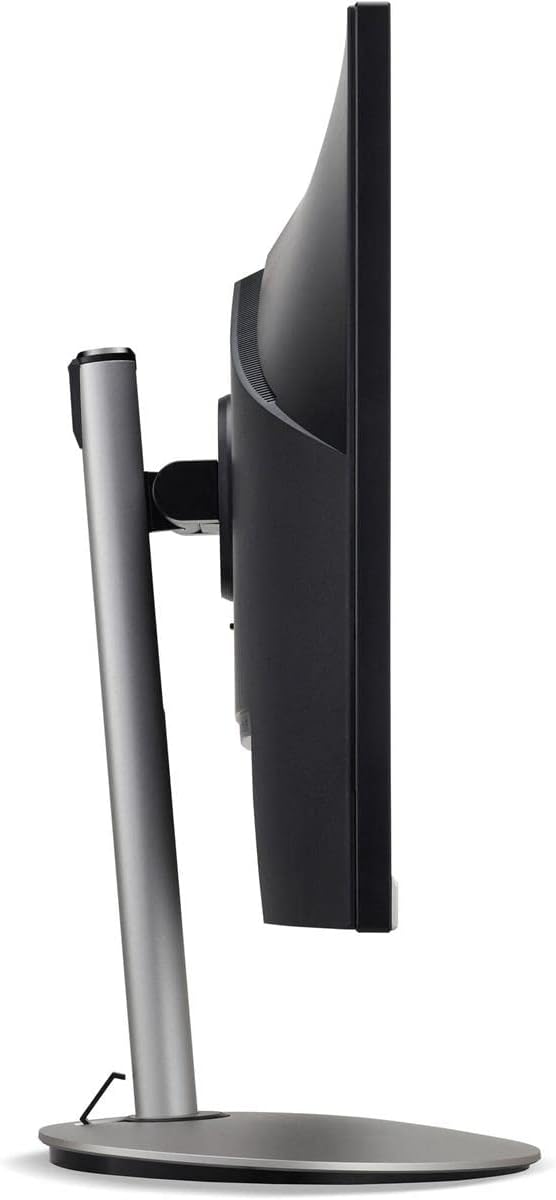
Figear 3: Taobh profile of the monitor, illustrating its adjustable stand for ergonomic positioning.
Cumail suas
Cleaning the Monitor Screen and Casing
To clean your monitor, first ensure it is turned off and unplugged from the power outlet. Use a soft, lint-free cloth. For stubborn marks, lightly dampen the cloth with water or a specialized non-abrasive screen cleaner. Do not spray liquid directly onto the screen or casing. Seachain ceimigean cruaidh, innealan-glanaidh sgrìobach, no fuasglaidhean a chleachdadh.
Stiùireadh airson stòradh
If you need to store the monitor for an extended period, it is recommended to use its original packaging to protect it from dust, moisture, and physical damage. Store in a cool, dry environment away from direct sunlight and extreme temperatures.
Fuasgladh thrioblaidean
Thoir sùil air a’ chlàr gu h-ìosal airson cùisean cumanta agus na fuasglaidhean aca:
| Trioblaid | Adhbhar a dh’fhaodadh a bhith ann | Fuasgladh |
|---|---|---|
| Gun ìomhaigh air an sgrion | Càball cumhachd air a dhì-cheangal; Càball bhidio air a dhì-cheangal; Stòr cuir-a-steach ceàrr air a thaghadh. | Check power and video cable connections; Ensure the monitor is powered on; Select the correct input source via the OSD menu. |
| Tha an ìomhaigh doilleir no air a shaobhadh | Suidheachadh rùn ceàrr; Càball bhidio lochtach. | Set the display resolution to 2560 x 1440 at 75 Hz; Try a different HDMI cable. |
| Gun fhuaim bho luchd-labhairt | Monitor volume too low or muted; Incorrect audio output selected on computer. | Adjust monitor volume via OSD; Unmute audio; Select the monitor as the audio output device in your computer's sound settings. |
| A’ priobadh an sgrìn | Refresh rate mismatch; Interference; Faulty cable. | Ensure refresh rate is set to 75 Hz; Check for nearby electronic devices causing interference; Replace video cable. |
Sònrachaidhean
Key technical specifications for the Acer CB272U smiiprx LED Monitor:
| Feart | Mion-fhiosrachadh |
|---|---|
| Ainm Modail | CB272U smiiprx |
| Meud sgrion | 24.1 òirlich |
| Fuasgladh Dùthchasach | 2560 x 1440 (WQHD) |
| Ìre Ath-nuadhachaidh | 75 Hz |
| Àm Freagairt | 1 Millisecond (VRB) |
| Co-mheas taobh | 16:9 |
| Seòrsa Taisbeanaidh | LED-backlit LCD / TFT active matrix (IPS) |
| Gile | 350 cd / m² |
| Co-mheas coimeas | 1000: 1 (Staidigeach) |
| Ceangalachd | HDMI |
| Adaptive Sync | FreeSync |
| Luchd-labhairt togte | Tha |
| Dimensions (WxDxH with stand) | 24.1 ann an x 9.2 ann an x 20.5 a-steach |
| Cuideam (le seasamh) | 18.1 Punnd |

Figure 4: Monitor dimensions with stand, indicating width, depth, and height.
Fiosrachadh Barantais
The Acer CB272U smiiprx LED Monitor comes with a Barantas cuibhrichte 3-bliadhna bhon neach-dèanamh. This warranty covers defects in materials and workmanship under normal use. For complete details regarding warranty coverage, limitations, and how to make a claim, please refer to the warranty documentation included with your product or visit the official Acer support weblàrach.
Please retain your proof of purchase (receipt or invoice) as it will be required for any warranty service.
Taic Luchd-cleachdaidh
Should you require further assistance, technical support, or wish to download the latest drivers and firmware updates for your monitor, please visit the official Acer support weblàrach:
You can also find contact information for Acer customer service in your region on the support weblàrach airson taic phearsantaichte.