
1. Toradh thallview
This manual provides instructions for the EPEVER RTS300R47K3.81A Remote Temperature Sensor. This sensor is designed to enable the active temperature compensation function of compatible EPEVER solar charge controllers, ensuring optimal battery charging performance.
Prìomh fheartan
- Enables active temperature compensation for solar charge controllers.
- Compatible with EPEVER Tracer, Viewstar VS, and Landstar LS series Solar Charge Controllers.
- Plug and Play functionality for convenient and fast installation.

Figure 1: The EPEVER RTS300R47K3.81A Remote Temperature Sensor.
2. Co-fhreagarrachd
The RTS300R47K3.81A Remote Temperature Sensor is compatible with various EPEVER solar charge controller series, including Tracer, Viewstar VS, and Landstar LS.

Figure 2: Visual representation of compatible EPEVER solar charge controllers.
3. Setup agus Stàladh
A 'ceangal an Teòthachd Sensor
The RTS300R47K3.81A sensor is designed for simple plug-and-play installation. Follow these steps to connect the sensor:
- Locate the dedicated temperature sensor port on your compatible EPEVER solar charge controller.
- Insert the green terminal pin of the RTS300R47K3.81A sensor cable into the temperature sensor port. Ensure a secure connection.

Figure 3: The green terminal pin of the sensor cable.
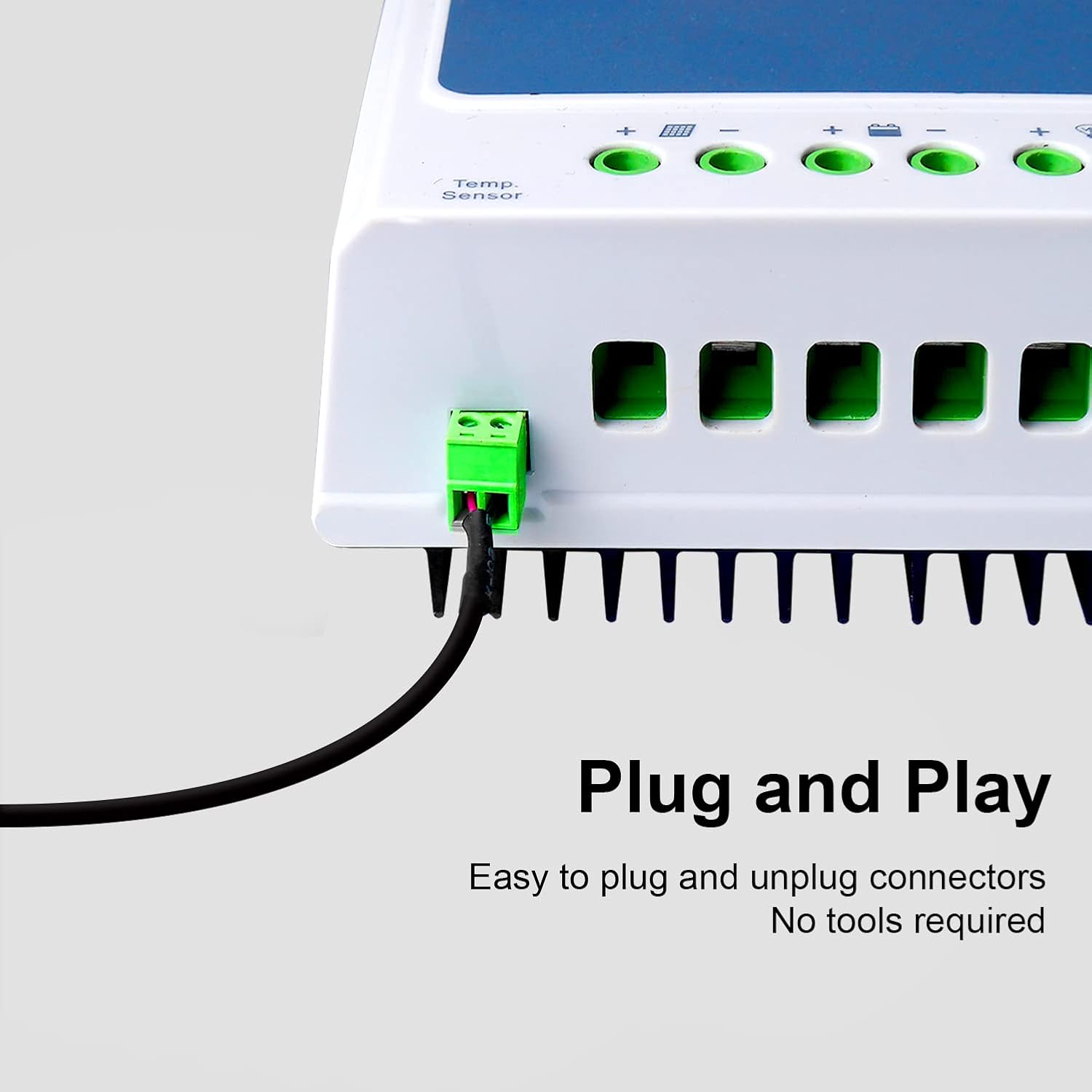
Figure 4: The sensor connected to an EPEVER solar charge controller, demonstrating plug-and-play ease.
No special tools are required for installation. Ensure the sensor probe is placed near the battery to accurately measure its temperature.
4. Obrachadh
Once connected, the RTS300R47K3.81A Remote Temperature Sensor automatically provides real-time ambient temperature data to the solar charge controller. This data is crucial for the controller's active temperature compensation function.
Dìoladh Teòthachd
Temperature compensation adjusts the charging voltage of the battery based on its temperature. Batteries are sensitive to temperature fluctuations; charging at too high a voltage in warm conditions or too low a voltage in cold conditions can reduce battery life and performance. The sensor ensures the controller charges the battery at the optimal voltage for its current temperature, extending battery lifespan and improving efficiency.

Figure 5: Close-up of the sensitive temperature probe.

Figure 6: Illustration of the high-quality temperature cable construction, designed for durability.
5. Cumail suas
The RTS300R47K3.81A Remote Temperature Sensor requires minimal maintenance to ensure continued accurate operation.
- Periodically inspect the cable and connector for any signs of damage, fraying, or wear.
- Ensure the sensor probe is clean and free from dust, dirt, or debris to maintain accurate temperature readings.
- Avoid placing the sensor in direct sunlight, near heat-generating components, or in areas with extreme temperature fluctuations that do not accurately reflect the battery's ambient temperature.
6. A ’dèanamh trioblaid
Leughaidhean Teòthachd neo-mhearachdach
- Check Sensor Placement: Ensure the sensor is placed as close as possible to the battery, away from direct heat sources or cold drafts, to accurately reflect battery temperature.
- Dèan sgrùdadh air càball: Verify that the sensor cable is not damaged, pinched, or improperly connected. A damaged cable can lead to incorrect readings.
- Clean Sensor Probe: Remove any dirt or debris from the metal probe tip, as this can insulate the sensor and affect accuracy.
Temperature Compensation Not Active
- Dearbhaich co-chòrdalachd an rianadair: Confirm that your EPEVER solar charge controller model explicitly supports external temperature compensation via this sensor.
- Thoir sùil air Ceangal: Ensure the sensor is securely plugged into the correct temperature sensor port on the controller.
- Roghainnean an Rianadair: Consult your solar charge controller's manual to ensure temperature compensation is enabled in its settings, if applicable. Some controllers may require manual activation.
Sensor Cha deach a lorg
- Re-plug Sensor: Disconnect and reconnect the sensor to ensure a proper and firm connection.
- Port Sgrùdaidh: Check the controller's sensor port for any obstructions, bent pins, or visible damage.
- Test with Another Controller (if available): If possible, test the sensor with a different compatible controller to help determine if the issue lies with the sensor or the original controller.
If issues persist after performing these troubleshooting steps, refer to your solar charge controller's manual or contact EPEVER customer support for further assistance.
7. Sònrachaidhean Teicnigeach
| Feart | Mion-fhiosrachadh |
|---|---|
| Modail | RTS300R47K3.81A |
| Brand | EIPIR |
| Fad Càball | 3 Meatair |
| Co-fhreagarrachd | EPEVER Tracer, Viewstar VS, Landstar LS series Solar Charge Controllers |
| Dath | Dubh |
| UPC | 791280364622 |
| GTIN | 791280364622 |
8. Barantas agus Taic
For detailed warranty information, technical support, or service inquiries regarding your EPEVER RTS300R47K3.81A Remote Temperature Sensor, please refer to the documentation provided with your EPEVER solar charge controller or visit the official EPEVER weblàrach.
EPEVER Official Weblàrach: www.epever.com